
1. Product Overview
The Polartec Digital Alarm Clock is a versatile device combining an alarm clock, Bluetooth speaker, and FM radio. It features a sleek design and advanced technology for an enhanced audio and timekeeping experience. This manual provides detailed instructions for its setup, operation, and maintenance.
Key Features:
- Bluetooth Version BT 5.0: Seamlessly connect your devices for wireless audio.
- Clock Radio with FM Radio: Enjoy your favorite stations right from your bedside.
- Multiple Format Support: Compatible with Micro SD card, USB, and AUX for versatile audio playback.
- TWS Function: True Wireless Stereo capability for an immersive sound experience.
- Long-lasting Battery: 1200mAh/3.7V battery providing up to 3 hours of normal volume playtime.
- High-Quality Sound: S/N Ratio of ≥90db with dual 52mm speakers delivering rich, clear audio.
- Portable Size: Compact design with a speaker size of 189mm x 64.8mm x 84.5mm, perfect for any space.
- Quick Charging: Charges in 3-4 hours with a DC 5V-0.5A input.

Figure 1.1: Front view of the Polartec Alarm Clock Bluetooth Speaker, displaying the time 07:56.
2. Package Contents
Please check the box for the following items:
- 1x Polartec Digital Alarm Clock
- 1x USB charging cable
3. Initial Setup
3.1 Charging the Device
Before first use, fully charge the Polartec Alarm Clock. Use the provided USB charging cable.
- Connect the small end of the USB charging cable to the charging port on the back of the speaker.
- Connect the larger end of the USB cable to a DC 5V-0.5A USB power adapter (not included) or a computer USB port.
- The charging indicator light will illuminate. Charging typically takes 3-4 hours.
- Once fully charged, the indicator light may change or turn off, depending on the model. Disconnect the cable.
3.2 Powering On/Off
- To Power On: Press and hold the Power button (usually marked with ⏻) on the top panel for a few seconds until the display lights up.
- To Power Off: Press and hold the Power button again for a few seconds until the display turns off.
4. Operating Instructions

Figure 4.1: Angled view of the Polartec Alarm Clock Bluetooth Speaker, highlighting the top control panel and digital time display.
4.1 Bluetooth Pairing
To connect your device via Bluetooth:
- Ensure the speaker is powered on. It will automatically enter Bluetooth pairing mode, indicated by a flashing Bluetooth icon or a voice prompt.
- On your mobile device (smartphone, tablet, etc.), enable Bluetooth and search for available devices.
- Select "Polartec Speaker" (or similar name) from the list of found devices.
- Once connected, the speaker will provide an audible confirmation, and the Bluetooth icon on the display will become solid.
4.2 FM Radio Operation
To use the built-in FM radio:
- Press the 'M' (Mode) button on the top panel to switch to FM radio mode.
- Press and hold the Play/Pause button (⏸) to initiate an automatic scan for FM stations. The speaker will save all found stations.
- Use the 'Previous' (⏮) and 'Next' (⏭) buttons to navigate between saved stations.
4.3 Setting the Alarm Clock
The Polartec Alarm Clock allows you to set alarms for your morning routine.
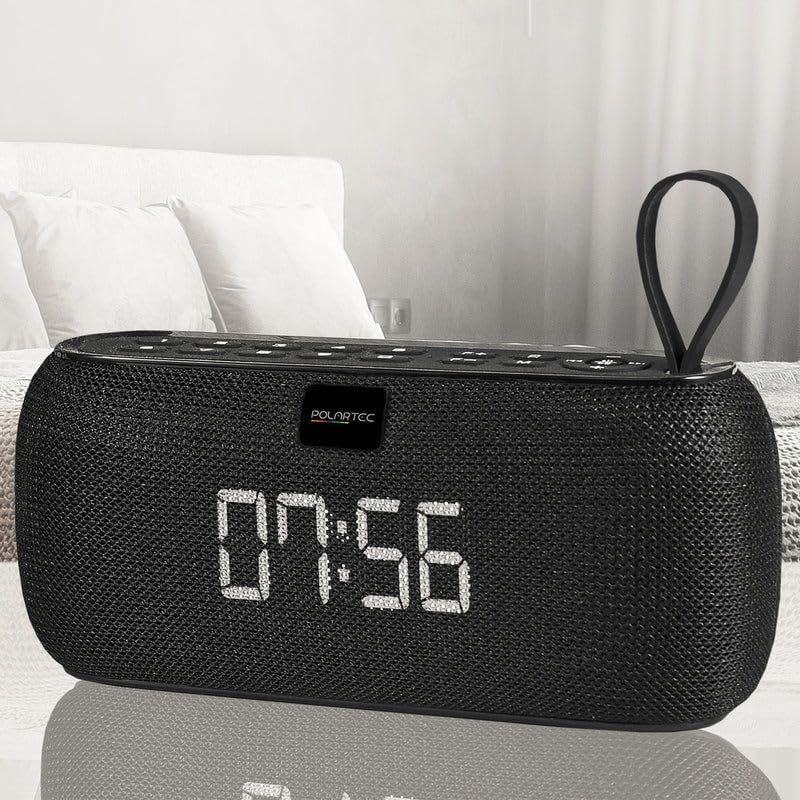
Figure 4.2: The Polartec Alarm Clock Bluetooth Speaker positioned on a bedside table, displaying the time 07:56, indicating its use as an alarm clock.
- Press the 'Alarm' button (often indicated by an alarm clock icon) to enter alarm setting mode.
- Use the 'Previous' (⏮) and 'Next' (⏭) buttons to adjust the hour. Press the 'Alarm' button again to confirm the hour and move to minutes.
- Adjust the minutes using the 'Previous' (⏮) and 'Next' (⏭) buttons. Press the 'Alarm' button to confirm.
- You may have options to set the alarm tone (e.g., buzzer, FM radio, or a specific track from an SD card). Use the navigation buttons to select and confirm.
- To enable or disable the alarm, press the 'Alarm' button briefly outside of setting mode. An alarm icon on the display will indicate if it's active.
4.4 Audio Playback (Micro SD, USB, AUX)
The speaker supports various audio input methods:
- Micro SD Card: Insert a Micro SD card with audio files into the designated slot. The speaker will automatically switch to Micro SD mode and begin playback.
- USB Drive: Insert a USB flash drive with audio files into the USB port. The speaker will switch to USB mode and start playing.
- AUX Input: Connect an external audio device (e.g., MP3 player, computer) to the AUX port using a 3.5mm audio cable (not included). Press the 'M' (Mode) button to switch to AUX mode.
4.5 True Wireless Stereo (TWS) Function
The TWS function allows you to pair two Polartec Alarm Clock Bluetooth Speakers for a stereo sound experience.
- Ensure both speakers are powered on and not connected to any other Bluetooth device.
- On one speaker (this will be the primary speaker), press and hold the TWS button (if available, or a specific combination as per product instructions, often the Play/Pause button in Bluetooth mode).
- The primary speaker will search for the secondary speaker. Once connected, you will hear an audible confirmation.
- Now, connect your mobile device to the primary speaker via Bluetooth as described in section 4.1. Audio will play through both speakers in stereo.
4.6 Button Functions Overview
The top panel of the speaker features several control buttons:
| Button | Function |
|---|---|
| Power (⏻) | Press and hold to Power On/Off. |
| Mode (M) | Short press to switch between Bluetooth, FM Radio, Micro SD, USB, and AUX modes. |
| Play/Pause (⏸) | Short press to Play/Pause audio. In FM mode, press and hold for auto-scan. |
| Previous (⏮) / Volume Down (-) | Short press for previous track/station. Press and hold to decrease volume. |
| Next (⏭) / Volume Up (+) | Short press for next track/station. Press and hold to increase volume. |
| Alarm (⏰) | Short press to enable/disable alarm. Press and hold to enter alarm setting mode. |
5. Care and Maintenance
- Cleaning: Use a soft, dry cloth to clean the surface of the speaker. Do not use abrasive cleaners, waxes, or solvents.
- Storage: Store the device in a cool, dry place away from direct sunlight and extreme temperatures.
- Water Exposure: This device is not waterproof. Avoid exposure to water or high humidity.
- Battery Care: To prolong battery life, avoid fully discharging the battery frequently. Charge the device regularly, even if not in use for extended periods.
6. Troubleshooting Guide
If you encounter issues with your Polartec Alarm Clock Bluetooth Speaker, refer to the table below for common problems and solutions.
| Problem | Possible Cause | Solution |
|---|---|---|
| Device does not power on. | Low battery. | Charge the device fully using the provided USB cable. |
| No sound from speaker. | Volume too low; incorrect mode; device not connected. | Increase volume. Ensure correct mode (Bluetooth, FM, AUX, SD/USB). Re-pair Bluetooth device. |
| Bluetooth pairing fails. | Speaker not in pairing mode; device too far; interference. | Ensure speaker is in Bluetooth pairing mode. Move devices closer. Turn off other Bluetooth devices. |
| FM radio reception is poor. | Weak signal; environmental interference. | Reposition the speaker. Extend the antenna (if applicable). Perform an auto-scan again. |
| Alarm does not sound. | Alarm not enabled; volume too low; incorrect time setting. | Ensure alarm icon is visible on display. Increase volume. Verify alarm time is set correctly. |
7. Technical Specifications
| Feature | Specification |
|---|---|
| Bluetooth Version | BT 5.0 |
| Battery Capacity | 1200mAh/3.7V |
| Playing Time (Normal Volume) | Up to 3 hours |
| S/N Ratio | ≥90db |
| Speaker Size | Dual 52mm speakers, 4Ω/5W*2 |
| Frequency Response | 120Hz-20kHz |
| Charging Voltage | DC 5V-0.5A |
| Charging Time | 3-4 hours |
| Product Dimensions | 189mm x 64.8mm x 84.5mm (approx. 19.7D x 10W x 7.1H cm) |
| Item Weight | 600 g |
| Color | Black |
8. Warranty and Customer Support
This Polartec product is designed for reliability and performance. For information regarding warranty coverage, please refer to the warranty card included with your purchase or contact your retailer.
If you require technical assistance or have questions not covered in this manual, please contact Polartec customer support through the retailer's platform or the official Polartec website for further assistance.