
1. Important Safety Information
Please read all instructions carefully before assembly and use. Keep this manual for future reference.
- Do not exceed the maximum weight capacity of 800 pounds.
- Exercise caution during assembly to avoid injury from sharp edges.
- Ensure all screws and bolts are securely tightened before use. Periodically check and re-tighten as necessary.
- Keep small parts away from children during assembly.
2. Product Overview
The RVONOW Queen Size Bed Frame offers a modern and functional design, integrating a headboard with convenient features and a sturdy metal platform for optimal mattress support.

Image: Fully assembled RVONOW Queen Size Bed Frame with illuminated headboard and charging station, showcasing under-bed storage space.
Key Features:
- Storage Headboard with USB Charging Station: Features 2 AC outlets, 1 USB port, and 1 Type-C port, along with two tiers of storage shelves.
- Smart RGB LED Light Bed Frame: Headboard includes RGB LED strips with 12 colors, 0%-100% brightness adjustment, and 4 scene modes, controllable via remote.
- Full Metal Slats & Noise-Free Design: Supported by a robust metal frame with 10 heavy-duty steel slats and 9 metal legs, capable of supporting up to 800 pounds. EVA silent foam minimizes noise.
- Under Bed Storage: Provides 14 inches of clearance for convenient storage and easy cleaning.
- Easy Assembly: Designed for straightforward assembly with numbered parts and clear instructions.
3. Package Contents
Before beginning assembly, ensure all parts listed in the packing list are present and undamaged. Refer to the included installation manual for a detailed list of components and hardware.

Image: Various metal and wooden components of the bed frame laid out for assembly.
4. Setup and Assembly Instructions
Follow these steps carefully for proper assembly. It is recommended to have two people for easier and safer installation.
Assembly Video Guide:
Video: A detailed step-by-step guide demonstrating the assembly process of the RVONOW Metal Platform Bed Frame.
Step-by-Step Guide:
- Prepare the Headboard: Attach the wooden panels to the metal headboard frame using the provided screws (e.g., B1*4). Ensure the two holes for the charging station are near the outside.
- Install the Charging Station: Secure the charging station (H1) into the designated slot on the headboard using the smaller screws (e.g., J1*2).
- Assemble Side Rails: Connect the side rails (G, I, M, O) and center support bars (H, K) using the appropriate screws (e.g., E1*2).
- Connect Headboard to Side Rails: Attach the assembled headboard to the side rails using the larger bolts (e.g., E1*2).
- Install Bed Slats: Place the metal bed slats into the designated grooves on the side rails. Ensure they are evenly spaced and secure.
- Final Tightening: Once all components are in place, thoroughly tighten all screws and bolts using the provided Allen wrench.
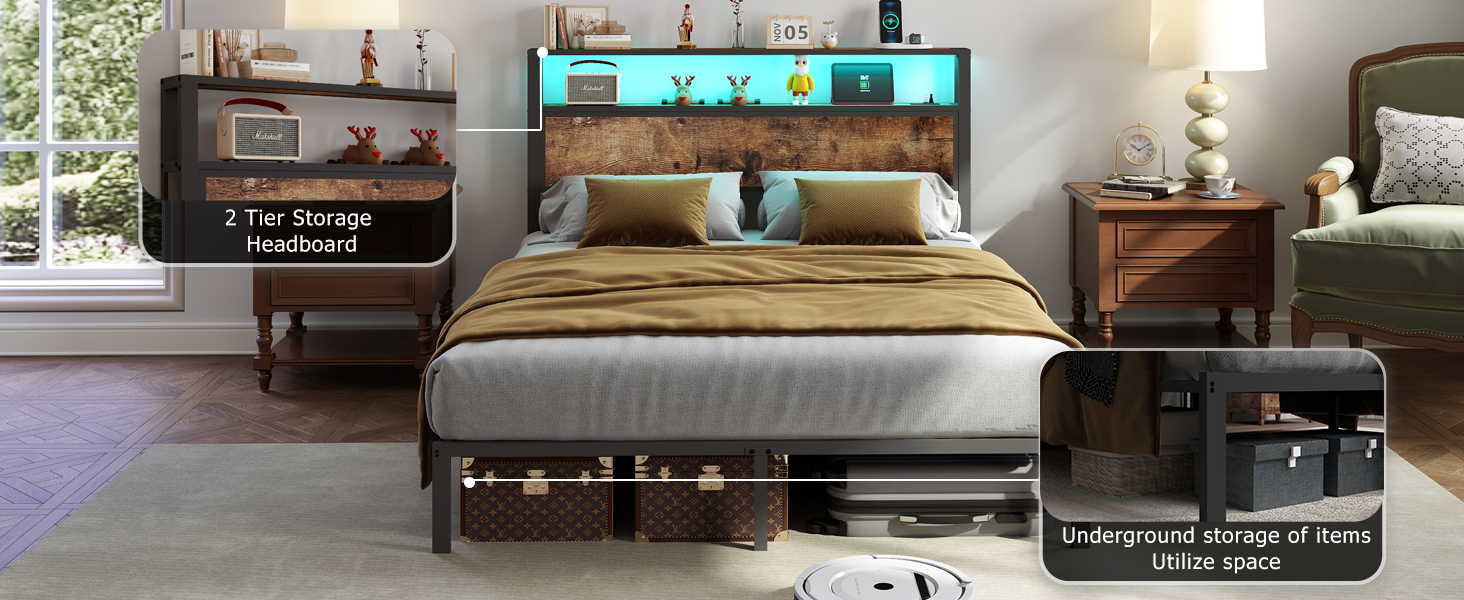
Image: Illustration of attaching headboard components and tightening screws.

Image: Close-up of the charging station being screwed into the headboard.

Image: Close-up showing the U-shaped bar grooves for easy slat installation and screw tightening with the supplied tool.
5. Operating Instructions
5.1. LED Lights Operation
The headboard features integrated RGB LED lights for customizable ambiance.

Image: The bed frame headboard illuminated with RGB LED lights, showing the remote control for various settings.
- Power On/Off: Use the remote control to turn the LED lights on or off.
- Color Selection: Choose from 12 available colors using the color buttons on the remote.
- Brightness Adjustment: Adjust the brightness from 0% to 100% to suit your preference.
- Scene Modes: Select from 4 pre-programmed scene modes or create your own custom modes for different atmospheres.
5.2. Charging Station Usage
The headboard includes a built-in charging station for your electronic devices.
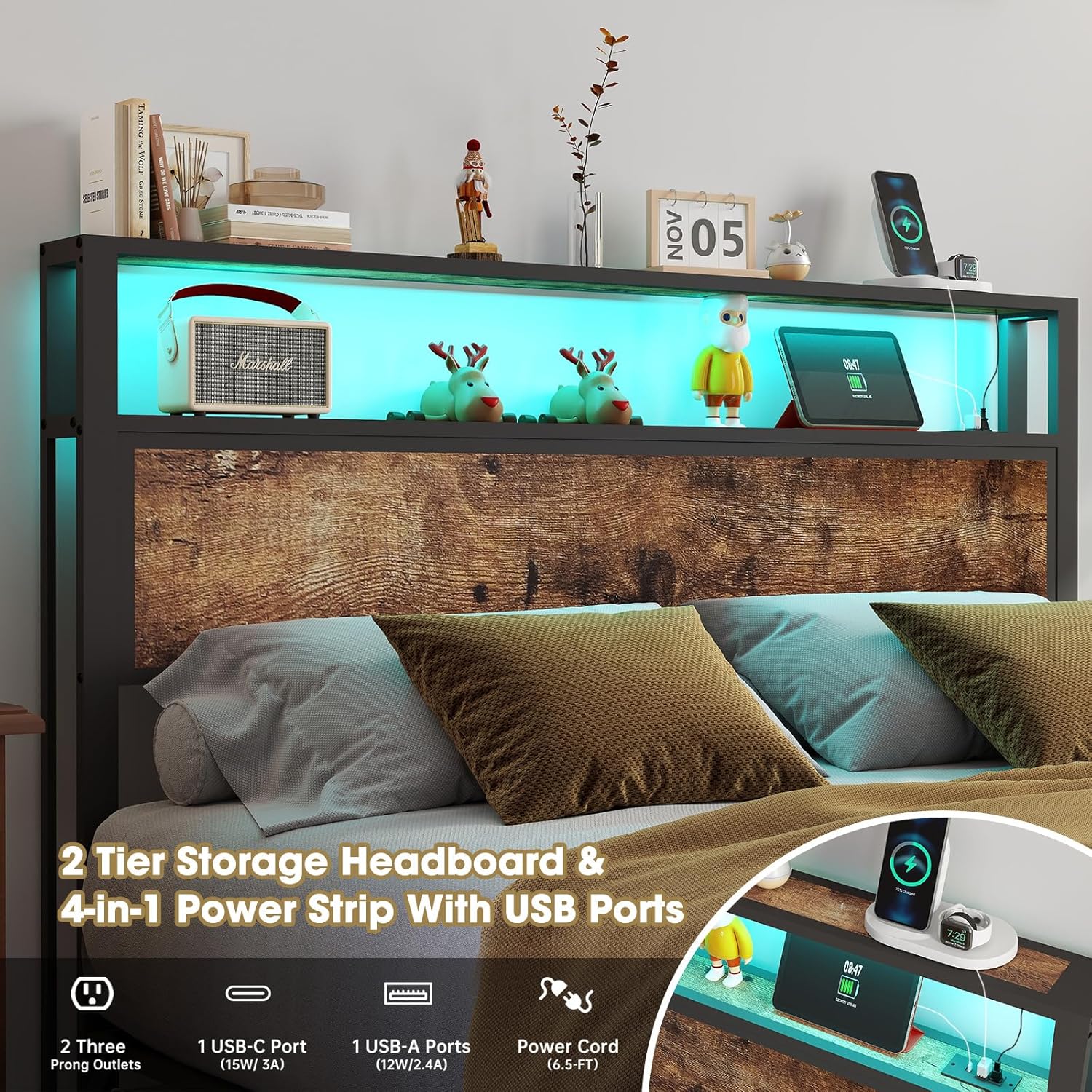
Image: Detailed view of the headboard's charging station, highlighting the 2 AC outlets, 1 USB port, and 1 Type-C port.
- AC Outlets: Plug in devices requiring standard AC power.
- USB Ports: Use the USB-A (12W/2.4A) and USB-C (15W/3A) ports to charge compatible smartphones, tablets, and other gadgets.
- Power Connection: Ensure the bed frame's power cord is securely plugged into a wall outlet for the charging station and LED lights to function.
6. Maintenance
Regular maintenance helps prolong the life and appearance of your bed frame.
- Cleaning: Wipe the metal and wooden surfaces with a damp cloth. Avoid harsh chemicals or abrasive cleaners.
- Hardware Check: Periodically inspect all screws and bolts to ensure they remain tight. Re-tighten if any looseness is detected.
- LED Lights: If LED lights become dusty, gently wipe them with a dry, soft cloth.
- Under-Bed Area: Utilize the 14-inch under-bed clearance for easy vacuuming or cleaning to maintain a tidy space.
7. Troubleshooting
If you encounter any issues, refer to the following common solutions.
- Bed Frame Squeaks/Noise:
- Ensure all assembly bolts are securely tightened.
- Verify that the EVA silent foam is correctly placed between the slats and frame to minimize friction.
- LED Lights Not Working:
- Check if the bed frame's main power cord is securely plugged into a functional wall outlet.
- Ensure the LED strip connector is properly attached to the power source.
- Replace the remote control batteries if necessary.
- Charging Station Not Functioning:
- Confirm the bed frame is plugged into a live power outlet.
- Test with different devices and cables to rule out device-specific issues.
8. Specifications
Detailed product specifications for the RVONOW Queen Size Bed Frame.

Image: Diagram illustrating the dimensions (86.2"L x 59.5"W x 45.6"H) and weight capacity (800 lbs) of the Queen size bed frame.
| Attribute | Value |
|---|---|
| Size | Queen |
| Product Dimensions | 86.2"L x 59.5"W x 45.6"H |
| Weight Capacity | 800 pounds |
| Recommended Mattress Height | 10"-14" |
| Material | Steel Frame & 2-Tier Wooden Storage Cabinet |
| Charging Station | 2 AC Outlets, 1 USB-A Port, 1 Type-C Port |
| Special Features | No Box Spring Needed, Remote Control LED Lights, Heavy Duty Metal Slat Support, Under Bed Storage |
| Assembly Required | Yes (Easy to follow instructions included) |
| Item Weight | 61.7 pounds |
9. Warranty Information
RVONOW products are manufactured with quality and care. For specific warranty details regarding your bed frame, please refer to the warranty card included in your product packaging or contact customer support.
10. Customer Support
If you have any questions, require assistance with assembly, or need to report damaged/missing parts, please contact RVONOW customer service. We are committed to providing satisfactory solutions.
You can typically find contact information on the product packaging, the RVONOW official website, or through your purchase platform.