
1. Important Safety Instructions
Please read all safety and operating instructions carefully before using your television. Keep these instructions for future reference.
- Do not expose this apparatus to rain or moisture.
- Do not block any ventilation openings. Install in accordance with the manufacturer's instructions.
- Do not install near any heat sources such as radiators, heat registers, stoves, or other apparatus (including amplifiers) that produce heat.
- Protect the power cord from being walked on or pinched, particularly at plugs, convenience receptacles, and the point where they exit from the apparatus.
- Only use attachments/accessories specified by the manufacturer.
- Unplug this apparatus during lightning storms or when unused for long periods of time.
- Refer all servicing to qualified service personnel. Servicing is required when the apparatus has been damaged in any way.
2. Package Contents
Verify that all items are present in the package:
- Lexuco 55-inch 4K Smart LED TV
- Remote Control
- Power Cable
- User Manual (this document)
- TV Stand Components (if applicable)
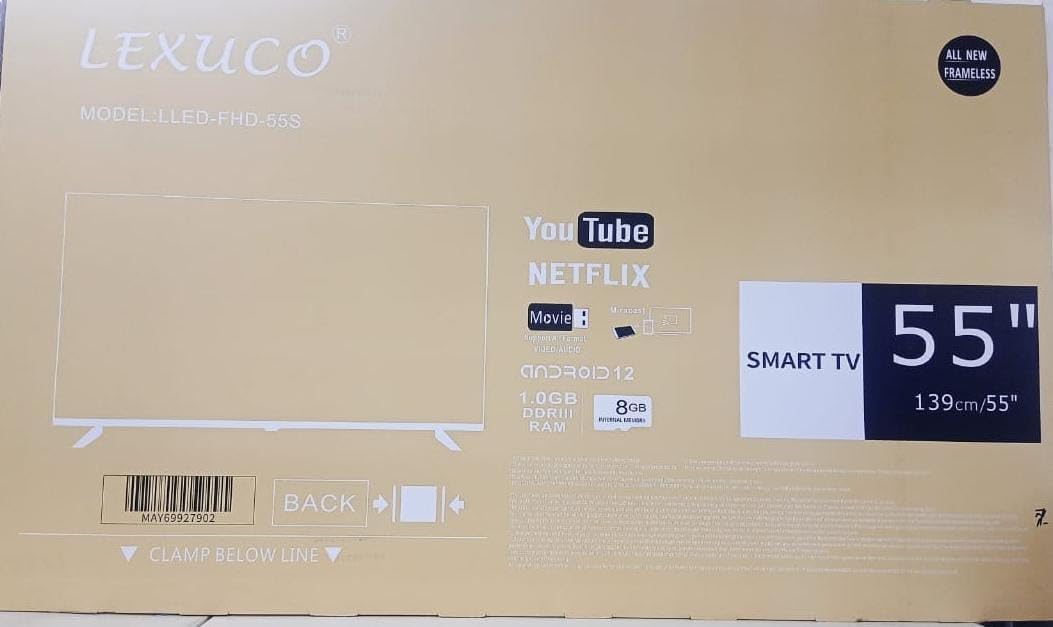
Image: The Lexuco 55-inch Smart TV packaging box, showing model number LLED-FHD-55S and features like YouTube, Netflix, and Smart TV capabilities.
3. Setup
3.1 Unpacking
Carefully remove the TV and all accessories from the packaging. It is recommended to retain the packaging for future transport or service needs.
3.2 Stand Installation or Wall Mounting
Your Lexuco TV can be mounted on a wall or placed on a tabletop stand. The VESA mount standard for this model is 400 x 400 mm.
- For Stand Installation: Attach the included stand components to the bottom of the TV using the provided screws. Ensure the stand is securely fastened before placing the TV on a stable, level surface.
- For Wall Mounting: Use a compatible VESA 400 x 400 mm wall mount kit (sold separately). Follow the instructions provided with your wall mount kit for safe and secure installation. Ensure the wall can support the weight of the TV (approximately 12 kg).
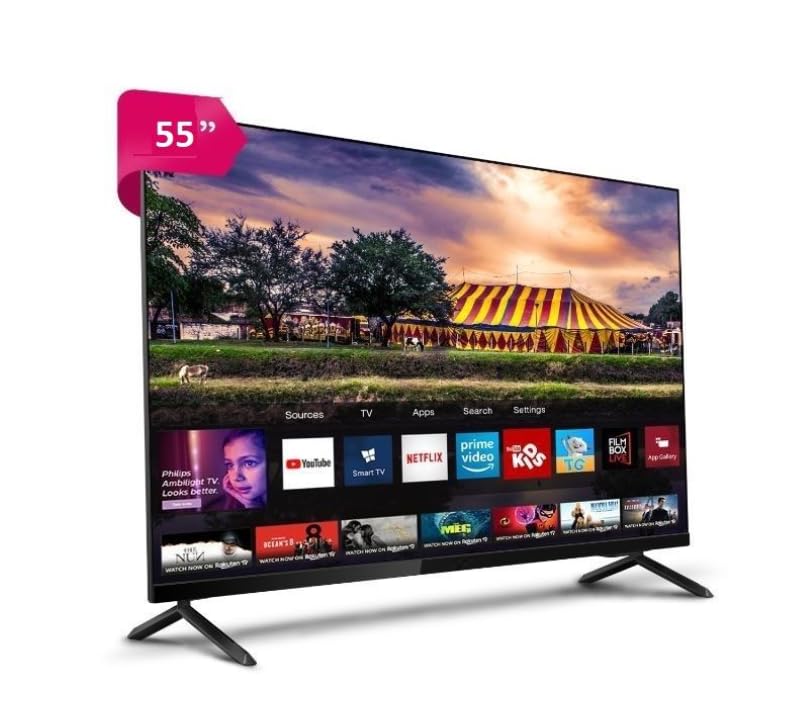
Image: The Lexuco 55-inch Smart TV displayed on its stand, showcasing its slim bezels and vibrant display.
3.3 Connecting Devices
Connect your external devices to the TV using the available ports:
- HDMI Ports (x2): Connect Blu-ray players, gaming consoles, set-top boxes, or other HDMI-enabled devices.
- USB 3.0 Port (x1): Connect USB storage devices for media playback.
- Audio Input (HDMI ARC, Optical): For connecting external sound systems or soundbars.
- Ethernet Port: For a wired internet connection.
3.4 Power On
After connecting all necessary cables, plug the power cable into the TV and then into a wall outlet. Press the power button on the remote control or on the TV itself to turn on the television.
4. Operating
4.1 Remote Control Overview
The included remote control allows you to navigate the TV's features. Familiarize yourself with the buttons for power, volume, channel selection, input source, and smart TV functions.
4.2 Basic TV Functions
- Power On/Off: Press the power button on the remote.
- Volume Control: Use the Volume Up/Down buttons.
- Channel Selection: Use the Channel Up/Down buttons or number pad.
- Input Source: Press the 'Source' or 'Input' button to select between HDMI, USB, and other connected devices.
4.3 Smart TV Features
Your Lexuco 55-inch Smart TV runs on a Linux operating system and offers various smart functionalities:
- Wi-Fi Connectivity: Connect to your home wireless network for internet access. Navigate to the network settings menu to set up Wi-Fi.
- Bluetooth: Pair Bluetooth headphones, speakers, or other compatible devices for wireless audio.
- Miracast: Use the Miracast feature to wirelessly mirror the screen of your compatible smartphone, tablet, or computer to the TV.
- Streaming Apps: Access pre-installed applications like YouTube and Netflix, or download others from the app store (if available on the Linux platform).
5. Maintenance
5.1 Cleaning
To clean the TV screen, gently wipe it with a soft, lint-free cloth. For stubborn marks, slightly dampen the cloth with water or a specialized screen cleaner. Do not use harsh chemicals or abrasive materials. For the TV casing, use a soft, dry cloth.
5.2 Storage
If storing the TV for an extended period, disconnect it from power, pack it in its original packaging, and store it in a dry, dust-free environment.
6. Troubleshooting
If you encounter issues with your TV, refer to the following common solutions:
- No Power: Ensure the power cable is securely connected to both the TV and the wall outlet. Test the outlet with another device.
- No Picture/Sound: Check the input source selection. Ensure external devices are powered on and connected correctly. Try a different HDMI cable.
- Poor Picture Quality: Check the resolution settings of your connected device. Ensure the TV's picture settings are optimized (e.g., brightness, contrast).
- No Internet Connection: Verify your Wi-Fi password and router connection. Try restarting your router and the TV. For wired connections, ensure the Ethernet cable is properly connected.
- Remote Control Not Working: Replace the batteries in the remote control. Ensure there are no obstructions between the remote and the TV's IR sensor.
If problems persist, contact customer support for further assistance.
7. Specifications
| Feature | Specification |
|---|---|
| Model Name | Lexuco 55 smart |
| Model Number | LLED_FHD55s |
| Screen Size | 55 Inches |
| Display Technology | LED |
| Resolution | 4K (3840 x 2160 pixels) |
| Refresh Rate | 60 Hz |
| HDR Format Supported | HDR10 |
| Operating System | Linux |
| Connectivity Technology | HDMI, Wi-Fi, Bluetooth |
| HDMI Ports | 2 |
| USB 3.0 Ports | 1 |
| Audio Input | HDMI ARC, Optical |
| Wireless Technology | Wi-Fi, Bluetooth |
| Special Feature | Miracast |
| Speaker Description | 2.0 channel stereo speakers with Dolby Audio |
| Mounting Type | Wall mount, Tabletop/stand mount |
| VESA Mount Standard | 400 x 400 mm |
| Product Dimensions (D x W x H) | 5D x 140W x 80H centimetres |
| Item Weight | 12 Kilograms |
| Color | Black |
8. Warranty and Support
This Lexuco TV comes with a 1-year limited warranty. Please retain your proof of purchase for warranty claims.
For technical support or warranty inquiries, please refer to the contact information provided with your purchase documentation or visit the manufacturer's official website.