
1. Introduction
This manual provides detailed instructions for the assembly, operation, and maintenance of your ONBRILL Full Size Floating Bed Frame. Please read this manual thoroughly before assembly and use to ensure proper installation and safe operation. Retain this manual for future reference.
The ONBRILL Floating Bed Frame is designed to provide a modern aesthetic with practical features. It includes integrated smart LED lighting and a convenient USB charging station. The frame features a heavy-duty metal construction for stability and durability, designed to support a full-size mattress without the need for a box spring. Its innovative design incorporates hidden support legs and rounded edges for enhanced safety and a clean, floating appearance.

Image 1.1: The ONBRILL Floating Bed Frame with integrated LED lighting, showcasing its modern design and under-bed illumination.
2. Safety Information
Please observe the following safety precautions to prevent injury and damage to the product:
- Read all instructions: Ensure you understand all assembly steps and safety warnings before proceeding.
- Adult assembly required: This product should be assembled by adults.
- Use appropriate tools: Only use the tools provided or recommended in the assembly instructions.
- Weight limit: Do not exceed the maximum weight capacity of 1000 lbs (approximately 453 kg).
- Placement: Place the bed frame on a level, stable surface.
- Electrical safety: When using the charging station, ensure all devices are compatible with the provided power specifications (2 AC outlets, 1 USB port, 1 Type-C port). Do not overload the outlets. Keep liquids away from electrical components.
- Children and pets: Keep small parts away from children and pets during assembly to prevent choking hazards.
- Regular checks: Periodically check all bolts and connections to ensure they remain tight.
- Avoid sharp objects: Do not use sharp objects near the LED light strips or electrical components to prevent damage.

Image 2.1: Illustration of the bed frame's innovative hidden support legs and rounded edge design, contributing to safety and aesthetics.
3. Package Contents
Before beginning assembly, verify that all parts listed below are present and undamaged. If any parts are missing or damaged, do not proceed with assembly and contact customer support.

Image 3.1: Overview of the bed frame components, including the metal frame, LED light strip, and charging station, along with key dimensions and weight capacity.
The package typically includes:
- Metal Bed Frame Components (various beams, side rails, support legs)
- Metal Slats
- LED Light Strip (approximately 14.7 ft / 4.5 meters)
- Charging Station Module (with 2 AC outlets, 1 USB port, 1 Type-C port)
- Power Cord (approximately 47 inches / 1.2 meters)
- Remote Control for LED Lights
- Assembly Hardware (bolts, washers, nuts, Allen wrench)
- Installation Manual
4. Setup (Assembly Instructions)
Follow these steps carefully for proper assembly. It is recommended to assemble the bed frame with two adults.
- Unpack and Identify Parts: Lay out all components on a clean, soft surface (like a carpet) to prevent scratches. Refer to the "Package Contents" section and the included installation manual to identify each part. All parts and accessories are numbered.
- Assemble the Main Frame: Connect the side rails and end rails using the provided bolts and Allen wrench. Ensure all connections are secure but do not fully tighten bolts until the frame is fully assembled.
- Attach Support Legs: Secure the hidden support legs to the designated points on the frame. These legs are designed to be discreetly positioned under the frame.
- Install Center Support: Assemble and attach any central support beams and legs as indicated in the manual to ensure maximum stability.
- Place Slats: Position the metal slats across the frame. Secure them according to the instructions, typically by snapping them into place or using screws. Ensure even spacing for optimal mattress support.
- Install LED Light Strip: Carefully adhere the LED light strip to the designated channels or areas on the underside of the bed frame. Ensure the strip is firmly attached and the wiring is routed safely to the charging station module.
- Mount Charging Station: Attach the charging station module to the side of the bed frame as specified. Connect the LED light strip power cable and the main power cord to the charging station.
- Final Tightening: Once all components are in place and aligned, fully tighten all bolts and screws. Do not overtighten.
- Connect to Power: Plug the bed frame's power cord into a standard wall outlet.
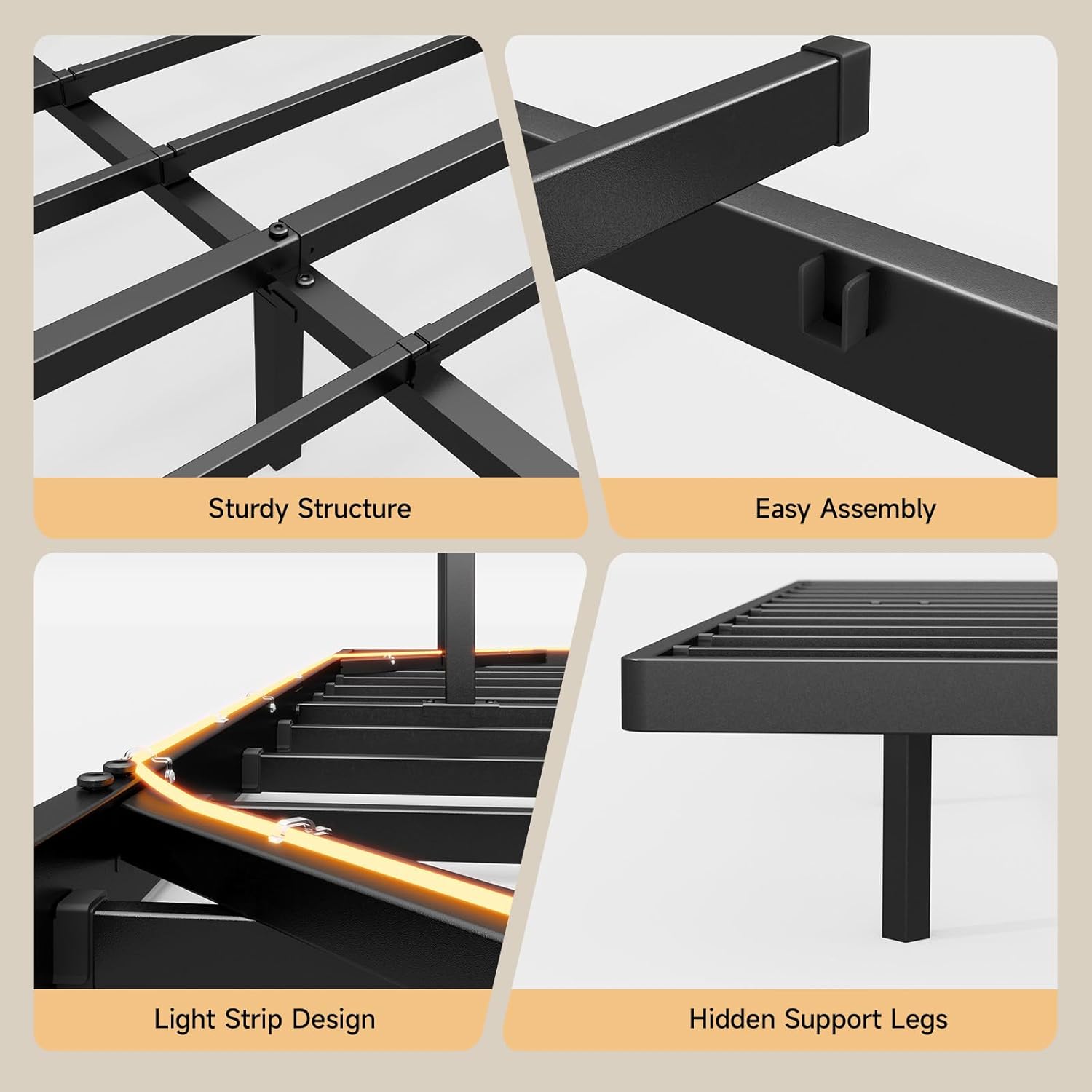
Image 4.1: Visual representation of the bed frame's sturdy structure, ease of assembly, integrated light strip design, and hidden support legs.
5. Operating Instructions
5.1. LED Smart Lights
The integrated LED lights offer various customization options for ambiance and functionality.
- Control Methods: The LED lights can be controlled via the included remote control or a dedicated smartphone application (APP). Refer to the installation manual for APP download and pairing instructions.
- Color Selection: Choose from over 60,000 colors to match your mood or room decor.
- Brightness Adjustment: Adjust the light intensity to your preference.
- Modes: Select from various pre-set lighting modes, including timing mode, mic mode (lights react to sound), and music sync mode.
- Timer Settings: Program the lights to turn on or off at specific times.

Image 5.1: The bed frame's LED lighting system, illustrating control options via remote and smartphone application, with features like color selection, timing, and music synchronization.

Image 5.2: A visual comparison of the bed frame's appearance with LED lights activated at night versus during the day, highlighting the ambient lighting effect.
5.2. USB Charging Station
The integrated charging station provides convenient power access for your electronic devices.
- AC Outlets: Two standard 110V/12A AC outlets are available for powering larger devices.
- USB Ports: One 5V 2A USB port and one Type-C port are provided for charging smartphones, tablets, and other USB-powered devices.
- Usage: Simply plug your device's charging cable into the appropriate port on the charging station. Ensure the bed frame is connected to a power source.

Image 5.3: Detailed view of the built-in charging station, featuring two AC outlets, one USB port, and one Type-C port for convenient device charging.
6. Maintenance
Regular maintenance will help prolong the life and appearance of your ONBRILL Floating Bed Frame.
- Cleaning the Frame: Wipe the metal frame with a soft, damp cloth. Avoid using harsh chemicals or abrasive cleaners, as these can damage the finish.
- Cleaning LED Strips: Gently wipe the LED light strips with a dry or slightly damp cloth. Ensure the power is disconnected before cleaning any electrical components.
- Checking Connections: Periodically (e.g., every 3-6 months) inspect all bolts and screws to ensure they are tight. Retighten if necessary to maintain stability and prevent noise.
- Electrical Components: Keep the charging station free from dust and debris. Do not attempt to disassemble or repair the electrical components yourself.
7. Troubleshooting
If you encounter issues with your bed frame, refer to the following common problems and solutions:
| Problem | Possible Cause | Solution |
|---|---|---|
| Bed frame is wobbly or noisy. | Loose bolts or uneven assembly. | Ensure all bolts are fully tightened. Check that the bed frame is on a level surface. |
| LED lights are not turning on. | Not plugged in, loose connection, remote battery dead, or APP issue. | Verify the power cord is securely plugged into a working outlet. Check connections to the charging station. Replace remote battery. Re-pair APP if necessary. |
| Charging station not working. | Not plugged in, power outage, or device incompatibility. | Ensure the bed frame is plugged in and the outlet is functional. Test with another device. Check device's charging cable. |
| Parts missing or damaged upon arrival. | Manufacturing or shipping error. | Do not proceed with assembly. Contact ONBRILL customer support immediately for replacement parts. |
8. Specifications
Key technical specifications for the ONBRILL Full Size Floating Bed Frame:
- Model: Full Size Floating Bed Frame
- Size: Full (U.S. Standard)
- Product Dimensions: 190.5L x 137.2W x 24.9H centimetres (approximately 75L x 54W x 9.8H inches)
- Material: Heavy Duty Metal Frame
- Color: Black
- Weight Capacity: Up to 1000 lbs (approximately 453 kg)
- LED Light Strip Length: Approximately 14.7 ft (4.5 meters)
- Charging Station Output:
- AC Outlets: 2 x 110V/12A
- USB Port: 1 x 5V 2A
- Type-C Port: 1 x (specification not provided, assuming standard charging)
- Power Cord Length: Approximately 47 inches (1.2 meters)
- Special Features: Smart LED Lights (APP/Remote Control, 60000+ colors, timing, mic, music sync modes), USB Charging Station, Hidden Support Legs, Rounded Edge Design, No Box Spring Needed, Noise-Free.
9. Warranty and Customer Support
For warranty information, replacement parts, or technical assistance, please contact ONBRILL customer support. Details for contacting support are typically found on the product packaging, the included installation manual, or the official ONBRILL website.
When contacting support, please have your product model (Full Size Floating Bed Frame) and purchase information readily available.