1. Introduction
The Smilewolf SWV Zigbee 3.0 Smart Water Valve is designed to automate and control your irrigation system, providing efficient watering for lawns, gardens, and vegetable patches. This device integrates seamlessly with Zigbee 3.0 compatible hubs and offers smart features such as scheduling, capacity-based watering, and voice control.

Figure 1.1: Smilewolf SWV Zigbee 3.0 Smart Water Valve in an irrigation setup.
2. Safety Information
Please read all safety warnings and instructions carefully before installation and operation. Failure to do so may result in electric shock, fire, or serious injury.
- Installation and maintenance of the device should be performed by a professional electrician to avoid electric shock.
- Do not operate the device or connect the terminal connector while the device is powered on.
- Ensure the device is installed in a location protected from direct water spray, although it has an IP55 rating for water resistance.
- Keep out of reach of children.
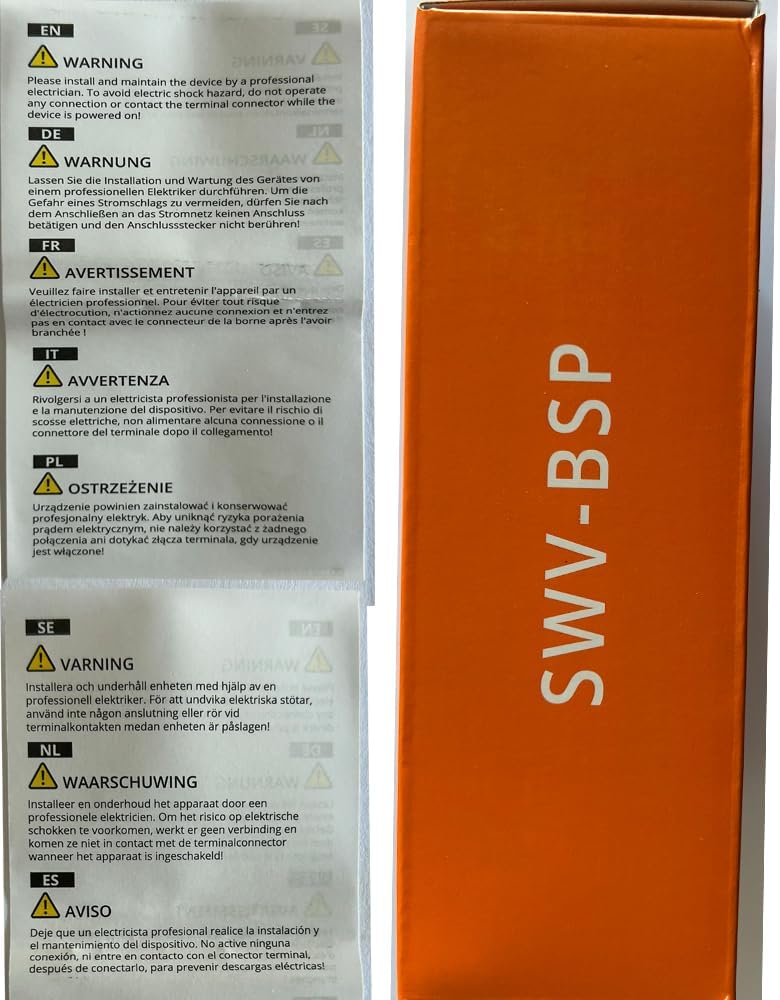
Figure 2.1: Important safety warnings for the device.
3. What's in the Box
Verify that all components are present in the package:
- Smilewolf SWV Zigbee 3.0 Smart Water Valve (A-SWV-BSP)
- User Manual
- Installation Accessories (e.g., thread seal tape)
Note: Batteries are not included and must be purchased separately (4 x 1.5V AA batteries).

Figure 3.1: Package contents of the Smilewolf Smart Water Valve.
4. Setup and Installation
4.1 Battery Installation
- Locate the battery compartment on the device.
- Open the compartment cover.
- Insert four (4) 1.5V AA batteries, ensuring correct polarity.
- Close the battery compartment cover securely.
4.2 Physical Installation
The smart water valve is designed for quick and easy installation between your faucet and hose.
- Ensure the water supply to the faucet is turned off.
- Connect the inlet side of the Smart Water Valve to your outdoor faucet. Use the provided thread seal tape if necessary to ensure a watertight seal.
- Connect your garden hose or irrigation system to the outlet side of the Smart Water Valve.
- Turn on the water supply to the faucet and check for any leaks.

Figure 4.1: Simple installation process for the Smart Water Valve.
4.3 Connecting to a Zigbee Hub
A Zigbee Hub is required for the Smart Water Valve to function with smart home systems. Please ensure your Zigbee Hub is updated to the latest firmware version before pairing.
- The valve is compatible with Zigbee 3.0 hubs, including eWeLink iHost, eWeLink NSPanel Pro, ZB Bridge Pro, eWeLink ZB Bridge Ultra, ZBDongle-P, ZBDongle-E, and Echo Plus 2nd Gen.
- Refer to your specific Zigbee Hub's instructions for adding a new device. Generally, this involves putting the hub into pairing mode and then activating the pairing mode on the Smart Water Valve (refer to the valve's quick start guide for specific button presses).
- Once paired, the device will appear in your eWeLink app or other compatible smart home application.
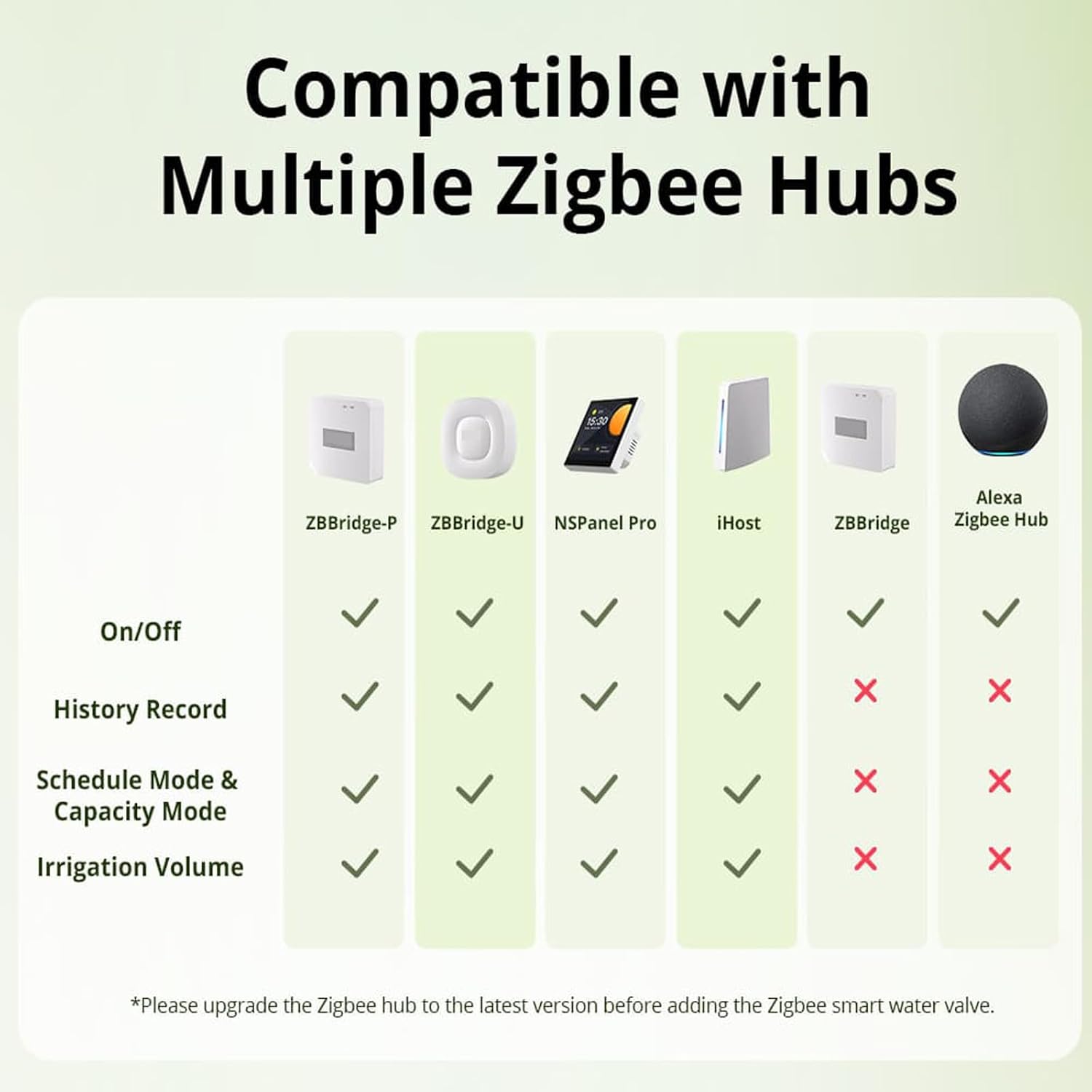
Figure 4.2: Zigbee Hub compatibility chart.
5. Operating the Smart Water Valve
The Smilewolf Smart Water Valve offers various modes and controls through the eWeLink app and voice commands.

Figure 5.1: Overview of Smart Water Valve features.
5.1 eWeLink App Control
Once paired with your Zigbee Hub, you can control the valve via the eWeLink app:
- Manual On/Off: Tap the button in the app to immediately open or close the valve.
- Schedule Mode: Set specific times for the valve to open and close, allowing for automated daily or weekly watering routines. Supports single and cyclic irrigation.
- Capacity Mode: Define the volume of water to be dispensed. The valve will close automatically once the set volume is reached.
- History Record: The app stores up to 180 days of water usage and duration data, allowing you to monitor and optimize your watering habits.
- Smart Scenes: Create automated scenes based on various triggers (e.g., weather conditions, time of day) to control the valve.
5.2 Voice Control
The Smart Water Valve supports voice control through Alexa and Google Home when connected to a compatible Zigbee Hub (e.g., Echo Plus 2nd Gen).
- Link your eWeLink account to your Alexa or Google Home app.
- Use commands such as:
- "Alexa, turn on the water valve."
- "Hey Google, turn off the garden hose."
5.3 Open-Source Platform Integration
For advanced users, the Smart Water Valve can integrate with open-source platforms via ZBDongle-P or ZBDongle-E, enabling custom automation functions.

Figure 5.2: Integration with open-source platforms.
6. Maintenance
6.1 Battery Life and Replacement
The Smart Water Valve's battery can last up to 20 months under typical usage (watering once a day for one hour). When the battery level is low, the eWeLink app will send a notification. Replace batteries promptly to ensure continuous operation.
6.2 Water Shortage Notification
If a water shortage is detected during irrigation, the app will immediately send a notification to alert you.
6.3 Cleaning
Wipe the exterior of the valve with a damp cloth as needed. Do not use abrasive cleaners or submerge the device in water.
7. Troubleshooting
- Device not responding: Check battery level and replace if necessary. Ensure the Zigbee Hub is powered on and within range.
- Cannot pair with Zigbee Hub: Ensure your Zigbee Hub is Zigbee 3.0 compatible and its firmware is up to date. Try resetting the valve and the hub's pairing mode.
- Water leakage: Ensure all connections are tight and thread seal tape is properly applied. Check for any cracks or damage to the valve body.
- Inaccurate water usage data: Ensure the valve is installed correctly and there are no external factors affecting water flow (e.g., blockages).
8. Specifications
| Feature | Detail |
|---|---|
| Model Number | A-SWV-BSP |
| Wireless Connection | Zigbee 3.0 |
| Waterproof Rating | IP55 |
| Power Supply | 6V (4 x 1.5V AA batteries) |
| Working Temperature | 5–60°C (41–140°F) |
| Watering Temperature | 5–40°C (41–104°F) |
| Working Humidity | 5%–95% RH, non-condensing |
| Working Pressure | 0.06–0.8 MPa |
| Dimensions (L x W x H) | 152 x 100 x 46 mm (5.98 x 3.94 x 1.81 inches) |
| Color | Black |
| Casing Materials | PC+ABS Plastic |
| Thread Designation | G3/4-14 (British Standard Pipe) |
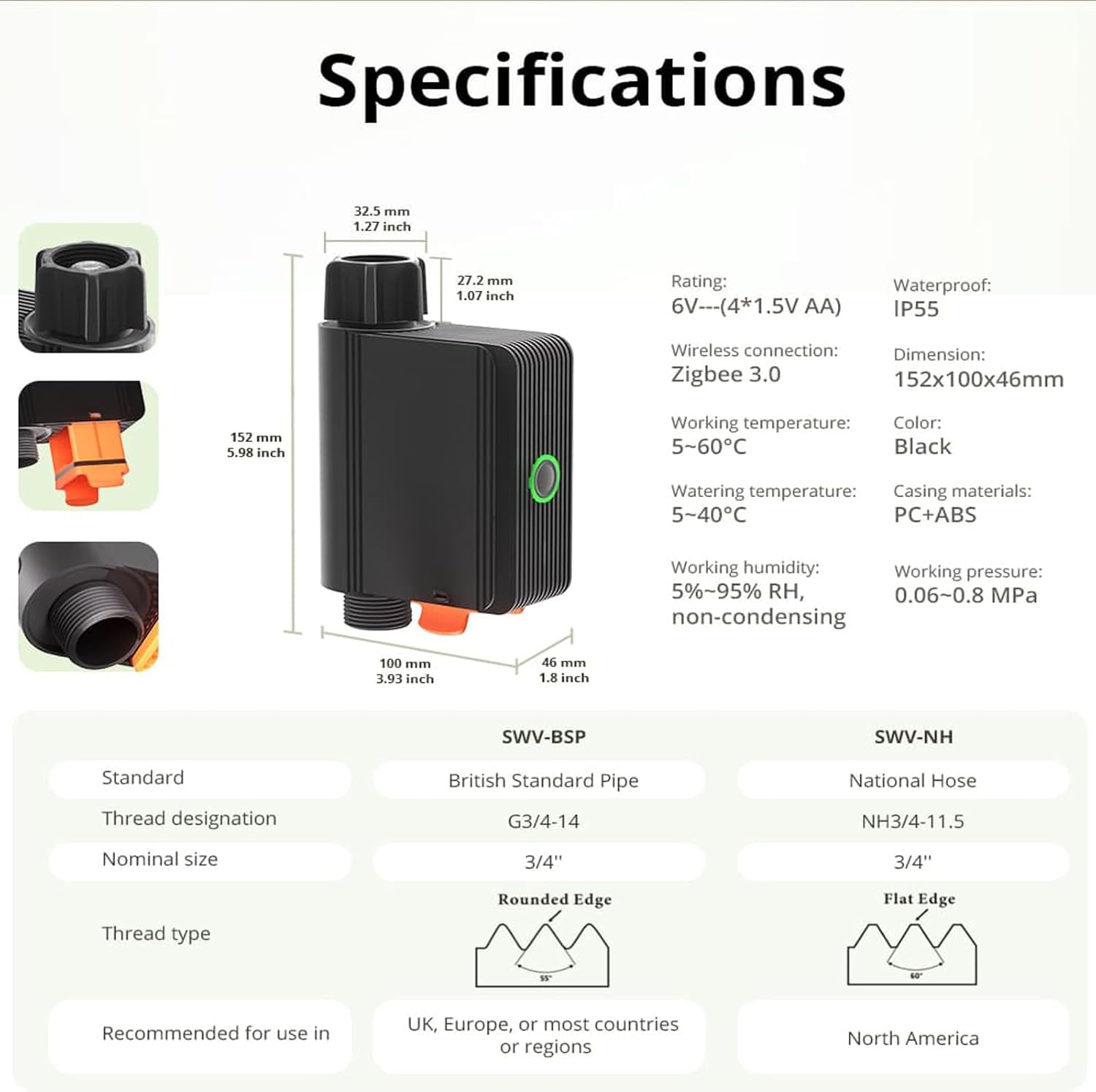
Figure 8.1: Technical specifications and dimensions.
9. Warranty and Support
For warranty information and technical support, please refer to the contact details provided on the product packaging or the official Smilewolf website. Keep your purchase receipt as proof of purchase for warranty claims.


