
1. Product Overview
The ULANZI BG-2 Pro Battery Handle Grip is a versatile accessory designed to provide extended power and enhanced handling for action cameras, mirrorless cameras, and smartphones. It integrates a 5500mAh power bank with 18W Power Delivery (PD) and Quick Charge (QC) capabilities, ensuring fast charging for your devices. Its ergonomic design and 180-degree tilt adjustment offer flexibility and comfort during use.

The ULANZI BG-2 Pro Battery Handle Grip connected to an action camera and a mirrorless camera, demonstrating its use as a power source and grip.
Key Features:
- Universal Compatibility: Functions as both a grip and a power bank for various devices, suitable for indoor and outdoor use.
- Fast Charging: Features 18W dual-direction fast charging (PD and QC) with a 5500mAh capacity, fully charging in approximately 80 minutes via the Type-C port.
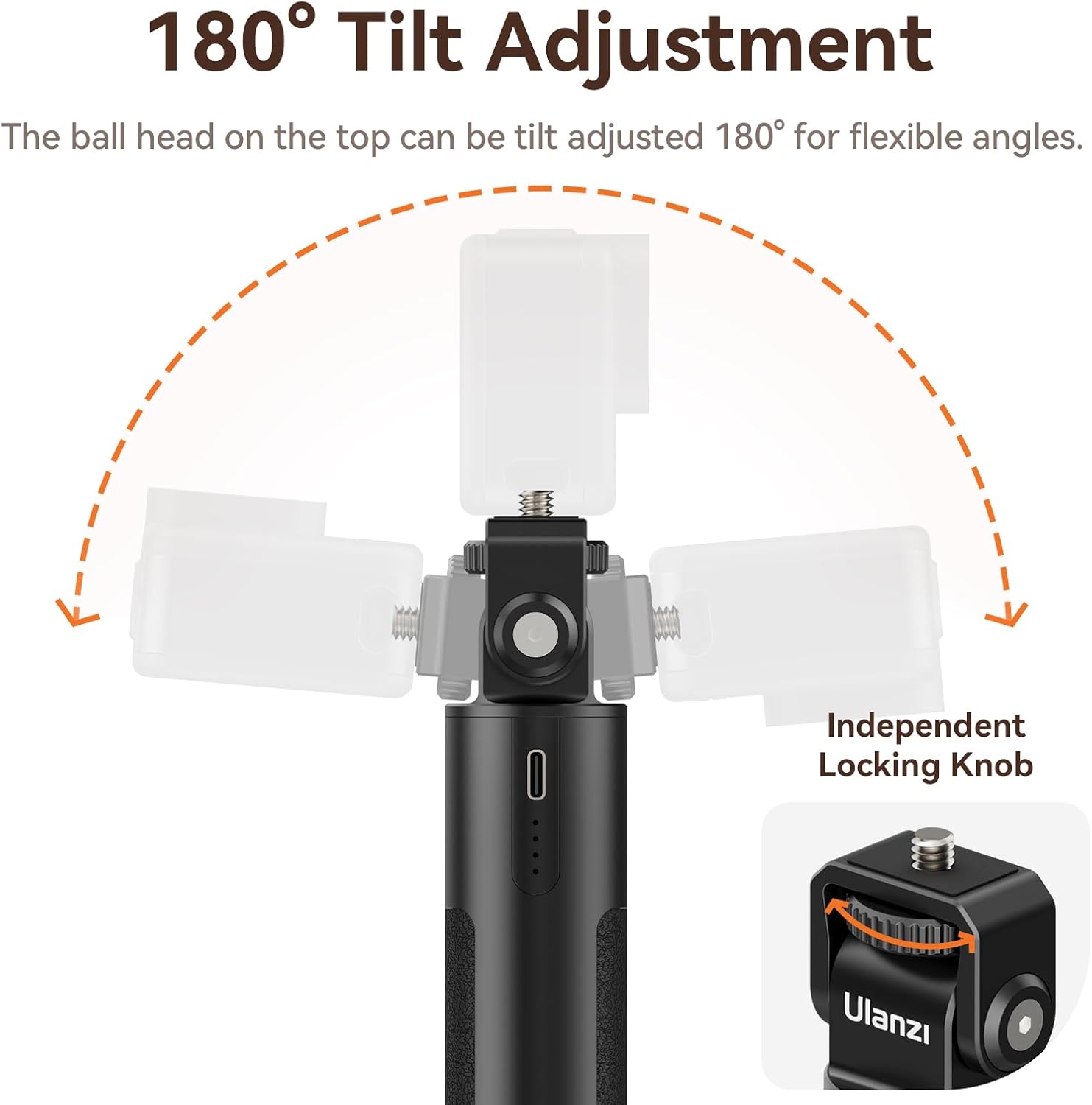
- Flexible Angles: The integrated ball head allows for 180° tilt adjustment, providing versatile shooting angles.
- Universal Mounting: Equipped with a 1/4" screw mount at the top and a 1/4" threaded hole at the bottom, compatible with most tripods, extension poles, smartphones, cameras, and action cameras.
- Ergonomic Design: Lightweight and portable with an anti-slip design for comfortable one-handed grip.
2. Setup
2.1 Charging the Battery Handle Grip
Before first use, fully charge the ULANZI BG-2 Pro. Connect a compatible USB-C charging cable to the Type-C port on the grip and to an 18W (or higher) power adapter. The LED indicators will show the charging status. A full charge takes approximately 80 minutes.
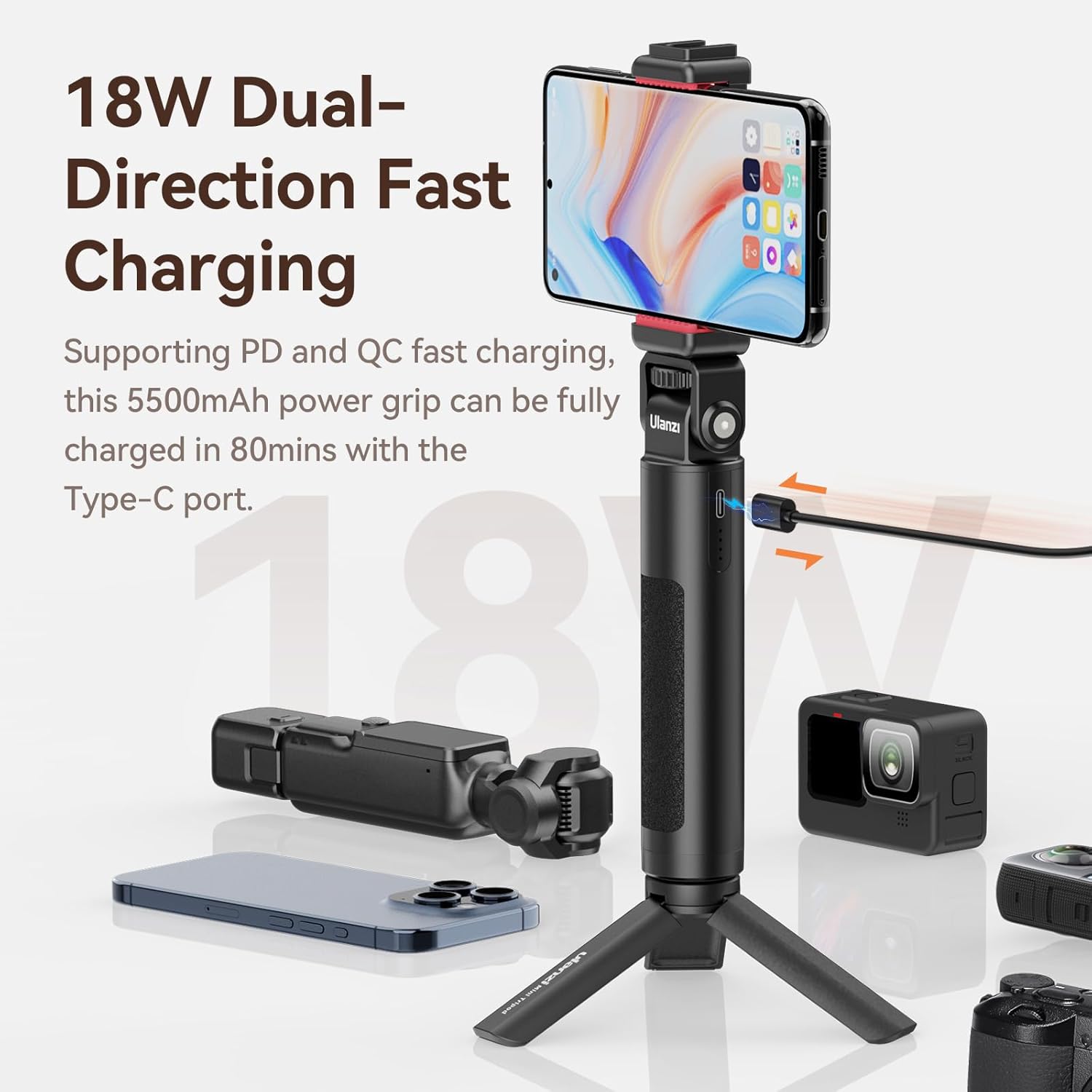
Close-up of the ULANZI BG-2 Pro Battery Handle Grip highlighting its 18W dual-direction fast charging capability via a Type-C port, with various devices around it.
2.2 Attaching Your Device
The BG-2 Pro features a universal 1/4" screw mount at the top for attaching cameras, action cameras, or smartphone holders. Secure your device by screwing it onto the mount until snug. Do not overtighten.

Detailed view of the ULANZI BG-2 Pro Battery Handle Grip's universal 1/4-inch screw mount at the top and threaded hole at the bottom, illustrating compatibility with smartphones, cameras, and action cameras.
2.3 Connecting to Tripods/Extension Poles
A 1/4" threaded hole is located at the bottom of the grip, allowing it to be mounted onto tripods, monopods, or extension poles for increased stability and versatility.
3. Operating Instructions
3.1 Using as a Hand Grip
Hold the BG-2 Pro comfortably in one hand. Its anti-slip design ensures a secure grip, making it ideal for handheld shooting and vlogging.
A hand holding the ULANZI BG-2 Pro Battery Handle Grip, emphasizing its lightweight and anti-slip design for comfortable one-handed use.
3.2 Powering Your Devices
Connect your camera, action camera, or smartphone to the BG-2 Pro using a suitable USB cable (USB-A or USB-C output). The grip will automatically begin charging your device. The LED indicators on the grip will show the remaining battery level.
3.3 Adjusting the Tilt Angle
The ball head at the top of the grip allows for 180° tilt adjustment. Loosen the independent locking knob, adjust your device to the desired angle, and then tighten the knob to secure it in place.

Diagram illustrating the 180-degree tilt adjustment feature of the ULANZI BG-2 Pro Battery Handle Grip's ball head, with an independent locking knob.
3.4 Versatile Applications
The BG-2 Pro can be used in various scenarios, including handheld vlogging, as a mini tripod for stable shots, or as a power source for extended recording sessions.

Collage of four images demonstrating different applications of the ULANZI BG-2 Pro Battery Handle Grip: holding a mirrorless camera, as a mini tripod for an action camera, for vlogging, and as a stand for a smartphone connected to a monitor.
4. Maintenance
- Keep the device dry. Do not expose it to moisture or rain.
- Clean the exterior with a soft, dry cloth. Avoid using harsh chemicals or abrasive materials.
- Store in a cool, dry place away from direct sunlight and extreme temperatures.
- Avoid dropping or subjecting the grip to strong impacts.
5. Troubleshooting
- Device not charging or charging intermittently:
Ensure you are using a high-quality USB-C cable. Some included cables may be inferior and cause connectivity issues. Try a different, known-good cable. - USB-A output issues:
If experiencing unreliable charging or disconnection with the USB-A port, try using the USB-C output for a more stable connection, especially for power-intensive devices. - Action camera (e.g., GoPro Hero 9) stops charging during recording:
Some action cameras may stop drawing power from external sources when actively recording to prevent overheating or manage power delivery. A common workaround is to remove the camera's internal battery and power the camera directly from the BG-2 Pro. This may require a specialized battery door with a cable pass-through, and will render the camera non-waterproof. - Grip not holding a charge:
Ensure the grip is fully charged using a reliable power source and cable. If the issue persists, contact customer support. - Ball head becoming loose:
Regularly check and tighten the independent locking knob on the ball head to maintain desired angles. If a small hex wrench is required for further tightening, ensure you have the appropriate tool.
6. Specifications
| Feature | Detail |
|---|---|
| Model Number | ULANZI BG-2 Pro |
| Battery Capacity | 5500mAh |
| Charging Power | 18W (PD & QC compatible) |
| Tilt Adjustment | 180° |
| Mounting Options | Universal 1/4" screw mount (top), 1/4" threaded hole (bottom) |
| Item Weight | 8.4 ounces |
| Package Dimensions | 7.48 x 2.56 x 2.32 inches |
| Compatible Devices | Cameras, Action Cameras, Smartphones |
| Manufacturer | ULANZI OFFICIAL |
What's in the Box:
- 1*BG-2 Pro Battery Handle

Image displaying the ULANZI BG-2 Pro Battery Handle Grip and text indicating 'Package List: 1*BG-2 Pro Battery Handle'.
7. Warranty and Support
ULANZI products are designed and manufactured to high-quality standards. For specific warranty information, please refer to the warranty card included with your product or visit the official ULANZI website. If you encounter any issues or require technical assistance, please contact ULANZI customer support through their official channels.
For the latest information and support, please visit the ULANZI Store on Amazon.