
VEVOR KW-870
VEVOR Vinyl Cutter Machine User Manual
Model: KW-870 | Brand: VEVOR
Product Overview
The VEVOR Vinyl Cutter Machine is a high-performance cutting plotter designed for precision and versatility in sign making, decal creation, and various other applications. This machine features advanced contour cutting capabilities, a user-friendly digital control panel, and robust construction for reliable operation.

Figure 1: VEVOR 34-inch Vinyl Cutter Machine with various accessories including vinyl rolls, cutting mat, and tool kit.
Key Features:
- Trusted Performance: Maximum paper feed of 34 inches (870 mm) and maximum cutting width of 31 inches (780 mm).
- Auto Camera Contour Cutting: Equipped with a camera for superior tracking and advanced contour cutting.
- Digital Control Panel: Illuminated LCD screen and large control panel for easy operation, with adjustable cutting force (500g) and speed (800mm/s).
- High Compatibility: Supports USB and COM interfaces, DM/PL, HP/GL languages, and various Windows operating systems (XP/Vista/7/8/10) with software like ARTCUT, Graph-Cut, Signcut, Signmaster, Flexi, Coreldraw. Not compatible with Mac systems.
- Versatile Use: Ideal for cutting sticker and decal vinyl, scrapbook papers, card stock, vinyl lettering, pinstriping, and general signage.
Setup Guide
Follow these steps to set up your VEVOR Vinyl Cutter Machine for the first time.
1. Unpacking and Assembly
Carefully remove all components from the packaging. Ensure all parts listed in the packing list are present. Assemble the stand according to the included assembly instructions, then mount the cutter machine onto the stand.
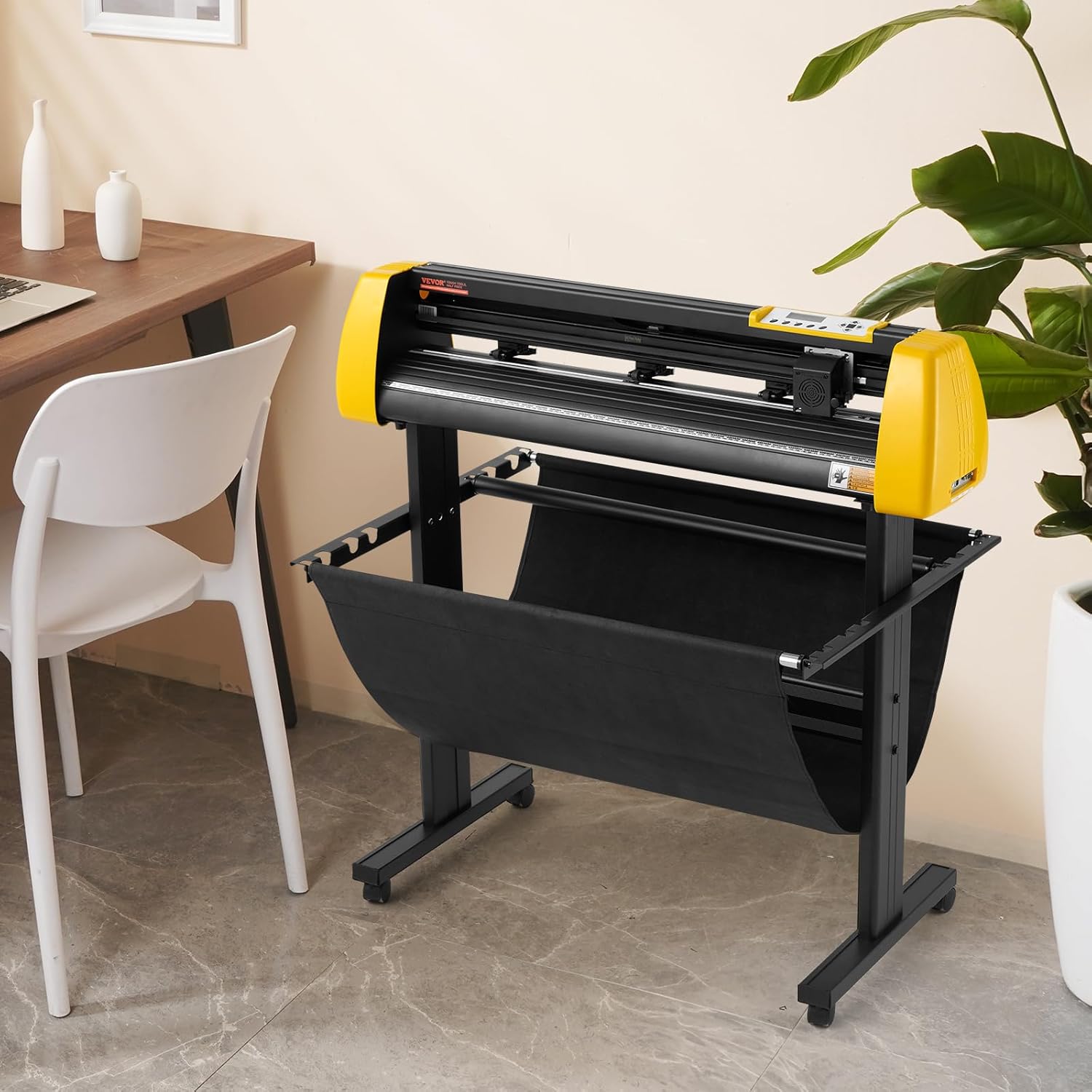
Figure 2: Assembled VEVOR Vinyl Cutter Machine ready for use.
2. Software Installation
The machine comes with dedicated cutting software. Insert the provided software CD or download the latest version from the official VEVOR website. Follow the on-screen instructions for installation. This machine is compatible with Windows XP/Vista/7/8/10 and supports various cutting software such as ARTCUT, Graph-Cut, Signcut, Signmaster, Flexi, and Coreldraw. Note: This machine is not compatible with Mac systems.

Figure 3: Connectivity options (USB & COM) and Windows operating system compatibility for effortless setup.
3. Connecting the Machine
Connect the vinyl cutter to your computer using either the USB or COM interface. Ensure the power cable is securely connected to the machine and a power outlet. Turn on the machine using the power switch.
4. Loading Material
Place your vinyl or other cutting material onto the feed rollers. Adjust the pinch rollers to securely hold the material in place. Ensure the material is aligned straight to prevent misfeeds during cutting.

Figure 4: The machine's maximum paper feed is 34.3 inches (870mm) and maximum cutting width is 30.1 inches (765mm).
Operating Instructions
This section details the operation of your VEVOR Vinyl Cutter Machine.
1. Control Panel Overview
The machine features an illuminated LCD screen and a digital control panel for easy adjustments. Use the buttons to navigate menus, set cutting parameters, and control the cutting process.

Figure 5: The LCD display allows adjustment of speed and blade pressure, while the digital panel controls cutting progress.
2. Adjusting Cutting Parameters
- Cutting Speed: Adjust the cutting speed via the control panel or software. The machine supports speeds up to 800mm/s.
- Cutting Force (Pressure): Set the blade pressure based on the material thickness and type. The maximum cutting pressure is 500g.
- Blade Depth: Ensure the blade is correctly installed and its depth is adjusted to cut through your material without damaging the cutting mat.
3. Contour Cutting with Camera
The integrated camera allows for precise contour cutting. Load your pre-printed material, and the camera will scan registration marks to ensure accurate cuts around your designs. Refer to your software manual for detailed instructions on setting up contour cuts.

Figure 6: The cutting head ensures high precision with an accuracy of ±0.1mm.
4. Ensuring Long-Distance Cutting Accuracy
The machine is designed with features to prevent material misalignment during long cuts. Dual-spring pinch rollers and an aluminum knurling stick work together to maintain consistent paper feed.

Figure 7: Anti-shift design details including dual-spring clamping rollers, high-precision pinch rollers, aluminum roller shaft, and ruler markings for long-distance cutting without misalignment.
5. Material Versatility
This plotter is capable of cutting various materials including vinyl, cardstock, window film, and heat transfer material. It is suitable for creating car decals, wedding decor, wall stickers, and business banners.
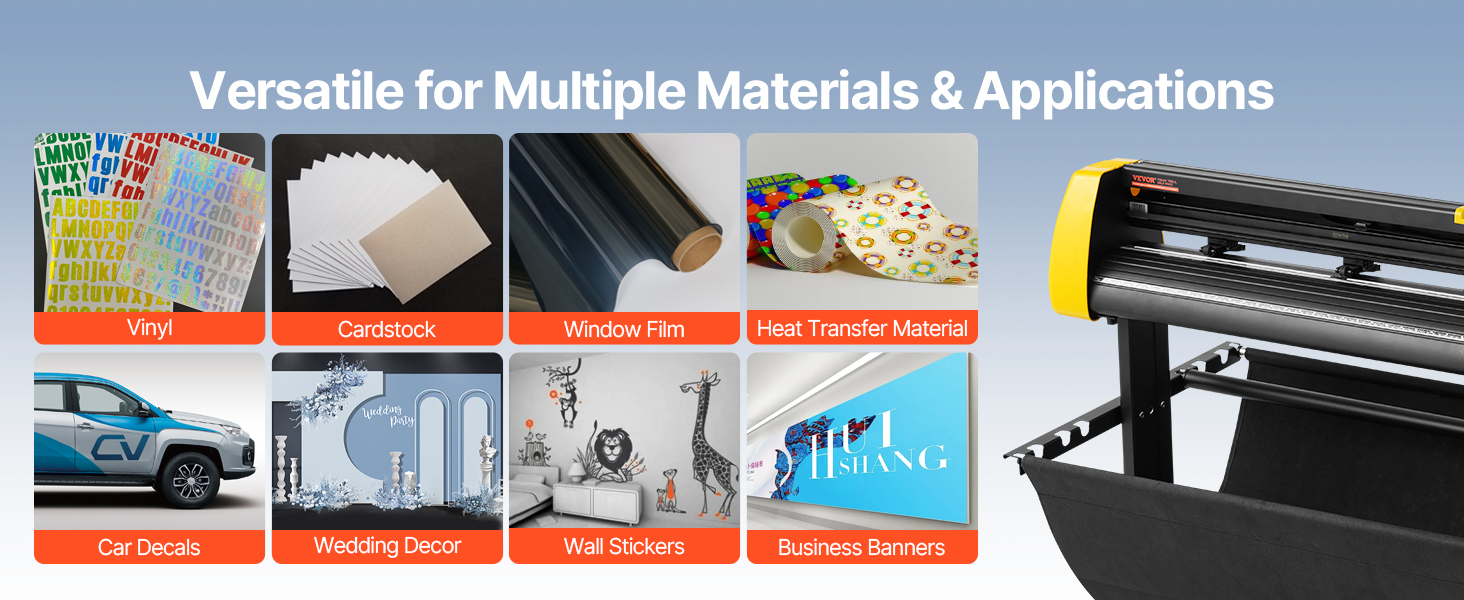
Figure 8: Examples of materials and applications for the VEVOR Vinyl Cutter Machine.
Maintenance
Regular maintenance ensures the longevity and optimal performance of your vinyl cutter.
1. Cleaning
- Dust Removal: Regularly wipe down the machine with a soft, dry cloth to remove dust and debris.
- Roller Cleaning: Clean the pinch rollers and aluminum roller shaft periodically to ensure smooth material feeding. Use a damp cloth and mild detergent if necessary, then dry thoroughly.
- Blade Holder: Inspect the blade holder for any accumulated material or adhesive residue. Clean as needed to ensure free movement of the blade.
2. Blade Replacement
Replace the cutting blade when you notice a decrease in cutting quality or if the blade appears dull or chipped. Refer to the specific instructions for your blade type for proper replacement.
3. Lubrication
Periodically apply a small amount of light machine oil to the guide rails and other moving parts as recommended in the detailed product manual (if available) to ensure smooth operation.
Troubleshooting
This section provides solutions to common issues you might encounter with your VEVOR Vinyl Cutter Machine.
| Problem | Possible Cause | Solution |
|---|---|---|
| Machine not powering on | Loose power cable; power outlet issue; machine fault. | Check power cable connection. Test power outlet. Contact customer support if problem persists. |
| Cutter not recognized by computer | Incorrect driver installation; loose USB/COM cable; software issue. | Reinstall drivers. Ensure cables are securely connected. Restart computer and machine. Verify software settings. |
| Inconsistent or incomplete cuts | Dull blade; incorrect blade pressure/speed; material slippage; software error. | Replace blade. Adjust cutting force and speed. Ensure material is loaded straight and pinch rollers are firm. Check design in software for errors. |
| Material misaligns during cutting | Improper material loading; worn pinch rollers; excessive speed. | Reload material, ensuring it is straight and secure. Inspect pinch rollers for wear. Reduce cutting speed for long or intricate designs. |
| Cutting head not dropping low enough | Blade holder issue; mechanical obstruction; software setting. | Check blade holder for debris. Ensure blade is correctly inserted. Verify cutting depth settings in software. If problem persists, contact customer support. |
If you encounter an issue not listed here, or if the suggested solutions do not resolve the problem, please contact VEVOR customer support for further assistance.
Specifications
| Feature | Detail |
|---|---|
| Item Model Number | KW-870 |
| Max Paper Feed Width | 34.3 in / 870 mm |
| Max Cutting Width | 30.1 in / 765 mm |
| Cutting Speed Range | 20-800 mm/s |
| Blade Pressure Range | 20-500 gf |
| Cutting Material Thickness | ≤1 mm |
| Cutting Accuracy | ±0.1 mm |
| Connection Type | USB/COM |
| Item Weight | 23.8 pounds |
| Product Dimensions (L x W x H) | 43.7 x 13 x 16.5 inches |
| Included Components | 1 x Vinyl Cutter Plotter Machine, 1 x Software |

Figure 9: Detailed dimensions of the VEVOR Vinyl Cutter Machine.
Warranty and Support
For warranty information and technical support, please refer to the documentation included with your product or visit the official VEVOR website. VEVOR provides customer support to assist with any product-related inquiries or issues.
Customer Support: For assistance, please visit the VEVOR store on Amazon or their official website for contact information.
Returns: This product typically includes a 30-day easy returns policy. Please check your purchase details for specific return conditions.