
NXGKET 2AYV7YG-813
NXGKET Rechargeable Walkie Talkies for Kids - User Manual
Model: 2AYV7YG-813
Introduction
Thank you for choosing the NXGKET Rechargeable Walkie Talkies. This set of four walkie talkies is designed for children, offering long-range communication with a built-in lithium-ion battery and USB Type-C charging. With 16 channels, these devices are ideal for outdoor games, camping, and hiking, providing a reliable way for children to stay connected.
Please read this manual thoroughly before operating the devices to ensure safe and optimal performance. Keep this manual for future reference.
Package Contents
The package includes:
- 4 x NXGKET Rechargeable Walkie Talkies (Orange, Yellow, Blue, Purple)
- 1 x USB Type-C Charging Cable
- User Manual (this document)

Image: Contents of the NXGKET walkie talkie package, showing the four colorful units, charging cable, and box.
Product Overview
Familiarize yourself with the components of your walkie talkie:
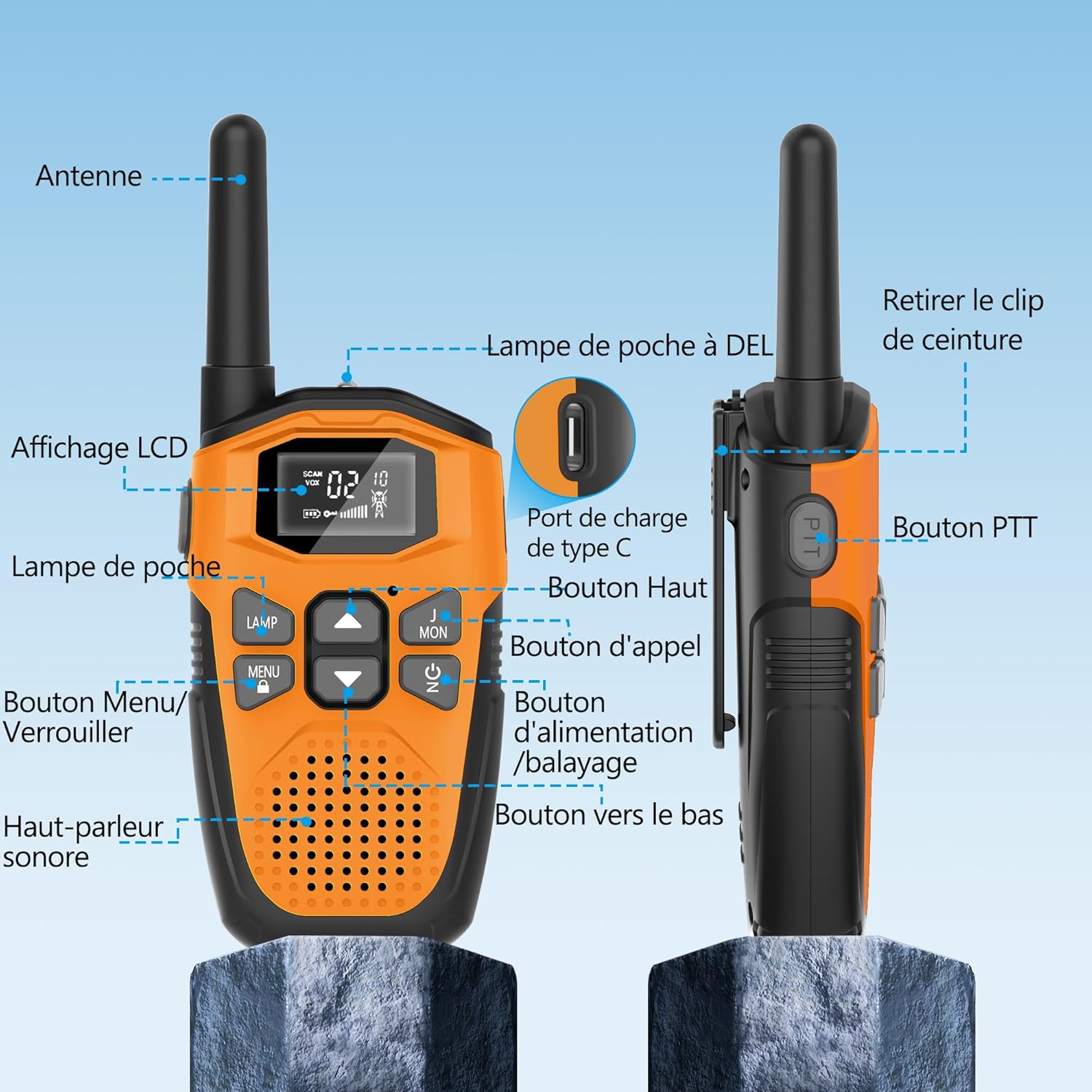
Image: Detailed diagram labeling the various parts of the walkie talkie, such as the antenna, LCD display, flashlight, PTT button, and charging port.
- Antenna: For transmitting and receiving signals.
- LCD Display: Shows channel, volume, battery status, and other indicators.
- Lamp (Flashlight): Built-in LED light for illumination.
- MENU/LOCK Button: Accesses menu settings or locks/unlocks the keypad.
- Speaker/Microphone: For audio output and input.
- PTT (Push-to-Talk) Button: Press and hold to transmit your voice.
- Up Button: Navigates menu or increases values.
- Call Button: Sends a call tone to other walkie talkies.
- Power/Scan Button: Turns the device on/off or initiates channel scanning.
- Down Button: Navigates menu or decreases values.
- Type-C Charging Port: For connecting the USB Type-C charging cable.
- Belt Clip: For attaching the walkie talkie to clothing or a belt.

Image: Detailed views highlighting the LCD display, speaker, charging port, and flashlight of the walkie talkie.
Setup
1. Initial Charging
The walkie talkies come with a built-in 1200mAh rechargeable lithium-polymer battery. Before first use, it is recommended to fully charge the devices.
- Connect the supplied USB Type-C charging cable to the charging port on the walkie talkie.
- Connect the other end of the cable to a USB power adapter (not included) or a computer USB port.
- The battery indicator on the LCD display will show charging status. A full charge typically takes about 2 hours.
- Once fully charged, the device can operate for approximately 24 hours of continuous use and up to 3 days on standby.
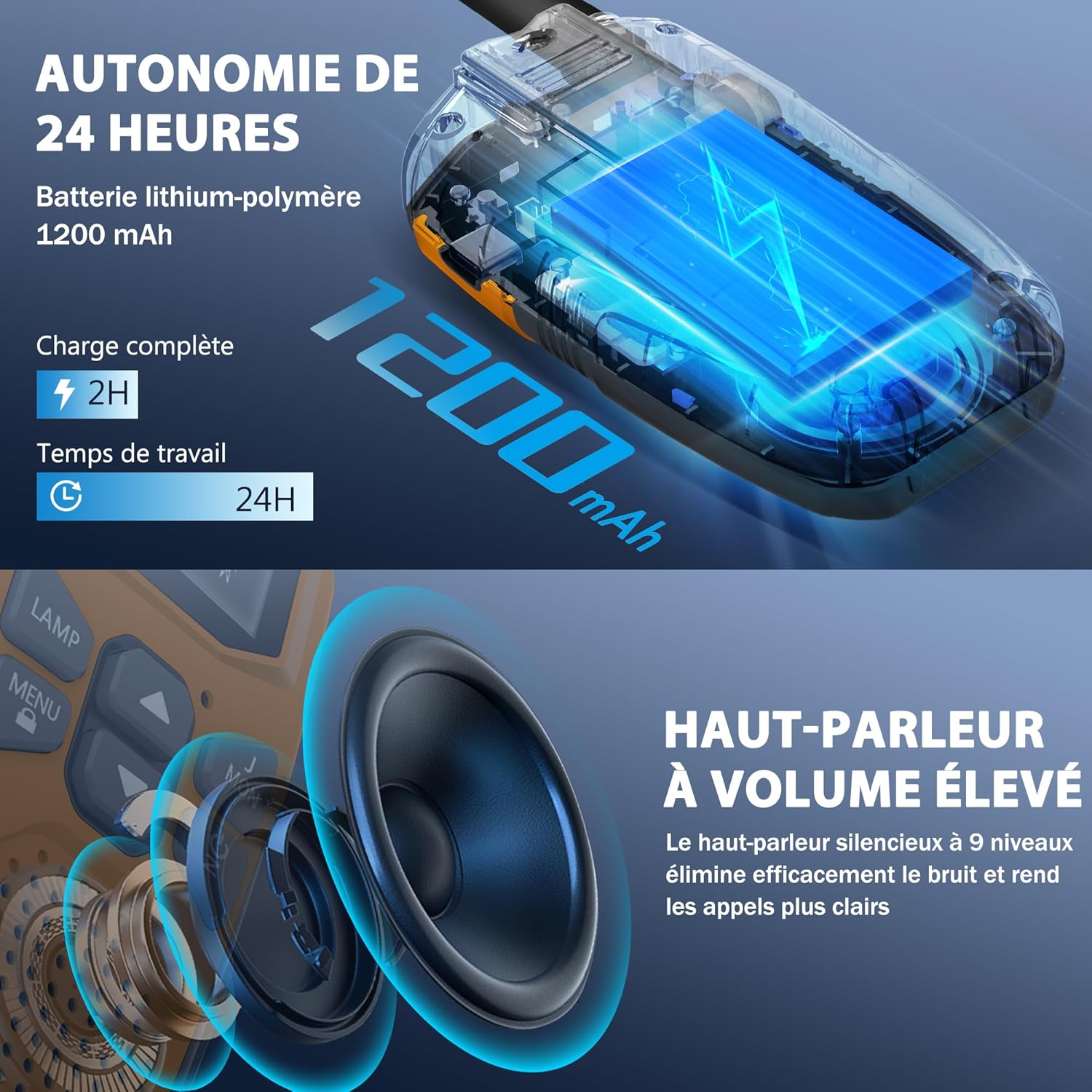
Image: Visual representation of the walkie talkie's 1200mAh battery and its charging and usage duration.
2. Attaching the Belt Clip
To attach the belt clip, align it with the slots on the back of the walkie talkie and slide it down until it clicks into place. To remove, push the release tab and slide the clip upwards.
Operating Instructions
1. Power On/Off
Press and hold the Power/Scan button for 3 seconds to turn the walkie talkie on or off.
2. Adjusting Volume
Use the Up and Down buttons to adjust the speaker volume. The volume level will be displayed on the LCD.
3. Selecting a Channel
The walkie talkies have 16 channels. To communicate, all walkie talkies in your group must be on the same channel and privacy code.
- Press the MENU button once. The channel number will flash on the LCD.
- Use the Up or Down buttons to select your desired channel (1-16).
- Press the MENU button again to confirm the channel selection, or wait a few seconds for it to automatically set.
4. Setting Privacy Codes (CTCSS/DCS)
The walkie talkies support 121 interference elimination codes (38 CTCSS codes and 83 DCS codes) to ensure private communication and reduce interference from other users on the same channel.
- After selecting a channel, press the MENU button twice. The privacy code number will flash.
- Use the Up or Down buttons to select a privacy code (0-121). Code 0 means no privacy code is set.
- Press the MENU button again to confirm, or wait for automatic setting.
5. Transmitting and Receiving (PTT)
To speak, press and hold the PTT (Push-to-Talk) button located on the side of the walkie talkie. Speak clearly into the microphone. Release the PTT button to listen for a response.
6. Call Tone
Press the Call button to send a call tone to other walkie talkies on the same channel and privacy code, alerting them to your presence.
7. VOX (Voice Operated Exchange) - Hands-Free Operation
VOX allows you to transmit without pressing the PTT button. When VOX is enabled, the walkie talkie will automatically transmit when it detects your voice.
- Press the MENU button until the VOX icon flashes on the LCD.
- Use the Up or Down buttons to select a VOX sensitivity level (1-3, with 3 being most sensitive). Select 'OFF' to disable VOX.
- Press MENU to confirm.
8. Flashlight Function
Press the LAMP button to turn the built-in LED flashlight on or off. This can be used for emergency lighting or during nighttime activities.
9. Keypad Lock
To prevent accidental changes to settings, press and hold the MENU/LOCK button for 3 seconds. A lock icon will appear on the LCD. Repeat the action to unlock the keypad.
Key Features
- Extended Range Communication:
These walkie talkies offer significant communication range. In open areas such as rural environments, suburbs, or coastal regions without obstructions, they can reach up to 5 kilometers (3.1 miles). In urban or village settings, the range is approximately 1.5 kilometers (0.9 miles). This allows users to stay connected without relying on mobile phone networks.

Image: Visual representation of the walkie talkie's communication range in different environments.
- Clear Audio Quality:
Equipped with a high-volume speaker and noise reduction technology, these walkie talkies deliver clear and loud audio. The 9-level silent speaker effectively eliminates noise, ensuring rapid and clear responses during conversations.
Image: Detailed view of the walkie talkie's speaker, emphasizing its high volume and clear sound capabilities.
- Durable and Lightweight Design:
The walkie talkies feature a hard, anti-drop shell made from environmentally friendly, fall-resistant material, providing protection against accidental drops. Despite their robust construction, each unit is lightweight, weighing approximately 93g, and compact, measuring 16cm in height, 3cm in depth, and 2cm in width, making them easy for children to handle.
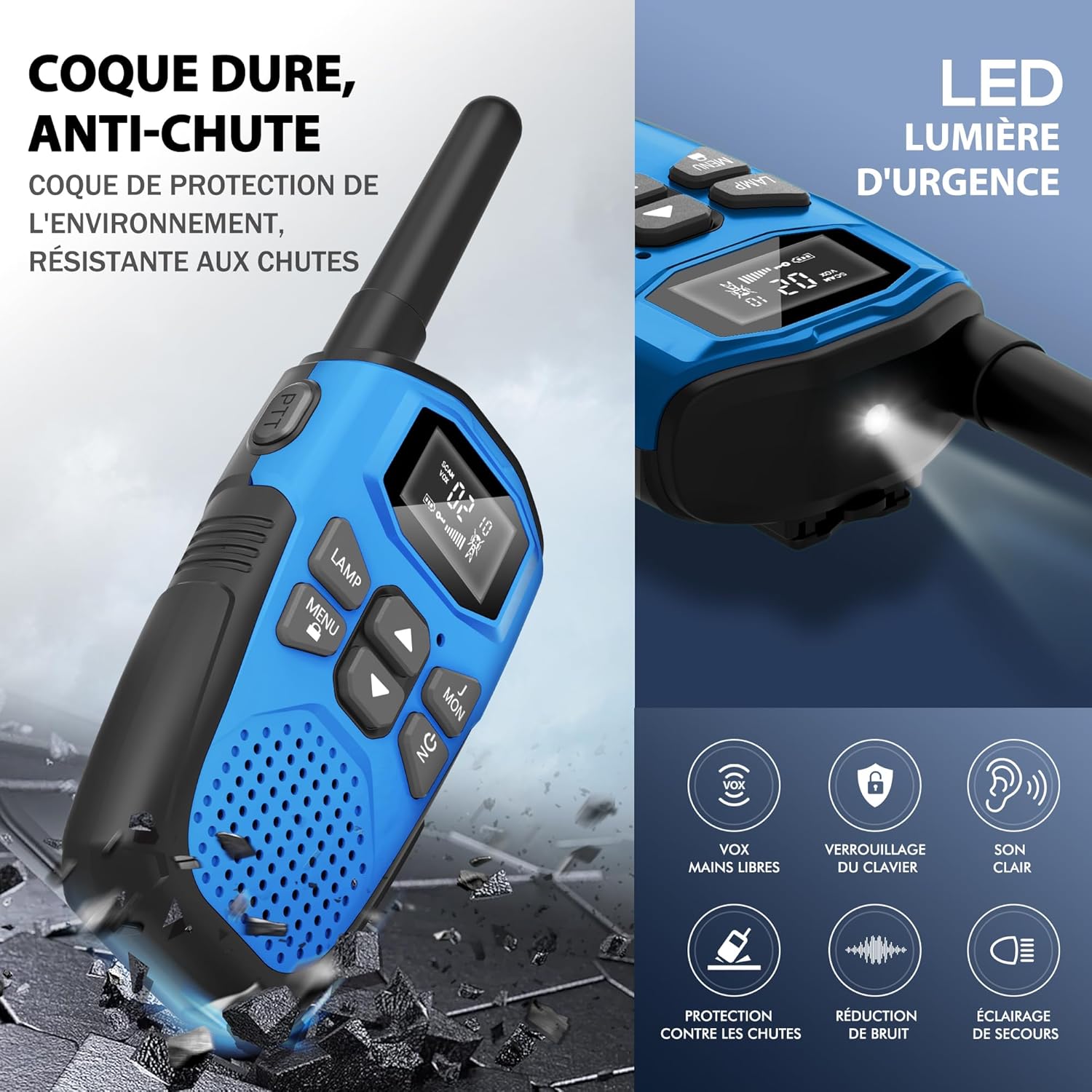
Image: Depiction of the walkie talkie's durable, drop-resistant casing and a summary of its key features.

Image: Dimensions and weight of the walkie talkie, highlighting its lightweight and slim design.
- Integrated LED Flashlight: Each walkie talkie includes a built-in LED flashlight, which can serve as an emergency light source, making it suitable for outdoor adventures and nighttime exploration.
- Automatic Power Saving: The devices are designed with an automatic power-saving feature to extend battery life during periods of inactivity.
- Low Battery Alert: An indicator will notify you when the battery level is low, prompting you to recharge the device.
Specifications
| Brand | NXGKET |
| Model Number | 2AYV7YG-813 |
| Color | Orange, Yellow, Blue, Purple |
| Number of Channels | 16 |
| Frequency Range | 446 MHz |
| Maximum Range | 3 Kilometers (up to 5 km in open areas) |
| Tuning Technology | UHF |
| Battery Composition | Lithium-Polymer |
| Battery Capacity | 1200 mAh (Built-in) |
| Rechargeable Battery | Yes |
| Voltage | 3.7 Volts (DC) |
| Water Resistance Level | Not Waterproof |
| Special Features | Digital display, Long range, Lightweight, Battery saver mode, Rechargeable, VOX hands-free, Keypad lock, Clear sound, Drop protection, Noise reduction, Emergency light |
Maintenance
- Cleaning: Use a soft, damp cloth to clean the exterior of the walkie talkie. Do not use harsh chemicals or abrasive cleaners.
- Storage: Store the walkie talkies in a cool, dry place away from direct sunlight and extreme temperatures when not in use.
- Battery Care: To prolong battery life, avoid fully discharging the battery frequently. Recharge the devices regularly, even if not in constant use.
- Water Exposure: These walkie talkies are not waterproof. Avoid exposing them to rain, splashes, or immersion in water.
Troubleshooting
| Problem | Possible Solution |
|---|---|
| No power | Ensure the battery is charged. Press and hold the Power button for 3 seconds. |
| Cannot communicate with other walkie talkies |
|
| Poor sound quality or static |
|
| Battery drains quickly |
|
| Keypad is unresponsive | The keypad might be locked. Press and hold the MENU/LOCK button for 3 seconds to unlock it. |
Warranty and Support
The NXGKET walkie talkies have been tested to meet CE certification standards.
Manufacturer Warranty: A one-year warranty is provided by the manufacturer from the date of purchase. This warranty covers defects in materials and workmanship under normal use.
Exclusions: The warranty does not cover damage caused by misuse, accidents, unauthorized modifications, or exposure to water.
Customer Support: For any questions, technical assistance, or warranty claims, please contact NXGKET customer service via the email address provided on your purchase receipt or through the retailer's support channels. Please have your model number (2AYV7YG-813) and purchase details ready when contacting support.
Related documents2AYV7YG-813


Ask a question about this manual
Ask about setup, troubleshooting, compatibility, parts, safety, or missing instructions. Manuals+ will review the question and use this page’s manual context to help answer it.