
G-ELEK 30ULD/3AO
G-ELEK Outdoor 24-Hour Mechanical Timer Outlet
Model: 30ULD/3AO
1. Introduction
Thank you for choosing the G-ELEK Outdoor 24-Hour Mechanical Timer Outlet. This device is designed to automate the operation of outdoor electrical appliances, providing convenience and energy efficiency. It features a durable, weatherproof design suitable for various outdoor applications, including lighting, pool pumps, and other heavy-duty equipment. Please read this manual thoroughly before installation and operation to ensure safe and optimal performance.

Image 1.1: Two G-ELEK Outdoor 24-Hour Mechanical Timer Outlets. These black, rectangular timers feature a clear protective cover over a circular dial, with two grounded outlets at the bottom and a short power cord with a right-angle plug at the top.
2. Safety Information
To prevent personal injury or property damage, always follow basic safety precautions when using electrical products. This timer is ETL Listed, ensuring it meets recognized safety standards.
- Risk of Electric Shock: Do not immerse in water. Do not use if the housing or cord is damaged.
- Grounding: This product must be properly grounded. Ensure the outlet it is plugged into is a grounded outlet.
- Overload Protection: Do not exceed the electrical ratings of 125V/15A/1875W, 1/2HP.
- Installation: Mount the timer vertically at least 2 feet (0.6 meters) above the ground to ensure optimal waterproof performance.
- Children: Keep out of reach of children.
- Maintenance: Disconnect power before cleaning or performing any maintenance.

Image 2.1: G-ELEK Outdoor Timer Mounted Vertically. The image shows the timer installed on a brick wall, connected to outdoor string lights, with icons indicating its suitability for sunny, rainy, and snowy conditions. This demonstrates proper vertical mounting for weather resistance.
3. Product Overview
The G-ELEK Outdoor Timer Outlet is a robust mechanical timer designed for outdoor use. Key components and features include:
- 24-Hour Dial: A rotating dial with 30-minute segments for setting ON/OFF times.
- Push-Down Pins: Integrated pins around the dial that control the ON/OFF cycles. Each pin represents 30 minutes.
- Manual Override Switch: A slide switch to toggle between timer mode (⏱) and always-ON mode (I).
- Dual Grounded Outlets: Two 3-prong grounded outlets for connecting appliances.
- Weatherproof Cover: A clear, hinged cover protects the dial and switch from dust, debris, and moisture.
- Heavy-Duty Cord: 6-inch 14AWGx3C SJTW UL approved PVC cable with a right-angle plug.

Image 3.1: G-ELEK Outdoor Timer Features. This image highlights the timer's capabilities: ON/OFF settings, 48 total settings, 30-minute pins, 24-hour daily repeat, and two grounded outlets.
4. Setup
Follow these steps to set up your G-ELEK Outdoor Timer Outlet:
- Choose a Location: Select a suitable outdoor location near a grounded electrical outlet. Ensure the location allows for vertical mounting and is at least 2 feet (0.6 meters) above the ground to maximize weather protection.
- Mount the Timer: Use the integrated wall mount hole on the back of the timer to securely fasten it to a wall or sturdy surface.
- Plug In the Timer: Connect the timer's power cord to a grounded 125V electrical outlet.
- Connect Appliances: Plug your outdoor appliances (e.g., lights, pool pump) into the two grounded outlets on the timer. Ensure the total load does not exceed 1875W (15A).
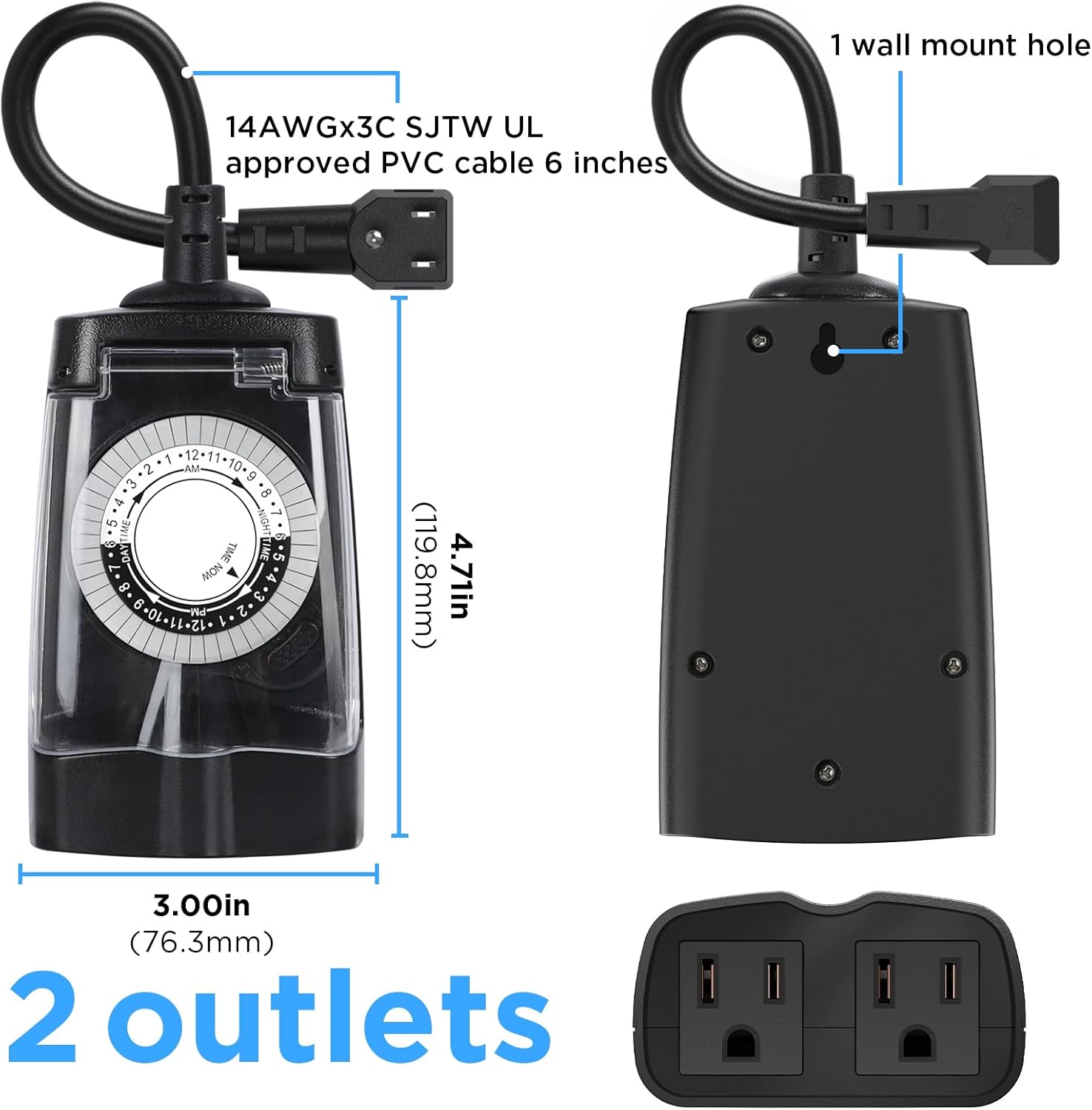
Image 4.1: G-ELEK Outdoor Timer Dimensions and Mounting. This image provides a side view and back view of the timer, showing its dimensions (6.1"D x 3.5"W x 1.9"H), the 6-inch UL approved PVC cable, and the location of the wall mount hole.
5. Operating Instructions
Programming the G-ELEK timer involves three main steps:
- Set the Current Time: Rotate the entire timer dial clockwise until the "TIME NOW" arrow points to the current time. The dial is marked with 24 hours (1-12 AM and 1-12 PM).
- Set ON/OFF Times: The dial has small pins around its circumference. Each pin represents a 30-minute interval.
- To set an appliance to turn ON, push the corresponding pins DOWN for the desired duration.
- To set an appliance to turn OFF, leave the corresponding pins in the UP position.
You can set up to 48 ON/OFF programs per 24-hour cycle.
- Select Operating Mode: Use the slide switch located on the side of the timer to choose the desired mode:
- Slide to ⏱ (Timer Function): The timer will operate according to your programmed ON/OFF settings.
- Slide to I (Always ON): The connected appliances will remain continuously powered, bypassing the timer settings.

Image 5.1: Easy-to-Use Timer Controls. This diagram clearly labels the Timer Dial, Pins, and Switch, illustrating how to set the current time, push pins down for ON, pull pins up for OFF, and select between 'always ON' (I) or 'timer function' (⏱) modes.
Applications: This timer is suitable for various outdoor uses, including:
- Outdoor lighting (Christmas lights, string lights, security lights)
- Pool pumps and fountain pumps
- Garden irrigation systems and sprinklers
- Engine block heaters

Image 5.2: Versatile Applications. This collage shows the G-ELEK timer being used for various purposes such as controlling Christmas lights, outdoor party lights, a pool pump, and a garden sprinkler, demonstrating its broad utility.
6. Maintenance
Proper maintenance ensures the longevity and reliable operation of your G-ELEK timer.
- Cleaning: Disconnect the timer from the power source before cleaning. Wipe the exterior with a soft, damp cloth. Do not use harsh chemicals or abrasive cleaners.
- Weather Protection: While designed to be weatherproof, ensure the clear protective cover is always securely closed when the timer is in use outdoors. Regularly check for any cracks or damage to the cover.
- Storage: If storing the timer for an extended period, disconnect it from power, clean it, and store it in a dry, cool place away from direct sunlight.
7. Troubleshooting
If you encounter issues with your G-ELEK timer, refer to the following common problems and solutions:
| Problem | Possible Cause | Solution |
|---|---|---|
| Appliance does not turn ON/OFF at programmed times. |
|
|
| Appliance is always ON or always OFF. |
|
|
| Timer is not receiving power. |
|
|
8. Specifications
| Model Number | 30ULD/3AO |
| Electrical Rating | 125V AC, 60Hz, 15A, 1875W Resistive/Tungsten, 1/2 HP |
| Number of Outlets | 2 Grounded Outlets |
| Minimum ON/OFF Time | 30 minutes |
| Daily Programs | Up to 48 ON/OFF settings per 24 hours |
| Cord Length | 6 inches (14AWGx3C SJTW UL approved PVC cable) |
| Material | Plastic |
| Dimensions (approx.) | 6.1"D x 3.5"W x 1.9"H |
| Certifications | ETL Listed |
9. Warranty and Support
G-ELEK products are designed for reliability and performance. For warranty information or technical support, please refer to the contact details provided with your purchase or visit the official G-ELEK website. Please retain your proof of purchase for warranty claims.
Related Documents - 30ULD/3AO
 |
BN-LINK BND-60/U208D 24-Hour Mechanical Dual Outlet Timer User Manual User manual for the BN-LINK BND-60/U208D 24-hour mechanical dual outlet timer. Provides instructions on setting schedules, operating the device, ratings, applications, and troubleshooting for indoor lighting and other electrical devices. |
 |
BN-LINK FD60-U2 24 Hour Mechanical Dual Outlet Timer User Manual User manual for the BN-LINK FD60-U2 24 Hour Mechanical Dual Outlet Timer, covering product overview, components, ratings, warnings, applications, operating instructions, and troubleshooting. |
 |
Fosmon C-10798FAUS 24-Hour Mechanical Outlet Timer User Manual User manual for the Fosmon C-10798FAUS 24-Hour Front Facing Mechanical Outlet Timer, detailing setup, operation, specifications, warranty, and support. |
 |
Electrovision E304CF & E304CG Mechanical 24 Hour Segment Timer User Manual User manual for the Electrovision E304CF and E304CG Mechanical 24 Hour Segment Timers. Provides instructions on setup, operation, safety precautions, and technical specifications for these 24-hour plug-in timers. |
 |
BN-LINK 24 Hour Mechanical Dual Outlet Timer User Manual User manual for the BN-LINK 24 Hour Mechanical Dual Outlet Timer, providing operating instructions, product view, ratings, applications, troubleshooting, and contact information. |
 |
BN-LINK BND-60/U44 24-Hour Mechanical Mini Timer User Manual User manual for the BN-LINK BND-60/U44 24-Hour Mechanical Mini Timer. Includes setup instructions, ratings, warnings, applications, and troubleshooting for indoor use. |
Ask a question about this manual
Ask about setup, troubleshooting, compatibility, parts, safety, or missing instructions. Manuals+ will review the question and use this page’s manual context to help answer it.