
1. Introduction
Thank you for choosing the Pabulum 9000A Jump Starter with Air Compressor. This versatile device is designed to provide reliable emergency starting power for 12V vehicles (up to All Gas/12L Diesel engines), inflate tires with its 150PSI air compressor, function as a power bank, and offer illumination with its integrated LED flashlight. Please read this manual thoroughly before use to ensure safe and optimal operation.

Image 1: The Pabulum 9000A Jump Starter with Air Compressor, smart jump cable, carry case, pump tube, air nozzle, and USB cable.
2. Safety Information
Always observe the following safety precautions to prevent injury or damage to the device and vehicle:
- Ensure proper polarity when connecting jumper cables. Incorrect connection will trigger a warning sound and red light on the smart cable clip.
- Do not use the jump starter to charge the car battery directly. Remove the clamps immediately after the vehicle starts.
- Keep the device away from children.
- Do not expose the device to extreme temperatures (below -4°F or above 140°F).
- Avoid short-circuiting the clamps.
- The device features 10 safety protections: over-charge, over-current, short-circuit, reverse-polarity, low-temp, high-temp, over-voltage, over-load, spark-proof, and reverse-charge.

Image 2: Visual representation of the 10-type safety protection system integrated into the jump starter.
3. Product Overview
What's in the Box:
- Pabulum 9000A Jump Starter with Air Compressor
- Smart Jump Starter Clamps
- Air Hose
- Air Nozzles (various types)
- USB Cable (USB-A to USB-C)
- User Manual
- Product Storage Case

Image 3: All components included in the Pabulum 9000A Jump Starter package.
4. Setup
Initial Charging:
Before first use, fully charge the jump starter. Connect the provided USB-A to USB-C cable to the device and a suitable USB power adapter (not included). The display will indicate charging status. A full charge ensures maximum performance and readiness for emergencies.
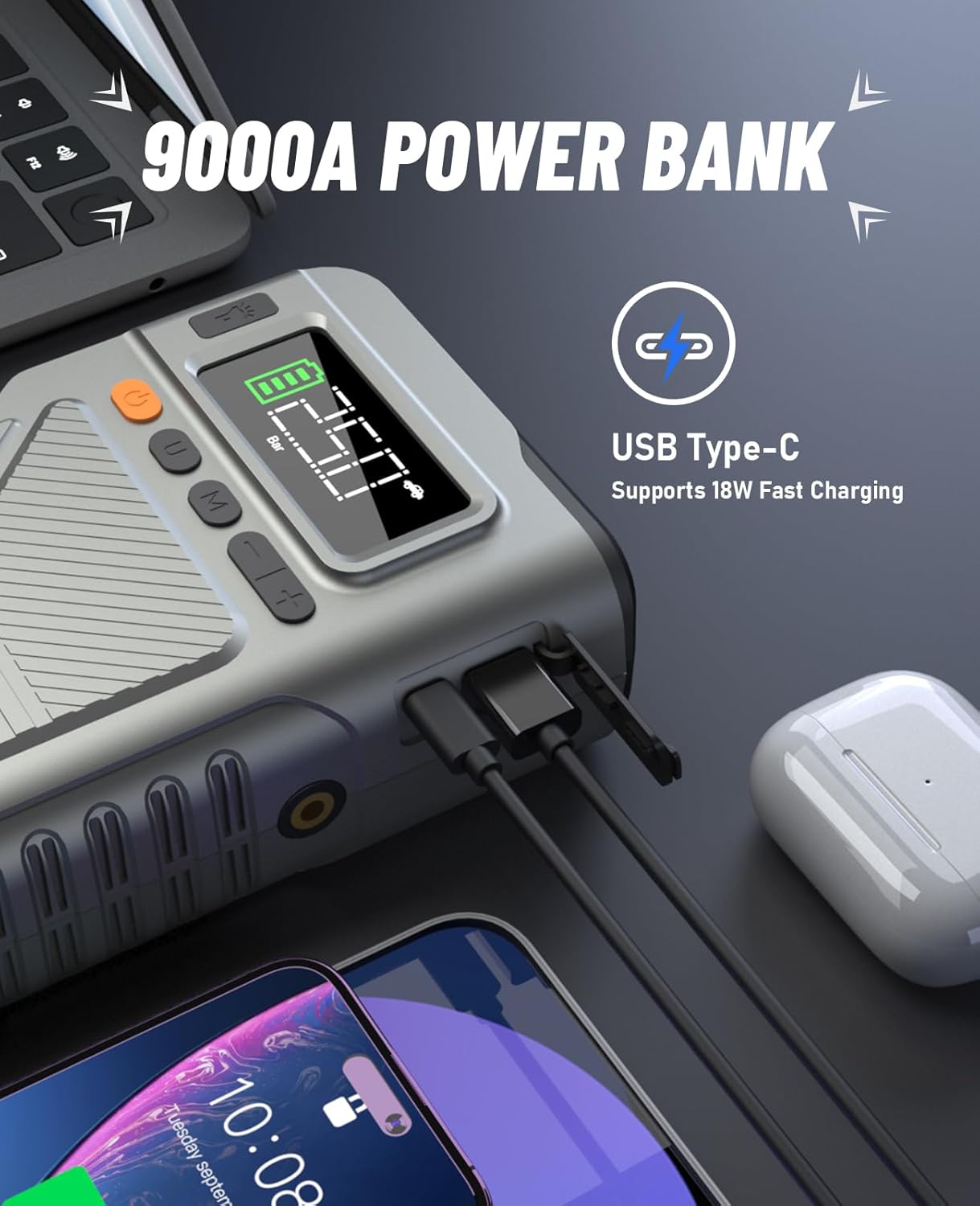
Image 4: The jump starter's USB-C port for charging and power bank functionality.
5. Operating Instructions
5.1. Jump Starting a Vehicle
- Connect Smart Clamps: Plug the smart jump starter clamps into the designated port on the jump starter.
- Attach to Battery: Connect the red clamp to the positive (+) terminal of the vehicle's battery and the black clamp to the negative (-) terminal. The smart cable clip will indicate correct connection with a green light. If a red light and beeping sound occur, swap the connections.
- Start Vehicle: Once the green light is solid, start your vehicle's engine.
- Remove Clamps: Immediately remove the smart clamps from the vehicle battery after the engine starts.

Image 5: Visual steps for jump starting a vehicle.
Video 1: Demonstration of how to jump start a car using the Pabulum 9000A Jump Starter. This video shows the process from opening the hood to successfully starting the engine and disconnecting the clamps.
5.2. Using the Tire Inflator
- Connect Air Hose: Screw the air hose into the air outlet port on the jump starter.
- Attach Nozzle: Select the appropriate air nozzle for your tire/item (car, motorcycle, bicycle, ball) and attach it to the air hose.
- Set Pressure: Turn on the device. Use the 'U' button to cycle through different modes (car, motorcycle, bicycle, ball) and the 'M' button to select pressure units (PSI, KPA, BAR, kg/cm²). Use the '+' and '-' buttons to set the desired pressure.
- Start Inflation: Press the power button to begin inflation. The device will automatically stop once the preset pressure is reached.

Image 6: The jump starter functioning as a cordless digital tire inflator for a car.

Image 7: The versatility of the 150PSI tire inflator for cars, motorcycles, bicycles, and balls.
5.3. Using as a Power Bank
The device includes USB-A and USB-C output ports for charging electronic devices. Simply connect your device's charging cable to the appropriate port on the jump starter. It supports 18W fast charging.
5.4. Using the LED Flashlight
Press the flashlight button to cycle through three modes:
- Constant Light: For general illumination.
- Strobe Mode: For signaling or attracting attention.
- SOS Mode: For emergency signaling.

Image 8: The multi-mode LED flashlight for various emergency and utility uses.
6. Maintenance
- Recharge the device every 3-6 months, even if not used, to maintain battery health.
- Store the device in its carry case in a cool, dry place, away from direct sunlight and extreme temperatures.
- Clean the exterior with a soft, damp cloth. Do not use harsh chemicals or abrasive cleaners.
- Inspect cables and clamps for damage before each use.
7. Troubleshooting
- Device not turning on: Ensure the device is charged. If fully charged and still not turning on, contact customer support.
- Smart cable clip shows red light/beeps during jump start: This indicates incorrect polarity. Disconnect and re-attach the clamps to the correct battery terminals (red to positive, black to negative).
- Tire inflator not working: Check that the air hose is securely connected to both the device and the tire valve. Ensure the desired pressure is set and the device is turned on.
- Slow inflation: Ensure the air nozzle is correctly sealed to the tire valve to prevent air leakage.
8. Specifications
| Feature | Specification |
|---|---|
| Brand | Pabulum |
| Model | SU7 |
| Peak Output Current | 9000 Amps |
| Vehicle Compatibility | 12V vehicles, All Gas/12L Diesel engines |
| Tire Inflator Pressure | Up to 150 PSI |
| Power Bank Output | 18W Fast Charging (USB-A, USB-C) |
| LED Flashlight Modes | Constant, Strobe, SOS |
| Operating Temperature | -4°F to 140°F |
| Product Dimensions | 2.36"D x 4.95"W x 9.2"H |
| Item Weight | 2.09 Pounds |
| Battery Type | Lithium Ion (included) |
9. Warranty and Support
- 30-Day Unconditional Return Guarantee: For any reason, you may return the product within 30 days for a full refund.
- 24-Month Quality Problem Solutions: The product is covered for quality-related issues for 24 months from the date of purchase.
- Lifetime Customer & Technical Support: Pabulum provides ongoing customer and technical assistance for the lifetime of the product.
- 24 Hours 7x24 Customer Support: For any inquiries or assistance, please contact our customer support team available 24/7.