
1. Product Overview
The MOSKESON 24h Insulin Cooler Travel Case is designed to maintain the required temperature for temperature-sensitive medications, such as insulin, during travel. It features a Fahrenheit temperature display for real-time monitoring and is constructed with insulated materials to ensure long-lasting cooling without electricity. This case is TSA approved for air travel.

Image 1.1: MOSKESON Insulin Cooler Travel Case with included ice packs and visible temperature display.
2. Key Features
- Fahrenheit Temperature Display: Allows clear observation of the internal temperature.
- Insulated Construction: Made of EVA exterior and aircraft-insulated pearl cotton with aluminum foil lining for effective temperature retention.
- Long-Lasting Cooling: Capable of maintaining temperatures for over 12 hours with two frozen ice packs (TSA Approved).
- Ample Storage: Designed to hold 4-8 insulin pens, syringes, alcohol wipes, cotton balls, and other diabetic supplies.
- Portable Design: Compact and easy to carry, suitable for various travel scenarios.
- Durable Materials: Features EVA hard leather waterproof material and clamped zippers for protection.

Image 2.1: Interior view of the cooler case, highlighting elastic bands for securing pens and a mesh pocket for additional supplies.
3. Setup and Preparation
Follow these steps to prepare your MOSKESON Insulin Cooler Travel Case for use:
- Activate Temperature Display: Upon first use, locate and remove the battery insulation tab from the temperature display unit. The temperature will then be shown.
- Freeze Ice Packs: Place the two included ice packs in a freezer for approximately 5-8 hours until they are completely frozen solid.
- Insert Frozen Ice Packs: Once frozen, place the hard ice packs into the designated compartments within the cooler box.

Image 3.1: Visual guide for initial setup, including battery tab removal and ice pack freezing.
4. Operating Instructions
To effectively use your cooler case for medication storage:
- Load Medication: Carefully place your medication (e.g., insulin pens, vials) and other necessary supplies into the compartments and mesh pockets of the cooler case. Ensure items are arranged to allow the temperature probe to monitor effectively.
- Position Temperature Probe: Ensure the temperature probe is positioned near the items you wish to refrigerate for accurate readings.
- Secure Closure: Zip up the case completely to seal the contents and maintain the internal temperature.
- Monitor Temperature: Periodically check the Fahrenheit temperature display to ensure your medication remains within the desired temperature range.
5. Maintenance and Care
- Cleaning: Wipe the exterior of the case with a damp cloth. Do not submerge the case in water. For the interior, use a mild disinfectant wipe if necessary and allow to air dry completely before closing.
- Ice Pack Reuse: The included ice packs are reusable for 3-5 years. After each use, clean them if necessary and refreeze them for future use. Store them in the freezer when not in use to ensure they are ready.
- Storage: Store the cooler case in a cool, dry place away from direct sunlight when not in use.
- Battery Replacement: If the temperature display becomes dim or stops working, replace the battery. Refer to the display unit for battery type and replacement instructions.
6. Troubleshooting
| Problem | Possible Cause | Solution |
|---|---|---|
| Temperature display is blank or dim. | Battery insulation tab not removed or battery is low/dead. | Remove battery insulation tab (first use). Replace battery if it's low or dead. |
| Cooler does not maintain temperature for the expected duration. | Ice packs not fully frozen. Case not properly sealed. Ambient temperature too high. | Ensure ice packs are frozen solid for 5-8 hours. Verify zippers are fully closed. Avoid prolonged exposure to high ambient temperatures. |
| Zippers are difficult to operate or broken. | Excessive force used. Debris in zipper teeth. | Avoid overfilling the case. Clean zipper teeth if obstructed. If a zipper is broken, contact customer support. |
| Insufficient space for medication. | Overestimation of capacity. | Review the stated capacity (4-8 insulin pens). Consider if all items are essential for travel. |
7. Specifications
| Feature | Detail |
|---|---|
| Model | B0D9BS1BFD |
| Brand | MOSKESON |
| Color | Black |
| Material Type | EVA, Pearl Cotton, Aluminum Foil |
| Closure Type | Zipper |
| Number of Compartments | 3 |
| Item Weight | 0.56 Kilograms |
| Cooling Duration (approx.) | Over 6 hours at 35.6°F, over 8.5 hours at 46.4°F, over 12 hours at 74°F (at 86°F ambient) |

Image 7.1: Cooling performance graph illustrating temperature retention over time under specific ambient conditions.
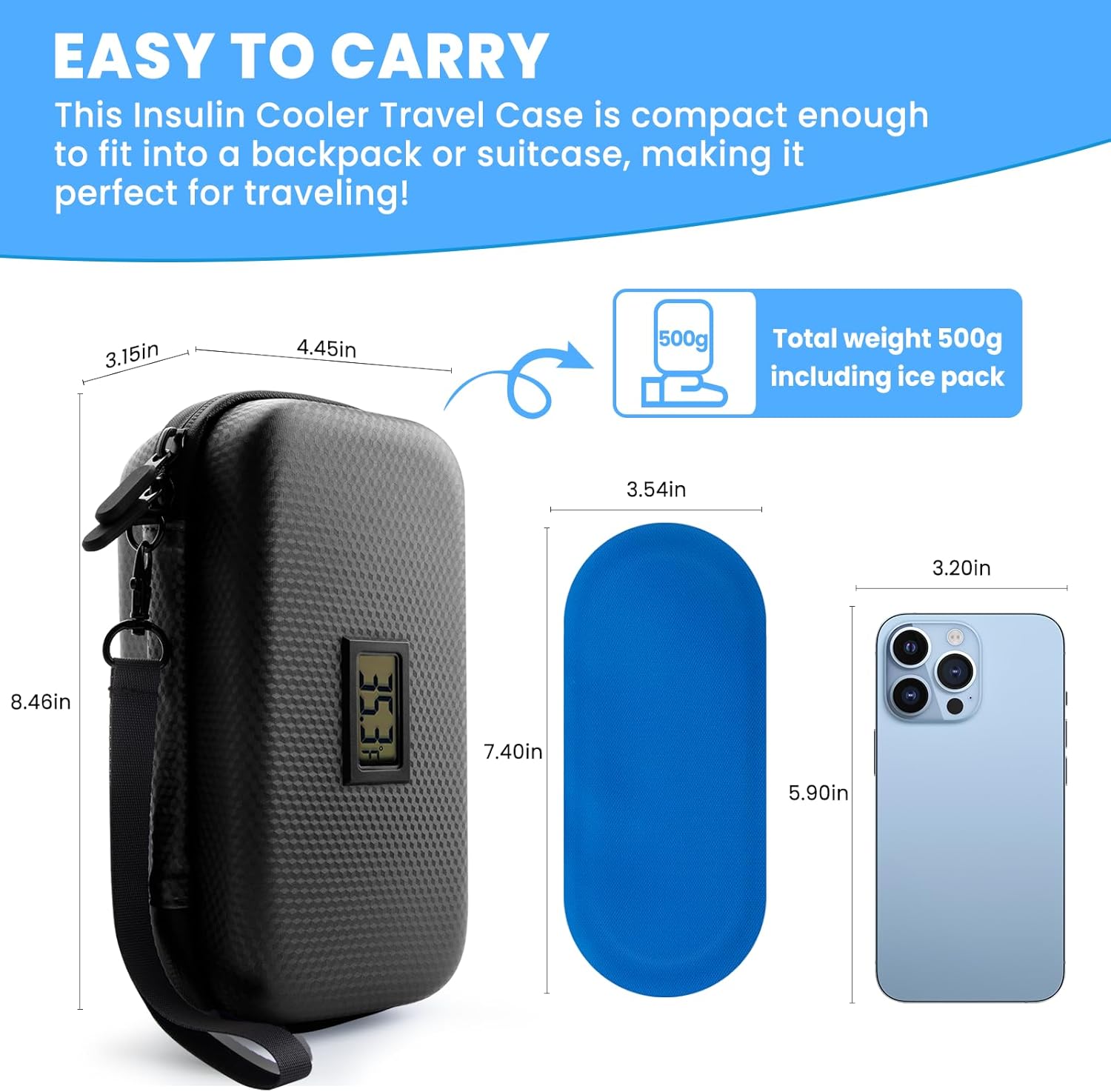
Image 7.2: Product dimensions, including the case and ice pack, for reference.
8. Warranty and Support
For warranty information or customer support regarding your MOSKESON Insulin Cooler Travel Case, please refer to the product packaging or contact the manufacturer directly through their official website or the retailer where the product was purchased. Keep your proof of purchase for any warranty claims.


