
1. Introduction
The Yealink SkySound CS10 is a low-profile 2-way coaxial network speaker designed for video conferencing environments. It delivers high-quality audio performance and features an elegant, minimalist design suitable for modern conference rooms. This manual provides essential information for the setup, operation, and maintenance of your SkySound CS10 speaker.
2. Key Features
- Innovative Coaxial Structure: Features a 2-way coaxial setup with a 5.7-inch LF Woofer and a 1.1-inch HF Tweeter for high-fidelity audio.
- High-Performance Acoustics: Boasts impressive acoustic parameters, with a sensitivity of 88dB@1W 1m and a maximum SPL of 99dB@20W 1m.
- PoE-Enabled Active Speaker: Integrates DAC and PoE technology for swift digital signal processing from the network, ensuring hassle-free setup and minimal latency.
- Dante Ready: Available in both Dante-enabled and standard versions for seamless integration into sophisticated audio networks.
- Versatile Deployment: Offers diverse indoor installation solutions, compatible with various ceiling types and grid systems.
- Sophisticated Design: Features a detachable, paintable magnetic grille in black and white, with a low-profile (120mm) look.
- Ethernet Connectivity: Provides a reliable and convenient way for communication, playback, and connectivity.
3. What's in the Box
Verify that all items are present in the package:
- SkySound CS10 Speaker
- White Mesh Cover
- Quick Start Guide
- Assembly Fixing Bracket
- Dust Cover
- Deployment Instruction Template
- Bracing Bridge
- 6 x Dust Cover Screws
4. Product Overview and Components

Figure 1: SkySound CS10 Speaker with Detached Grille. This image shows the main speaker unit with its black housing and the white magnetic grille separated, revealing the internal speaker components.
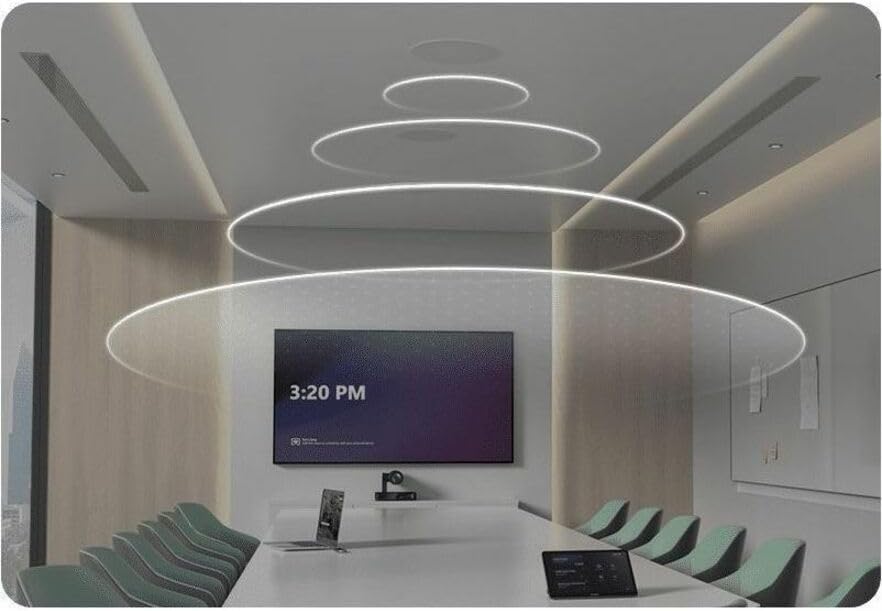
Figure 2: SkySound CS10 in a Conference Room Setting. This image illustrates the speaker's integration into a modern conference room ceiling, with visual representations of sound dispersion.

Figure 3: SkySound CS10 in a Large Meeting Space. This image displays the speaker's application in a larger meeting or classroom environment, highlighting its discreet ceiling installation.
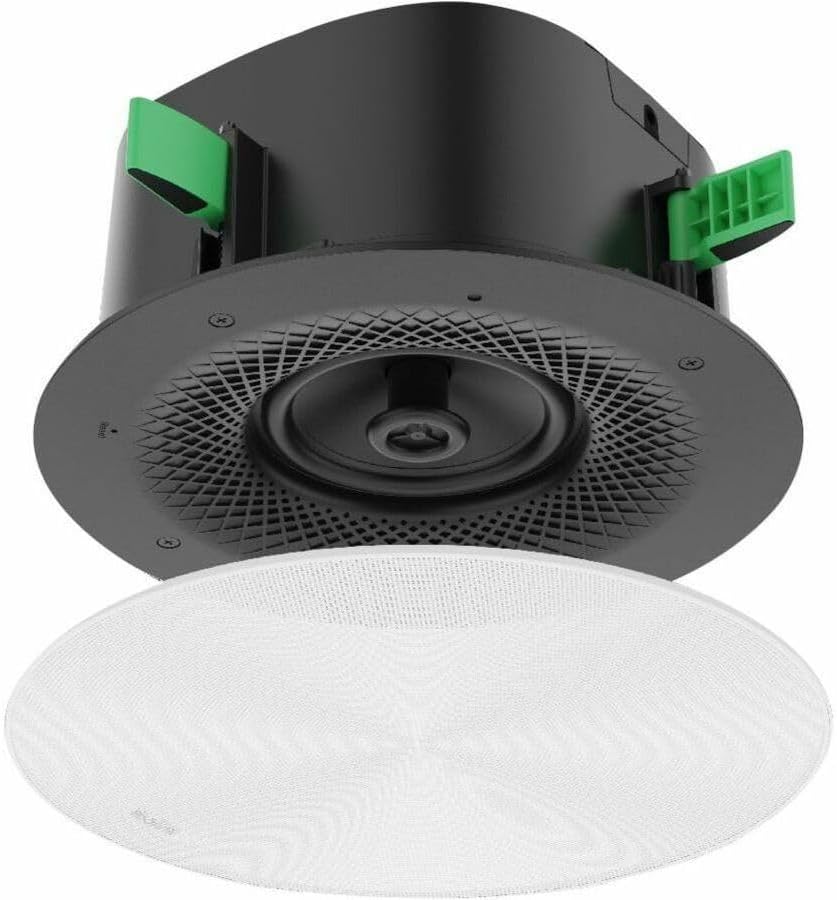
Figure 4: SkySound CS10 with Grille Attached. A detailed view of the speaker with its white magnetic grille in place, showcasing its low-profile and integrated appearance.

Figure 5: SkySound CS10 Exploded View. This image shows the main speaker body and the separate white mesh cover, illustrating how the cover is applied to the speaker.

Figure 6: SkySound CS10 Grille Top View. A direct overhead shot of the white magnetic grille, highlighting its perforated design and the subtle indicator light.
5. Setup and Installation
5.1 Safety Precautions
- Ensure power is disconnected before installation.
- Installation should be performed by qualified personnel.
- Follow all local electrical and building codes.
- Do not expose the speaker to moisture or extreme temperatures.
5.2 Ceiling Mounting
The SkySound CS10 is designed for ceiling mounting. Use the provided Deployment Instruction Template and Assembly Fixing Bracket for proper installation.
- Determine the optimal location for speaker placement in the ceiling.
- Use the Deployment Instruction Template to mark the cutout area on the ceiling.
- Cut the opening in the ceiling according to the template.
- Connect the Ethernet cable (PoE) to the speaker's port.
- Insert the speaker into the ceiling cutout.
- Secure the speaker using the Assembly Fixing Bracket and Bracing Bridge as per the Quick Start Guide.
- Attach the magnetic White Mesh Cover to the speaker.
5.3 Network Connection (PoE)
The SkySound CS10 is a PoE-enabled speaker. Connect it to a PoE-enabled network switch or injector using a standard Ethernet cable. This single connection provides both power and data.
6. Operating Instructions
6.1 Powering On
Once connected to a PoE source, the speaker will power on automatically. An indicator light on the grille (Figure 6) may illuminate to show power status.
6.2 Audio Playback
The SkySound CS10 functions as an audio output device for your conferencing system or media player. Ensure your audio source (e.g., computer, conferencing codec) is configured to output audio to the speaker via the network connection.
6.3 Volume Control
Volume control is typically managed through the connected audio source or conferencing system. Refer to the documentation of your audio source for specific volume adjustment procedures.
6.4 Dante Integration (if applicable)
If you have the Dante-enabled version, use Dante Controller software to manage audio routing and settings within your Dante network. Ensure the speaker is discovered and configured correctly within the Dante ecosystem.
7. Maintenance
7.1 Cleaning
- Wipe the speaker grille and housing with a soft, dry cloth.
- Do not use liquid cleaners, aerosols, or abrasive solvents.
- The magnetic grille can be carefully removed for cleaning if necessary.
7.2 Software Updates
Periodically check the Yealink official website for firmware updates for the SkySound CS10 to ensure optimal performance and access to new features. Follow the provided instructions for any update procedures.
8. Troubleshooting
| Problem | Possible Cause | Solution |
|---|---|---|
| No audio output. |
|
|
| Distorted or poor audio quality. |
|
|
| Speaker not detected on network (Dante). |
|
|
9. Specifications
| Feature | Detail |
|---|---|
| Model Name | SkySound CS10 |
| Mounting Type | Ceiling Mount |
| Speaker Type | 2-Way Coaxial Network Speaker |
| Woofer Diameter | 5.7 Inches |
| Tweeter Diameter | 1.1 Inches |
| Impedance | 8 Ohm |
| Frequency Response | 100 Hz - 20 kHz |
| Sensitivity | 88 dB@1W 1m |
| Maximum SPL | 99 dB@20W 1m |
| Speaker Maximum Output Power | 90 Watts |
| Power Source | PoE (Power over Ethernet) |
| Connectivity Technology | Ethernet |
| Product Dimensions | 14.8"D x 14.2"W x 7"H |
| Item Weight | 12.2 Pounds |
| Included Components | SkySound CS10 Speaker, White Mesh Cover, Quick Start Guide, Assembly Fixing Bracket, Dust Cover, Deployment Instruction Template, Bracing Bridge, 6 x Dust Cover Screws |
| Recommended Uses | Meeting, Conference Room |
| Special Features | High Fidelity, Flexible, DANTE (Digital Audio Network Through Ethernet), Ceiling Mountable |
10. Warranty and Support
For warranty information and technical support, please refer to the official Yealink website or contact your local distributor. Keep your purchase receipt for warranty claims.
Online resources and FAQs may also be available on the Yealink support portal.