
1. Product Overview
The TQ Ebike HPR Display - V02 is a sophisticated control unit designed for seamless integration into TQ-equipped Trek e-bikes. It serves as the central interface for monitoring crucial e-bike data, ensuring riders have access to essential information even in challenging lighting conditions.
This display provides comprehensive information regarding battery status, selected riding mode, and estimated range. Its ANT+ connectivity allows for easy pairing with smartphones or other bike computers, enhancing the riding experience with additional data and control options.
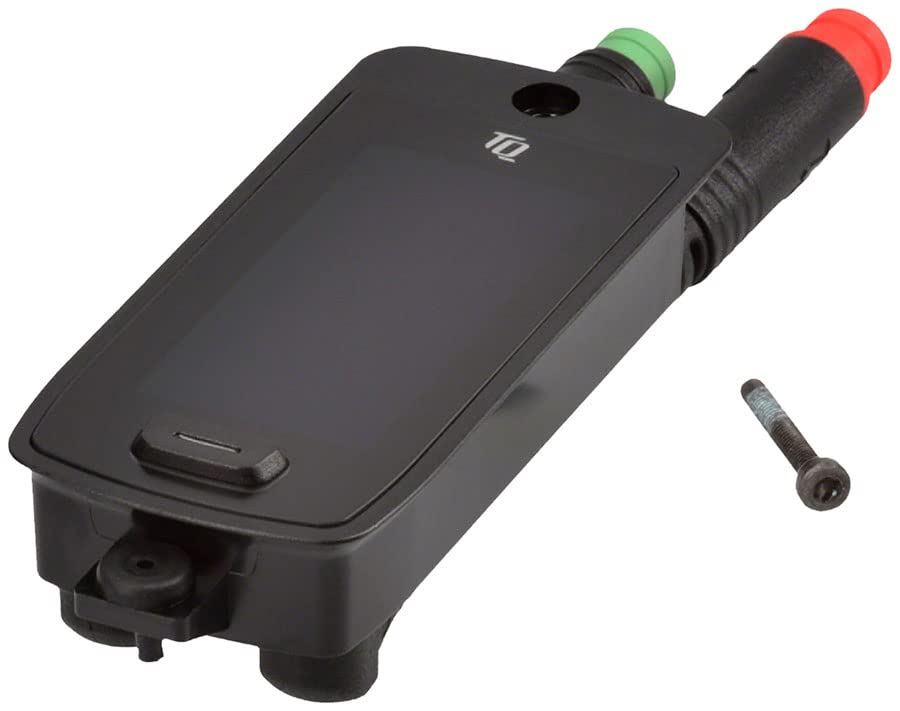
Figure 1: The TQ Ebike HPR Display - V02. This compact black unit is designed for integration into Trek e-bikes. It features a dark display screen, a control button at the bottom, and two colored connectors (green and red) on the right side for power and data. A small screw is visible to the right of the unit, likely for mounting purposes.
2. Setup and Installation
This display unit is specifically designed for TQ-equipped Trek bikes. Ensure your e-bike is compatible before proceeding with installation.
2.1 Unpacking and Inspection
- Carefully remove the eBike Head Unit from its packaging.
- Inspect the unit for any signs of damage during transit. If damage is found, do not proceed with installation and contact your retailer.
- Verify all included components are present, specifically the eBike Head Unit and any associated mounting hardware (e.g., screws).
2.2 Mounting the Display
The TQ HPR Display is designed for integrated mounting within the frame of compatible Trek e-bikes. Refer to your specific Trek e-bike's frame manual for precise mounting instructions and location. Typically, this involves securing the unit with screws into a designated recess.
2.3 Electrical Connection
Connect the display unit to the e-bike's electrical system using the provided connectors. Ensure the green and red connectors are securely fastened to their corresponding ports on the e-bike's wiring harness. A firm click usually indicates a secure connection. Incorrect connection may prevent the display from functioning or cause damage.
3. Operating Instructions
The TQ HPR Display provides intuitive control and information access through its integrated buttons and clear LED display.
3.1 Powering On/Off
To power on the display, press and hold the main control button (Human Interface Input: Buttons) located on the unit until the display illuminates. To power off, press and hold the same button until the display shuts down.
3.2 Display Information
The display provides critical riding information at a glance, even in varying light conditions:
- Battery Status: The unit displays the remaining battery life for both the main e-bike battery and any connected range extender separately.
- Riding Mode: Indicates the currently selected assist level.
- Estimated Range: Provides an estimate of the remaining distance you can travel based on current battery levels and riding mode.
- Other relevant data may be displayed depending on the e-bike's configuration.
3.3 Riding Assist Levels and Walk Assist
The display allows you to cycle through three distinct riding assist levels to match your desired level of motor support. Use the control buttons to switch between these modes. Additionally, a walk assist function is available for easier maneuvering of the e-bike when dismounted.
3.4 ANT+ Connectivity
The display features ANT+ connectivity, enabling wireless pairing with compatible smartphones or bike computers. This allows for extended functionality, such as viewing additional ride metrics, navigation, or customizing display settings via a connected device. Refer to your smartphone app or bike computer manual for pairing instructions.
4. Maintenance and Care
Proper care ensures the longevity and optimal performance of your TQ HPR Display.
- Cleaning: Wipe the display screen and unit housing with a soft, damp cloth. Avoid using abrasive cleaners, solvents, or harsh chemicals, as these can damage the display or casing.
- Protection: While designed for outdoor use, avoid prolonged exposure to extreme temperatures or direct sunlight when not in use.
- Connections: Periodically check the electrical connections for cleanliness and secure fit. Ensure no dirt or debris has accumulated in the ports.
5. Troubleshooting
If you encounter issues with your TQ HPR Display, consider the following common troubleshooting steps:
- Display Not Turning On:
- Ensure the e-bike's main battery is charged and powered on.
- Check all electrical connections to the display unit for secure fit.
- Verify the display unit is correctly mounted and not loose.
- Incorrect Information Displayed:
- Ensure the display is properly connected to the e-bike's system.
- If connected to a smartphone/bike computer, check the app/device settings and ensure proper synchronization.
- Connectivity Issues (ANT+):
- Ensure the external device (smartphone/bike computer) has ANT+ enabled and is within range.
- Try re-pairing the devices.
- Check for any firmware updates for the display or the external device.
For persistent issues, consult your Trek e-bike's comprehensive manual or contact TQ Systems GmbH customer support.
6. Specifications
| Feature | Detail |
|---|---|
| Brand | TQ Systems GmbH |
| Model Name | 339254.01 |
| Display Type | LED |
| Sensor Type | Cadence Sensor |
| Connectivity Technology | ANT |
| Included Components | eBike Head Unit |
| Human Interface Input | Buttons |
| Material | Multi |
| Item Package Dimensions | 9 x 6 x 3 inches |
| Package Weight | 3.2 ounces |
7. Warranty and Support
7.1 Warranty Information
The TQ Ebike HPR Display - V02 comes with a Limited Warranty. Please refer to the warranty documentation provided with your purchase or visit the official TQ Systems GmbH website for detailed terms and conditions regarding warranty coverage, duration, and claims process.
7.2 Customer Support
For technical assistance, troubleshooting beyond this manual, or warranty claims, please contact TQ Systems GmbH customer support. Contact information can typically be found on their official website or through your authorized Trek e-bike dealer.

