1. Introduction
This manual provides essential instructions for the proper installation, operation, and maintenance of your ENOIAMYF Floor Brush Head replacement part. This accessory is designed to restore or enhance the cleaning performance of compatible MOOSOO S2 and EFBPF01 cordless stick vacuum cleaners.
Please read this manual thoroughly before use to ensure safe and effective operation.
2. Compatibility and Package Contents
2.1. Compatibility
This Floor Brush Head is specifically designed as a replacement part for:
- MOOSOO S2 Cordless Lightweight Stick Vacuum Cleaner
- MOOSOO EFBPF01 Cordless Lightweight Stick Vacuum Cleaner
2.2. Package Contents
The package includes the following item:
- 1 x Motorized Floor Brush Head
Note: Other products or vacuum cleaner components are not included.

Figure 1: Motorized Floor Brush Head as received in packaging. This image shows the brush head enclosed in a clear plastic bag, highlighting its new condition.
3. Setup and Installation
Follow these steps to properly attach the replacement floor brush head to your vacuum cleaner:
- Power Off: Ensure your vacuum cleaner is turned off and unplugged (if applicable) before beginning installation.
- Remove Old Head (if applicable): If replacing an existing brush head, locate the release button or latch on your vacuum's extension wand or main body. Press the button and gently pull the old brush head away.
- Attach New Head: Align the connection point of the new ENOIAMYF Floor Brush Head with the corresponding port on your vacuum's extension wand or main body. Push firmly until you hear a click, indicating it is securely locked in place.
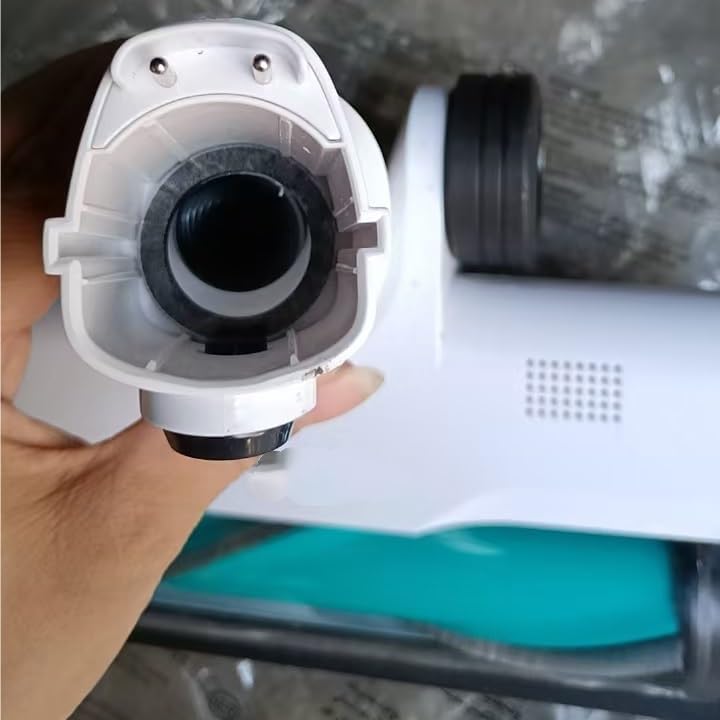
Figure 2: Detailed view of the brush head's connection mechanism. This image illustrates the circular opening and electrical contacts where the brush head connects to the vacuum's main body or extension wand.

Figure 3: Example of the floor brush head attached to a compatible cordless stick vacuum. This image shows the complete vacuum assembly with the brush head securely in place, ready for use.
4. Operating Instructions
Once the floor brush head is securely attached, your vacuum cleaner is ready for use. This motorized brush head is designed for effective cleaning on various floor types.
- General Use: Turn on your vacuum cleaner. The motorized brush will activate, providing enhanced cleaning power for carpets and hard floors.
- Low Noise Operation: The brush head is engineered for low noise operation, contributing to a quieter cleaning experience.
- Effective Cleaning: The roller brush is particularly effective for cleaning under furniture such as beds or sofas, reaching dust and debris in hard-to-access areas.

Figure 4: Underside view of the motorized floor brush head. This image clearly displays the teal-colored roller brush and the soft brush strips designed for efficient debris collection.
5. Maintenance
Regular maintenance of your floor brush head will ensure optimal performance and extend its lifespan.
- Inspect Regularly: Periodically check the roller brush for tangled hair, threads, or debris.
- Remove Debris: Carefully remove any accumulated hair or debris from the roller brush using scissors or a cleaning tool.
- Washing the Roller: The roller brush is washable. To clean, remove the roller from the brush head (refer to your vacuum's main manual for specific instructions on roller removal). Wash the roller under running water.
- Drying: Crucially, ensure the roller is completely dry before reinserting it into the brush head and using it again. Reinserting a wet roller can damage the vacuum or the brush head.
6. Troubleshooting
If you encounter issues with your floor brush head, refer to the following common troubleshooting steps:
- Brush Not Spinning:
- Check for obstructions: Turn off the vacuum and inspect the roller brush for tangled hair, large debris, or foreign objects that might be preventing it from spinning. Remove any obstructions.
- Ensure proper connection: Verify that the brush head is securely attached to the vacuum's extension wand or main body. Reattach if necessary.
- Reduced Suction:
- Clean the roller brush: A heavily soiled roller can impede airflow. Follow the maintenance steps to clean the roller.
- Check other vacuum components: Ensure the vacuum's dustbin is empty, filters are clean, and there are no blockages in the main vacuum body or wand.
- Unusual Noise:
- Inspect for damage: Turn off the vacuum and visually inspect the brush head for any visible damage or loose parts.
- Check for foreign objects: Listen for any objects rattling inside the brush head or around the roller. Remove if found.
If problems persist after following these steps, please refer to your main vacuum cleaner's instruction manual or contact customer support for further assistance.
7. Specifications
| Product Name | Motorized Floor Brush Head |
| Model Number | EFBPF01 |
| Material | Plastic |
| Compatibility | MOOSOO S2, EFBPF01 Cordless Stick Vacuum Cleaners |
| Item Weight | 1.76 ounces (approximately 50 grams) |
| Package Dimensions | 0.39 x 0.39 x 0.39 inches (approximate, as per product data) |

Figure 5: Product label on the brush head. This image shows a label with technical details such as "Name: Electric Floor Brush", "Model: EFBPF01", "Power: 30W", and "Voltage: 25.9V".
8. Safety Information
- Always ensure the vacuum cleaner is turned off and unplugged before attaching, detaching, or performing maintenance on the brush head.
- Do not operate the brush head if it is visibly damaged or if the roller brush is not spinning correctly.
- Keep hands, hair, and loose clothing away from the rotating brush during operation.
- This product is intended for household use only.
- Do not immerse the motorized brush head in water. Only the roller brush is washable, and it must be completely dry before reinstallation.