1. Introduction
The Cleer ARC 3 Open Ear Headphones offer a unique audio experience with their comfortable, ergonomic design and advanced features. These true wireless earbuds provide crystal-clear sound with Dolby Atmos and Snapdragon Sound, ensuring an immersive listening experience while maintaining situational awareness. Designed for active lifestyles, they are IPX7 waterproof and come with a smart charging case featuring UV sterilization.

Image: Cleer ARC 3 Open Ear Headphones and their smart charging case.

Image: A person wearing the Cleer ARC 3 headphones, highlighting their ultra-light open-ear design for all-day comfort with zero-degree elastic silicone ear hooks.
2. What's in the Box
- Cleer ARC 3 Open Ear Headphones
- Charging Case with Built-in Sterilization using UV-C
- Charging Cable USB-C to USB-A
- User Manual
3. Setup
3.1 Initial Power On & Charging
Before first use, ensure your Cleer ARC 3 headphones and charging case are fully charged. Connect the USB-C to USB-A charging cable to the case and a power source. The case features an FHD display to show battery levels.

Image: The Cleer ARC 3 headphones in their charging case, illustrating the total 50 hours of battery life (10 hours from headphones + 40 hours from case).
3.2 Bluetooth Pairing
The Cleer ARC 3 headphones support Bluetooth 5.4 and multi-point connection, allowing simultaneous pairing with two devices.
Option 1: First-time Pairing (via MFB on case)
- Remove the protective film from the earbuds and long-press the Multi-Function Button (MFB) on the case for 2 seconds to power on the ARC 3.
- The ARC 3 will automatically enter pairing mode.
- Turn on Bluetooth on your device and ensure it is in pairing mode. Select "Cleer ARC 3" from the list of available Bluetooth devices.
Option 2: Using Touchpad Controls for Pairing
- Tap the touchpad on either headphone 5 times and wait for the LED indicators to blink red and white, signaling that the ARC 3 is in pairing mode.
- Turn on Bluetooth on your device and ensure it is in pairing mode. Select "Cleer ARC 3" from the list of available Bluetooth devices.
Option 3: Using the Charging Case for Pairing
- Place both headphones into the charging case and close the lid.
- On the "Auxiliary" page of your charging case's touch screen, select the "Pairing Mode."
- Open the charging case, and the headphones will enter pairing mode.
- Turn on Bluetooth on your device and ensure it is in pairing mode. Select "Cleer ARC 3" from the list of available Bluetooth devices.

Image: Visual guide for three different pairing methods: First pairing via MFB, Touchpad pairing, and Charging case pairing.
Video: Official Cleer ARC 3 pairing instructions, demonstrating how to connect your headphones to a device.
4. Operating the Headphones
4.1 Basic Controls
The ARC 3 headphones feature intuitive touch controls for managing playback, calls, and volume. You can also control these functions directly from the smart charging case's FHD display or via the Cleer+ App.

Image: Various methods to control volume: via phone, charging case touch screen, touchpad on headphones, or voice control.
4.2 Smart Features & Audio Quality
Experience enhanced audio with Dolby Atmos and Snapdragon Sound. The 16.2mm drivers deliver spatial sound, optimized for Dolby Atmos head tracking for an immersive experience.

Image: A woman wearing the Cleer ARC 3 headphones, illustrating the powerful sound optimized for Dolby Atmos and featuring Snapdragon Sound.
- Dolby Atmos & Head Tracking: Activate these features via the charging case display or Cleer+ App for a dynamic, spatial audio experience.
- Adaptive Volume Control: Automatically adjusts audio based on your surroundings for consistent listening.
- Motion Control: Enable head gesture commands for hands-free operation (e.g., nod twice to pick up calls).
- Voice Control: Use voice commands for various functions.
- EQ Settings: Customize your sound profile (Rock, Flat, Jazz, Classical, Pop, Custom) directly from the charging case or Cleer+ App.
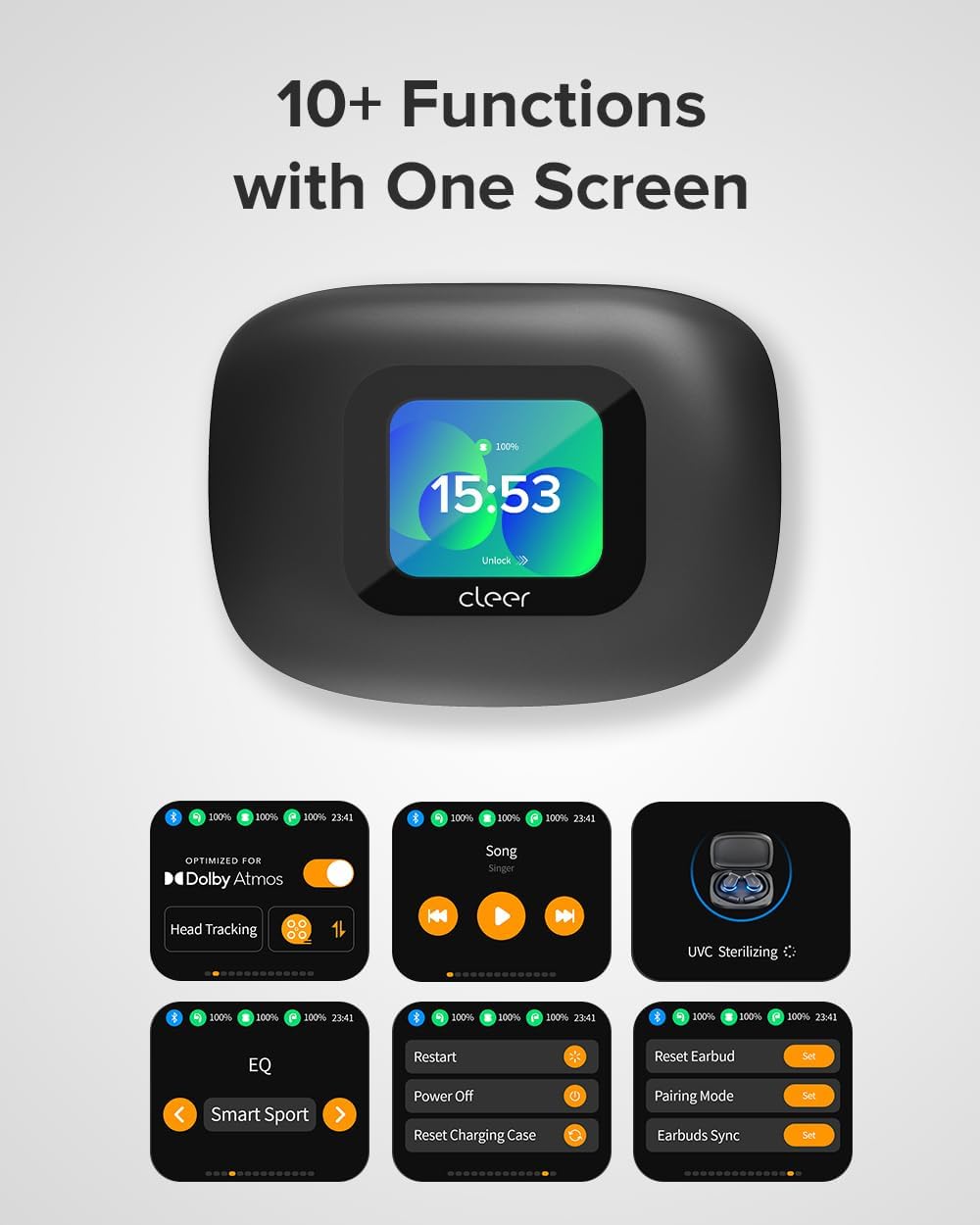
Image: The smart case display showcasing over 10 functions, including Dolby Atmos settings, EQ, UVC Sterilizing, and pairing options.
Video: Official Cleer video highlighting the ARC 3's features, including the smart case display and adaptive volume control.
Video: Official Cleer video demonstrating the ARC 3's optimization for Dolby Audio and its revolutionary open-ear design.
4.3 Cleer+ App
Download the Cleer+ App from the Apple App Store or Google Play Store to unlock full customization options, including EQ settings, motion control activation, and firmware updates.

Image: The Cleer+ App interface showing options for music mode, movie mode, head tracking, Smart Sport EQ, motion control, and intelligent voice control.
5. Maintenance
5.1 Battery Life & Charging
The headphones offer up to 10 hours of playtime on a single charge, with an additional 40 hours provided by the wireless charging case, totaling 50 hours of continuous performance. A quick 10-minute charge can provide 2.5 hours of listening time.
The charging case itself takes 2.5 hours to fully charge.
5.2 UV Sterilization
The smart charging case features built-in UV-C light sterilization. When the earbuds are placed inside and the lid is closed, the UV-C light activates to sanitize your headphones, ensuring they are clean for your next use.

Image: The multifunctional charging case sterilizes the headphones with UV-C light when the case lid is closed.
5.3 Water Resistance
The Cleer ARC 3 headphones are IPX7 waterproof, making them resistant to sweat, rain, and accidental splashes. They are built to endure intense workouts and outdoor adventures.

Image: Cleer ARC 3 headphones with water droplets, indicating their IPX7 sweat-resistant and waterproof capabilities.
6. Troubleshooting
- Cannot Pair: Ensure both earbuds are charged. Try resetting the earbuds via the charging case display or the Cleer+ App. Make sure Bluetooth is enabled on your device and "Cleer ARC 3" is selected.
- No Sound/Low Volume: Check the volume levels on both your connected device and the headphones. Ensure the earbuds are properly seated on your ears.
- Earbud Finder: If you misplace an earbud, use the "Find My Earbuds" feature on the charging case's display to emit a sound from the lost earbud.
- Firmware Update Issues: Ensure the headphones and case are sufficiently charged and maintain a stable connection during firmware updates via the Cleer+ App.
7. Specifications
| Feature | Detail |
|---|---|
| Model Name | Cleer Audio ARC 3 |
| Form Factor | True Wireless |
| Ear Placement | Open Ear |
| Connectivity Technology | Wireless, Bluetooth (5.4) |
| Audio Driver Type | Dynamic Driver (16.2mm) |
| Battery Life (Headphones) | 10 Hours |
| Battery Life (with Case) | 50 Hours |
| Charging Time (Headphones) | 0.5 Hours |
| Charging Time (Case) | 2.5 Hours |
| Water Resistance Level | IPX7 (Water Resistant) |
| Item Weight | 12 grams (each earbud) / 130.02 Grams (total) |
| Control Type | Touch Control, Volume Control, APP Control, Voice Control |
| Special Features | Dolby Atmos, Snapdragon Sound, FHD Display, UV-C Sterilization, Multi-Point Connection, Head Gesture Commands, Adaptive Volume Control |
8. Warranty & Support
For detailed warranty information and customer support, please refer to the official Cleer website or the full User Manual PDF provided with your product.
You can access the full User Manual PDF here.
Protection plans are also available for extended coverage.


