
BEWISHOME FST28W
BEWISHOME FST28W White Vanity Desk User Manual
Model: FST28W
1. Safety Information
For safe use of your BEWISHOME FST28W Vanity Desk, please observe the following precautions:
- Ensure stability by placing the vanity on a flat, level surface.
- Avoid overloading drawers to prevent tipping or damage.
- Exercise caution around sharp edges during assembly and use.
- Follow general safety precautions for all electronic components, including the lighted mirror and charging station.
- Secure the vanity using the provided anti-toppling device to prevent accidental falls.
- Always turn off and unplug the lighted mirror when not in use to prevent burns or electrical hazards.
2. Product Overview
The BEWISHOME FST28W White Vanity Desk is designed to provide a functional and organized space for your beauty routine. Key features include:
- Lighted Mirror with 3 Color Modes: The integrated mirror offers warm, natural, and cool light settings with adjustable brightness for optimal illumination during makeup application.
- Tempered Glass Tabletop: A durable glass surface provides clear visibility of items stored in the top drawers, enhancing accessibility and display.
- Built-in Charging Station: Equipped with 2 USB ports and 2 standard plug sockets, allowing convenient charging for electronic devices and powering beauty tools.
- Ample Storage Space: Features multiple drawers, shelves, and open storage compartments to organize cosmetics, perfumes, lotions, brushes, and other beauty supplies.
- Elegant and Functional Design: A simple yet elegant design that complements various bedroom, bathroom, or hallway decors.

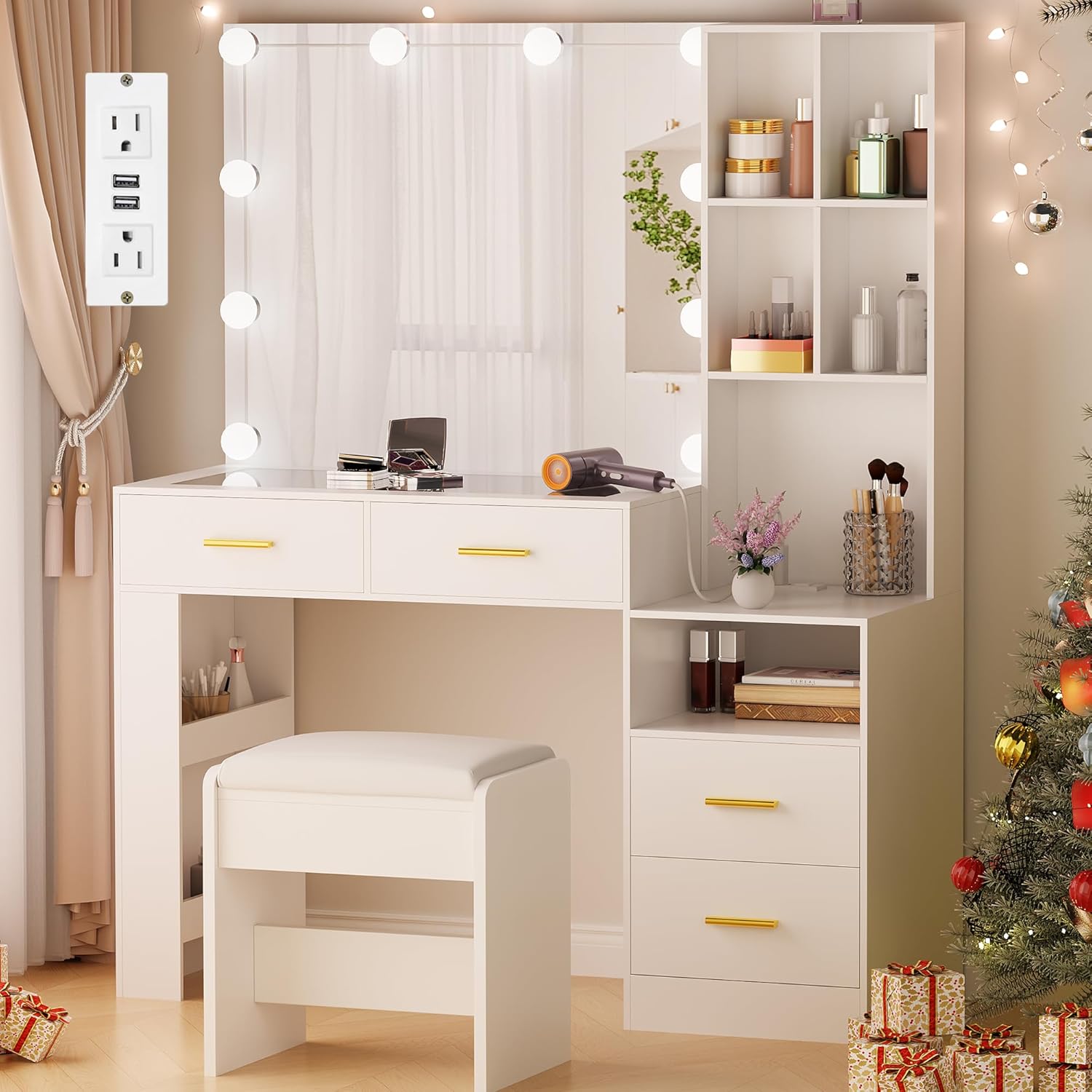
Front view of the BEWISHOME FST28W White Vanity Desk, showcasing the lighted mirror, glass top, multiple drawers, side shelving, and included stool.
Official product video demonstrating the features and design of the BEWISHOME FST28W White Vanity Desk with Lighted Mirror and Glass Top.
3. Setup and Assembly
The BEWISHOME FST28W Vanity Desk requires some assembly. Detailed step-by-step instructions are included with your product. It is recommended to follow these instructions carefully to ensure proper and stable construction.
- Unpack all components and verify against the parts list provided in the manual.
- Identify all hardware and tools required for assembly.
- Assemble the main frame, drawers, and shelving units as per the instructions.
- Install the lighted mirror and connect its power supply.
- Place the tempered glass tabletop carefully.
- Attach the charging station unit and ensure it is securely wired.
- Position the included stool.
Components of the BEWISHOME FST28W Vanity Desk laid out, illustrating the various parts before assembly.

The BEWISHOME FST28W Vanity Desk with a close-up of the integrated power outlet, showing its placement and functionality.
4. Operating Instructions
4.1. Lighted Mirror
The vanity mirror features integrated LED lights with three adjustable color modes and dimmable brightness:
- Power On/Off: Locate the control switch on the mirror's power cord. Press to turn the lights on or off.
- Color Mode Selection: Cycle through warm light, natural light, and cool light by pressing the mode button on the control switch.
- Brightness Adjustment: Use the '+' and '-' buttons on the control switch to increase or decrease the light intensity to your preference.

An illustration of the vanity mirror's lighting feature, demonstrating the three adjustable color modes: cold light, natural light, and warm light, with dimmable brightness.
4.2. Charging Station
The built-in charging station provides convenient access to power for your electronic devices:
- USB Ports: Connect your USB-compatible devices (e.g., smartphones, tablets) to the two USB ports for charging.
- Standard Outlets: Plug in hair dryers, curling irons, or other small appliances into the two standard AC outlets.

A close-up of the integrated charging station, featuring two AC outlets and two USB ports, designed for convenient power access for electronic devices.
4.3. Storage Drawers and Shelves
Utilize the various storage options to keep your items organized:
- Glass Top Drawers: Store frequently used items like makeup, jewelry, or small accessories for easy visibility and access through the tempered glass.
- Side Drawers and Shelves: Organize larger items, bottles, or decorative pieces in the opaque drawers and open shelving units.

The vanity desk with several drawers pulled open, displaying various beauty products, accessories, and organizers, illustrating the large storage capacity.
5. Maintenance
Regular maintenance will help preserve the appearance and functionality of your vanity desk:
- Cleaning Surfaces: Wipe down all surfaces, including the engineered wood and glass, with a soft, damp cloth. Avoid abrasive cleaners that may scratch or damage the finish.
- Mirror Care: Clean the mirror with a glass cleaner and a lint-free cloth. Do not spray cleaner directly onto the mirror; apply it to the cloth first.
- Drawer Slides: Periodically check drawer slides for smooth operation. If needed, a small amount of silicone lubricant can be applied.
- Electrical Components: Ensure the charging station and mirror lights are kept dry. Unplug the unit before cleaning any electrical parts.
6. Troubleshooting
6.1. Lighted Mirror Not Working
- Check Power Connection: Ensure the mirror's power cord is securely plugged into the charging station or a wall outlet.
- Verify Outlet Functionality: Test the outlet with another device to confirm it is receiving power.
- Inspect Control Switch: Ensure the power button on the control switch is pressed to the 'on' position.
6.2. Assembly Difficulties
- Review Instructions: Re-read the step-by-step assembly instructions carefully, paying close attention to diagrams and part numbers.
- Identify Parts: Double-check that you are using the correct numbered pieces and hardware for each step.
- Seek Assistance: If difficulties persist, consider seeking assistance from another person or contacting customer support.
6.3. Missing or Incorrect Parts
- Check Packaging Thoroughly: Ensure all packaging materials have been checked for small or overlooked components.
- Contact Customer Support: If parts are genuinely missing or incorrect, contact BEWISHOME customer support with your product model (FST28W) and a description of the issue.
7. Specifications
| Feature | Detail |
|---|---|
| Model Number | FST28W |
| Brand | BEWISHOME |
| Color | White |
| Product Dimensions | 31.50" L x 15.75" W x 55.31" H |
| Item Weight | 96 pounds |
| Frame Material | Engineered Wood |
| Seat Material Type | Metal (for stool, if included) |
| Assembly Required | Yes |
| Mirror Type | Lighted with 3 color modes (warm, natural, cool) and adjustable brightness |
| Tabletop Material | Tempered Glass |
| Charging Station | 2 USB ports, 2 Standard AC outlets |

A technical diagram providing precise measurements of the vanity desk, including length, width, and height, to assist with placement and space planning.
8. Warranty and Support
BEWISHOME is committed to customer satisfaction. For any inquiries or support needs regarding your FST28W Vanity Desk, please refer to the following:
- Returns: The product is returnable until January 31, 2026. Please refer to your purchase documentation for specific return policy details.
- Customer Service: For efficient service regarding any problems or questions, please contact BEWISHOME customer support.
- Protection Plans: Extended protection plans may be available for purchase. Check your retailer for details on 2-Year or 3-Year Protection Plans.
For further assistance, visit the official BEWISHOME store or contact their customer support channels.
Ask a question about this manual
Ask about setup, troubleshooting, compatibility, parts, safety, or missing instructions. Manuals+ will review the question and use this page’s manual context to help answer it.