
1. Introduction
This manual provides detailed instructions for the safe and efficient use of the GODIYMODULES DC-DC 400W High-Power Step Down Buck Converter, Model SZ6012-001. This module is designed to convert a higher DC input voltage to a lower, adjustable DC output voltage with constant current capabilities. Please read this manual thoroughly before installation and operation.
2. Safety Information
- Electrical Safety: Always ensure power is disconnected before making any connections or adjustments to prevent electric shock or damage to the module.
- Polarity: It is strictly forbidden to connect the positive and negative poles of the input and output in reverse. Reversed input will burn the fuse, and reversed output will damage the control board.
- Overvoltage Protection: The module has input undervoltage protection (shuts off below 10.5V), but it does not have input overvoltage protection. Ensure the input voltage does not exceed 60V.
- Heat Dissipation: For continuous high-power operation (above 280W or 12A), forced cooling (e.g., a fan) is required to prevent overheating.
- Inductive Loads: When charging batteries or connecting inductive loads (e.g., motors), an anti-reverse diode must be added to the output to prevent damage.
- Environment: Operate the module within the specified temperature range of -10°C to +85°C.
3. Product Overview
3.1. Key Features
- High Power Output: Natural heat dissipation supports up to 280W/12A. With forced cooling, it can achieve up to 400W.
- Wide Input Voltage: Accepts 10.5V to 60V DC input.
- Adjustable Output: Output voltage range from 0V to 45V (must meet step-down conditions, output is approximately 80% of input maximum).
- Constant Current: Adjustable constant current output from 0.2A to 15A.
- High Efficiency: Up to 97% conversion efficiency, especially when output voltage is above 10V.
- Protection Features: Includes input undervoltage protection and constant current short circuit protection.
- Indicators: Features a constant current indicator (red LED) and a work indicator (blue LED).
- Easy Connection: Equipped with welding-free 25A terminal blocks.
3.2. Component Identification
The following image illustrates the key components and connection points of the buck converter module:
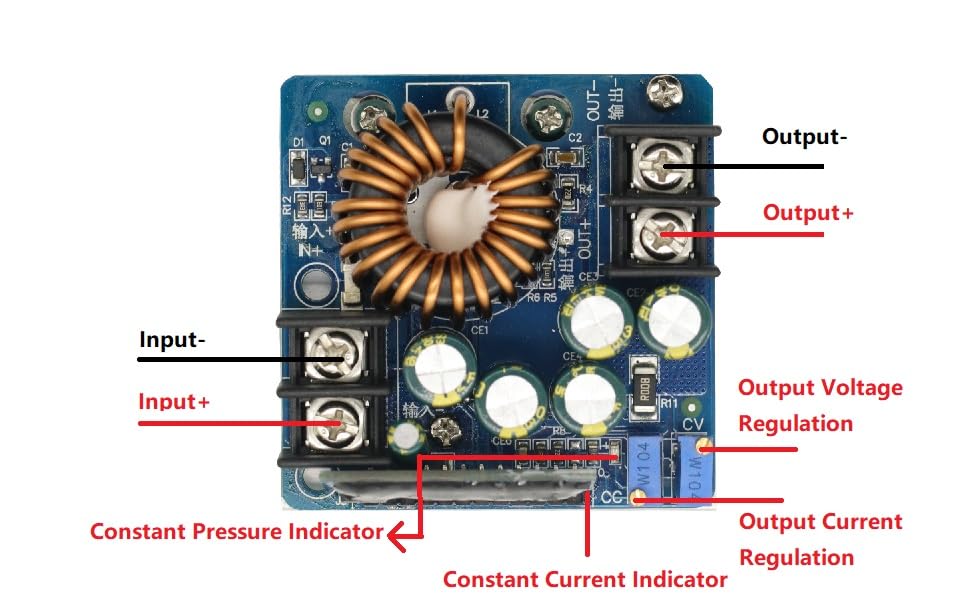
Figure 1: Labeled diagram of the GODIYMODULES DC-DC 400W High-Power Step Down Buck Converter. This image highlights the Input+ (IN+), Input- (IN-), Output+ (OUT+), Output- (OUT-), Output Voltage Regulation potentiometer (CV), Output Current Regulation potentiometer (CC), Constant Pressure Indicator, and Constant Current Indicator.
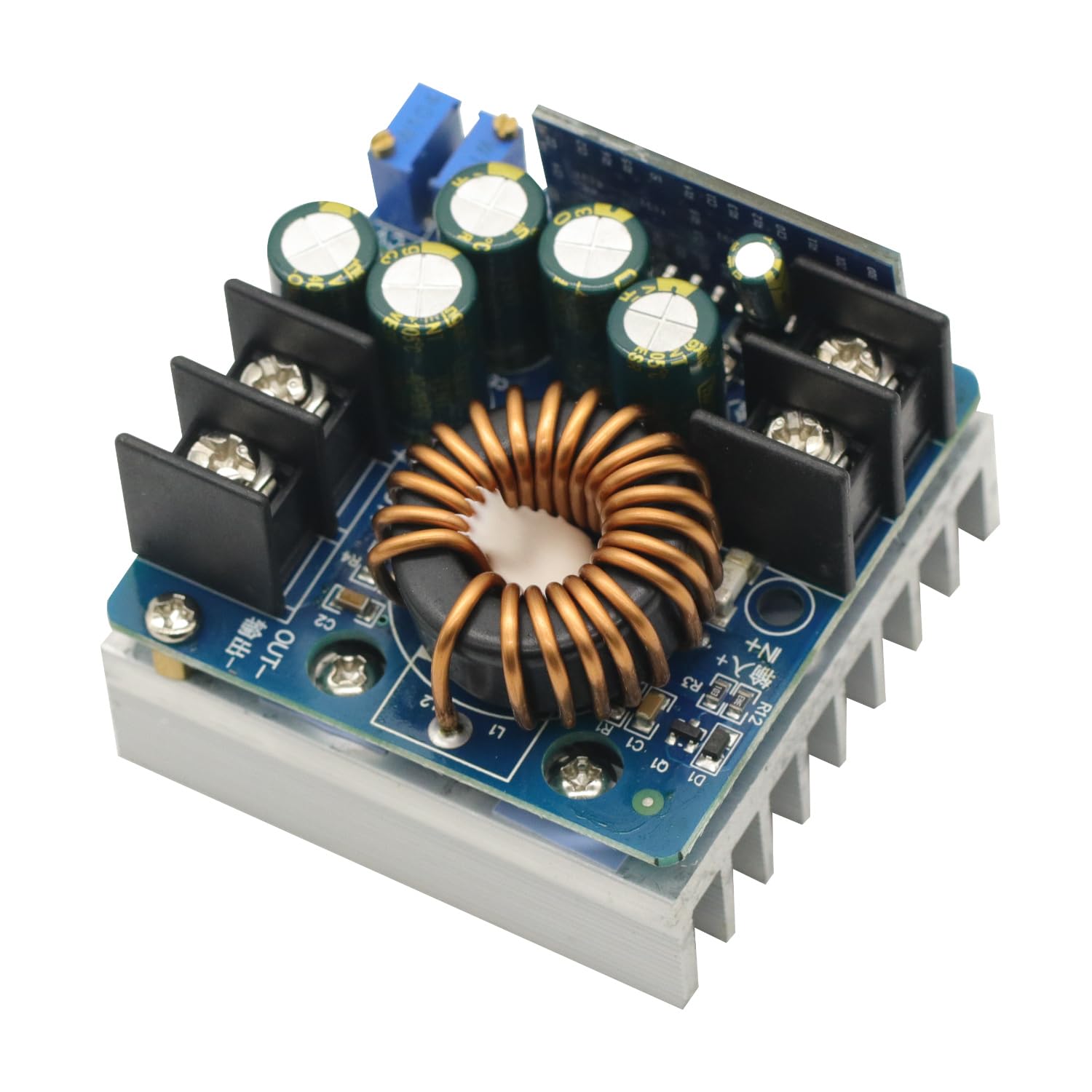
Figure 2: Top-down view of the GODIYMODULES DC-DC 400W High-Power Step Down Buck Converter, showcasing the inductor, capacitors, and heatsink.
4. Specifications
| Parameter | Value |
|---|---|
| Module Name | 400W Step-Down Constant Voltage and Constant Current |
| Module Nature | Non-isolated step-down module (BUCK) |
| Input Voltage | 10.5V - 60V DC |
| Output Voltage Range | 0V - 45V (adjustable, max output approx. 80% of input) |
| Minimum Output Voltage | 0V (+1V) |
| Output Constant Current | 0.2A - 15A (continuously adjustable) |
| Maximum Output Power | 400W (with forced cooling) |
| Continuous Max Working Power | 280W (under ventilated environment) |
| Continuous Max Working Current | 12A (under ventilated environment) |
| Input Undervoltage Protection | Yes (output turns off below 10.5V, approx. 0.5V error) |
| Input Overvoltage Protection | No (overvoltage is prohibited) |
| Working Temperature | -10°C to +85°C (enhance heat dissipation above 65°C) |
| Working Frequency | 100 KHz |
| Conversion Efficiency | Up to 97% (depends on input/output, current, and voltage difference) |
| Short Circuit Protection | Yes (constant current protection) |
| Input Reverse Connection Protection | Yes (but short-circuiting input with reverse connection will burn the fuse) |
| Output Anti-Recharge | No (requires external anti-reverse diode for battery charging/inductive loads) |
| Work Indicator | Yes (blue LED) |
| Constant Current Indicator | Yes (red LED, lights up when constant current is active) |
| Connection Method | Welding-free 25A terminal block |
| Module Dimensions | 60mm (L) x 60mm (W) x 45mm (H) |
| Net Weight | 170 grams |
5. Setup
5.1. Wiring Connections
Refer to Figure 1 for component identification. Use appropriate gauge wires for your expected current draw.
- Input Connection: Connect your DC power source to the IN+ (positive input) and IN- (negative input) terminals. Ensure correct polarity.
- Output Connection: Connect your load or device to the OUT+ (positive output) and OUT- (negative output) terminals. Ensure correct polarity.
- Battery Charging/Inductive Loads: If charging a battery or connecting an inductive load (e.g., a motor), an external anti-reverse diode must be connected in series with the output to prevent current backflow into the module.
5.2. Initial Power-Up
Before applying power, double-check all connections for correct polarity and secure fastening. Once verified, apply power to the input terminals. The blue work indicator LED should illuminate.
6. Operating Instructions
6.1. Adjusting Output Voltage (CV)
- Connect the input power source.
- Without a load connected, or with a light load, use a multimeter to monitor the output voltage.
- Turn the Output Voltage Regulation (CV) potentiometer (refer to Figure 1) clockwise to increase the output voltage or counter-clockwise to decrease it. Adjust to your desired voltage.
6.2. Adjusting Output Current (CC)
The constant current feature is primarily used for charging batteries or driving LEDs.
- First, set the desired output voltage as described above.
- To set the constant current limit, you can either:
- Connect a suitable ammeter in series with the output and a load.
- Alternatively, for battery charging, connect a discharged battery.
- Turn the Output Current Regulation (CC) potentiometer (refer to Figure 1) clockwise to increase the current limit or counter-clockwise to decrease it. Adjust to your desired current limit.
- When the module operates in constant current mode (e.g., when the load draws more current than the set limit, or during battery charging), the red Constant Current Indicator LED will illuminate. If the output current is below the set limit, the module operates in constant voltage mode, and the red LED will be off.
6.3. Demonstration Video
This video demonstrates the adjustment of output voltage and current, and the module's performance under load.
Video 1: Demonstration of the GODIYMODULES DC-DC 400W Step Down Buck Converter. The video shows the process of adjusting the output voltage and current using the potentiometers, and monitoring the values on external measurement equipment. It illustrates the module's ability to maintain a stable output under varying load conditions.
7. Maintenance
- Cleaning: Keep the module clean and free from dust and debris. Use a soft, dry cloth for cleaning.
- Heat Dissipation: Regularly check that the heatsink is clear of obstructions. If operating at high power, ensure any additional cooling fans are functioning correctly.
- Connections: Periodically inspect all wiring connections to ensure they are secure and free from corrosion.
- Environmental Conditions: Avoid exposing the module to excessive moisture, extreme temperatures, or corrosive environments.
8. Troubleshooting
- No Output Voltage:
- Check input power supply.
- Verify input voltage is above 10.5V (undervoltage protection will shut off output below this).
- Ensure input and output polarities are correct. Reversed input will burn the fuse.
- Check if the output voltage potentiometer (CV) is adjusted to 0V.
- Module Overheating:
- Reduce the output power or current.
- Ensure adequate ventilation around the module.
- For continuous operation above 280W or 12A, install a cooling fan.
- Constant Current Indicator (Red LED) Not Lighting Up:
- This is normal if the load is drawing less current than the set constant current limit (module is in constant voltage mode).
- If you expect constant current operation, ensure the load is sufficient to draw current above the set limit, or that the battery being charged is sufficiently discharged.
- Damage from Reverse Polarity:
- Input reverse connection will burn the input fuse. Replace the fuse if accessible and verify polarity before reapplying power.
- Output reverse connection will damage the control board, which is generally not repairable and requires module replacement.
9. Warranty and Support
For technical support or warranty inquiries regarding your GODIYMODULES DC-DC 400W High-Power Step Down Buck Converter (Model SZ6012-001), please contact the seller or manufacturer through the platform where the product was purchased. Please have your purchase details and model number available when contacting support.