
1. Introduction
This manual provides detailed instructions for the installation, operation, and maintenance of your LyteSolar Smart Home Energy Monitor. This device is designed to accurately measure and track electricity usage in real-time, offering insights into your energy consumption patterns. It features bi-directional power tracking and integrates with Tuya or Smart Life applications for convenient monitoring.
2. Safety Information
Warning: Installation of this device involves working with electrical wiring. Improper installation can lead to electric shock, fire, or other hazards. It is strongly recommended that installation be performed by a qualified electrician or an experienced individual with a thorough understanding of electrical systems.
- Always disconnect power to the circuit breaker or fuse box before attempting any installation or wiring. Verify that power is off using a voltage tester.
- Ensure all connections are secure and comply with local electrical codes.
- Do not exceed the specified current rating of 80A for the CT sensors.
- The device is designed for indoor use only. Avoid exposure to moisture or extreme temperatures.
- The Current Transformers (CTs) must only be clamped on the live wire.
3. Package Contents
Please verify that all items are present in your package:
- 1 x LyteSolar Smart Home Energy Monitor (Main Unit)
- 2 x 80A Current Transformers (CTs)
- 1 x Mounting Bracket
4. Setup and Installation
Follow these steps for proper installation of your energy monitor:
- Prepare for Installation: Ensure the main power supply to your electrical panel is turned off at the circuit breaker. Confirm with a voltage tester that no power is present.
- Mount the Main Unit: Use the provided mounting bracket to secure the main energy monitor unit within your electrical panel or a suitable enclosure. The bracket can be installed using adhesive film or screws (not included).

Image: Product dimensions and components. The main unit measures approximately 4.6cm x 4.6cm x 2.2cm. The CT sensor has a clamp diameter of 10mm.
- Connect AC Input: Connect the L (Live) and N (Neutral) wires from your AC power source (100-240V, 50/60Hz) to the corresponding terminals on the main unit.
- Install CT Sensors: Clamp the two 80A CT sensors onto the live wires of the circuits you wish to monitor. Ensure the CT sensors are oriented correctly according to the current flow direction. Connect the CT sensor wires to the S1 and S2 terminals on the main unit for each channel (CT1 to S1/S2 for channel A, CT2 to S1/S2 for channel B).

Image: Diagram illustrating the connection of two CT sensors to the main energy monitor unit for dual-channel monitoring.
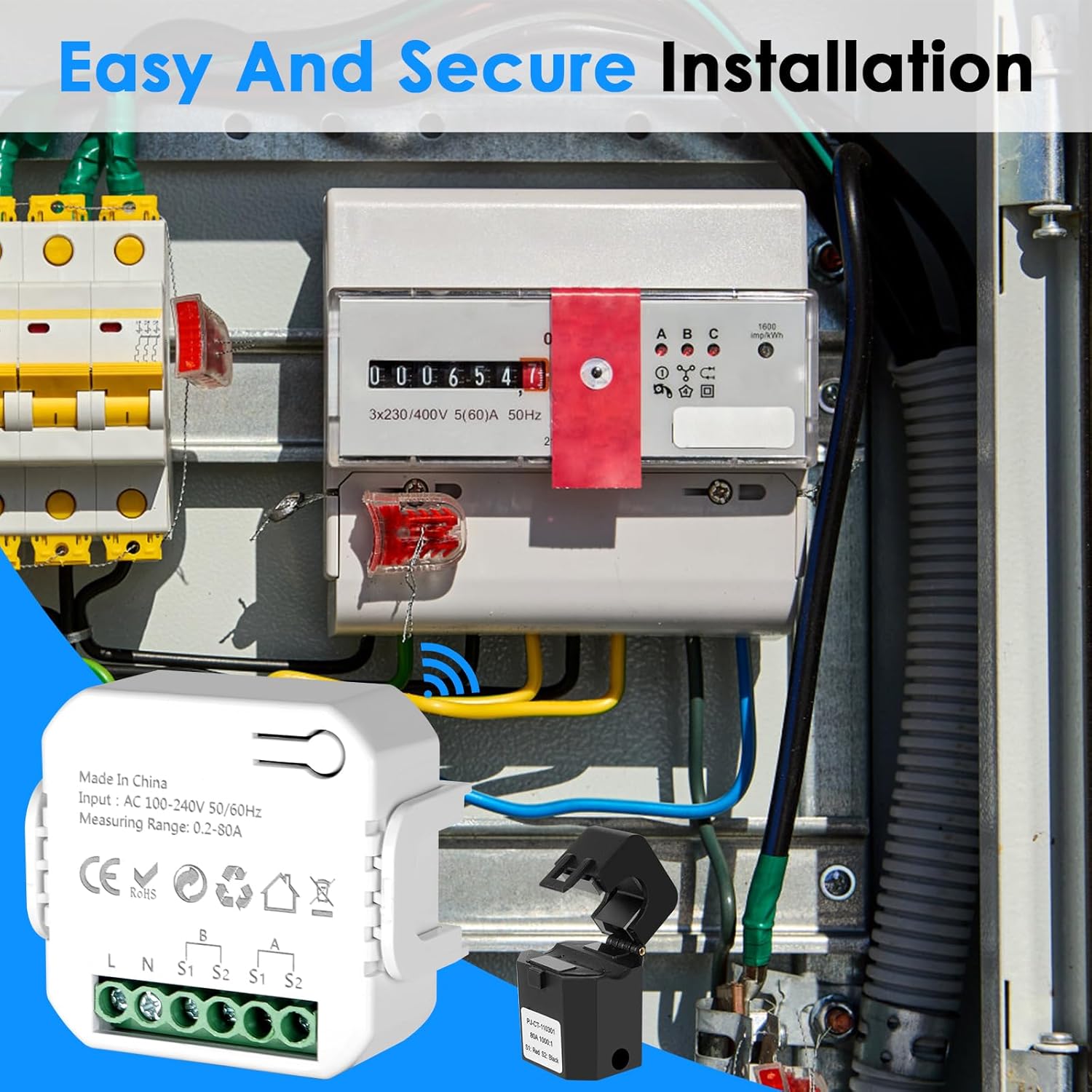
Image: Example of the energy monitor and CT sensors installed within an electrical distribution panel.
- Bi-directional Measurement Setup: For bi-directional monitoring (e.g., with solar panels), ensure the CT is placed correctly to measure power flow both from and to the grid. The module powers itself from the circuit it measures.

Image: Diagram showing how to set up the energy monitor for bi-directional measurement, including connections to the grid, AC distribution box, load, inverter, and solar panel. Note: The circuit measured by the CT must be in the same phase as the circuit powering the module.
- Restore Power: Once all connections are secure, restore power to the electrical panel. The LED indicator on the main unit should illuminate.
- App Connection:
- Download the Tuya Smart or Smart Life app from your smartphone's app store.
- Register or log in to your account.
- Add a new device. The monitor uses 2.4GHz Wi-Fi. Ensure your phone is connected to a 2.4GHz Wi-Fi network during setup.
- Follow the in-app instructions to pair the energy monitor with your Wi-Fi network. If pairing fails, try resetting the device by pressing the reset button.

Image: The LyteSolar Smart Home Energy Monitor main unit and CT sensors shown alongside a smartphone displaying the energy monitoring app interface.
5. Operating Instructions
Once successfully installed and connected to the app, you can begin monitoring your energy usage:
- Real-Time Monitoring: Open the Tuya Smart or Smart Life app. Select your energy monitor device. The app will display real-time data for power, voltage, current, and power factor for each monitored channel.
- Historical Data: The app allows you to view historical energy records by hour, day, month, and year. This data helps in understanding consumption trends and identifying opportunities for energy saving.

Image: Multiple smartphone screenshots displaying the app's electricity statistics interface, showing daily, monthly, and yearly energy consumption graphs.
- Bi-Directional Tracking: The monitor supports tracking energy flow in both directions, allowing you to differentiate between energy consumed from the grid and energy generated (e.g., from solar panels) and fed back into the grid.
- Individual Calibration: The app may offer options for individual calibration of voltage, current, and power readings for each channel to ensure accuracy.

Image: Smartphone screenshots illustrating the app's individual calibration settings for voltage, current, and power, as well as options for creating smart scenes based on energy data.
- Smart Scenes/Automation: Utilize the app's automation features to create smart scenes based on energy usage, such as receiving notifications for unusual consumption patterns.
6. Features
- Accurate Meter Monitoring: Equipped with 2 x 80A CT sensors for precise measurement of electricity usage for various appliances.
- Real-Time Energy Monitoring: Track power, voltage, current, and power factor instantly via the Tuya Smart or Smart Life apps.
- Bi-Directional Power Tracking: Monitor energy consumption from the grid and energy generation (e.g., solar) simultaneously.
- Historical Data Records: Access detailed energy usage history by hour, day, month, and year to manage consumption effectively.
- Easy Installation: Lightweight design and simple setup process, requiring only clamping CT sensors and Wi-Fi connection.
- Wide Applicability: Suitable for various home setups, whether connected to a solar photovoltaic system or directly to the city grid.
7. Specifications
| Parameter | Value |
|---|---|
| Input Voltage | AC 100-240V 50/60Hz |
| Measuring Range | 0.2-80A |
| Wireless Frequency | 2.4GHz Wi-Fi |
| Accuracy | Within ±2% |
| CT Clamp Diameter | 10mm |
| Module Size | 50 x 45 x 23mm |
| Operating Temperature | -10°C to +55°C |
| Measurement Type | Ammeter |
8. Troubleshooting
- Device Not Pairing:
- Ensure your Wi-Fi network is 2.4GHz. The device does not support 5GHz Wi-Fi.
- Verify that your smartphone is connected to the 2.4GHz Wi-Fi network during the pairing process.
- Check that the device is within range of your Wi-Fi router.
- Try resetting the device by pressing the reset button.
- Restart your Wi-Fi router.
- No Data in App:
- Confirm the device is successfully paired and connected to Wi-Fi (check LED indicator).
- Ensure the CT sensors are correctly clamped onto the live wires and properly connected to the main unit.
- Verify that power is flowing through the monitored circuits.
- Inaccurate Readings:
- Check the orientation of the CT sensors. They must be clamped in the direction of current flow.
- Ensure the CT sensors are securely closed around the live wire.
- Utilize the individual calibration feature in the app if available and necessary.
- App Functionality Issues:
- Ensure your Tuya Smart or Smart Life app is updated to the latest version.
- Clear the app's cache or reinstall the app.
- Check your internet connection.
9. Maintenance
The LyteSolar Smart Home Energy Monitor is designed for minimal maintenance. Follow these guidelines to ensure optimal performance:
- Cleaning: Gently wipe the exterior of the device with a dry, soft cloth. Do not use harsh chemicals, solvents, or abrasive cleaners.
- Environment: Keep the device in a dry environment, away from direct sunlight, moisture, and extreme temperatures.
- Periodic Checks: Periodically inspect the wiring and CT sensor connections to ensure they remain secure. Ensure power is off before performing any physical inspection.
- Firmware Updates: Check the Tuya Smart or Smart Life app regularly for any available firmware updates for the device. Updates can improve performance and add new features.
10. Warranty and Support
LyteSolar products are manufactured to high-quality standards. For warranty information, technical support, or any questions regarding your Smart Home Energy Monitor, please refer to the contact information provided with your purchase or visit the official LyteSolar website. Please have your product model and purchase date available when contacting support.