
1. Product Overview
The ZunDian Portable Car Battery Booster Jump Starter (Model 020) is a robust and versatile device designed to provide reliable power for various automotive and electronic needs. With a peak current of 3000A, it can quickly revive low voltage and completely drained car batteries, suitable for engines up to 6.0L gas and 3.0L diesel. Beyond jump-starting, it functions as a portable power bank and features an emergency flashlight.
Key Features:
- Powerful Jump Starter: 3000A peak current for 12V vehicles, capable of starting up to 6.0L gas and 3.0L diesel engines.
- Versatile Power Bank: Equipped with a Type-C in/out port and a Quick Charge 3.0 USB port for charging electronic devices like phones and tablets.
- Emergency LED Light: Integrated flashlight with multiple modes (lighting, SOS, strobe) for visibility in dark situations.
- Safety Protections: Designed with multiple safety features to ensure secure operation.
- Portable Design: Compact and easy to store, making it an essential emergency tool for any vehicle.
2. Package Contents
Ensure all items are present upon unboxing:
- ZunDian Portable Car Battery Booster Jump Starter (Model 020)
- Smart Jumper Cables with Clamps (Red for Positive, Black for Negative)
- USB Charging Cable (Type-C)
- Wall Charger Adapter
- User Manual
- Storage Case

Image: ZunDian Jump Starter kit contents, including the main unit, smart jumper cables, charging cables, and user manual, neatly organized in a compact carrying case.
3. Setup and Charging
Initial Charge:
- Before first use, fully charge the jump starter.
- Connect the provided USB charging cable to the Type-C input port on the jump starter.
- Plug the other end of the USB cable into the wall charger adapter and then into a power outlet.
- The LCD screen will display the charging progress. Charge until it shows 100%.
Checking Battery Level:
Press the power button on the jump starter. The LCD screen will display the current battery percentage. It is recommended to keep the device charged above 50% for optimal performance.

Image: The ZunDian Jump Starter unit showing its LCD display at 100% charge, highlighting its USB-A and USB-C output ports for charging external devices.
4. Operating Instructions
4.1. Jump Starting a Vehicle:
- Ensure the jump starter is sufficiently charged (preferably above 50%).
- Connect the smart jumper cables to the jump starter's dedicated port. Ensure a secure connection.
- Attach the red (positive) clamp to the positive (+) terminal of the vehicle's battery.
- Attach the black (negative) clamp to the negative (-) terminal of the vehicle's battery.
- Once connected, the indicator light on the smart jumper cables should turn green, indicating a safe connection. If it's red, check connections for polarity or shorts.
- Start your vehicle. If it doesn't start immediately, wait 30 seconds and try again. Do not crank for more than 3 seconds per attempt.
- Once the vehicle starts, immediately remove the jumper cables from the vehicle battery, then disconnect them from the jump starter.
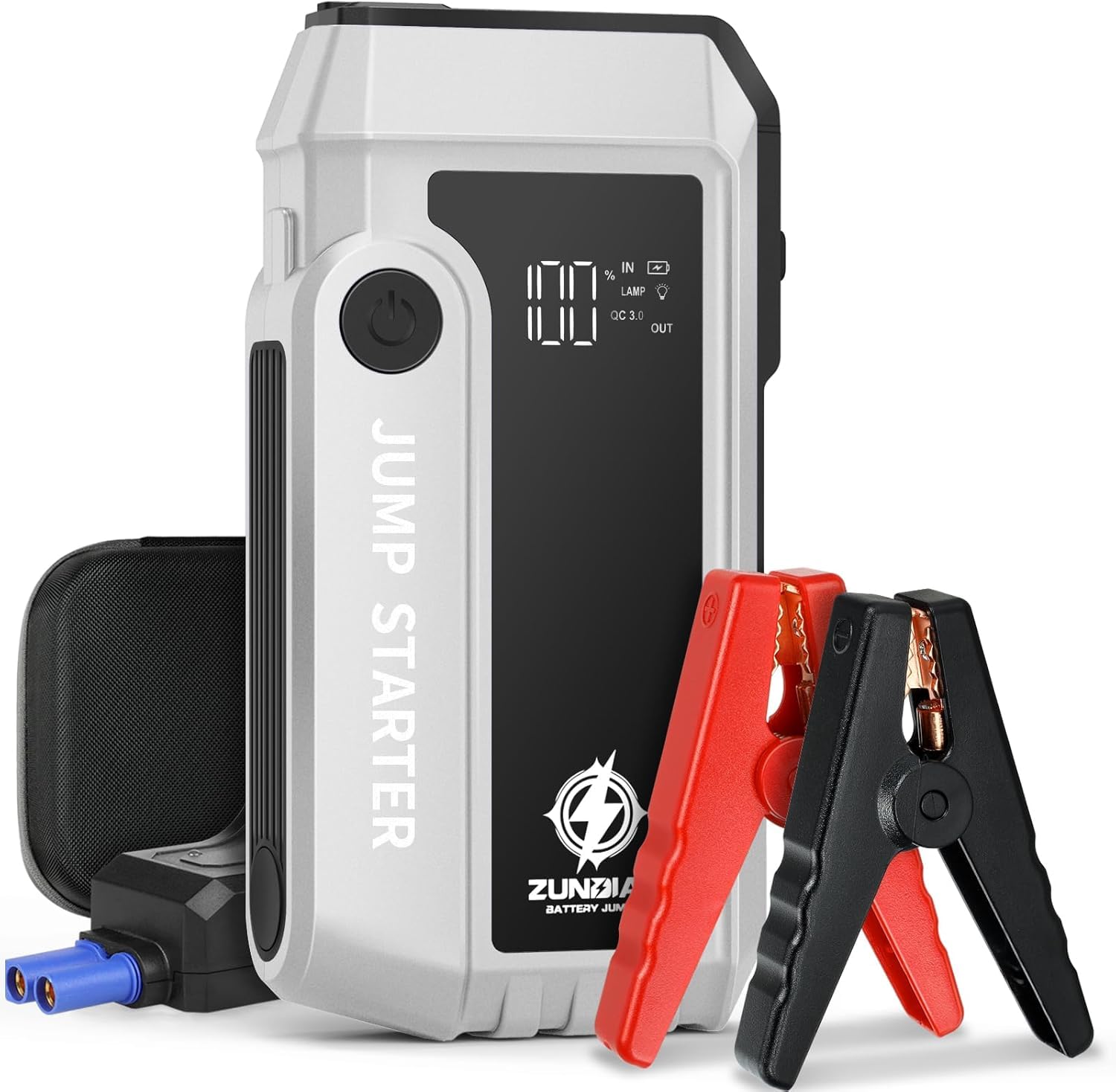
Image: Demonstrates the connection process of the ZunDian Jump Starter to a car battery. The unit shows a full charge, and the smart cables indicate readiness with a green light.
Video: A user demonstrates the ZunDian Jump Starter, showing how to connect the smart cables to the unit and then to a car battery. The video highlights the ease of use and the indicator lights on the cables.
4.2. Using as a Power Bank:
The jump starter can charge various electronic devices:
- Connect your device's USB charging cable to either the Type-C or Quick Charge 3.0 USB output port on the jump starter.
- The jump starter will automatically begin charging your device.
4.3. Emergency LED Light:
The integrated LED flashlight offers multiple modes:
- Press and hold the power button for a few seconds to turn on the flashlight (steady light mode).
- Press the power button again to cycle through modes: steady light → SOS signal → strobe light.
- Press and hold the power button again to turn off the flashlight.

Image: The ZunDian Jump Starter's emergency LED light in use, providing illumination for working on a car engine in low-light conditions. The image also depicts SOS and strobe light icons.
5. Safety Protections
The ZunDian Jump Starter (Model 020) incorporates 10 safety protections to ensure user safety and prevent damage to the device and vehicle. These include:
- Short-circuit protection
- Over-current protection
- Over-charge protection
- Over-discharge protection
- Over-temperature protection
- Reverse polarity protection
- Reverse connection protection
- Low voltage protection
- High voltage protection
- Spark-proof technology

Image: The smart jumper cables connected to the ZunDian Jump Starter, showing a green light that indicates the active 10 safety protections when connected to a car battery.
6. Maintenance and Storage
- Recharging: Recharge the jump starter every 3-6 months, even if not used, to maintain battery health.
- Cleaning: Use a soft, dry cloth to clean the device. Do not use harsh chemicals or abrasive materials.
- Storage: Store the jump starter in its provided carrying case in a cool, dry place, away from direct sunlight and extreme temperatures.
- Temperature: Avoid operating or storing the device in temperatures below -4°F (-20°C) or above 140°F (60°C).
7. Troubleshooting
- Vehicle does not start:
- Check if the jump starter is sufficiently charged.
- Ensure the jumper cable clamps are securely connected to the correct battery terminals (red to positive, black to negative).
- Verify the smart cable indicator light is green. If red, re-check connections.
- Wait 30 seconds between attempts if the vehicle doesn't start on the first try.
- Jump starter not charging:
- Ensure the charging cable and adapter are properly connected to a working power outlet.
- Try a different charging cable or adapter if available.
- Device not turning on:
- Ensure the device has sufficient charge.
- Press and hold the power button for a few seconds to ensure it's not just a quick press.
8. Product Specifications
| Specification | Detail |
|---|---|
| Brand | ZunDian |
| Model | 020 |
| Peak Amperage | 3000 Amps |
| Voltage | 12 Volts |
| Engine Compatibility | Up to 6.0L Gas, 3.0L Diesel |
| Battery Cell Composition | Lithium Polymer |
| Item Weight | 2.11 pounds |
| Product Dimensions | 7.87 x 4.72 x 3.15 inches |
| Manufacturer Part Number | Js3000a |
| OEM Part Number | Js3000 |
9. Warranty and Support
For warranty information and customer support, please refer to the documentation included in your package or visit the official ZunDian website. Keep your purchase receipt for warranty claims.