
1. Introduction
Thank you for choosing the Kibiy RFCD-8105 Electric Body Trimmer. This manual provides essential information for the safe and effective use, maintenance, and troubleshooting of your new device. Please read it thoroughly before first use and retain it for future reference.
The Kibiy RFCD-8105 is designed for precise and comfortable body grooming. Key features include:
- Dual Ceramic Blades: Includes a specialized intimate blade with a serrated design for sensitive areas and a standard blade for general body trimming.
- Powerful Motor: 7000 RPM motor for efficient trimming of various hair types.
- IPX7 Waterproof: Suitable for both wet and dry use, and easy to clean under running water.
- Flexible Charging: Supports wireless charging via a dock and direct USB cable charging.
- LED Display: Shows battery level for convenient power management.
- Integrated LED Light: Enhances visibility for detailed trimming.
- Ergonomic Design: Non-slip grip for comfortable and secure handling.
2. Safety Information
To ensure safe operation and prevent injury or damage, please observe the following safety guidelines:
- This appliance is not intended for use by persons (including children) with reduced physical, sensory or mental capabilities, or lack of experience and knowledge, unless they have been given supervision or instruction concerning use of the appliance by a person responsible for their safety.
- Children should be supervised to ensure that they do not play with the appliance.
- Do not use the trimmer if the blades are damaged or broken, as this may cause skin irritation or injury.
- Keep the charging cable and dock away from water and heat sources.
- Only use the provided charging cable and dock.
- Do not disassemble or attempt to repair the trimmer yourself. Contact customer support for assistance.
- Unplug the trimmer before cleaning or when not in use for extended periods.
- Avoid using the trimmer on irritated, inflamed, or broken skin.
3. Package Contents
Upon unpacking, please verify that all items listed below are present:
- Kibiy RFCD-8105 Electric Body Trimmer
- Charging Dock
- USB Charging Cable
- Intimate Ceramic Blade
- Body Trimming Ceramic Blade
- Adjustable Guide Comb (3/5/7 mm)
- Cleaning Brush
- Lubricating Oil
- User Manual (this document)

Image 3.1: The Kibiy RFCD-8105 Electric Body Trimmer with its charging dock, USB cable, two blade types, and an adjustable guide comb.
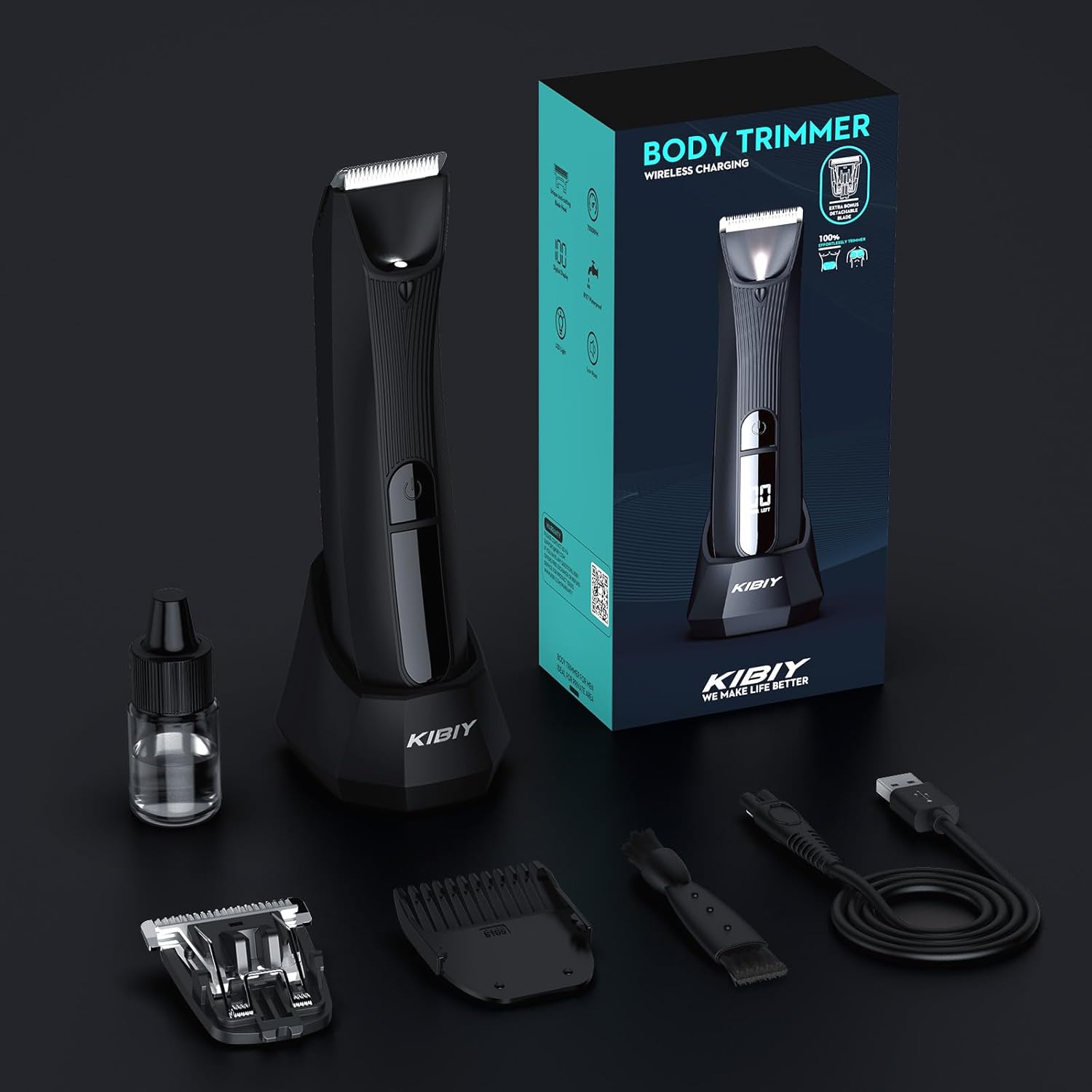
Image 3.2: A comprehensive view of all items included in the Kibiy RFCD-8105 package, neatly arranged.
4. Product Overview
Familiarize yourself with the components of your Kibiy RFCD-8105 trimmer:
- Trimmer Head: Where the ceramic blade is attached.
- LED Light: Illuminates the trimming area.
- Power Button: Turns the trimmer on and off.
- LED Display: Shows battery percentage.
- Charging Port: For direct USB cable connection.
- Charging Contacts: For use with the charging dock.

Image 4.1: The trimmer's LED display indicating the remaining battery charge.

Image 4.2: A close-up view of the integrated LED light, designed to illuminate the trimming path for enhanced precision.
5. Setup
5.1 Initial Charging
Before first use, fully charge the trimmer. The LED display will show the battery level. A full charge takes approximately 1.5 hours and provides up to 90 minutes of shaving time.
- Using the Charging Dock: Place the trimmer into the charging dock. Ensure the charging contacts align. Connect the USB cable to the dock and then to a USB power adapter (not included).
- Direct USB Charging: Connect the USB cable directly to the charging port at the bottom of the trimmer and then to a USB power adapter.

Image 5.1: Illustration of the two charging methods: via the charging dock and direct USB cable connection.
5.2 Attaching/Detaching Blades and Guide Combs
The trimmer comes with two ceramic blades and one adjustable guide comb.
- To Attach a Blade: Align the blade with the trimmer head and press firmly until it clicks into place.
- To Detach a Blade: Push the blade release button (if present, or gently push the blade upwards from the front) and pull the blade away from the trimmer head.
- To Attach the Guide Comb: Slide the guide comb onto the desired blade until it locks securely.
- To Adjust Comb Length: Use the slider on the guide comb to select the desired trimming length (3mm, 5mm, or 7mm).

Image 5.2: The two distinct ceramic blades: one designed for intimate areas and another for general body trimming.

Image 5.3: A detailed view of the trimmer blade, highlighting its design and attachment points.
6. Operating Instructions
6.1 Powering On/Off
Press the power button once to turn the trimmer on. Press it again to turn it off.
6.2 Trimming Techniques
- For General Body Trimming: Use the body trimming blade. For an even length, attach the adjustable guide comb and select your desired length (3mm, 5mm, or 7mm). Move the trimmer against the direction of hair growth.
- For Intimate Areas: Use the specialized intimate ceramic blade. This blade features a serrated chamfer design for safer trimming. Exercise caution and stretch the skin taut to avoid nicks.
- Wet or Dry Use: The IPX7 waterproof rating allows for comfortable use in the shower or on dry skin. For best results, consider trimming on dry skin for maximum efficiency, and then using it wet for a smoother finish.

Image 6.1: A man demonstrating the use of the Kibiy RFCD-8105 trimmer for chest hair grooming.

Image 6.2: A man demonstrating the use of the Kibiy RFCD-8105 trimmer for grooming the groin area.
6.3 LED Display and Light
The LED display indicates the current battery charge. When the battery is low, the display will prompt you to recharge. The integrated LED light automatically activates when the trimmer is on, providing better visibility for precise trimming.
7. Maintenance
7.1 Cleaning
Regular cleaning ensures optimal performance and hygiene.
- After each use, turn off the trimmer and detach the blade.
- Rinse the blade and the trimmer head under running water. The IPX7 rating allows for easy cleaning.
- Use the provided cleaning brush to remove any trapped hairs from the blade and trimmer body.
- Allow all parts to air dry completely before reattaching the blade or storing the trimmer.
- Apply a small drop of lubricating oil to the blades periodically to maintain smooth operation.

Image 7.1: The trimmer shown in water, illustrating its IPX7 waterproof capability for easy cleaning.
7.2 Blade Replacement
For optimal performance and hygiene, it is recommended to replace the ceramic blades every 6 months, or sooner if you notice reduced cutting efficiency or discomfort.
8. Troubleshooting
If you encounter issues with your Kibiy RFCD-8105 trimmer, refer to the following table:
| Problem | Possible Cause | Solution |
|---|---|---|
| Trimmer does not turn on. | Battery is depleted. | Charge the trimmer fully. |
| Poor trimming performance or pulling hair. | Blades are dull or clogged with hair. | Clean the blades thoroughly. Replace blades if dull. |
| Trimmer makes unusual noise. | Blades are not properly attached or need lubrication. | Reattach blades securely. Apply lubricating oil. |
| Trimmer not charging. | Charging cable/dock not connected properly or faulty. | Ensure secure connection. Try a different USB power adapter. |
9. Specifications
| Feature | Specification |
|---|---|
| Model Number | RFCD-8105 |
| Brand | Kibiy |
| Power Source | Battery Powered |
| Battery Type | 1 Lithium-ion (included) |
| Charging Time | Approx. 1.5 hours |
| Usage Time | Approx. 90 minutes |
| Waterproof Rating | IPX7 |
| Blade Material | Ceramic |
| Motor Speed | 7000 RPM |
| Special Features | Battery Indicator, Rechargeable, Interchangeable Trimmer Head, Illuminated, Waterproof |
| Recommended Uses | Intimate area, Chest, Legs, Beard, Face, Armpits, Shower |
| Color | Black |
10. Warranty and Support
Kibiy products are manufactured with quality and reliability in mind. For information regarding warranty coverage, product support, or replacement parts, please refer to the warranty card included with your purchase or contact Kibiy customer service directly. Contact details can typically be found on the official Kibiy website or through your retailer.