
1. Introduction
This manual provides instructions for the proper setup, operation, and maintenance of your Aimery Digital Health Scale with Height Rod. This device is designed for accurate measurement of body weight and height, suitable for various environments including medical institutions, schools, and homes. It features a high-accuracy weighing system and a retractable height measuring rod.

Figure 1: Aimery Digital Health Scale in use.
2. Safety Information
Please read all safety instructions before using the scale to ensure safe and proper operation.
- Place the scale on a firm, flat, and stable surface to ensure accurate readings and prevent tipping.
- Do not exceed the maximum weight capacity of 150 kg (330 lb).
- Keep the scale dry. Avoid exposure to water or excessive moisture.
- Clean the scale with a soft, damp cloth. Do not use abrasive cleaners or immerse the unit in water.
- Ensure the height rod is securely locked in position before and after use.
- Supervise children when they are using the scale.
3. Package Contents
Verify that all components are present and undamaged upon unpacking:
- Scale Base with Weighing Platform
- Height Measuring Rod Assembly
- Display Unit
- Mounting Hardware (screws, brackets)
- User Manual (this document)
4. Setup Instructions
Follow these steps to assemble your digital health scale:
- Unpack Components: Carefully remove all parts from the packaging.
- Attach Height Rod: Securely attach the height measuring rod assembly to the designated slot on the scale base using the provided mounting hardware. Ensure it is firmly in place and upright.
- Connect Display Unit: Connect the display unit to the main scale body. Refer to the connection points for proper alignment.
- Adjust Leveling Feet: The scale features adjustable feet. Place the scale on its intended surface and adjust the feet to ensure the platform is perfectly level. This is crucial for accurate measurements.
- Power On: Insert batteries (if applicable) or connect to a power source. The scale is equipped with an intelligent switch for automatic or manual power-on.
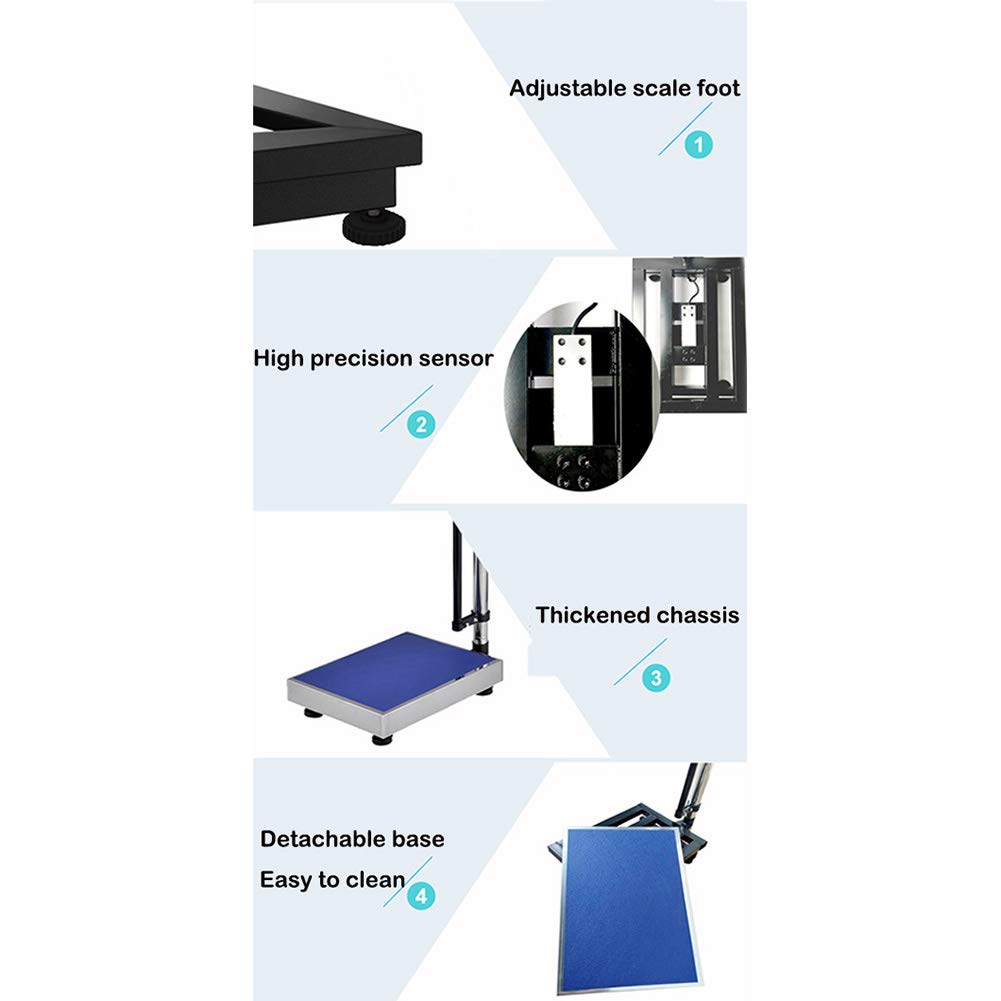
Figure 2: Key features including adjustable scale foot and thickened chassis.

Figure 3: Overall view of the scale, highlighting the intelligent switch.
5. Operating Instructions
To obtain accurate weight and height measurements:
- Power On: The scale will automatically turn on when stepped on, or it can be manually activated using the power button if available.
- Weighing: Step onto the center of the scale platform barefoot and stand still. The LCD display will show your weight. Wait for the reading to stabilize before stepping off.
- Height Measurement: Extend the height measuring rod upwards. Stand with your back against the rod, ensuring your head is level. Lower the measuring arm until it rests gently on the top of your head. Read the height measurement directly from the rod's clear scale. The height rod is retractable and adjustable for various user heights (72 cm - 192 cm).
- Reading the Display: The HD LCD display shows weight, and may also include temperature and power indicators.

Figure 4: LCD high-definition display showing weight and temperature.

Figure 5: Clear scale markings on the height rod for easy reading.
6. Maintenance
Proper maintenance ensures the longevity and accuracy of your scale:
- Cleaning: Wipe the scale platform and display with a soft, slightly damp cloth. Do not use harsh chemicals or abrasive materials. The base is detachable for easier cleaning.
- Storage: Store the scale in a dry, cool place away from direct sunlight and extreme temperatures.
- Battery Replacement: If the display indicates low power, replace the batteries promptly according to the instructions in the battery compartment.
- Inspection: Periodically check for any loose parts or damage. Ensure the height rod moves smoothly and locks securely.
7. Troubleshooting
Refer to the table below for common issues and their solutions:
| Problem | Possible Cause | Solution |
|---|---|---|
| No display/Scale won't turn on | Low or dead batteries; No power connection; Faulty power button | Replace batteries; Ensure power adapter is securely connected; Contact support if issue persists. |
| Inaccurate weight readings | Scale not on a flat, stable surface; Overload; Movement during measurement; Calibration needed | Place on a hard, level surface; Do not exceed 150kg; Stand still; Consult manual for calibration steps if applicable. |
| Height rod stuck or difficult to adjust | Debris in mechanism; Misalignment; Damage | Clean the rod and guides; Ensure proper alignment; Do not force adjustment; Contact support if damaged. |
| Display shows "Err" | Overload; Internal error | Remove weight immediately; Restart the scale. If error persists, contact support. |
8. Specifications
Key technical specifications for the Aimery Digital Health Scale:
| Feature | Detail |
|---|---|
| Weighing Range | 2 kg - 150 kg (330 lb) |
| Height Measurement Range | 72 cm - 192 cm |
| Scale Value (Weight Increment) | 100 grams |
| Countertop Size | 30 cm x 40 cm |
| Product Dimensions | 38 x 25 x 22 inches (approximate assembled) |
| Item Weight | 3.31 pounds |
| Display | HD LCD with temperature and power display |
| Model Number | Aimery |

Figure 6: Dimensional overview of the scale.
9. Warranty and Support
For warranty information or technical support, please refer to the documentation included with your purchase or contact Aimery customer service. Keep your purchase receipt as proof of purchase.