1. Introduction
The TAXNELE TXATS3-63A/2P is a PC class automatic transfer switch designed for AC systems operating at 50-60Hz with a rated current of 6A-63A. This device ensures an uninterrupted power supply by automatically switching between a main power source (Common Power Supply A) and a backup power source (Backup Power Supply B) in the event of a power failure. The switching speed is less than 50 milliseconds, minimizing disruption. When both power sources are available, the device prioritizes the main power supply.
Safety Information
WARNING: Installation and maintenance should only be performed by qualified personnel. Ensure all power sources are disconnected before installation or servicing to prevent electric shock or equipment damage. Always follow local electrical codes and regulations.
2. Product Features
- Dual Power Inputs: Connects to two distinct power sources for continuous operation.
- Automatic Transfer: Seamlessly switches between power sources without manual intervention, ensuring reliable power.
- Compact Design: Space-saving DIN rail-mountable enclosure for easy integration into electrical cabinets.
- Robust Construction: Manufactured with high-quality, wear-resistant, and compressive materials for durability in various environments.
- Wide Application: Suitable for industrial equipment, telecommunications systems, and backup power solutions.

Figure 2.1: The TAXNELE ATS features automatic switching after a power off event, with a response time of less than 50 milliseconds, ensuring minimal interruption to power supply.
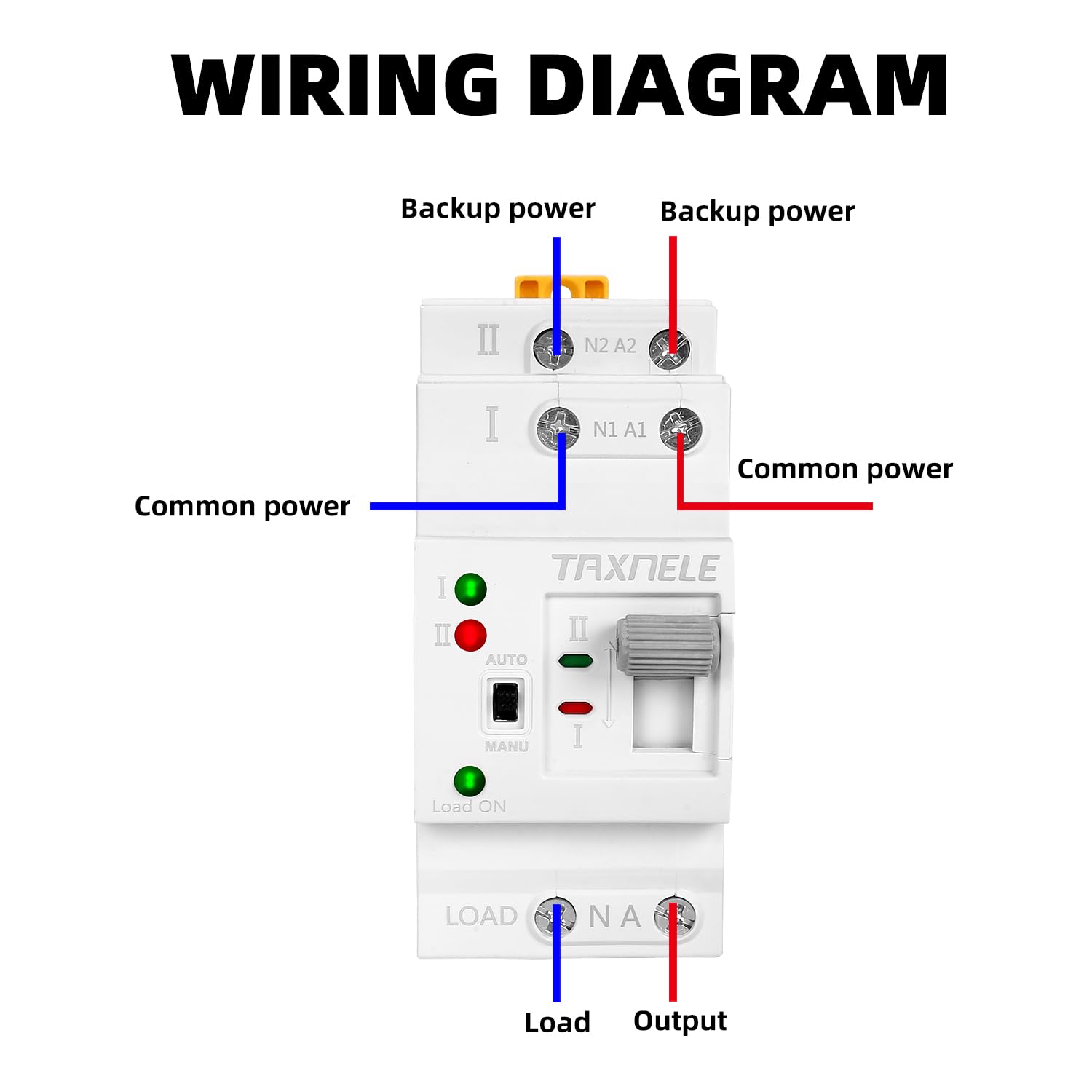
Figure 2.2: The robust shell of the ATS is designed to be cold and heat-resistant, providing stability and reliable performance in complex and harsh operating environments.
3. Specifications
| Attribute | Value |
|---|---|
| Brand | TAXNELE |
| Model Number | TXATS3-63A/2P |
| Current Rating | 63 Amps |
| Number of Poles | 2 |
| Circuit Breaker Type | Standard |
| Mounting Type | DIN Rail Mount |
| Operating Frequency | AC 50-60Hz |
| Switching Speed | < 50 milliseconds |
| Batteries Required | No |

Figure 3.1: Detailed dimension diagram of the TAXNELE TXATS3-63A/2P Automatic Transfer Switch, showing measurements in millimeters for installation planning.
4. Setup and Installation
4.1 DIN Rail Installation
The TAXNELE TXATS3-63A/2P is designed for standard 35mm DIN rail mounting. It can be directly installed into household lighting distribution boxes or industrial control panels.
- Ensure all power to the distribution box or panel is turned off at the main breaker.
- Align the ATS with the DIN rail.
- Press the ATS firmly onto the rail until it clicks into place.
- Verify that the ATS is securely fastened and does not wobble.

Figure 4.1: The ATS is designed for easy installation on a standard 35mm DIN rail, suitable for integration into existing electrical distribution boxes.
4.2 Wiring Diagram
Refer to the wiring diagram below for correct connection of the main power, backup power, and load. Incorrect wiring can lead to malfunction or damage.

Figure 4.2: Wiring diagram illustrating the connections for common power (main), backup power, and the load output. Ensure neutral and live wires are connected correctly to N1/A1 (Common Power) and N2/A2 (Backup Power) inputs, and Load/NA outputs.
Connection Points:
- N1 A1: Common Power (Main Power Supply) input terminals. Connect the neutral wire to N1 and the live wire to A1.
- N2 A2: Backup Power (Standby Power Supply) input terminals. Connect the neutral wire to N2 and the live wire to A2.
- LOAD N A: Load Output terminals. Connect the neutral wire of the load to N and the live wire of the load to A.
After wiring, double-check all connections for tightness and correctness before restoring power.
5. Operating Instructions
The TAXNELE ATS offers both automatic and manual operation modes.

Figure 5.1: The control panel of the ATS, highlighting the Auto/Manual switch, manual operation handle, and power indicator lights for both common (I) and backup (II) power supplies, as well as the Load ON indicator.
5.1 Mode Selection
- AUTO Mode: Slide the switch to the "AUTO" position. In this mode, the ATS will automatically detect the presence of power from both sources and switch accordingly. It prioritizes Common Power (I) when available. If Common Power fails, it will automatically switch to Backup Power (II) if present.
- MANU Mode: Slide the switch to the "MANU" position. In this mode, the ATS will not automatically switch. You must use the manual operation handle to select between Common Power (I) or Backup Power (II).
5.2 Indicator Lights
- Indicator I (Green): Illuminates when Common Power Supply A is active.
- Indicator II (Red): Illuminates when Backup Power Supply B is active.
- Load ON (Green): Illuminates when power is being supplied to the load.
5.3 Power Priority
In AUTO mode, the ATS is designed to prioritize the Common Power Supply (I). If both Common Power (I) and Backup Power (II) are available, the ATS will use Common Power (I). It will only switch to Backup Power (II) if Common Power (I) fails.
6. Maintenance
The TAXNELE TXATS3-63A/2P is designed for minimal maintenance. However, regular inspections can ensure optimal performance and longevity.
- Visual Inspection: Periodically check the device for any signs of physical damage, loose connections, or overheating (discoloration).
- Cleaning: Ensure the device is free from dust and debris. Use a dry, soft cloth for cleaning. Do not use liquid cleaners.
- Connection Check: Annually, or as needed, verify that all wiring connections are secure and tight.
- Functionality Test: If possible and safe to do so, periodically test the automatic transfer function by temporarily disconnecting the main power supply to ensure it switches to backup power.
Always disconnect power before performing any maintenance.
7. Troubleshooting
| Problem | Possible Cause | Solution |
|---|---|---|
| Device does not switch automatically. | ATS is in MANU mode. No power from backup source. Faulty wiring. | Switch to AUTO mode. Check backup power supply. Verify wiring according to diagram (Section 4.2). |
| No power to load. | Both power sources are off. Loose load wiring. Internal fault. | Check both main and backup power supplies. Secure load connections. Contact support if problem persists after checking power and wiring. |
| Indicator lights not working. | No power to the respective source. LED failure. | Check power supply to the corresponding input. If power is present and LED is off, contact support. |
If troubleshooting steps do not resolve the issue, please contact customer support. Do not attempt to repair the device yourself.
8. Warranty and Support
This TAXNELE product is covered by a standard manufacturer's warranty against defects in materials and workmanship. For specific warranty terms and conditions, please refer to the documentation provided with your purchase or contact your retailer.
For technical support, inquiries, or service requests, please contact TAXNELE customer service through your point of purchase or visit the official TAXNELE website for contact information. Please have your model number (TXATS3-63A/2P) and purchase date available when contacting support.


