1. Introduction
This manual provides essential information for the safe and effective operation, maintenance, and care of your BOSCH GWS14-60 6 In. Angle Grinder. Please read this manual thoroughly before using the tool to ensure proper handling and to prevent injury or damage.

Figure 1: BOSCH GWS14-60 6 In. Angle Grinder
2. Important Safety Information
Always follow basic safety precautions to reduce the risk of fire, electric shock, and personal injury when operating power tools. Keep this manual for future reference.
General Power Tool Safety Warnings
- Work Area Safety: Keep work area clean and well lit. Cluttered or dark areas invite accidents. Do not operate power tools in explosive atmospheres, such as in the presence of flammable liquids, gases or dust. Power tools create sparks which may ignite the dust or fumes.
- Electrical Safety: Power tool plugs must match the outlet. Never modify the plug in any way. Do not abuse the cord. Never use the cord for carrying, pulling or unplugging the power tool. Keep cord away from heat, oil, sharp edges or moving parts.
- Personal Safety: Always wear eye protection. Use safety glasses or goggles. Wear hearing protection when operating the tool for extended periods. Dress properly. Do not wear loose clothing or jewelry. Keep your hair, clothing and gloves away from moving parts.
- Tool Use and Care: Do not force the power tool. Use the correct power tool for your application. Disconnect the plug from the power source before making any adjustments, changing accessories, or storing power tools.
- Specific Grinder Safety: Always use guards. Ensure the guard is securely attached and positioned for maximum safety. Use only accessories that are recommended by the manufacturer for your specific model.
3. Setup and Assembly
3.1 Unboxing
Carefully remove all components from the packaging. Verify that all items listed in the package contents are present and undamaged.

Figure 2: Angle Grinder with key features highlighted.
3.2 Attaching the Anti-Vibration Side Handle
The anti-vibration side handle can be screwed into either side of the gear housing, depending on your preference and the application. This handle helps reduce vibration for increased user comfort and control.
- Identify the threaded holes on both sides of the grinder's gear housing.
- Screw the anti-vibration side handle firmly into the desired hole.

Figure 3: Attaching the anti-vibration side handle.
3.3 Installing the Guard
The angle grinder comes with an adjustable tool-free guard. This guard is essential for user safety during operation.
- Align the guard with the mounting collar on the grinder head.
- Press the guard onto the collar until it clicks into place.
- Rotate the guard to the desired position for your application. Ensure it provides maximum protection.
3.4 Installing Grinding/Cutting Discs
Always ensure the grinder is unplugged from the power source before changing discs. Use only discs appropriate for the tool's specifications and the material being worked on.
- Ensure the inner flange is correctly seated on the spindle.
- Place the grinding or cutting disc onto the spindle, ensuring it sits flush against the inner flange.
- Thread the outer lock nut onto the spindle and tighten it firmly using the provided lock nut wrench.
- Press the spindle lock button to prevent the spindle from rotating while tightening the nut.
4. Operating Instructions
4.1 Powering On/Off (Slide Switch)
The GWS14-60 features a convenient slide switch for easier long-run operation.
- To turn the tool ON, slide the switch forward until it locks into the ON position.
- To turn the tool OFF, slide the switch backward to the OFF position.
4.2 Variable-Speed Selection
The tool features variable-speed selection to match the speed to the specific application and material. The speed adjustment dial is located near the rear of the tool, potentially behind the air filter cover.
- Adjust the dial to select the desired RPM for your task. Lower speeds are suitable for polishing or delicate work, while higher speeds are for aggressive grinding and cutting.
4.3 Advanced Safety Features
- KickBack Control: This feature helps shut off the tool if the wheel gets into a binding situation, reducing the risk of sudden kickback.
- Restart Protection: Prevents accidental tool startup if the power supply is interrupted and then restored while the switch is in the ON position. The tool must be manually reset.
- Soft Start: Reduces the initial impact and torque for a smooth startup, enhancing user control and extending gear life.
- Overload Protection: Reduces the risk of the motor overloading or overheating during heavy-duty applications, protecting the tool from damage.

Figure 4: Angle grinder in use for concrete grinding.

Figure 5: Angle grinder in use for metal cutting.
5. Maintenance
Regular maintenance ensures optimal performance and extends the lifespan of your angle grinder. Always unplug the tool before performing any maintenance.
5.1 Cleaning the Air Filter
The GWS14-60 features enhanced motor cooling with air inlets on the backside and a removable air filter for dust protection. Regularly clean the filter to maintain airflow and prevent motor overheating.
- Locate the air filter cover at the rear of the tool.
- Carefully remove the filter cover.
- Remove the mesh filter and clean it using compressed air or a soft brush. Do not use water.
- Reinsert the clean filter and securely attach the cover.
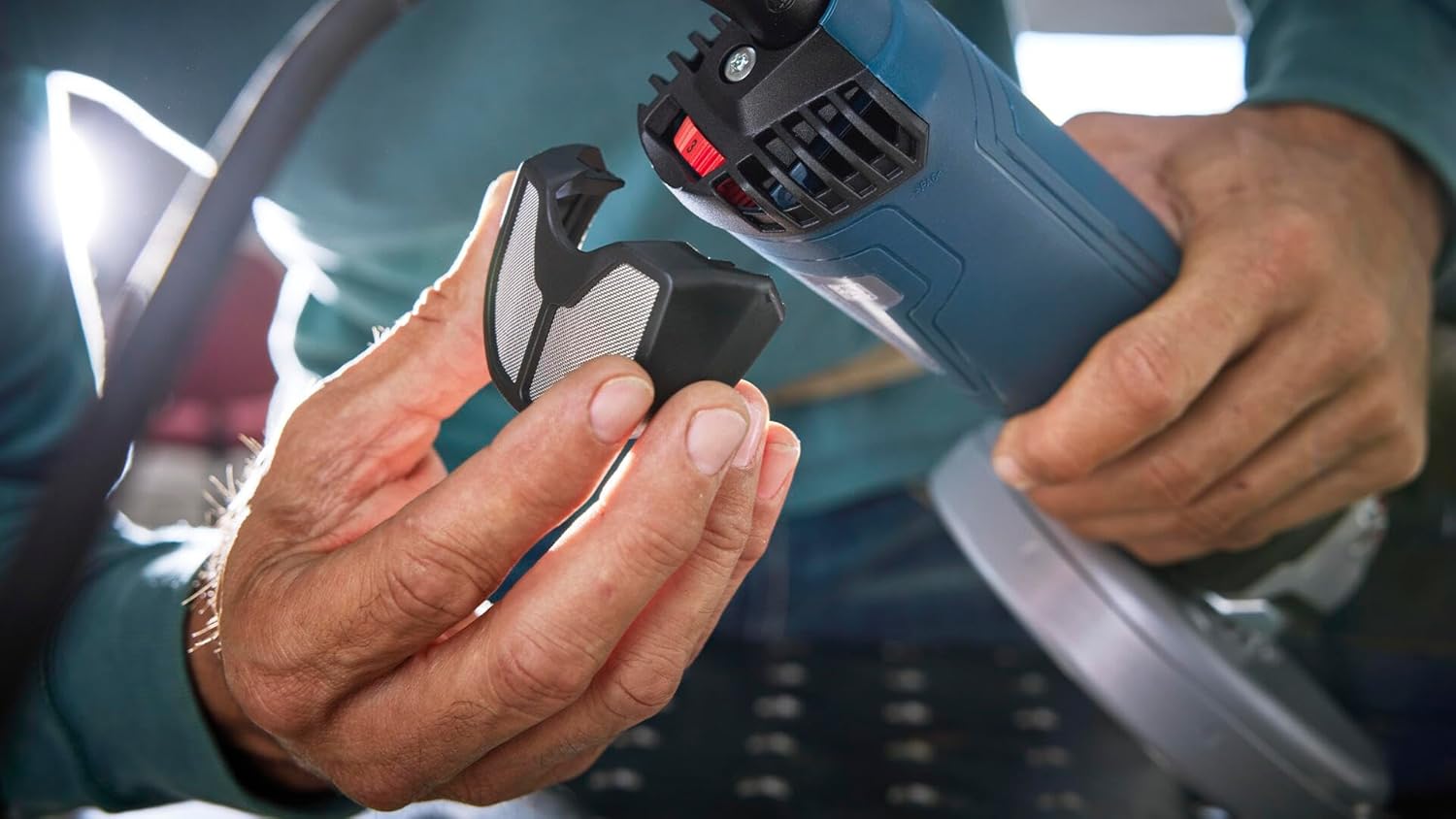
Figure 6: Removing and cleaning the air filter.
5.2 General Cleaning and Inspection
- Wipe down the tool with a damp cloth after each use. Do not use harsh chemicals or abrasive cleaners.
- Inspect the power cord for any damage, cuts, or fraying. Replace damaged cords immediately.
- Check all screws and fasteners for tightness. Tighten as necessary.
- Ensure the ventilation openings are clear of debris to prevent overheating.
6. Troubleshooting
This section addresses common issues you might encounter with your angle grinder. For problems not listed here, contact BOSCH customer support.
| Problem | Possible Cause | Solution |
|---|---|---|
| Tool does not start | No power supply; Restart Protection activated; Damaged cord/plug | Check power outlet and connections; Turn switch OFF then ON again; Inspect and replace damaged components. |
| Tool stops during operation | Overload Protection activated; KickBack Control activated | Reduce pressure on the tool; Check for binding of the disc; Allow motor to cool down. |
| Excessive vibration | Disc improperly installed; Damaged or worn disc; Loose handle | Re-install disc correctly; Replace disc; Tighten side handle. |
| Overheating | Blocked air vents; Continuous heavy load | Clean air filter and vents; Allow tool to cool; Reduce load. |
7. Specifications
| Feature | Detail |
|---|---|
| Model | GWS14-60 |
| Power Source | Corded Electric |
| Motor | 13 Amp |
| Maximum Rotational Speed | 9,700 RPM |
| Disc Diameter | 6 inches (150 mm) |
| Spindle Thread | 5/8"-11 |
| Voltage | 120V~ 60Hz |
| Item Weight | 5.2 Pounds |
| Material | Metal |
| Included Components | (1) Lock Nut, (1) Type B (27) Grinding Wheel Guard, (1) 6 In. Angle Grinder, (1) Backing Flange, (1) Vibration Control Side Handle, (1) Type A (41/1A) Cutting Wheel Guard, (1) Lock Nut Wrench |
8. Warranty Information
BOSCH offers a limited warranty for this product. Effective 6/1/23, all 18V products are covered by this updated warranty. For updated terms and conditions, please visit the official BOSCH website or contact customer support.

Figure 7: BOSCH 1 Year Limited Warranty details.
For warranty claims or detailed information, please refer to the official Bosch Power Tool Warranty page or call 1-877-BOSCH99.
9. Customer Support
If you have any questions, require technical assistance, or need to order replacement parts, please contact BOSCH customer support:
- Phone: 1-877-BOSCH99 (1-877-267-2499)
- Website: www.boschtools.com


