
1. Introduction
Thank you for choosing the TOVENDOR Electric Water Flosser. This device is designed to enhance your daily oral hygiene routine by effectively removing plaque and food debris from between your teeth and below the gumline. Its cordless, rechargeable, and waterproof design makes it suitable for both home and travel use. Please read this manual thoroughly before first use to ensure proper operation and maintenance.
2. Important Safety Information
- Always follow the instructions provided for safe and proper use.
- Charge the device on a dry surface. Do not use the device while charging.
- Do not use the device if you have had oral surgery recently without consulting your dentist.
- Ensure the charging port cover is closed tightly before use to maintain waterproof integrity.
- For first-time users, or those with sensitive gums, always begin with the "Soft" mode for the initial 7 days to allow your teeth and gums to adapt to the water pressure.
- Keep out of reach of children.
- Do not immerse the charging cable or adapter in water.
3. Package Contents
The TOVENDOR Electric Water Flosser package includes:
- 1 x TOVENDOR Electric Water Flosser Unit
- 5 x Flosser Tips (various types for different needs)
- 1 x USB Charging Cable (adapter not included)
- 1 x User Manual
4. Product Overview
Familiarize yourself with the components of your TOVENDOR Electric Water Flosser:
- Nozzle/Tip: Directs the water stream. Easily detachable for cleaning and replacement.
- On/Off Button: Powers the device on or off.
- Mode Button: Cycles through the three operating modes: Normal, Soft, and Pulse.
- Mode Indicators: LEDs to show the currently selected mode.
- Charging Port: Located at the bottom, covered by a waterproof plug.
- Water Tank: 300ml capacity, detachable for easy filling and cleaning.

Figure 1: Front view of the TOVENDOR Electric Water Flosser, highlighting control buttons and mode indicators.

Figure 2: Side view of the water flosser, illustrating the detachable water tank and the charging port location.
5. Setup
5.1 Charging the Device
- Locate the charging port cover at the bottom of the device.
- Gently open the cover to expose the charging port.
- Connect the provided USB charging cable to the device and to a 5V 1A USB power source (e.g., power bank, PC USB port, or a compatible USB adapter).
- The "CH" indicator light will pulse during charging. A full charge takes approximately 4 hours and provides up to 25-30 days of use.
- Once fully charged, disconnect the cable and securely close the charging port cover to maintain waterproofing.
Video: Demonstrates how to charge the Tovendor Dental Oral Irrigator. The video shows the charging port being opened, the USB cable inserted, and the device charging.
5.2 Attaching a Flosser Tip
- Select the desired flosser tip for your needs (e.g., standard, orthodontic, tongue scraper).
- Insert the tip into the opening at the top of the main unit until it clicks securely into place.
- To remove a tip, press the tip release button located on the side of the unit and pull the tip out.
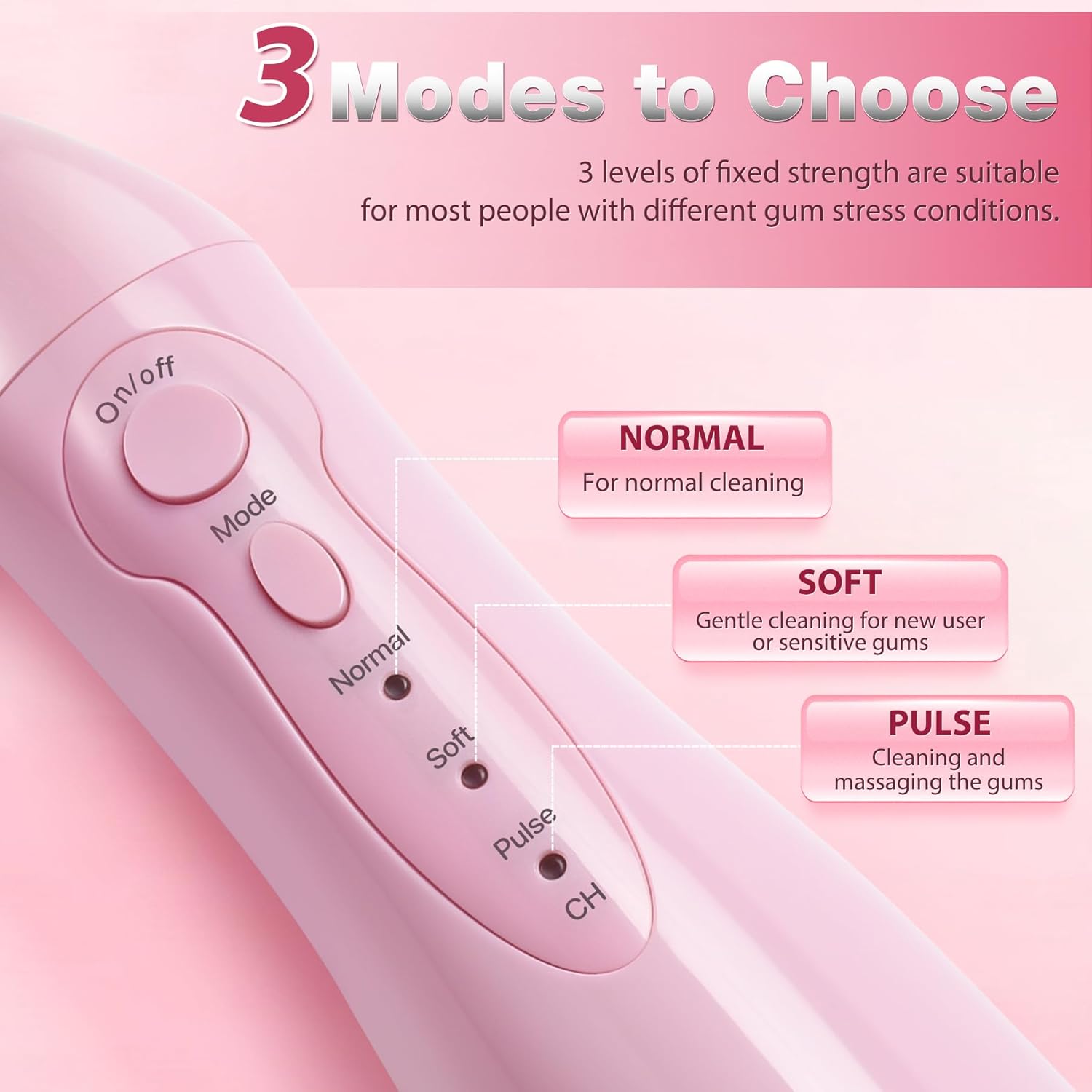
Figure 3: Illustration of the five different flosser tips and their recommended uses.
5.3 Filling the Water Tank
- Detach the water tank from the main unit by sliding it downwards.
- Open the water tank cap.
- Fill the tank with lukewarm water. You may add a small amount of mouthwash if desired.
- Close the water tank cap securely and reattach the tank to the main unit until it clicks.

Figure 4: Detachable 300ml water tank being filled with water.
6. Operating Instructions
- Select Mode: Press the "Mode" button to cycle through the three pressure settings:
- Normal: For daily cleaning and plaque removal.
- Soft: Gentle cleaning for new users, sensitive gums, or children.
- Pulse: For gum massage and enhanced cleaning.
- Position the Tip: Lean over a sink. Place the flosser tip into your mouth, aiming it at the gumline at a 90-degree angle. Slightly close your lips around the tip to prevent splashing, but allow water to flow into the sink.
- Start Flossing: Press the "On/Off" button to start the water stream.
- Guide the Stream: Move the flosser tip along the gumline and between each tooth. Pause briefly between teeth. Ensure you clean both the front and back surfaces of your teeth.
- Complete Cleaning: Continue until you have cleaned all areas of your mouth or the water tank is empty. The device will automatically shut off after 120 seconds to protect the motor.
- Finish: Press the "On/Off" button to turn off the device. Empty any remaining water from the tank.

Figure 5: Proper usage technique for the water flosser.

Figure 6: Close-up of the control panel for mode selection.
7. Maintenance
7.1 Cleaning the Unit
- After each use, empty any remaining water from the tank.
- Detach the water tank and rinse it thoroughly with clean water. Allow it to air dry.
- Rinse the flosser tip under running water.
- Wipe the main unit with a soft, damp cloth. Do not use abrasive cleaners or harsh chemicals.
- Ensure the charging port cover is always closed when not charging to prevent water ingress.
7.2 Storage
Store the water flosser in a cool, dry place away from direct sunlight when not in use. Ensure the water tank is empty and dry before storing for extended periods.
8. Troubleshooting
| Problem | Possible Cause | Solution |
|---|---|---|
| Device does not turn on. | Low battery. | Charge the device fully. |
| Weak water pressure. | Water tank is low or empty. | Refill the water tank. |
| Water leaks from the unit. | Water tank or charging port cover not properly sealed. | Ensure the water tank is securely attached and the charging port cover is tightly closed. |
| Device stops unexpectedly. | Automatic 120-second shut-off. | This is a normal function to protect the motor. Simply restart the device if needed. |
9. Specifications
| Model Number | F5020D |
| Product Dimensions | 3.5 x 2.4 x 9.3 inches |
| Weight | 15.52 ounces (approx. 0.97 lbs) |
| Water Tank Volume | 300 Milliliters |
| Power Source | Battery Powered (1 Lithium Ion battery included) |
| Charging Time | Approx. 4 hours for full charge |
| Battery Life | Up to 25-30 days on a single charge |
| Waterproof Rating | IPX7 |
| Modes | Normal, Soft, Pulse |
| Manufacturer | SHENZHEN RISUN TECHNOLOGY CO., LTD. |
10. Warranty and Support
For warranty information or technical support, please refer to the product packaging or contact TOVENDOR customer service directly. Keep your purchase receipt as proof of purchase.
Contact Information: Please refer to the official TOVENDOR website or your product packaging for the most up-to-date contact details.