
ASAHOM A1007
ASAHOM S1060 16.4ft Extension Lights User Manual
Model: A1007
Introduction
This manual provides comprehensive instructions for the installation, operation, and maintenance of your ASAHOM 16.4ft Extension Lights (Model A1007). These extension lights are designed exclusively for use with the ASAHOM S1060 series RGBCW Permanent Outdoor Lights Pro. Please read this manual thoroughly before installation and use to ensure proper function and safety.
Package Contents
Verify that all components are present before beginning installation:
- 1 x 16.4ft Black Extension Light Segment (with 12 LED lamps)
- Adhesion Prep Pad
- VHB Gum Stickers
- Mounting Clips
Note: The power adapter and control box are NOT included with this extension light package. This product is an extension and requires the ASAHOM S1060 series permanent outdoor lights pro for operation.
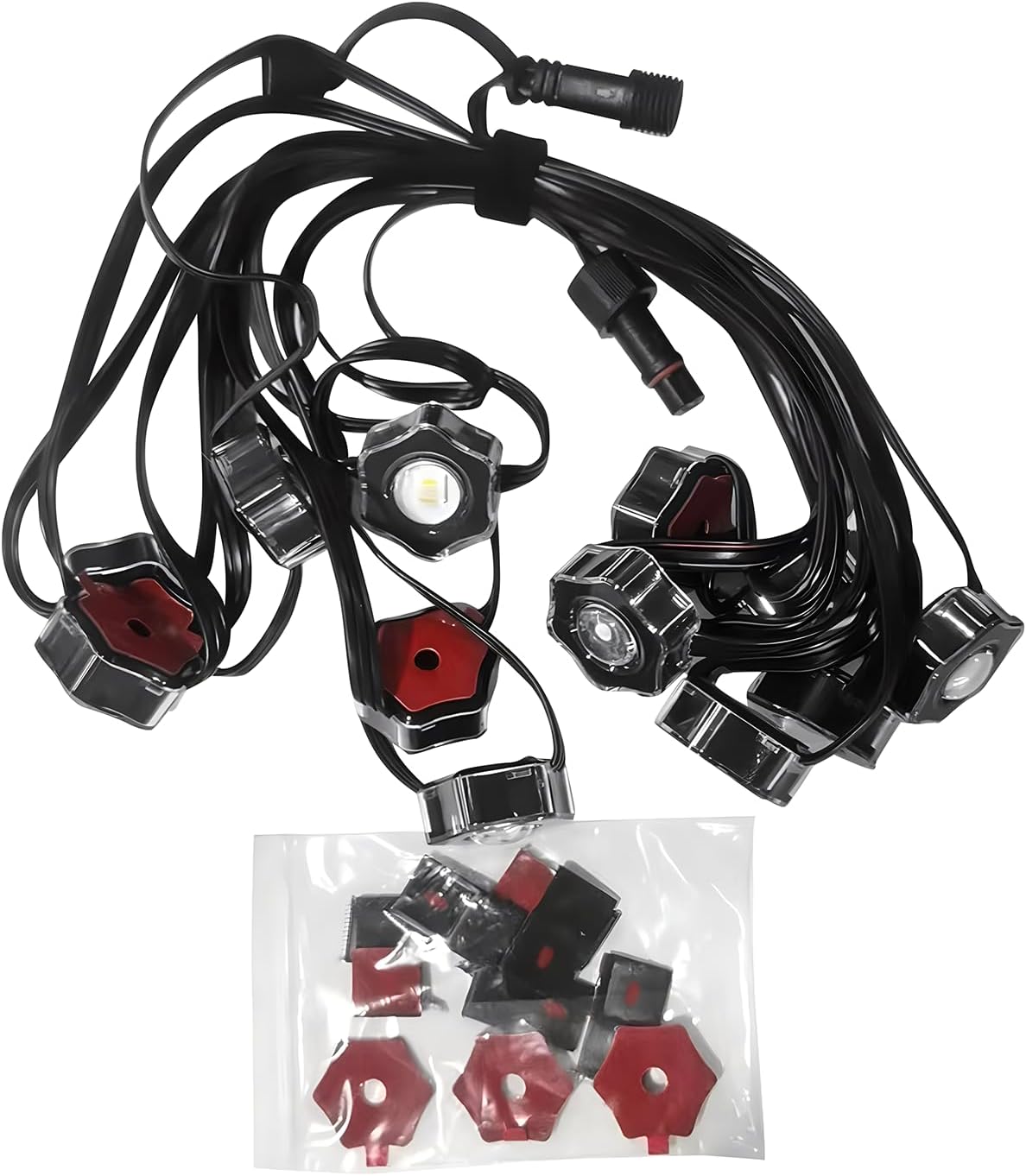
Image: Contents of the ASAHOM 16.4ft Extension Lights package, showing the light segment, connectors, and a bag of mounting clips and VHB gum stickers.
Safety Information
- Always disconnect power to the main S1060 light system before installing or removing extension lights.
- Ensure all connections are secure and waterproof joints are properly sealed to prevent water ingress.
- Do not cut, modify, or attempt to repair the light segments or wiring. This will void the warranty and may cause electrical hazards.
- Install lights in a location where they will not be a tripping hazard or subject to physical damage.
- Operating temperature range: -4°F to 113°F (-20°C to 45°C). Do not operate outside this range.
- This product is rated IP67 waterproof for outdoor use; however, avoid submerging the lights in water.
Setup and Installation
These extension lights are designed to expand your existing ASAHOM S1060 RGBCW Permanent Outdoor Lights Pro system. The S1060 system can connect up to a maximum of 9 light segments, extending the total length to 150ft.
- Preparation: Disconnect the power supply from your main ASAHOM S1060 light system before starting any installation.
- Surface Cleaning: Clean the installation surface thoroughly with a tissue. Then, use the enclosed Adhesion Prep Pad to clean the surface again. This step is crucial for ensuring strong adhesion of the mounting components.
- Pre-Installation Test: Before permanently mounting, connect the extension lights to your existing system and briefly test whether they function normally. This helps identify any issues before full installation.
- Mounting: Use the provided VHB gum stickers and clips to install each outdoor light. It is recommended to install the lights approximately 2-4 inches away from the wall surface.
- Connecting Segments: Splice the extension light segment into your existing S1060 system using the waterproof joints. Ensure these joints are securely fastened to maintain water resistance. Each segment is 16.4ft long.
- Placement: Install the lights on eaves, garages, walls, fences, or corridors as desired.
Operation
Once the extension lights are installed and connected to your ASAHOM S1060 main system, they will operate in conjunction with your existing setup. Control methods include app control, button control, remote control, and voice control, depending on your main S1060 system's capabilities.
App Synchronization for Added Segments
When you increase or decrease the number of string light segments connected to your system, it is essential to synchronize the changes within the control application:
- Ensure the lights are connected to the app.
- In the app interface, locate and click the "..." icon, typically found in the right corner.
- Navigate to "Light Number Setting".
- Click "Refresh".
After performing these steps, the entire strand of lights, including the newly added or removed segments, should synchronize and light up correctly according to your settings.
Maintenance
- Cleaning: Periodically clean the LED lamps and housing with a soft, damp cloth to remove dirt and debris. Do not use harsh chemicals or abrasive cleaners.
- Connection Check: Annually inspect all waterproof joints and connections to ensure they remain secure and free from damage.
- Mounting Security: Check the mounting clips and VHB stickers periodically to ensure the lights are still securely attached, especially after severe weather conditions.
Troubleshooting
- Lights not illuminating or individual lights not working:
- Ensure the main S1060 system is powered on.
- Check all connections, especially the waterproof joints between segments, to ensure they are fully engaged and secure.
- Verify that the app synchronization steps (as described in the "Operation" section) have been followed after adding or removing segments.
- Inspect for any visible damage to the wiring or individual LED lamps.
- Lights displaying incorrect colors or patterns:
- Perform the app synchronization ("Refresh" in "Light Number Setting") to ensure the system recognizes all connected segments.
- Restart the main S1060 control box and the app.
- Ensure the app is updated to the latest version.
- Lights falling off the mounting surface:
- Re-evaluate the installation surface. Ensure it was thoroughly cleaned with the Adhesion Prep Pad before applying VHB stickers.
- Replace VHB stickers and clips if they show signs of wear or reduced adhesion.
- Consider additional mounting points or stronger adhesive solutions if the environment is particularly harsh.
Specifications
| Model Number | A1007 |
| Length | 16.4 ft (5 meters) |
| Number of LED Lamps | 12 |
| Compatibility | ASAHOM S1060 RGBCW Permanent Outdoor Lights Pro series only |
| Light Source Type | LED |
| Light Color | Multicolor (RGBCW, controlled by main system) |
| Special Features | Color Changing, Dimmable, Energy Efficient, Waterproof (IP67) |
| Indoor/Outdoor Usage | Outdoor |
| Operating Temperature | -4°F to 113°F (-20°C to 45°C) |
| Lifespan | Up to 50,000 hours |
| Material | Plastic |
| Item Weight | 12.3 ounces (0.77 lbs) |
Warranty and Support
For warranty information and technical support, please refer to the documentation provided with your main ASAHOM S1060 RGBCW Permanent Outdoor Lights Pro system or contact ASAHOM customer service directly. Contact details can typically be found on the manufacturer's official website or through your purchase platform.
Please have your product model number (A1007) and purchase details ready when contacting support.
Related documentsA1007


Ask a question about this manual
Ask about setup, troubleshooting, compatibility, parts, safety, or missing instructions. Manuals+ will review the question and use this page’s manual context to help answer it.