
1. Introduction
This manual provides detailed instructions for the installation, operation, and maintenance of your Rollei IPC-88 Indoor Security Camera. Please read this manual thoroughly before using the product to ensure proper function and safety. Keep this manual for future reference.
2. Safety Information
- Ensure the camera is installed in a stable location to prevent falls.
- Do not expose the camera to water or moisture. This product is designed for indoor use only.
- Use only the provided power adapter. Using unauthorized adapters may damage the device and void the warranty.
- Keep the camera away from heat sources and direct sunlight.
- Do not attempt to disassemble or repair the camera yourself. Contact customer support for assistance.
- Keep out of reach of children and pets.
3. Package Contents
Verify that all items are present in the package:
- Rollei IPC-88 Indoor Security Camera
- Power Adapter
- Mounting Accessories (Wall mount, screws)
- User Manual (This document)
4. Product Overview
The Rollei IPC-88 is a 1080p Full HD indoor security camera featuring 360° pan/tilt functionality, motion detection, night vision, and two-way audio. It is designed for comprehensive home monitoring.

Image: Front view of the Rollei IPC-88 Indoor Security Camera, showing the lens and the Rollei logo on the base.

Image: Back view of the Rollei IPC-88 Indoor Security Camera, highlighting the speaker grille and the USB-C power port at the bottom.
Key Features:
- 1080p Full HD Resolution: Provides clear and detailed video footage (1920 x 1080p).
- 360° Pan/Tilt Functionality: Allows for flexible viewing angles and comprehensive room coverage.
- Intelligent Motion Detection & Tracking: Detects movement and automatically tracks the subject, sending instant notifications.
- Infrared Night Vision: Ensures clear visibility even in low-light or complete darkness.
- Two-Way Audio: Enables communication with individuals near the camera through the integrated microphone and speaker.
- App Control: Manage settings, view live footage, and access recordings via the Smart Life application.
- Voice Control: Compatible with Amazon Alexa and Google Assistant for convenient hands-free operation.
5. Setup
5.1 Physical Installation
The Rollei IPC-88 camera offers flexible installation options:
- Standalone Placement: Place the camera on a flat surface such as a shelf, table, or cabinet.
- Wall Mounting: Use the provided wall mount and screws to secure the camera to a wall. Ensure the mounting surface is stable and can support the camera's weight.

Image: The Rollei IPC-88 camera positioned on a white table, demonstrating standalone placement.
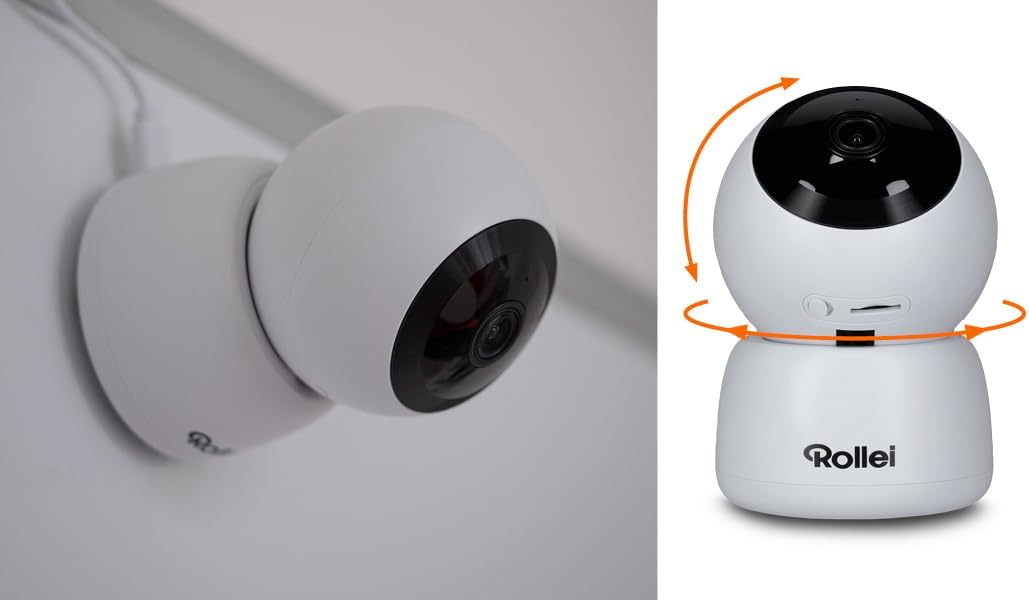
Image: The Rollei IPC-88 camera securely mounted on a wall, illustrating an alternative installation method.
5.2 Power Connection
- Connect the power adapter to the USB-C port on the back of the camera.
- Plug the power adapter into a standard electrical outlet.
- The camera will power on, and an indicator light will illuminate.
5.3 App Installation and Pairing
- Download the Smart Life app from your smartphone's app store (iOS or Android).
- Register for a new account or log in if you already have one.
- Tap the "+" icon in the top right corner of the app to add a new device.
- Select "Security & Video Surveillance" and then choose "Smart Camera (Wi-Fi)".
- Follow the on-screen instructions to connect the camera to your Wi-Fi network. Ensure your Wi-Fi network is 2.4GHz.
- The app will guide you through scanning a QR code displayed on your phone with the camera lens.
- Once connected, you can name your camera and begin monitoring.

Image: A smartphone screen showing the Smart Life application interface, demonstrating the camera's live view and control options.
6. Operating Instructions
6.1 Live View and Pan/Tilt Control
Open the Smart Life app and select your IPC-88 camera to access the live view. You can control the camera's pan (horizontal) and tilt (vertical) movements directly from the app interface to adjust the viewing angle.

Image: The Rollei IPC-88 camera with circular arrows illustrating its 360-degree rotational capability.
6.2 Motion Detection and Tracking
The camera features three levels of motion detection sensitivity. When motion is detected, the camera can automatically track the moving object and send instant notifications to your smartphone via the Smart Life app. Adjust sensitivity settings in the app to minimize false alarms.
6.3 Night Vision
The integrated infrared night vision function automatically activates in low-light conditions, providing clear black-and-white video footage up to several meters. This ensures continuous monitoring day and night.

Image: The Rollei IPC-88 camera in a dimly lit room, demonstrating its night vision capabilities with a crib in the background.
6.4 Two-Way Audio
Utilize the two-way audio feature to communicate through the camera. Tap the microphone icon in the app to speak, and the sound will be emitted from the camera's speaker. You can also hear audio from the camera's surroundings through your phone.
6.5 Recording and Storage
The camera supports local storage via a microSD card (not included) and cloud storage (subscription may be required). Insert a microSD card into the designated slot on the camera for continuous or event-based recording. Manage recordings and playback through the Smart Life app.
6.6 Voice Control
Integrate your Rollei IPC-88 with Amazon Alexa or Google Assistant for voice-activated control. Follow the instructions within the Smart Life app or your smart home assistant app to link the devices. You can then use voice commands to view the camera feed on compatible smart displays.
7. Maintenance
- Cleaning: Gently wipe the camera lens and body with a soft, dry cloth. Do not use liquid cleaners or abrasive materials.
- Firmware Updates: Regularly check the Smart Life app for available firmware updates to ensure optimal performance and security.
- Placement: Periodically check the camera's mounting to ensure it remains secure.
8. Troubleshooting
| Problem | Possible Cause | Solution |
|---|---|---|
| Camera not powering on | Power adapter not connected; Power outlet issue | Ensure power adapter is securely connected; Try a different power outlet. |
| Unable to connect to Wi-Fi | Incorrect Wi-Fi password; Camera too far from router; 5GHz Wi-Fi network | Verify Wi-Fi password; Move camera closer to router; Ensure you are connecting to a 2.4GHz Wi-Fi network. |
| No live view in app | Internet connection issue; Camera offline | Check your internet connection; Restart the camera and router; Re-pair the camera if necessary. |
| Motion detection not working | Sensitivity too low; Feature disabled | Adjust motion detection sensitivity in the app; Ensure motion detection is enabled. |
| Two-way audio not functioning | Microphone/speaker muted in app; Volume too low | Check app settings to ensure audio is enabled and volume is adequate. |
9. Specifications
| Feature | Detail |
|---|---|
| Model Name | Indoor Security Cam IPC-88 |
| Resolution | 1920 x 1080p (Full HD) |
| Viewing Angle | 360 Degrees (Pan/Tilt) |
| Connectivity | Wi-Fi (2.4GHz), Wireless, Ethernet Protocol |
| Special Features | Night Vision, Motion Detection, Two-Way Audio |
| Usage | Indoor |
| Compatible Devices | Smartphone (via Smart Life app) |
| Installation Type | Standalone, Wall Mount |
| Dimensions (L x W x H) | 10.4 x 7.1 x 7.1 cm |
| Material | Metal |
| Color | White |
10. Warranty and Support
For warranty information and technical support, please refer to the official Rollei website or contact your local distributor. Keep your proof of purchase for warranty claims.