
ZIOVO Z168
ZIOVO Z168 Android 14 Tablet User Manual
Model: Z168 | Brand: ZIOVO
Welcome to Your ZIOVO Z168 Tablet
Thank you for choosing the ZIOVO Z168 Android 14 Tablet. This manual provides essential information for setting up, operating, and maintaining your new device. Please read it thoroughly to ensure optimal performance and longevity of your tablet.
What's in the Box
Upon opening your ZIOVO Z168 Tablet package, please verify that all the following items are included:
- 1 x 10 inch Tablet with Case
- 1 x Charging Adapter with Type C Cable
- 1 x Bluetooth Keyboard
- 1 x Wireless Mouse (Bluetooth not available)
- 1 x Screen Protector
- 1 x Well-designed Box
- 1 x User Manual

Image: All components included in the ZIOVO Z168 Tablet package, neatly arranged.
Product Overview
Familiarize yourself with the physical components and interfaces of your ZIOVO Z168 Tablet.
Image: Detailed diagram illustrating the location of buttons, ports, and cameras on the ZIOVO Z168 Tablet.
Physical Components:
- Reset Button: Small pinhole for system reset.
- Power On/Off Button: Used to power the device on or off, and to wake/sleep the screen.
- Volume Buttons (+/-): Adjusts audio volume.
- USB Type-C Interface: For charging and data transfer.
- 3.5mm AUX Slot: For connecting headphones or external audio devices.
- Front Camera: 5MP for video calls and selfies.
- Double Speaker: Provides stereo audio output.
- Rear Camera/Flash: 8MP main camera with LED flash.
- TF Card Slot: For expandable storage up to 1TB.
Setup Guide
1. Initial Charging
Before first use, fully charge your tablet using the provided Type-C cable and charging adapter. The battery indicator on the screen will show charging progress.
2. Powering On
Press and hold the Power On/Off button until the ZIOVO logo appears. Follow the on-screen prompts to complete the initial Android 14 setup, including language selection, Wi-Fi connection, and Google account login.
3. Connecting Accessories (Keyboard & Mouse)
Your tablet comes with a Bluetooth keyboard and a wireless mouse for enhanced productivity.
Connecting the Bluetooth Keyboard:
- Ensure the keyboard is charged and powered on.
- On your tablet, go to Settings > Connected devices > Pair new device.
- Select "Bluetooth 3.0 Keyboard" from the list of available devices.
- Follow any on-screen prompts to complete pairing.
Connecting the Wireless Mouse:
- Open the battery back cover of the mouse and insert the signal receiver. Ensure batteries are installed (not included).
- Connect the adapter to the Type-C port of the tablet.
- Insert the signal receiver of the mouse into the female end of the adapter.
- Turn on the mouse. The mouse should connect automatically.

Image: Visual guide for pairing the Bluetooth keyboard and connecting the wireless mouse.
Operating Instructions
Android 14 Operating System
Your ZIOVO Z168 Tablet runs on the latest Android 14, offering enhanced security, privacy features, and a user-friendly interface. The Octa-Core processor ensures smooth performance for all your applications.

Image: Overview of the Android 14 system and its key features.

Image: Android 14 system highlights, including access to Google Play Store and privacy features.
Display and Multimedia
The 10.1-inch HD IPS display (1280x800 pixels) provides a vibrant visual experience. With Widevine L1 certification, you can enjoy high-quality video playback from popular streaming services like Hulu, Amazon Prime Video, Disney+, and YouTube.
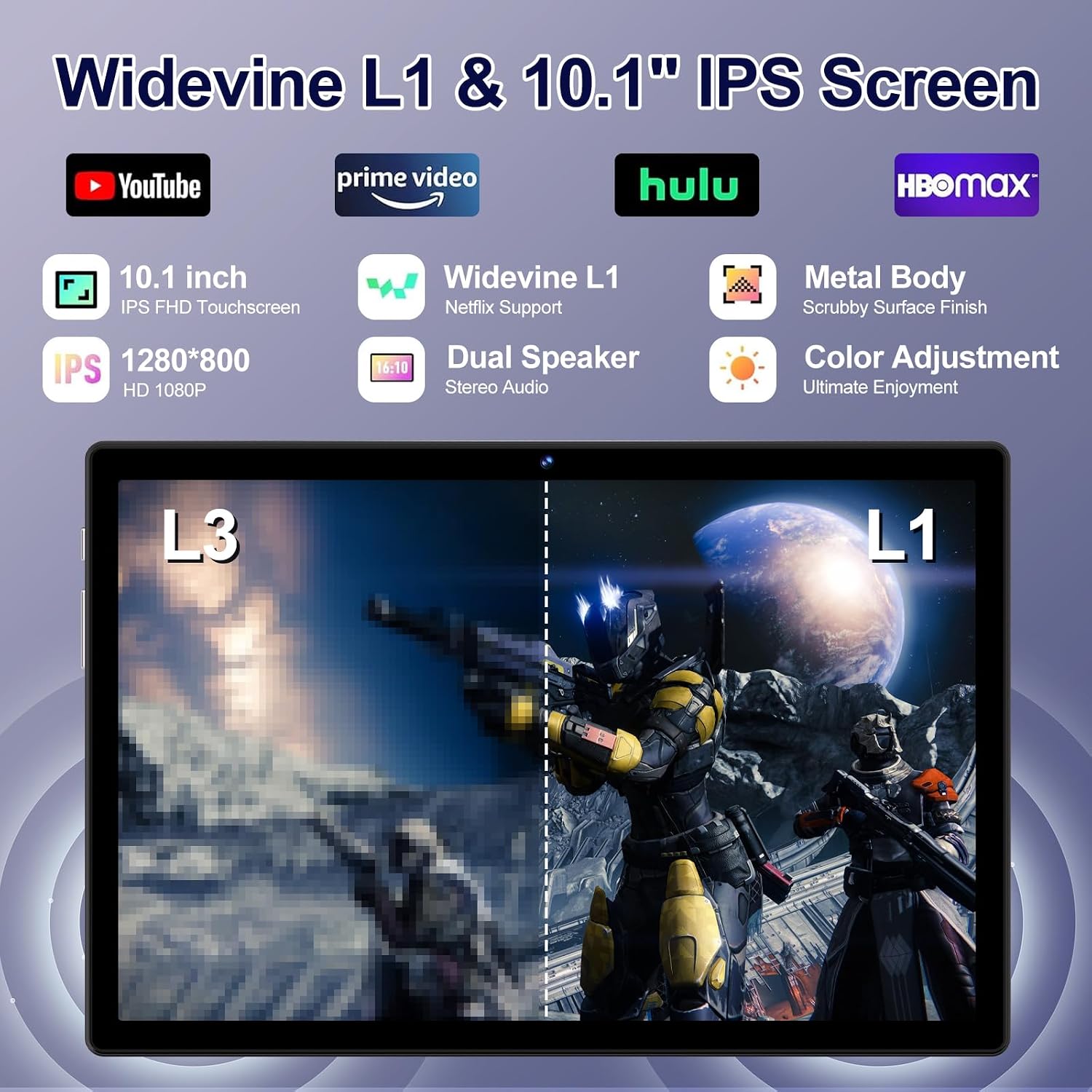
Image: Visual demonstration of Widevine L1 quality for streaming.

Image: Icons of streaming services supported by Widevine L1.
Dual speakers provide clear stereo audio for an immersive experience.
Storage and Performance
The tablet features 22GB RAM (6GB physical + 16GB virtual) and 128GB ROM, expandable up to 1TB with an SD card (sold separately). This ample storage allows you to install numerous applications, games, and media files.

Image: Visual representation of storage capacity and application usage.

Image: Infographic detailing RAM, ROM, and expandable storage.
Connectivity
The tablet supports 2.4G/5G dual-band Wi-Fi for stable and high-speed internet access. Bluetooth 5.0 allows for quick and easy connection to various Bluetooth devices, such as headphones, speakers, and the included keyboard.
Cameras
Capture moments with the 8MP rear camera and engage in clear video chats with the 5MP front camera.
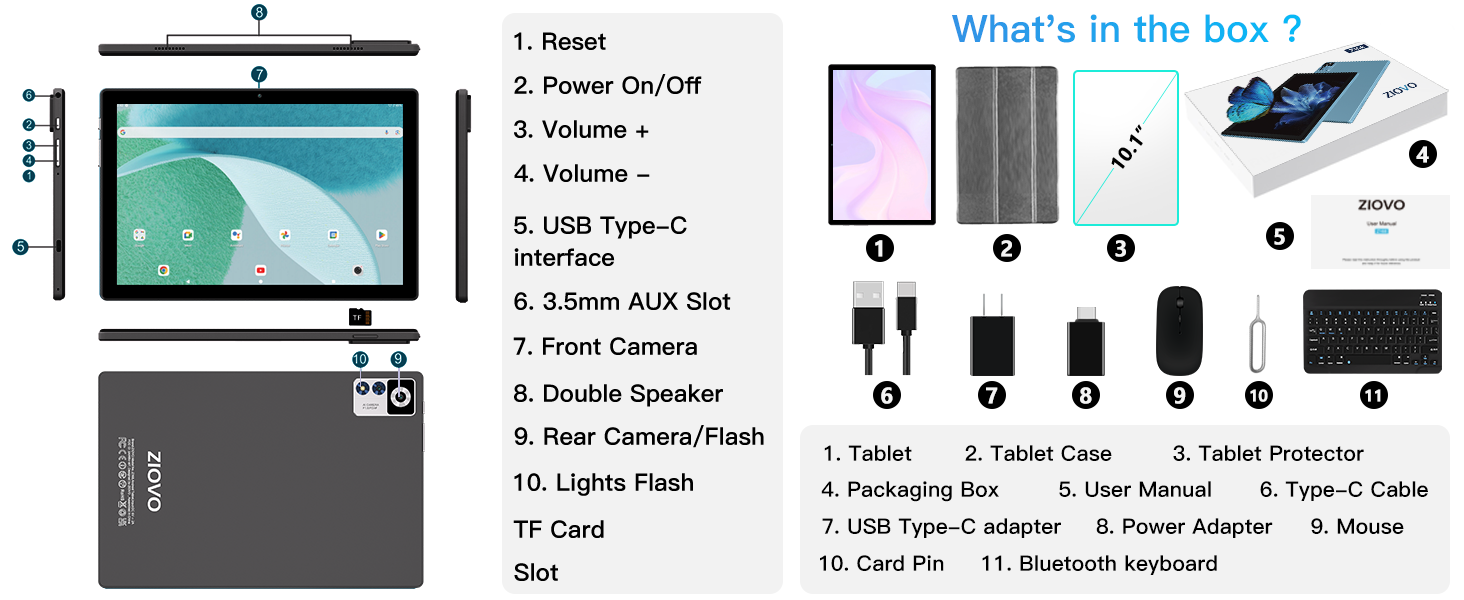
Image: Details on the tablet's front and rear camera capabilities.
Advanced Features
- Split Screen: Enhance productivity by running two applications side-by-side. To activate, click the square button (recent apps), then click on the app icon above and select "Split screen".

Image: Visual guide for using the split-screen feature.
- Face Unlock: Securely unlock your tablet using facial recognition for convenient, password-free access.

Image: Demonstration of the Face Unlock feature.
- Screen Project/Casting: Wirelessly cast your tablet's screen to a larger display for presentations or entertainment.

Image: Illustrating the wireless screen casting capability.
- GPS Functionality: Utilize the built-in GPS for navigation. You can download offline maps for use without an internet connection.

Image: Tablet used for GPS navigation in a vehicle.
- Parental Control: Manage screen time, filter content, and ensure a safe digital environment for children.

Image: Depiction of parental control features in use.
Battery Life
The 8000mAh battery provides extended usage time, allowing you to enjoy your tablet for longer periods without frequent recharging. Average battery life is approximately 8 hours, depending on usage.

Image: Visual representation of the tablet's long-lasting 8000mAh battery.
Maintenance
Proper maintenance ensures the longevity and optimal performance of your ZIOVO Z168 Tablet.
- Cleaning: Use a soft, lint-free cloth to clean the screen and body. Avoid abrasive cleaners or solvents.
- Software Updates: Regularly check for and install system updates to ensure your tablet has the latest features, security patches, and performance improvements. Go to Settings > System > System update.
- Battery Care: Avoid extreme temperatures. Do not let the battery fully drain frequently. For long-term storage, charge the battery to about 50%.
- Storage Management: Periodically clear unnecessary files and apps to free up storage space and maintain performance.
- Protection: Use the provided case and screen protector to guard against scratches and minor impacts.
Troubleshooting
This section addresses common issues you might encounter with your tablet.
| Problem | Solution |
|---|---|
| Tablet does not power on. | Ensure the tablet is fully charged. Press and hold the Power button for at least 10-15 seconds. If unresponsive, use a pin to press the Reset button. |
| Wi-Fi connection issues. | Restart your Wi-Fi router. On the tablet, turn Wi-Fi off and then on again. Forget the network and reconnect. Ensure you are within range. |
| Bluetooth accessories not connecting. | Ensure the accessory is in pairing mode and fully charged. On the tablet, turn Bluetooth off and on. Remove previous pairings and try again. For the mouse, ensure the USB receiver is correctly inserted via the Type-C adapter. |
| Tablet is slow or unresponsive. | Close unused applications. Clear cache and data for problematic apps. Restart the tablet. Check for available system updates. |
| Screen rotation not working. | Check if auto-rotate is enabled in Quick Settings (swipe down from top). Restart the tablet. |
Technical Specifications
| Feature | Detail |
|---|---|
| Model | Z168 |
| Operating System | Android 14 |
| Processor | Unisoc T606 Octa-Core, 2.0 GHz |
| RAM | 22GB (6GB Physical + 16GB Virtual) |
| Internal Storage (ROM) | 128GB |
| Expandable Storage | Up to 1TB via TF Card (not included) |
| Screen Size | 10.1 Inches |
| Screen Resolution | 1280 x 800 Pixels (HD IPS) |
| Rear Camera | 8 MP |
| Front Camera | 5 MP |
| Battery Capacity | 8000mAh |
| Average Battery Life | 8 Hours |
| Wireless Connectivity | 802.11a/b/g/n/ac (2.4G/5G Dual Band Wi-Fi), Bluetooth 5.0 |
| Dimensions (LxWxH) | 9.6 x 6.6 x 0.5 inches |
| Item Weight | 2.9 pounds |
| Special Features | Widevine L1, GPS, Split Screen, Face Unlock, Parental Control |
Warranty and Support
ZIOVO stands behind the quality of its products. Your ZIOVO Z168 Tablet comes with a 2-year warranty.
For any questions, technical assistance, or warranty claims, please contact ZIOVO US Direct, the seller of this product. You can typically find their contact information through your purchase platform or by visiting the ZIOVO brand store.
Seller: ZIOVO US Direct
We are committed to providing a pleasant shopping experience and prompt support.
Ask a question about this manual
Ask about setup, troubleshooting, compatibility, parts, safety, or missing instructions. Manuals+ will review the question and use this page’s manual context to help answer it.