
1. Introduction and Overview
Thank you for choosing the PHILIPS High Lumens Rechargeable Tactical Flashlight. This manual provides essential information for the safe and effective operation, maintenance, and troubleshooting of your new device. Designed for versatility and durability, this flashlight is an ideal companion for various activities, from home emergencies to outdoor adventures.
Key features include a powerful 1500-lumen LED, zoomable functionality for adjustable beam focus, and multiple lighting modes. Unique to this model are its integrated camping lamp function with adjustable color temperatures and an emergency ignition focusing lens. The flashlight is built with a robust aluminum alloy body, offering shock and water resistance, and features convenient Type-C charging with reverse charging capabilities.
2. What's in the Box
Upon opening your package, please ensure all items listed below are present:
- LED Rechargeable Flashlight with Ambient Lamp
- A Type-C charging cable
- A tactical lanyard
- Ignition Focusing Lens
- 5000mAh Battery
3. Setup
Before first use, please follow these steps:
- Battery Insertion: Remove the battery separator (if present) from the 5000mAh battery. Insert the battery into the flashlight with the positive (+) end facing towards the head of the flashlight.
- Initial Charge: It is recommended to fully charge the flashlight before its first use to ensure optimal performance and battery longevity. Connect the provided Type-C charging cable to the flashlight's charging port and a suitable USB power source. The battery level indicator will show charging status.

Figure 3.1: Proper battery insertion into the flashlight.
4. Operating Instructions
4.1 Power On/Off and Lighting Modes
- Power On: Single-click the power button to turn on the flashlight.
- Change Modes: While the flashlight is on, single-click the power button to cycle through the five lighting modes: Low, Medium, High, Strobe, and SOS.
- Power Off: In any mode, after 8 seconds of inactivity or when the green light indicator is off, single-click to turn off the flashlight. Alternatively, a long press will also turn off the flashlight.

Figure 4.1: The flashlight offers five distinct brightness modes for various needs.
4.2 Zoom Function (Spotlight & Floodlight)
The flashlight features an adjustable zoom function to switch between a focused spotlight and a wide floodlight beam:
- Spotlight: Stretch the flashlight handle forward (zoom out) to narrow the beam and illuminate objects up to 5,000 feet.
- Floodlight: Retract the flashlight handle (zoom in) to widen the beam, covering a larger area of up to two football fields.
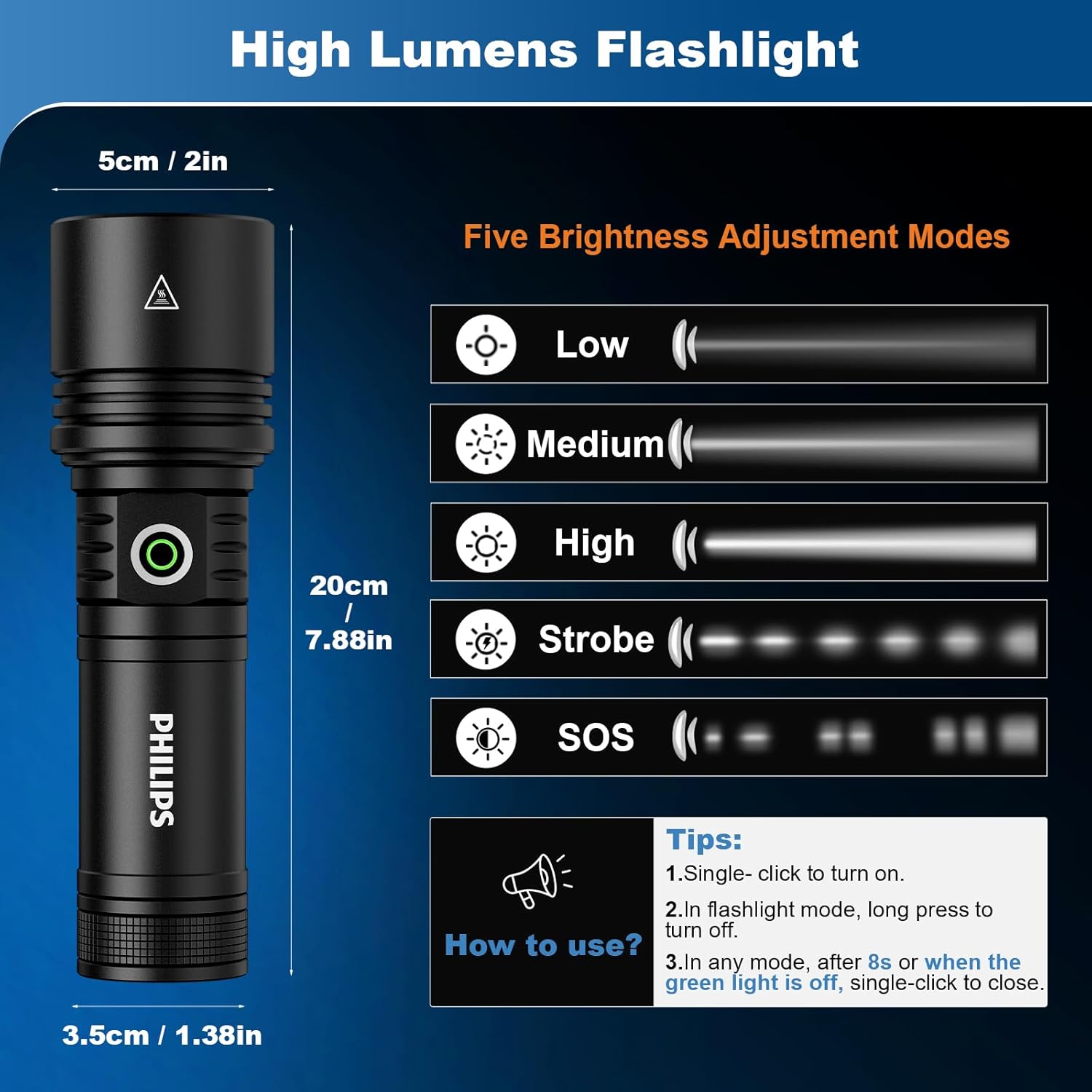
Figure 4.2: Adjust the flashlight head to switch between focused spotlight and wide floodlight.
4.3 Camping Lamp (Ambient Light)
To activate the ambient camping lamp feature:
- Activate Ambient Light: Zoom out the flashlight handle completely, then double-click the power switch.
- Change Color Temperature: While the ambient light is active, long press the power button to switch between natural white and warm white light.
- Adjust Brightness: Single-click the power button to cycle through ambient light brightness settings: Medium, High, or Breathing light.

Figure 4.3: The flashlight can extend to provide ambient lighting in two color temperatures.
4.4 Ignition Focusing Lens
The included Ignition Focusing Lens allows for emergency fire starting by concentrating the flashlight's beam:
- Attach Lens: Place the lens on the head of the flashlight and rotate it to securely combine with the flashlight.
- Position for Ignition: Stretch the flashlight handle to its full extension. Place a dark, flammable item (e.g., tinder, dry leaves) at a distance of 2cm (0.78in) to 3cm (1.15in) from the top of the flashlight.
- Ignite: Wait less than 1 minute for ignition.
Note: Remove the focus lens and retract the handle for storage after use to prevent accidental ignition or damage.

Figure 4.4: Step-by-step guide for attaching and using the ignition lens.
5. Charging and Power Bank Function
Your PHILIPS flashlight is designed for convenient charging and can also serve as a power bank:
- Charging: The flashlight charges quickly via its Type-C port. Connect the provided Type-C cable to the flashlight and a compatible USB power adapter. The battery level indicator will show charging progress (red for charging, green for fully charged).
- Reverse Charging (Power Bank): The flashlight can power your other devices (e.g., smartphones) via its USB connector. Simply plug your device's charging cable into the flashlight's USB-A output port.
- Battery Life: With its 5000mAh battery, the flashlight provides up to 70 hours of continuous use on lower settings. A built-in battery level indicator helps you monitor remaining power.

Figure 5.1: The flashlight supports both Type-C input charging and USB-A output for powering other devices.
6. Care and Maintenance
To ensure the longevity and optimal performance of your PHILIPS flashlight, follow these care and maintenance guidelines:
- Cleaning: Wipe the flashlight body with a soft, damp cloth. Do not use abrasive cleaners or solvents.
- Storage: Store the flashlight in a cool, dry place away from direct sunlight and extreme temperatures. If storing for extended periods, ensure the battery is partially charged (around 50%) and recharge it every 3-6 months to prevent deep discharge.
- Durability: The flashlight is made with durable aluminum alloy and can withstand drops from up to 1.2 meters. It is also water-resistant, making it reliable in various weather conditions.

Figure 6.1: The flashlight is designed to be rainproof and shock-resistant for robust outdoor use.
7. Troubleshooting
If you encounter issues with your PHILIPS flashlight, please refer to the common problems and solutions below:
| Problem | Possible Cause | Solution |
|---|---|---|
| Flashlight does not turn on or is dim. | Low battery; battery not inserted correctly; battery separator not removed. | Ensure battery separator is removed. Fully charge the battery using the provided cable. Re-insert battery correctly. |
| Charging indicator does not light up. | Incorrect charging cable; loose connection. | Use only the provided Type-C charging cable. Ensure the cable is securely connected to both the flashlight and the power source. |
| Ambient lamp not activating. | Incorrect activation sequence. | Ensure the flashlight handle is fully zoomed out, then double-click the power switch. |
| Ignition lens not working effectively. | Incorrect distance or material; lens not properly attached. | Ensure the lens is securely attached. Adjust the distance to 2-3cm from a dark, flammable material. Allow sufficient time (up to 1 minute). |
For any issues not covered here, please contact the seller (Philips Flashlight) via Amazon for assistance. They offer 24-hour online support.
8. Specifications
| Feature | Value |
|---|---|
| Brand | PHILIPS |
| Model Number | PHILIPS Flashlights High Lumens |
| Light Source Type | LED |
| Brightness | 1500 Lumens (Flashlight), 10000 Lumens (White Brightness) |
| Power Source | Battery Powered (Rechargeable) |
| Battery Type | 1 x 5000mAh Lithium Ion (included) |
| Runtime | Up to 70 hours |
| Charging Port | Type-C (Input), USB-A (Output for reverse charging) |
| Water Resistance Level | Waterproof |
| Shock Resistance | Withstands drops from up to 1.2 meters |
| Material | Durable Aluminum Alloy |
| Product Dimensions | 4.7 x 2.75 x 8.9 inches |
| Item Weight | 1.54 pounds |
| Special Features | Rechargeable, Reverse Charging, Ignition Focusing Lens, Zoomable, 5 Lighting Modes, Ambient Lamp (Natural White/Warm White) |
9. Warranty and Support
PHILIPS stands behind the quality of its products. Your flashlight comes with a One-Year Warranty from the date of purchase.
During the warranty period, if you experience any product problems or have suggestions, please contact the seller (Philips Flashlight) directly via Amazon. They are committed to providing free return and exchange service and offer 24-hour online support to ensure your satisfaction.
For the fastest service, please ensure you contact the official Philips Flashlight seller on Amazon.