
1. Introduction
The Shimbol TP Mini Max is a compact and efficient wireless video transmission system designed for professional video production. It consists of a transmitter (TX) and a receiver (RX) unit, enabling high-quality video and audio transmission over significant distances with minimal latency. This manual provides detailed instructions for the proper setup, operation, and maintenance of your TP Mini Max system.
2. Product Overview
The TP Mini Max system offers reliable wireless video transmission with advanced features for various applications.
Key Features:
- Long-distance Transmission: Up to 600 feet (180 meters) line-of-sight.
- Ultra-low Latency: As low as 0.07 seconds for real-time monitoring.
- High-definition Video: Supports up to 1080P60 resolution with simultaneous audio and video transmission.
- HDMI Loop-out: Transmitter features an HDMI loop-out for local monitoring.
- Fanless Design: Ensures quiet operation, ideal for sound-sensitive environments.
- Multiple Power Options: Supports NPF batteries (not included) and Type-C power banks.
- Durable Construction: Aviation aluminum alloy shell for enhanced durability and portability.
Components:

The Shimbol TP Mini Max system includes a transmitter (TX) and a receiver (RX) unit, designed for wireless video transmission.

This image highlights the system's capability for long-distance transmission up to 600 feet with ultra-low latency of 0.07 seconds, suitable for various professional scenarios.

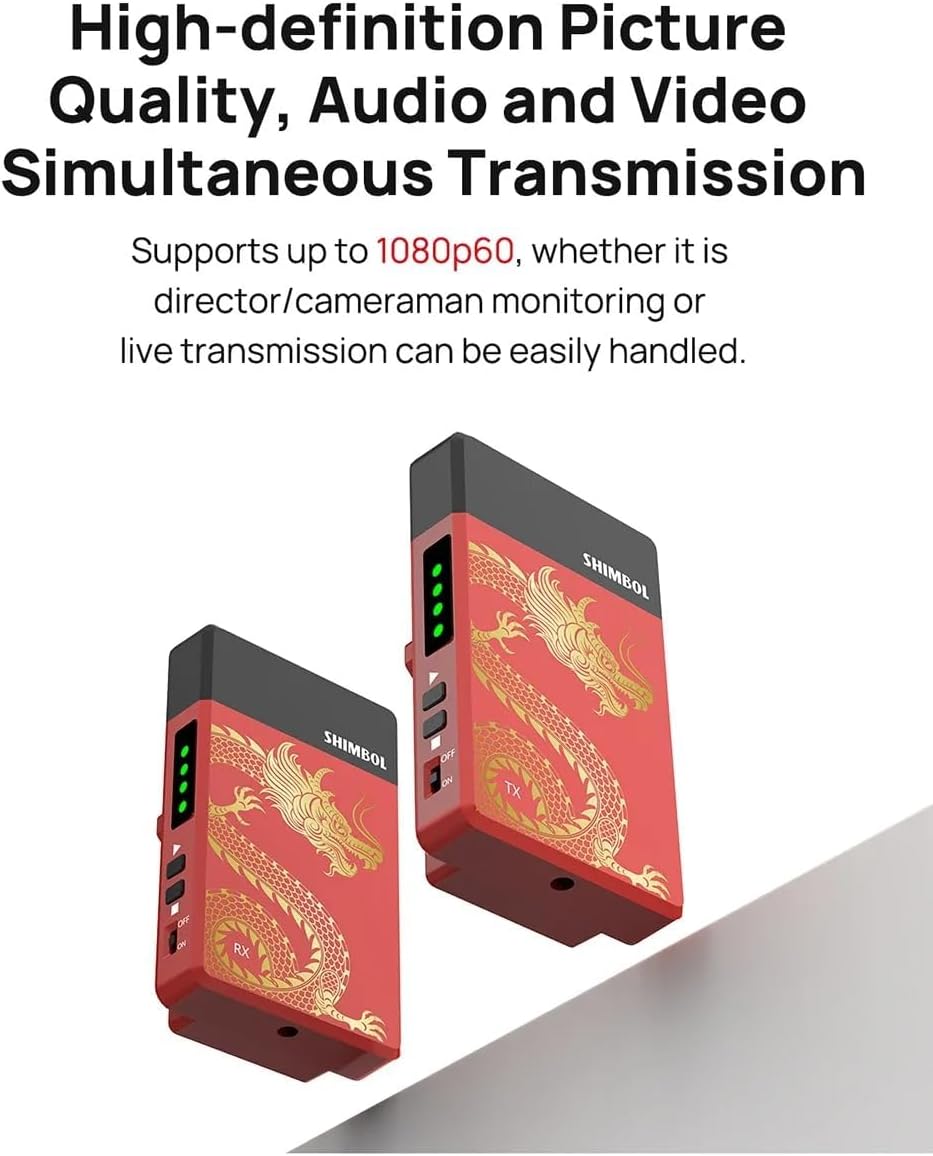
The system supports high-definition picture quality up to 1080P60, ensuring clear audio and video for monitoring and live transmission.

Constructed with an aviation aluminum alloy shell, the units are light, durable, and feature a classic sandblasted paintwork.
The system can be powered by NPF batteries or a power bank via the Type-C port, offering flexible power solutions.
What's in the Box:

The package includes one TP Mini Wireless Transmitter, one TP Mini Wireless Receiver, a user manual, two decorative stickers, and one USB charging cable.
3. Setup Instructions
Follow these steps to set up your Shimbol TP Mini Max system:
- Power Supply:
- Attach a fully charged NPF battery (not included) to the battery plate on both the transmitter (TX) and receiver (RX) units.
- Alternatively, connect a power bank to the Type-C port on each unit using the provided USB charging cable.
- Connect Transmitter (TX):
- Connect your video source (e.g., camera, camcorder) to the HDMI IN port of the TX unit using an HDMI cable (not included).
- If local monitoring is required, connect a monitor to the HDMI OUT (loop-out) port of the TX unit.
- Connect Receiver (RX):
- Connect your display device (e.g., monitor, TV, video switcher) to the HDMI OUT port of the RX unit using an HDMI cable (not included).
- Power On: Turn on both the TX and RX units using their respective power switches. The units will automatically pair.

The image displays the HDMI input and output ports on the Shimbol TP Mini Max unit, essential for connecting your video source and display.
This video provides a visual guide on how to set up the Shimbol TP Mini Max system, including connecting power and HDMI cables.
4. Operating Instructions
Once both units are powered on and connected, the system will automatically establish a wireless connection. The status indicators on the units will confirm successful pairing.
- Monitoring: The video feed from your source connected to the TX unit will be displayed on the monitor connected to the RX unit.
- Fanless Operation: The fanless design ensures silent operation, preventing unwanted noise interference during recording or live broadcasts.
- Frequency Hopping: The system utilizes intelligent frequency hopping for ultra-stable connection and enhanced anti-interference capabilities.
5. Maintenance
To ensure the longevity and optimal performance of your TP Mini Max system, follow these maintenance guidelines:
- Cleaning: Use a soft, dry cloth to clean the units. Avoid using liquid cleaners or solvents.
- Storage: When not in use, store the units in a cool, dry place, away from direct sunlight and extreme temperatures. It is recommended to use the original packaging or a protective case.
- Battery Care: If using NPF batteries, ensure they are charged and stored according to the battery manufacturer's recommendations. Remove batteries if the units will not be used for an extended period.
6. Troubleshooting
If you encounter issues with your TP Mini Max system, refer to the following common problems and solutions:
- No Video Signal:
- Ensure both TX and RX units are powered on.
- Verify all HDMI cables are securely connected to the correct ports.
- Check the video source output and display input settings.
- Confirm the distance between TX and RX is within the 600ft range and there are no significant obstructions.
- Intermittent Signal/Poor Quality:
- Reduce the distance between the TX and RX units.
- Minimize physical obstructions (walls, large metal objects) between the units.
- Avoid areas with high Wi-Fi or other wireless interference.
- Power Issues:
- Ensure NPF batteries are fully charged or the Type-C power source is providing adequate power.
- Check the power cables and connections.
7. Specifications
| Feature | Specification |
|---|---|
| Model Number | TP M1 |
| Transmission Range | Up to 600 feet (line-of-sight) |
| Latency | 0.07 seconds |
| Video Resolution | Up to 1080P60 |
| Input/Output | HDMI |
| Power Supply | NPF Batteries, Type-C (5V) |
| Shell Material | Aviation Aluminum Alloy |
| Item Weight | 13.1 ounces (approx. per unit) |
| Package Dimensions | 5.08 x 3.82 x 3.11 inches |
8. Warranty and Support
For warranty information or technical support, please contact Shimbol customer service or refer to the official Shimbol website. Keep your purchase receipt as proof of purchase for any warranty claims.