
1. Introduction
The YYGGWL M96 Mini Invisible Sleep Earphones are designed for comfort and high-quality audio, especially for extended wear and sleep. Featuring Bluetooth 5.3 technology, these earphones provide stable connectivity and clear sound. Their IPX5 waterproof rating makes them suitable for various activities, offering protection against sweat and light rain. The ergonomic, invisible design ensures a secure and comfortable fit, even when sleeping on your side.
Key features include:
- Bluetooth 5.3 for stable and low-latency transmission.
- IPX5 waterproof rating for protection against sweat and light rain.
- Invisible sleep earphone design for comfortable nighttime use.
- Hybrides technology vocalism for clear, natural sound quality.
- Durable plastic construction for long-lasting performance.
- Secure ear hook style for active lifestyles.
- CVC 8.0 and ENC noise cancellation for clear calls.
2. What's in the Box
Please check the package contents to ensure all items are present:
- YYGGWL M96 Mini Invisible Sleep Earphones (Left and Right)
- Charging Case
- USB Type-C Charging Cable (approx. 200mm)
- User Manual (Chinese/English)
3. Specifications
| Parameter | Value |
|---|---|
| Bluetooth Version | 5.3 |
| Play Time | Approx. 5 hours (earbuds), 7-8 hours (single charge), 33 hours (with charging case) |
| Standby Time | Approx. 240 hours |
| Headphone Charging Time | Approx. 1.5 hours |
| Headphone Battery Capacity | 30mAh |
| Charging Voltage | DC 5V |
| Charging Port | Type-C |
| Wireless Range | Up to 10 meters (33 feet) |
| Frequency Range | 20Hz-20KHz |
| Material | ABS + PC Plastic |
| Signal-to-Noise Ratio | >92DB |
| Control Type | Key/Touch |
| Waterproof Rating | IPX5 |
| Item Weight | 150 Grams |
4. Setup
4.1 Charging the Earphones and Case
Before first use, fully charge the earphones and the charging case.
- Place the earphones into the charging case. Ensure they are correctly seated in their respective slots.
- Connect the Type-C charging cable to the charging port on the case and the other end to a DC 5V power source (e.g., USB wall adapter, computer USB port).
- The digital display on the charging case will indicate the battery level. The earphones will show a charging indicator (e.g., LED light) while charging.
- Charging time for headphones is approximately 1.5 hours. The case will take longer to fully charge.
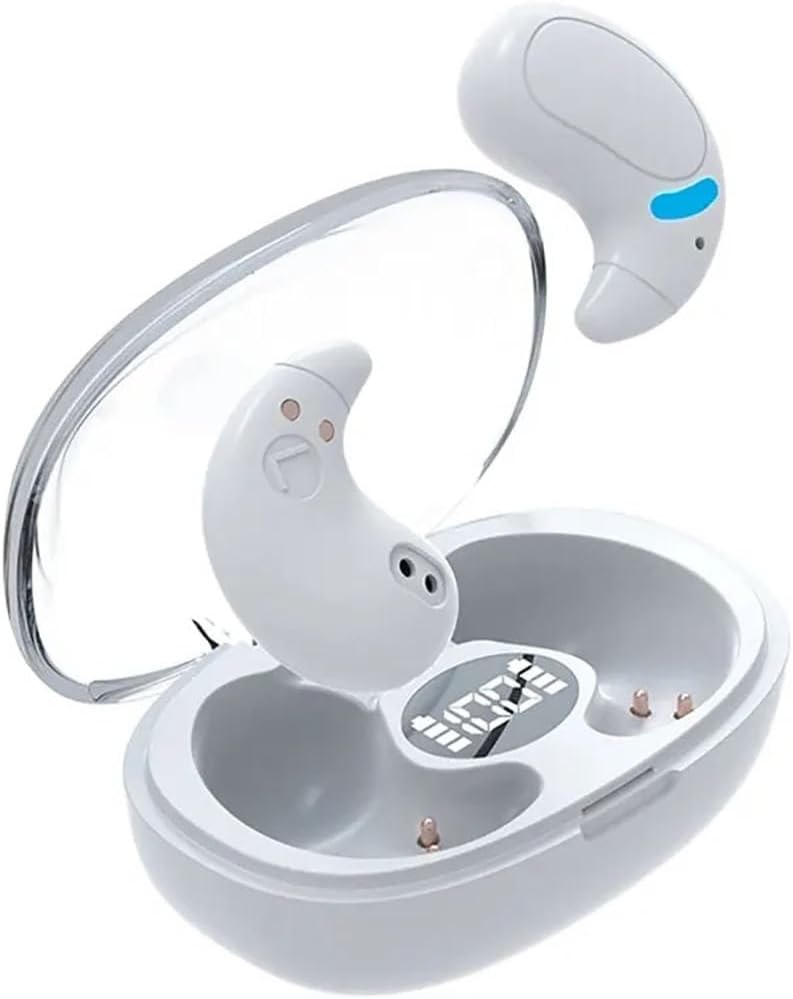
Image: YYGGWL M96 earphones placed inside their transparent charging case, showing the digital battery display on the case.

Image: The YYGGWL M96 earphones next to their open charging case, highlighting the compact size and the digital battery indicator on the case.
4.2 Bluetooth Pairing
To connect your earphones to a device:
- Ensure the earphones are charged.
- Open the charging case. The earphones will automatically power on and enter pairing mode.
- On your device (e.g., smartphone, tablet), go to the Bluetooth settings.
- Search for available Bluetooth devices. You should see "M96" or "YYGGWL M96" in the list.
- Select the earphone name to connect. Once connected, a voice prompt will confirm the successful pairing.
- If pairing fails, place the earphones back into the case, close it, and then repeat the steps.
5. Operating Instructions
5.1 Wearing the Earphones
The M96 earphones are designed for ergonomic comfort and a secure fit, even during sleep.
- Identify the left (L) and right (R) earphones.
- Gently insert each earphone into your ear canal, rotating slightly until it feels snug and comfortable. The design allows for minimal protrusion, making them suitable for side sleepers.
- Adjust the earphone until it sits securely and comfortably, ensuring optimal sound quality and noise isolation.
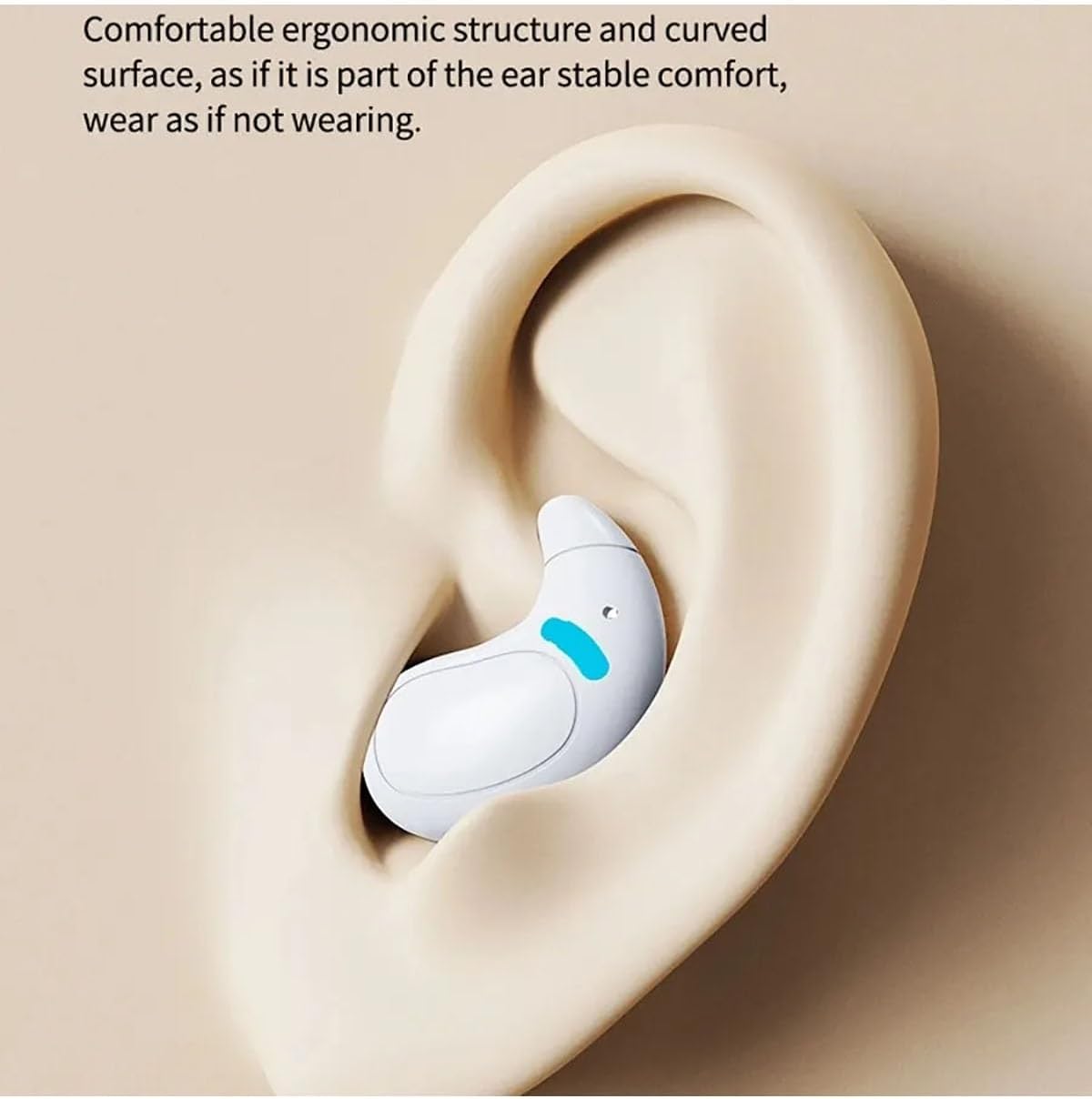
Image: A close-up of the YYGGWL M96 earphone comfortably seated in a human ear, demonstrating its ergonomic and low-profile design.
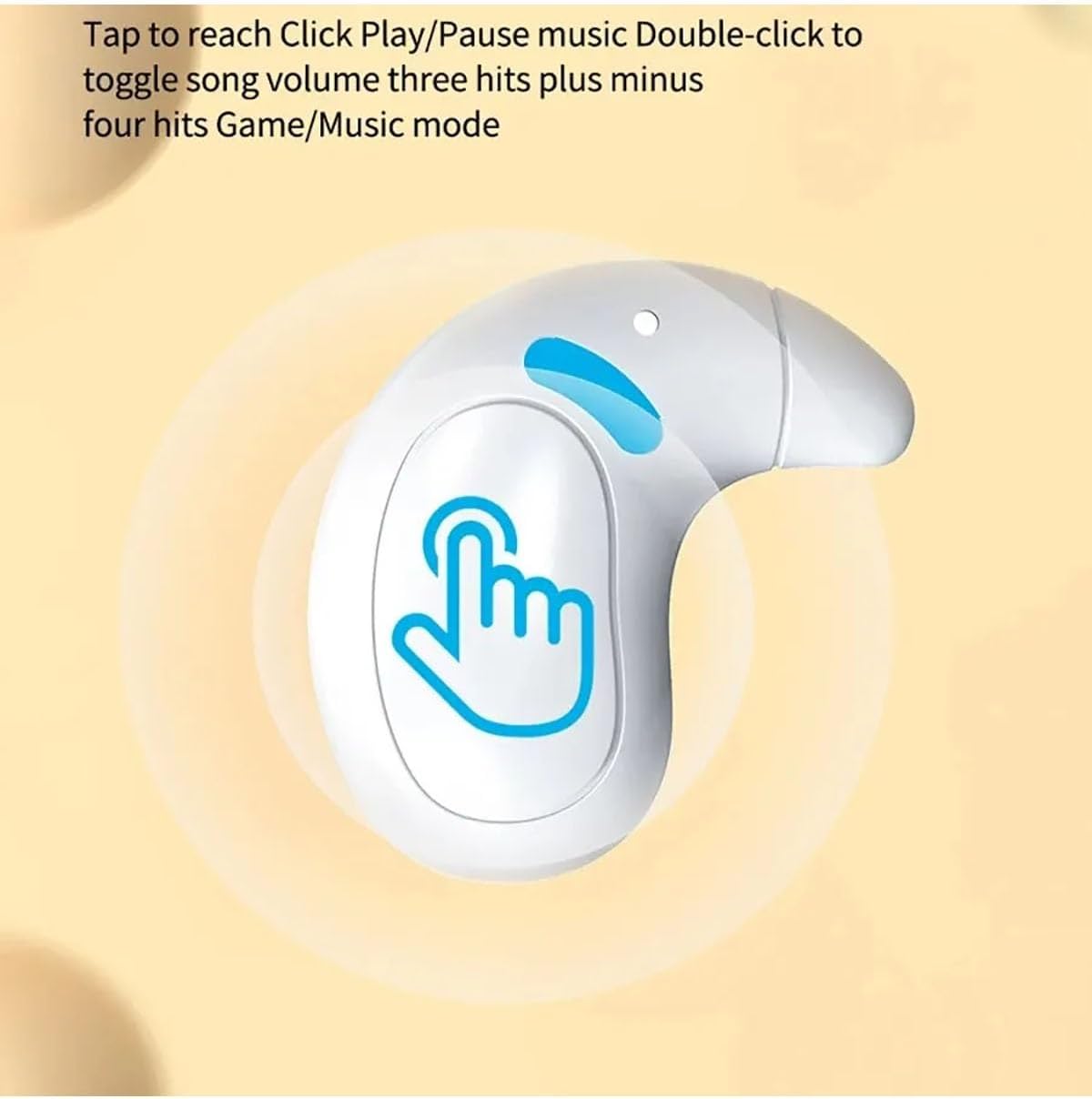
Image: A detailed view of the YYGGWL M96 earphone in an ear, showcasing its compact size and how it fits discreetly within the ear's contours.

Image: The YYGGWL M96 earphones in their charging case, with text emphasizing their suitability for sleeping on your side without discomfort.
5.2 Touch Controls
The earphones feature touch-sensitive controls on their outer surface. The specific touch area is indicated by a blue highlight in the diagram below.

Image: A diagram illustrating the touch control area on the YYGGWL M96 earphone, with a hand icon indicating where to tap.
- Single Tap: Play/Pause music.
- Double Tap: Toggle song (Next/Previous, depending on earbud).
- Three Taps: Adjust volume (plus/minus, depending on earbud).
- Four Taps: Switch between Game/Music mode.
- Long Press: (Specific function not detailed, typically for voice assistant or power on/off).
5.3 Power On/Off
- Power On: Open the charging case, and the earphones will automatically power on.
- Power Off: Place the earphones back into the charging case and close the lid. They will automatically power off and begin charging.
6. Maintenance
Proper maintenance ensures the longevity and performance of your earphones.
- Cleaning: Regularly clean the earphones and charging case with a soft, dry, lint-free cloth. Do not use harsh chemicals or abrasive materials.
- Water Resistance: The earphones are IPX5 waterproof, meaning they are resistant to sweat and light splashes. Do not submerge them in water or expose them to heavy rain. Dry them thoroughly if they get wet before placing them back in the charging case.
- Storage: When not in use, store the earphones in their charging case to protect them from dust and damage. Store in a cool, dry place away from direct sunlight and extreme temperatures.
- Charging: Charge the earphones and case regularly, even if not in frequent use, to maintain battery health.
7. Troubleshooting
If you encounter issues with your earphones, try the following solutions:
- Earphones not pairing:
- Ensure both earphones are charged.
- Place them back in the charging case, close the lid, wait a few seconds, then open the lid again.
- Turn off Bluetooth on your device and turn it back on.
- Forget the "M96" or "YYGGWL M96" device in your device's Bluetooth settings and try pairing again.
- No sound from one earphone:
- Ensure both earphones are charged and connected.
- Try resetting the earphones by placing them in the case and closing the lid.
- Charging issues:
- Check the charging cable and adapter. Try a different cable or power source.
- Ensure the charging contacts on the earphones and in the case are clean and free of debris.
- Low volume or poor sound quality:
- Adjust the volume on both your device and the earphones.
- Ensure the earphones are properly seated in your ears.
- Clean any earwax or debris from the earphone nozzles.
8. Warranty and Support
For warranty information and technical support, please contact the manufacturer or distributor:
- Manufacturer: Dengzhou Yuqi Network Technology Co., Ltd.
- Address: No. 56 Tuanjie Road, Gucheng Street, Dengzhou City, Nanyang City, Henan Province, China
- E-Mail: yuqiwangluokj@163.com
- European Representative (EC REP): REP Europe GmbH
- REP Europe Address: Dusseldorf, Prinzenallee 7, 40549, Germany
- REP Europe E-Mail: info@rep-europe.de

Image: Table detailing manufacturer information, European representative contact details, and various warning symbols and text.
9. Safety Information
Please read and follow these safety guidelines to prevent injury or damage:
- WARNING: To avoid danger of suffocation, keep this plastic bag away from babies and children. Do not use this bag in cribs, beds, carriages, or play pens. This bag is not a toy.
- Keep away from fire.
- Do not eat.
- Handle with care.
- Prevent shock and vibration.
- Do not expose to extreme temperatures or humidity.
- Do not disassemble, repair, or modify the product.
- Dispose of the product responsibly according to local regulations.