
1. Introduction
Thank you for choosing the Pumwry WJ-CO960 Carbon Monoxide Detector. This device is designed to provide continuous monitoring of carbon monoxide (CO) levels in your home, offering audible and visual alerts to help protect your family from this colorless, odorless, and potentially deadly gas. Please read this manual thoroughly before installation and use to ensure proper operation and safety.
2. Important Safety Information
- This carbon monoxide detector is designed for indoor use only. Do not expose it to rain or moisture.
- Do not paint the detector. Paint can clog the sensor openings and interfere with the unit's ability to detect CO.
- Regularly test the detector as instructed in this manual to ensure it is functioning correctly.
- This device is not a substitute for proper maintenance of fuel-burning appliances, including ventilation systems.
- Do not block the air inlets or outlets on the detector.
- In case of an alarm, follow the 'What to Do When the Alarm Sounds' instructions immediately.
3. Package Contents
Please check the package for the following items:
- Pumwry WJ-CO960 Carbon Monoxide Detector
- Instruction Manual
4. Product Overview
The Pumwry WJ-CO960 Carbon Monoxide Detector features a clear digital display, audible alarm, and visual indicators to provide comprehensive CO monitoring. It incorporates a high-precision electrochemical sensor for reliable detection.

Figure 4.1: Front and side view of the Pumwry WJ-CO960 Carbon Monoxide Detector with key components labeled. The image shows the display screen, air inlet, test button, work indicator light, alarm indicator light, fault indicator light, and alarm voice speaker.
Key Features:
- Digital LED Display: Shows real-time carbon monoxide levels in parts per million (PPM).
- Audible Alarm: Emits a loud 85-decibel alarm when CO levels reach dangerous thresholds.
- Visual Indicators: Three-color LED lights (Green, Yellow, Red) indicate power, fault, and alarm status.
- Self-Test Function: Allows for regular self-diagnostic checks to ensure proper operation.
- Peak Value Storage: Records and displays the highest CO level detected.
- Electrochemical Sensor: Provides accurate and reliable carbon monoxide detection.
5. Setup and Installation
5.1 Recommended Placement
For optimal protection, it is recommended to install carbon monoxide detectors in the following locations:
- On every level of your home, including the basement.
- Near sleeping areas, ensuring the alarm can be heard by all occupants.
- In rooms with fuel-burning appliances (e.g., furnace, water heater, fireplace).
- At least 5 feet (1.5 meters) away from fuel-burning appliances to avoid false alarms during startup.
- At least 1 foot (0.3 meters) from corners.
- Avoid placing the detector in direct sunlight, near vents, fans, or areas with high humidity.

Figure 5.1: Illustration of a house with multiple carbon monoxide detectors placed in various rooms and levels, including bedrooms, living areas, and near a garage, indicating optimal coverage.
5.2 Installation Steps
- Select a standard 110V AC wall outlet that is not controlled by a switch.
- Plug the Pumwry WJ-CO960 detector directly into the outlet.
- Upon plugging in, the detector will perform a brief self-test. The digital display will illuminate, and the indicator lights may cycle.
- Once the self-test is complete, the green indicator light will illuminate, and the display will show '0 PPM' or a low ambient CO reading, indicating it is operating normally.
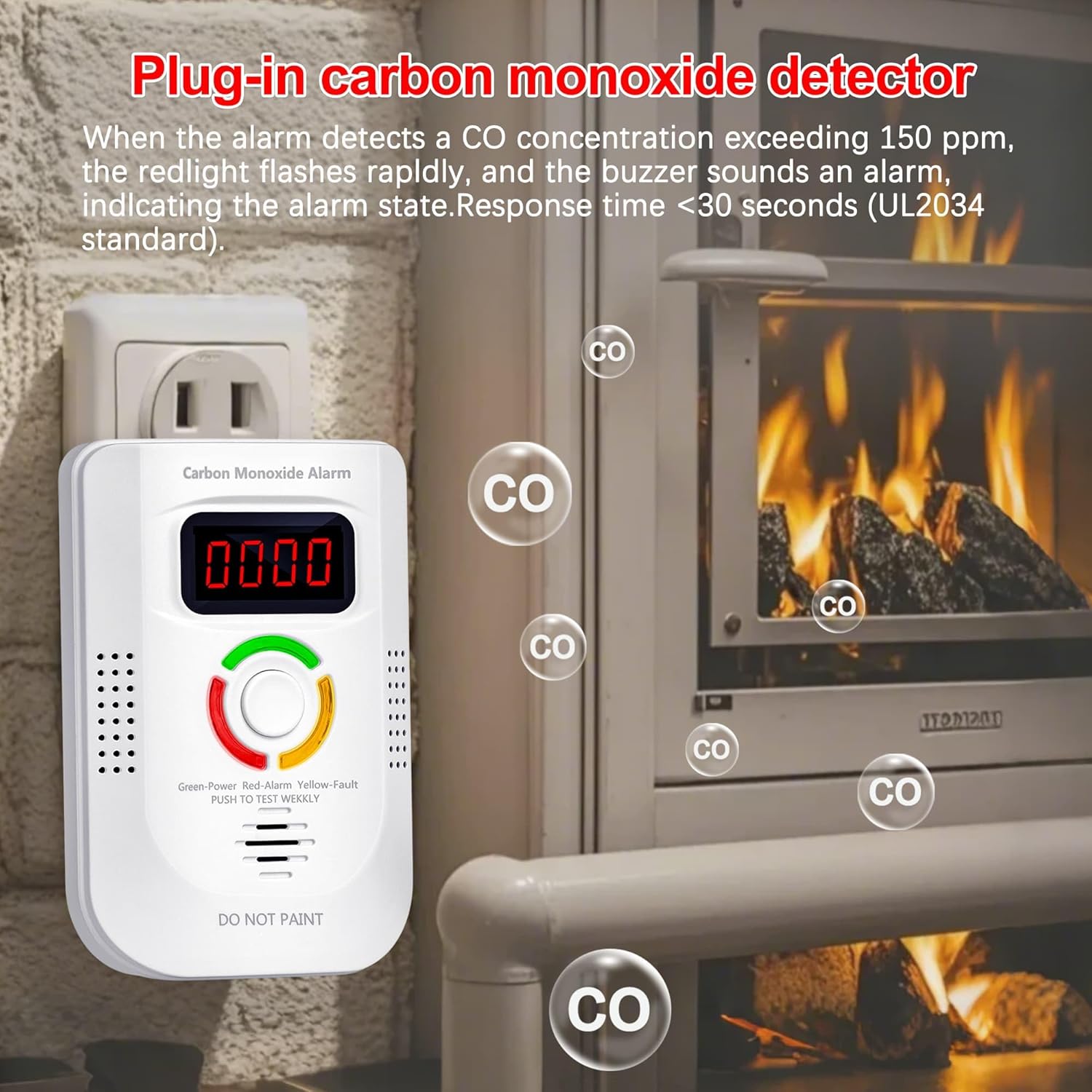
Figure 5.2: The carbon monoxide detector plugged into a standard wall outlet, demonstrating its plug-in installation. The image also shows CO bubbles indicating potential sources.
6. Operating Instructions
6.1 Digital Display and Indicator Lights
The detector provides visual feedback through its digital display and three LED indicator lights:
- Digital Display: Shows the current CO concentration in PPM (parts per million). If no CO is detected, it typically displays '0'.
- Green Light (Power/Normal): Illuminates steadily when the unit is powered on and operating correctly.
- Yellow Light (Fault/Inspection): Illuminates or flashes to indicate a malfunction or a need for inspection. Refer to the Troubleshooting section.
- Red Light (Alarm/Dangerous Condition): Flashes rapidly accompanied by an audible alarm when dangerous levels of CO are detected.

Figure 6.1: A graphic explaining the meaning of the three-color LED indicators on the detector: Green for normal monitoring/power on, Yellow for fault/inspection, and Red for dangerous condition/evacuation.
6.2 Test Function
To test the detector, press and hold the 'TEST' button located on the front of the unit. The alarm will sound, and the red light will flash, indicating that the alarm and internal circuitry are functioning. Release the button to stop the test. Perform this test weekly.
6.3 Alarm Sensitivity Settings
The detector is designed to alarm at specific CO concentrations and exposure times, adhering to safety standards:
- 30 PPM: No alarm before 120 minutes.
- 50 PPM: Alarms within 60-90 minutes.
- 100 PPM: Alarms within 10-40 minutes.
- 300 PPM: Alarms within 3 minutes.

Figure 6.2: A visual representation of the alarm sensitivity settings, showing the CO concentration in PPM and the corresponding time frame within which the alarm will activate.
6.4 Peak Value Storage
The detector automatically stores the highest CO level detected since the last reset or power cycle. This feature can be useful for understanding past CO exposure. To view the peak value, refer to the display. The peak value will typically be shown briefly after a test or power cycle, or can be accessed via a specific button press if available (refer to device markings if present).
7. Maintenance
7.1 Regular Cleaning
To maintain optimal performance, clean your CO detector regularly:
- Use a soft, damp cloth to wipe the exterior of the detector.
- Do not use cleaning solvents or chemicals, as these can damage the sensor or plastic casing.
- Do not spray cleaning agents directly onto the detector.
- Gently vacuum around the air inlets to remove any dust or debris that may accumulate.
7.2 Self-Test Frequency
Perform the self-test function (Section 6.2) at least once a week to ensure the alarm and internal components are working correctly.
7.3 End of Life
Carbon monoxide detectors have a limited lifespan, typically 5-7 years. While this model does not explicitly state an end-of-life indicator in the provided information, it is crucial to replace CO detectors according to the manufacturer's recommendations or if the fault indicator light remains active after troubleshooting.
8. Troubleshooting
| Problem | Possible Cause | Solution |
|---|---|---|
| Alarm sounds and Red light flashes | High CO concentration detected | Follow 'What to Do When the Alarm Sounds' below. |
| Yellow light illuminates/flashes | Unit malfunction or sensor fault | Unplug the unit for 30 seconds and plug it back in. If the fault persists, the unit may need replacement. |
| No display/No power | No power to outlet or unit malfunction | Check the power outlet with another appliance. Ensure the detector is fully plugged in. If still no power, the unit may be faulty. |
| Test button does not work | Unit malfunction | Ensure the unit is powered. If the test button still does not activate the alarm, the unit may be faulty and require replacement. |
8.1 What to Do When the Alarm Sounds
If the carbon monoxide alarm sounds:
- Evacuate Immediately: Move everyone, including pets, to fresh air outdoors.
- Do Not Re-enter: Do not re-enter the premises or move away from the open door/window until emergency services personnel have arrived, the premises have been aired out, and your alarm remains in its normal condition.
- Call Emergency Services: From a fresh air location, call your emergency services (Fire Department or 911).
- Identify Source: After evacuation, try to determine the source of the CO. This could be a faulty furnace, water heater, gas stove, or other fuel-burning appliance.
- Professional Inspection: Have the premises ventilated and the source of CO identified and corrected by a qualified professional before re-occupying the home.
9. Specifications
| Feature | Detail |
|---|---|
| Model Number | WJ-CO960 |
| Power Source | Plug-in (110 Volts) |
| Sensor Type | Electrochemical Carbon Monoxide |
| Alarm Loudness | 85 dB |
| Product Dimensions | 1.96"D x 2.7"W x 3.9"H |
| Item Weight | 2.56 ounces (0.16 Pounds) |
| Material | Plastic |
| Color | White |
| Included Components | Carbon Monoxide Detector, Manual |
10. Warranty and Support
For warranty information or technical support, please contact the seller or manufacturer directly. Keep your purchase receipt as proof of purchase. The manufacturer is Shenzhen Weijia security technology Co., LTD.


