
1. Introduction
This manual provides essential instructions for the safe and effective operation, setup, and maintenance of your ARCCAPTAIN 185A 3-in-1 Welding Machine. This versatile unit supports Flux Core MIG, Lift TIG, and Stick (MMA) welding processes, operating on a 110V power supply. Please read this manual thoroughly before using the welder to ensure proper function and safety.
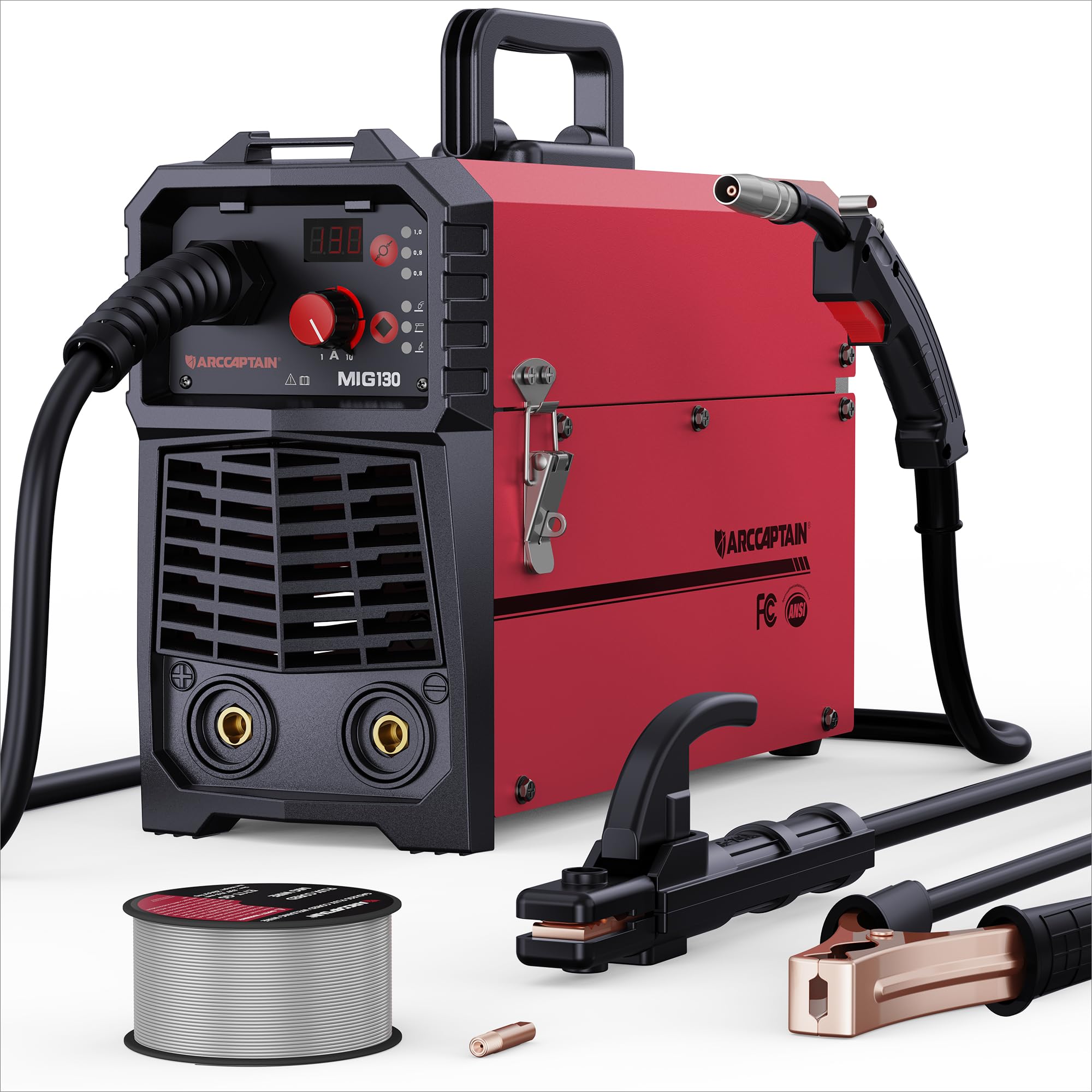
Figure 1: ARCCAPTAIN 185A 3-in-1 Welding Machine. This image displays the compact design of the welder, highlighting its control panel and connection points.
2. Safety Information
Welding operations involve significant risks. Always adhere to the following safety precautions to prevent injury or damage.
- Electric Shock: Welding current can cause fatal electric shock. Ensure proper grounding, wear dry gloves, and inspect cables for damage. Never touch live electrical parts.
- Fumes and Gases: Welding fumes and gases can be hazardous to your health. Work in a well-ventilated area or use an approved respirator. Keep your head out of the fumes.
- Arc Rays: Arc rays can burn eyes and skin. Always wear a welding helmet with appropriate shade, safety glasses, and protective clothing (long sleeves, heavy gloves).
- Fire and Explosion: Welding sparks and hot metal can cause fires. Keep flammable materials away from the welding area. Have a fire extinguisher readily available.
- Hot Parts: Welded materials and equipment can remain hot for extended periods. Use insulated gloves and allow parts to cool before handling.
- Noise: Excessive noise can damage hearing. Wear ear protection if noise levels are high.
- Pace Makers: Magnetic fields from high currents can affect pacemakers. Consult your doctor before welding.
3. Package Contents
Verify that all items listed below are present in your package:
- ARCCAPTAIN 185A Welding Machine
- MIG Torch
- Ground Clamp with Cable
- Electrode Holder (Stick) with Cable
- Flux Core Wire Spool (e.g., 2 lb .030" flux core wire)
- Contact Tips (e.g., spare .030" and .035" tips)
- Shoulder Strap
- User Manual (this document)
4. Setup
4.1 Power Connection
Connect the welder to a dedicated 110V AC power outlet. Ensure the circuit can handle the machine's maximum amperage (185A). Use an appropriate extension cord if necessary, ensuring it is rated for the required current and voltage.
4.2 Wire Installation (MIG/Flux Core)
- Open the wire feeder compartment.
- Place the wire spool onto the spool holder, ensuring it rotates freely.
- Feed the wire through the guide tube and into the drive roller mechanism.
- Close the drive roller tension arm, adjusting tension as needed (too loose will cause slipping, too tight will deform wire).
- Remove the contact tip from the MIG torch.
- With the welder powered on and in MIG mode, press the wire feed button (or trigger the torch) to feed the wire through the torch liner until it exits the torch nozzle.
- Reinstall the correct size contact tip for your wire diameter.
4.3 Ground Clamp Connection
Connect the ground clamp cable to the appropriate terminal on the welder (usually marked with a ground symbol or "-"). Securely attach the ground clamp to the workpiece or a clean, bare metal portion of the work table. A good ground connection is critical for stable arc and weld quality.
4.4 Torch/Electrode Holder Connection
- MIG Torch: Connect the MIG torch cable to the designated MIG connector on the front panel. Ensure it is securely tightened.
- Stick Electrode Holder: For Stick welding, connect the electrode holder cable to the positive (+) terminal and the ground clamp to the negative (-) terminal for most common electrodes (DCEN). Consult electrode manufacturer specifications for polarity.
- Lift TIG Torch: For Lift TIG, a separate TIG torch (not included) is required. Connect the TIG torch to the negative (-) terminal and the ground clamp to the positive (+) terminal (DCEP) for most applications.
5. Operation
Before operating, ensure all safety precautions are followed and appropriate personal protective equipment (PPE) is worn.
5.1 Control Panel Overview
The control panel typically features a mode selection button, current/voltage adjustment knobs, and a digital display. Refer to the specific layout on your machine for exact button functions.
5.2 MIG Welding (Flux Core)
- Select MIG mode on the control panel.
- Set the wire diameter and material type if your machine has this feature. The welder may automatically suggest initial settings.
- Adjust the voltage and wire feed speed according to the material thickness and wire type. Start with recommended settings and fine-tune as needed.
- Position the MIG torch at the start of the weld joint, maintaining a consistent stick-out.
- Press the torch trigger to initiate the arc and begin welding. Maintain a steady travel speed and torch angle.
- Release the trigger to stop welding.
5.3 Lift TIG Welding
Note: A TIG torch and appropriate consumables (tungsten electrode, gas lens, collet) are required and sold separately.
- Select Lift TIG mode.
- Connect the TIG torch and ground clamp with correct polarity.
- Set the desired amperage for your material thickness.
- Gently touch the tungsten electrode to the workpiece to establish a circuit, then lift it slightly to initiate the arc.
- Maintain a consistent arc length and travel speed.
5.4 Stick (MMA) Welding
- Select Stick (MMA) mode.
- Connect the electrode holder and ground clamp with correct polarity for your chosen electrode type.
- Insert the electrode into the holder.
- Set the amperage based on the electrode diameter and material thickness.
- Strike the electrode against the workpiece to initiate the arc, then maintain a consistent arc length and travel speed.
6. Maintenance
Regular maintenance ensures optimal performance and extends the lifespan of your welding machine.
- Cleaning: Periodically clean the interior of the machine using dry compressed air to remove dust and metal particles. Ensure the machine is unplugged before cleaning.
- Cable Inspection: Regularly inspect all welding cables, torch, and ground clamp for cuts, fraying, or loose connections. Replace damaged components immediately.
- Consumables: Replace MIG contact tips, nozzles, and TIG tungstens/collets as they wear out. Ensure the correct size and type are used.
- Wire Feeder: Clean the drive rollers and wire guide tubes to prevent wire feeding issues. Check drive roller tension.
- Storage: Store the welder in a clean, dry environment, protected from dust and moisture.
7. Troubleshooting
Refer to the table below for common issues and their potential solutions.
| Problem | Possible Cause | Solution |
|---|---|---|
| No power to machine | Power switch off, circuit breaker tripped, loose power cord | Turn on switch, reset breaker, check power cord connection |
| No arc | Poor ground connection, incorrect settings, damaged torch/electrode holder, wrong polarity | Ensure clean ground connection, verify settings, inspect cables, check polarity |
| Poor weld quality (porosity, spatter) | Incorrect settings (voltage/WFS/amperage), dirty workpiece, worn consumables, improper technique | Adjust settings, clean workpiece, replace consumables, refine welding technique |
| Wire feeding issues (MIG) | Incorrect drive roller tension, clogged liner, wrong contact tip size, tangled wire spool | Adjust tension, clean/replace liner, use correct tip, untangle wire |
| Overheating/Thermal overload | Exceeding duty cycle, insufficient ventilation | Allow machine to cool, ensure adequate airflow around the unit |
8. Specifications
Key technical specifications for the ARCCAPTAIN 185A Welding Machine:
- Model: Mig Welder
- Input Voltage: 110V AC
- Output Current: 185A (Max)
- Welding Processes: Flux Core MIG, Lift TIG, Stick (MMA)
- Manufacturer: ARCCAPTAIN
- Parcel Dimensions: 52.83 x 31.62 x 22.86 cm
- Item Weight: 3.18 kg
- ASIN: B0DF7XT858
9. Warranty and Support
For warranty information, technical support, or service inquiries, please contact ARCCAPTAIN customer service. Details can typically be found on the official ARCCAPTAIN website or through your purchase documentation. Please have your model number (Mig Welder) and ASIN (B0DF7XT858) ready when contacting support.
You can visit the ARCCAPTAIN store for more information: ARCCAPTAIN Store


