
1. Introduction
This manual provides detailed instructions for the safe and efficient operation of your DHRUVPRO KUAIQU SPS-C305S variable DC regulated power supply. This device is designed for laboratory and industrial applications, offering precise control over voltage and current output, along with essential protection features.
2. Safety Instructions
Please read and understand all safety instructions before operating the power supply. Failure to follow these instructions may result in electric shock, fire, or damage to the unit or connected equipment.
- Ensure the input voltage matches the specified requirements (AC 220V 50Hz).
- Do not operate the power supply in wet or damp conditions.
- Do not open the casing; there are no user-serviceable parts inside. Refer servicing to qualified personnel.
- Ensure proper ventilation to prevent overheating. Do not block ventilation openings.
- Always connect the ground terminal to a proper earth ground.
- Disconnect power before making or changing connections to the output terminals.
- Avoid short-circuiting the output terminals for extended periods, even with protection enabled.
3. Product Overview
The KUAIQU SPS-C305S is a high-precision, variable DC power supply featuring a digital display and encoder control for accurate adjustments. It includes multiple protection functions and convenient USB charging ports.
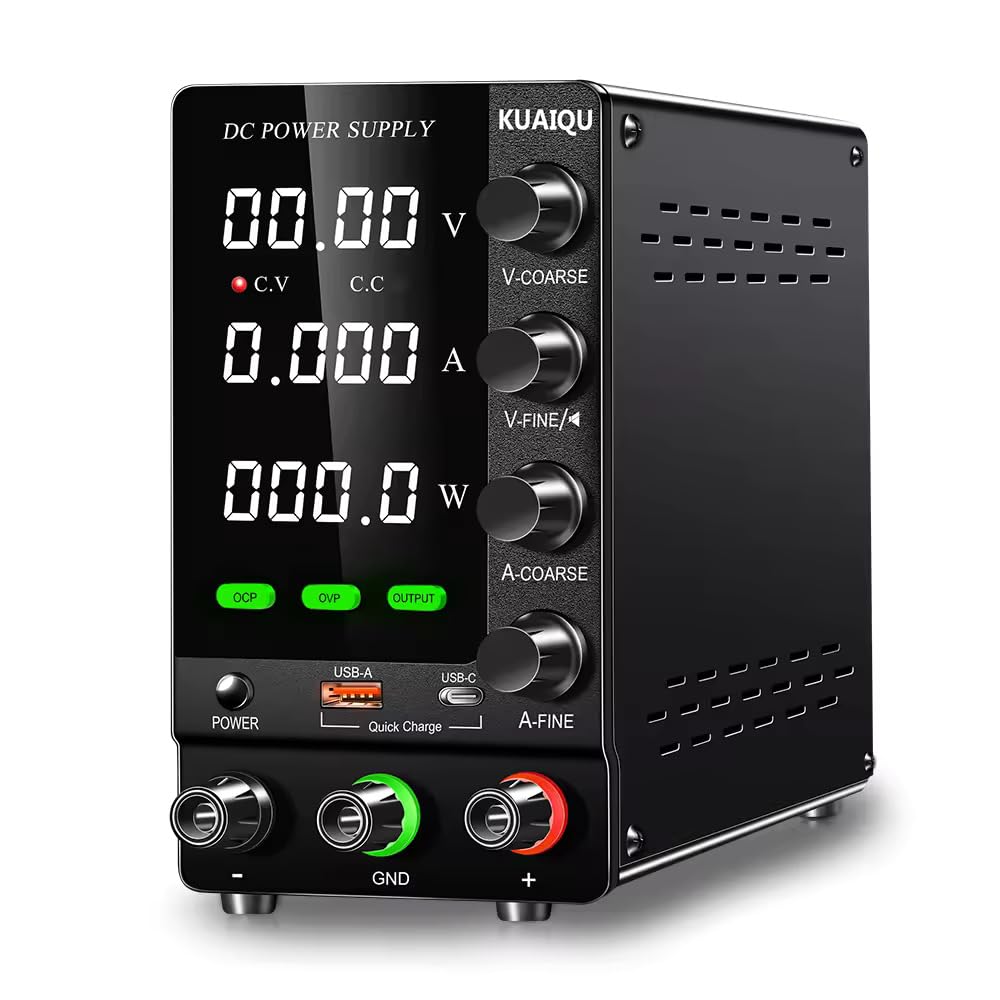
Front view of the KUAIQU SPS-C305S DC Power Supply, showing the digital display for voltage, current, and power, along with control knobs for voltage and current adjustment, and buttons for OCP, OVP, and Output control. USB-A and USB-C charging ports are also visible.
Key Features:
- Complete operating protection functions: Over Current Protection (OCP), Over Voltage Protection (OVP), and Short Circuit Protection.
- High efficiency, low ripple, compact volume, and light weight design.
- Dual digital display for simultaneous voltage and current readings with high precision.
- Stable voltage output and precise current limiting capabilities.
- Temperature-controlled fan for efficient heat dissipation and low noise operation.
- Dual potentiometers for fine and coarse adjustment of voltage and current.
- Integrated USB-A and USB-C (Type-C) charging ports for external devices, independent of main output.
4. Setup
Follow these steps to set up your power supply:
- Unpacking: Carefully remove the power supply from its packaging and inspect for any signs of damage.
- Placement: Place the unit on a stable, level surface with adequate ventilation around all sides. Ensure no objects obstruct the air vents.
- Power Connection: Connect the provided AC power cord to the power input socket on the rear of the unit, then plug the other end into a grounded AC 220V 50Hz power outlet.
- Load Connection: Before turning on the power, connect your load to the output terminals. Use appropriate gauge wires for your application. Connect the positive (+) terminal of your load to the red (+) output terminal of the power supply and the negative (-) terminal of your load to the black (-) output terminal. Ensure a secure connection.
5. Operating Instructions
5.1. Power On
- Press the "POWER" button located on the front panel to turn on the power supply. The digital display will illuminate, showing the previously set voltage and current values.
5.2. Voltage Setting
- Rotate the "VOLTAGE" encoder switch to adjust the desired output voltage.
- When adjusting, the currently selected digit on the voltage display will blink.
- Rotate clockwise to increase the value; rotate counterclockwise to decrease the value.
- Press the encoder switch to move the cursor position to adjust different digits (e.g., units, tenths, hundredths).
- The blinking will stop automatically after approximately 5 seconds of inactivity, confirming the set voltage.
5.3. Current Setting
- Rotate the "CURRENT" encoder switch to adjust the desired output current limit.
- Similar to voltage setting, the currently selected digit on the current display will blink during adjustment.
- Rotate clockwise to increase the value; rotate counterclockwise to decrease the value.
- Press the encoder switch to move the cursor position to adjust different digits.
- The blinking will stop automatically after approximately 5 seconds of inactivity, confirming the set current limit.
5.4. OCP (Over Current Protection) Short Circuit Protection
- Enable/Disable: Short press the "OCP" button to toggle the OCP function on or off.
- Setting OCP Value: Press and hold the "OCP" button for 3 seconds to enter the OCP setting state. Use the current adjustment knob to set the desired overcurrent protection value.
- Operation: When OCP is enabled, if an external load short circuit or overcurrent condition occurs, the power supply will stop outputting and an alarm will sound, effectively protecting the external load.
- Clearing Alarm: To clear the OCP alarm and resume operation, short press the "OCP" button.
5.5. OVP (Over Voltage Protection) Function
- Enable/Disable: Short press the "OVP" button to toggle the OVP function on or off.
- Setting OVP Value: Press and hold the "OVP" button for 3 seconds to enter the OVP setting state. Use the voltage adjustment knob to set the desired overvoltage protection value.
- Operation: When OVP is enabled, if the load voltage exceeds the set OVP value, the power supply will stop outputting and an alarm will sound, effectively protecting external loads.
- Clearing Alarm: To clear the OVP alarm and resume operation, short press the "OVP" button.
5.6. Output On/Off Control
- Short press the "OUTPUT" button to switch the power supply output on or off. This allows you to connect or disconnect the load without powering down the unit.
5.7. USB Charging Function
- The power supply is equipped with USB-A and USB-C (Type-C) charging ports on the front panel.
- These ports provide charging capabilities for compatible devices and operate independently of the main regulated voltage and current output.
- They can be used separately or simultaneously. When used separately, they support fast charging for compatible devices.
6. Maintenance
Proper maintenance ensures the longevity and reliable operation of your power supply.
- Cleaning: Regularly clean the exterior of the unit with a soft, dry cloth. Do not use abrasive cleaners or solvents. Ensure the unit is powered off and unplugged before cleaning.
- Ventilation: Keep the ventilation openings clear of dust and debris to ensure proper airflow and prevent overheating.
- Storage: When not in use for extended periods, store the power supply in a cool, dry environment, away from direct sunlight and extreme temperatures.
- Inspection: Periodically inspect the power cord and output cables for any signs of damage. Replace damaged cables immediately.
7. Troubleshooting
If you encounter issues with your power supply, refer to the following common problems and solutions:
- No Power:
- Check if the power cord is securely connected to both the unit and the AC outlet.
- Verify that the AC outlet is functional.
- Ensure the "POWER" button is pressed.
- No Output Voltage/Current:
- Check if the "OUTPUT" button is pressed to enable output.
- Verify that OCP or OVP protection has not been triggered. If an alarm is active, clear it by short pressing the respective OCP/OVP button.
- Ensure the voltage and current settings are not set to zero.
- Check the load connection for any open circuits or incorrect wiring.
- Unstable Output:
- Ensure the load is within the power supply's specifications.
- Check for loose connections at the output terminals.
- Verify that the power supply is adequately ventilated and not overheating.
8. Specifications
Technical specifications for the KUAIQU SPS-C305S power supply:
| Parameter | Value |
|---|---|
| Brand | DHRUVPRO |
| Model Number | SPS-C305S |
| Input Voltage | AC 220V 50Hz |
| Output Voltage Range | 0 - 30V (continuous adjustment) |
| Output Current Range | 0 - 5A (continuous adjustment) |
| Output Wattage | 150 Watts |
| Voltage Resolution | 0.01V |
| Current Resolution | 0.001A |
| Voltage Regulation (Line) | <5mV |
| Voltage Regulation (Load) | <5mV |
| Recovery Time | <500us (50% Load change, minimum load 0.5A) |
| Ripple & Noise | <5m Vrms, 100m Vp-p |
| Temperature Coefficient | <100ppm/°C |
| Current Regulation (Line) | <3mA |
| Current Regulation (Load) | <3mA |
| Voltage Display Precision | ±(0.5% of rdg + 2 digits) |
| Current Display Precision | ±(0.5% of rdg + 2 digits) |
| Operation Temperature & Humidity | 0~40°C, RH<80% |
| Storage Temperature & Humidity | -10~70°C, RH<70% |
| Cooling Type | Air |
| Product Dimensions (LxWxH) | 20 x 15 x 30 cm |
| Item Weight | 2 kg |
| Country of Origin | China |
9. Warranty and Support
This product comes with a standard manufacturer's warranty. For warranty claims, technical support, or any inquiries, please contact the seller or manufacturer directly.
Manufacturer/Packer: KUAIQU-S / DHRUVcom
Address: CHENNAI, TAMIL NADU, 600001, India
Email: support@dhruvpro.in
Phone Number: 7200470717