
Introduction
Thank you for choosing the UTTASU M79 Bone Conduction TWS Earbuds. These truly wireless earbuds are designed to provide a unique audio experience with 9D sound quality, hands-free calling, and smart touch controls. This manual will guide you through the setup, operation, and maintenance of your new earbuds to ensure you get the most out of them.
Package Contents
Please check the package for the following items:
- 1 x UTTASU M79 Bone Conduction TWS Earbuds
- 1 x Charging Case
- 1 x USB Charging Cable
- 1 x User Manual
Product Overview
The UTTASU M79 earbuds feature a unique bone conduction design for comfortable wear and an open-ear listening experience. The compact charging case provides portable power and features an LED display for battery status.
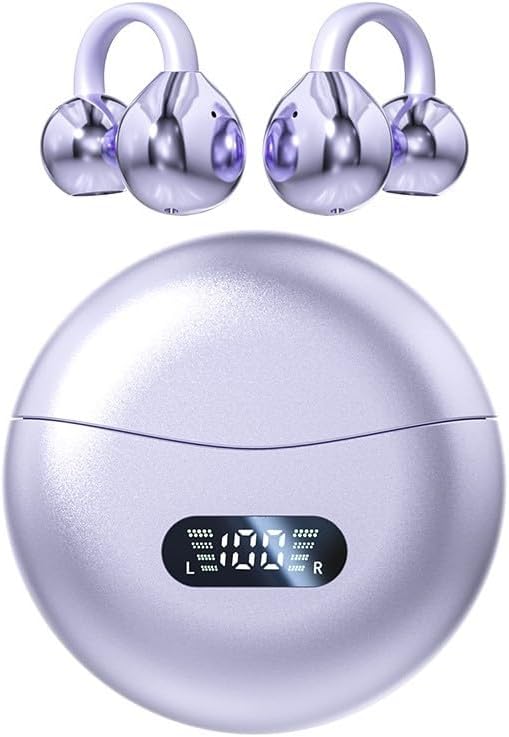
Figure 1: UTTASU M79 Bone Conduction TWS Earbuds and Charging Case. The image shows the two earbuds detached from the circular charging case, which displays a digital battery percentage.
The ergonomic design ensures a comfortable and secure fit, ideal for extended use and various activities.
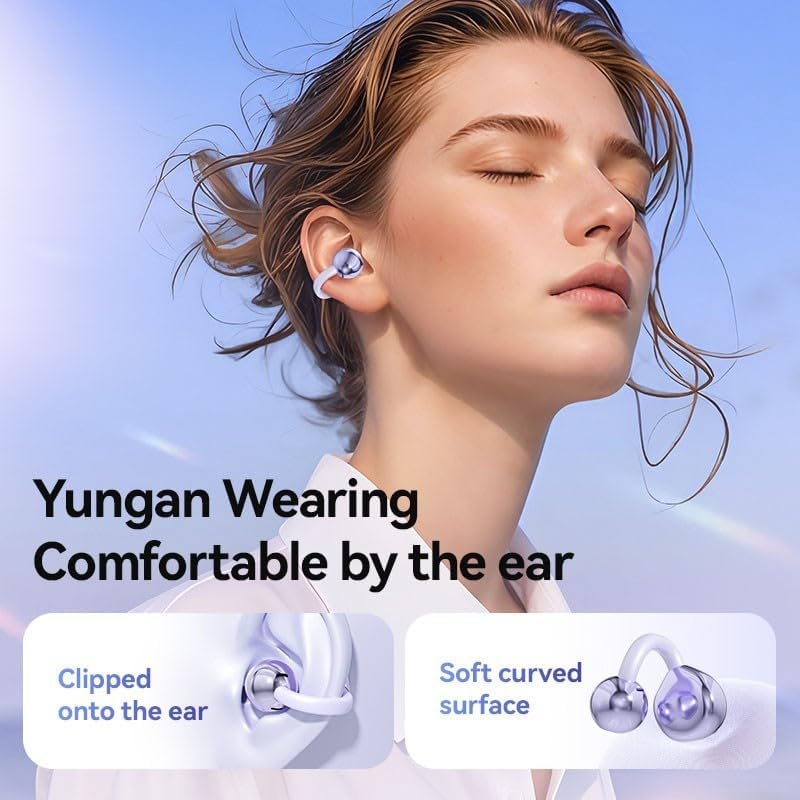
Figure 2: A person wearing the UTTASU M79 earbuds, demonstrating their comfortable and secure fit around the ear. The image highlights the "Yungan Wearing Comfortable by the ear" feature, showing how the earbuds clip onto the ear with a soft curved surface.
Setup
1. Charging the Earbuds and Case
Before first use, fully charge the charging case and earbuds. Place the earbuds into the charging case. Connect the USB charging cable to the charging port on the case and a power source (e.g., USB wall adapter, computer USB port).
- The LED display on the charging case will show the battery percentage during charging.
- The earbuds will indicate their charging status (e.g., LED indicator on earbuds).
- Once fully charged, the LED display will show 100%.

Figure 3: The UTTASU M79 charging case with its lid open, showing the earbuds inside and the LED digital display indicating battery levels for both the case and individual earbuds (L and R). This image highlights the "LED power digital display" feature.
2. Bluetooth Pairing
- Ensure the earbuds are charged.
- Open the charging case. The earbuds will automatically enter pairing mode (indicated by a flashing LED on the earbuds).
- On your device (smartphone, tablet, etc.), enable Bluetooth.
- Search for "M79" or "UTTASU M79" in the list of available Bluetooth devices.
- Select "M79" to connect. Once connected, a voice prompt will confirm the successful pairing, and the earbud LEDs will stop flashing.
- If pairing fails, turn off Bluetooth on your device, place the earbuds back in the case, close the lid, then repeat the steps.
Operating Instructions
The UTTASU M79 earbuds feature smart touch controls for easy management of music and calls.
Power On/Off
- Power On: Open the charging case, and the earbuds will automatically power on and connect to the last paired device. Alternatively, long-press the touch panel on both earbuds for 3 seconds.
- Power Off: Place the earbuds back into the charging case and close the lid. They will automatically power off. Alternatively, long-press the touch panel on both earbuds for 5 seconds.
Music Playback
- Play/Pause: Single tap on either earbud's touch panel.
- Next Track: Double tap the right earbud's touch panel.
- Previous Track: Double tap the left earbud's touch panel.
- Volume Up: Triple tap the right earbud's touch panel.
- Volume Down: Triple tap the left earbud's touch panel.
Call Management
- Answer/End Call: Single tap on either earbud's touch panel during an incoming call.
- Reject Call: Long press on either earbud's touch panel for 2 seconds during an incoming call.
Voice Assistant
- Activate Voice Assistant (Siri/Google Assistant): Long press on either earbud's touch panel for 3 seconds (when not on a call).
The M79 earbuds also feature intelligent noise reduction for clearer calls and an immersive listening experience.

Figure 4: A person wearing the UTTASU M79 earbuds, illustrating the "Intelligent noise reduction High immersion enjoyment" feature. This image emphasizes call noise reduction and accurate voice pickup while reducing environmental noise.
Maintenance and Care
To ensure the longevity and optimal performance of your UTTASU M79 earbuds, please follow these care instructions:
- Cleaning: Use a soft, dry, lint-free cloth to clean the earbuds and charging case. Do not use abrasive cleaners, alcohol, or chemical solvents.
- Storage: When not in use, store the earbuds in their charging case to protect them from dust and damage.
- Battery Care: Avoid fully discharging the battery frequently. Charge the earbuds regularly, even if not in use for extended periods, to maintain battery health.
- Water Resistance: While designed for active use, avoid submerging the earbuds in water. Wipe off sweat or moisture immediately after use.
- Temperature: Do not expose the earbuds or charging case to extreme temperatures (hot or cold) or direct sunlight for prolonged periods.
Troubleshooting
If you encounter any issues with your UTTASU M79 earbuds, please refer to the following common problems and solutions:
| Problem | Solution |
|---|---|
| Earbuds do not power on. | Ensure the charging case and earbuds are fully charged. Place earbuds in the case and open the lid. |
| Earbuds do not pair with device. | Make sure Bluetooth is enabled on your device. Place earbuds back in the case, close the lid, then reopen to re-enter pairing mode. Forget "M79" from your device's Bluetooth list and try pairing again. |
| Only one earbud is working. | Place both earbuds back into the charging case, close the lid, and then reopen. Ensure both earbuds have sufficient charge. Re-pair if necessary. |
| Low volume or poor sound quality. | Adjust the volume on both your device and the earbuds. Ensure earbuds are clean and properly positioned. Check for any obstructions. |
| Earbuds disconnect frequently. | Ensure your device is within the Bluetooth range (typically 10 meters/33 feet) without significant obstacles. Fully charge both earbuds and your device. |
Specifications
Detailed technical specifications for the UTTASU M79 Bone Conduction TWS Earbuds:
| Feature | Detail |
|---|---|
| Brand | UTTASU |
| Model Name | M79 |
| Product Model Number | 1A74P21247720C5Z6T2CWJF43 |
| Product Dimensions | 13 x 8 x 3 cm |
| Product Weight | 80 g |
| Sound Quality | 9D Audio, High Fidelity, Panoramic Soundtrack Quality |
| Control Type | Smart Touch Control |
| Connectivity | Wireless (Bluetooth) |
| Microphone | Built-in for Hands-Free Calls |
| Noise Reduction | Intelligent Noise Reduction |
The M79 earbuds incorporate advanced audio technology for a rich and detailed sound experience.

Figure 5: An exploded view diagram illustrating the internal components of the UTTASU M79 earbud, highlighting features like 360° Air Conduction Stereo (ACS), Sound Enhancement (SSOVP Extreme), and a Polymer Diaphragm for high fidelity sound. This image emphasizes the "Panoramic soundtrack quality Hear more details" aspect.
Warranty and Support
Your UTTASU M79 Bone Conduction TWS Earbuds come with a return policy. Please refer to your purchase platform for specific details regarding returns and refunds. Generally, products purchased are eligible for return within 30 days of receipt.
For technical support, warranty claims, or any product-related inquiries, please contact the seller or manufacturer through the platform where you made your purchase. Keep your purchase receipt or order number handy for faster service.

Figure 6: An image displaying product compliance information, including the EU Representative details (SUCCESS COURIER SL) and various warning labels in multiple languages, primarily advising against use for children under 36 months. This indicates adherence to European regulations.