Introduction
The AJAZZ AK980 is a versatile 96% layout mechanical gaming keyboard designed for optimal performance and user customization. It features triple-mode connectivity (USB-C, 2.4GHz Wireless, and Bluetooth 5.0), a vibrant 1.14-inch TFT screen, a multi-functional metal knob, and hot-swappable switches. Built with a gasket structure and five-layer sound dampening, it provides a comfortable and satisfying typing experience for both gaming and professional use across Windows and Mac operating systems.

Figure 1: AJAZZ AK980 Mechanical Gaming Keyboard (Black, Gift V2 Switch)
What's in the Box
Upon unboxing your AJAZZ AK980 keyboard, please ensure all the following components are present:
- AJAZZ AK980 Mechanical Gaming Keyboard
- Keycap Puller
- USB Cable (Type-C)
- User Manual (this document)
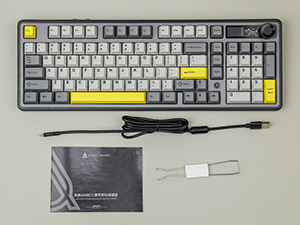
Figure 2: Included accessories with the keyboard.
Setup
Connectivity Modes
The AK980 supports three distinct connectivity modes for maximum flexibility:
- USB-C Wired: For a stable, low-latency connection, connect the provided USB-C cable from the keyboard to your computer.
- 2.4GHz Wireless: Insert the 2.4GHz USB receiver (usually found in a compartment on the keyboard) into your computer's USB port. Switch the keyboard to 2.4G mode.
- Bluetooth 5.0: Enable Bluetooth on your device. Switch the keyboard to Bluetooth mode and pair it with your device from the Bluetooth settings.

Figure 3: The keyboard supports USB-C wired, 2.4GHz wireless, and Bluetooth 5.0 connectivity.

Figure 4: Switches for selecting Mac/Win mode and connectivity type (2.4G, USB, BT).
Adjustable Feet
The keyboard features multi-level adjustable feet on the underside, allowing you to set the typing angle for optimal comfort and ergonomics. Gently pull out the feet to your desired height.
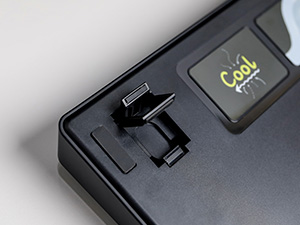
Figure 5: The keyboard's adjustable feet provide multiple typing angles.
Operating Instructions
TFT Screen and Metal Knob
The keyboard is equipped with a 1.14-inch TFT color screen and a versatile metal knob. The screen displays useful information such as time, date, connection mode, and battery level. It also supports custom GIF animations. The metal knob can be used to adjust volume, scroll through pages, or be customized for other handy shortcuts.

Figure 6: Detailed view of the 1.14-inch TFT color screen and metal knob functionalities.
Video 1: An overview of the MechLands AK980 Gaming Keyboard with its integrated screen, showcasing its features and design.
Hot-Swappable PCB
The AK980 features a hot-swappable PCB, allowing users to easily change mechanical switches without soldering. This enables customization of typing feel and quick replacement of switches.

Figure 7: Illustration of the hot-swappable PCB, demonstrating easy switch replacement.
RGB Backlight
The keyboard offers 16.8 million RGB backlight colors with 20 different lighting effects. You can adjust brightness, switch lights on/off, and customize lighting modes using the function keys:
- Fn + ↑/↓: Adjust Light Brightness
- Fn + X: Switch Light on/off
- Fn + 1/2/3#: Customize Lighting Modes

Figure 8: Overview of RGB backlight features and key combinations for control.
Video 2: A demonstration of the RGB lighting effects on the MechLands x AJAZZ AK980 Gaming Keyboard.
Gasket Structure & Sound Dampening
The keyboard incorporates a gasket structure and a five-layer sound dampening system for a quiet, cushioned, and tactile typing experience. This system includes Poron sandwich foam, IXPE switch pads, PET sound-improving film, PCB back foam, and Poron case foam.

Figure 9: Exploded view illustrating the various layers of the gasket structure and sound dampening system.
Software Programmable Features
The AJAZZ AK980 is software programmable, allowing for advanced customization. Users can remap keys, create macros, adjust screen settings, and fine-tune backlight settings through the dedicated software.
Video 3: A demonstration of typing on the AJAZZ AK980 Mechanical Keyboard, highlighting its sound and feel.
Maintenance
Battery Management
The keyboard is equipped with an 8000mAh battery (for models with a screen) or a 4000mAh battery (for models without a screen), ensuring extended usage. To prolong battery life, charge the keyboard regularly using the provided USB-C cable. Avoid fully depleting the battery frequently.
Cleaning
To maintain your keyboard's appearance and functionality, regularly clean it using a soft, lint-free cloth. For deeper cleaning, you may use the keycap puller to remove keycaps and clean underneath with compressed air or a small brush. Ensure the keyboard is disconnected from power before cleaning.
Troubleshooting
- Keyboard Not Responding:
- Ensure the keyboard is charged.
- Check the connectivity switch (USB, 2.4G, BT) is set correctly.
- For wireless modes, ensure the receiver is properly inserted or Bluetooth is paired.
- Try connecting via USB-C cable to rule out wireless issues.
- RGB Lighting Issues:
- Press Fn + X to toggle the lighting on/off.
- Use Fn + ↑/↓ to adjust brightness.
- Ensure the keyboard software is up-to-date for full customization options.
- TFT Screen Not Displaying:
- Check battery level.
- Ensure the keyboard is powered on.
- If using custom GIFs, verify the file format and size are compatible with the software.
Specifications
| Feature | Detail |
|---|---|
| Brand | MechLands |
| Model Number | AK980 |
| Product Dimensions | 164.06"L x 5.83"W x 0.76"H |
| Item Weight | 3.23 pounds |
| Number of Keys | 97 |
| Connectivity Technology | Bluetooth, 2.4GHz Wireless, USB-C |
| Keyboard Backlighting | RGB |
| Special Features | 98% Compact Keyboard, Creamy Keyboard, Rechargeable, Customizable Display Keys, Hot-Swappable |
| Battery Capacity | 8000mAh (with Screen) / 4000mAh (without Screen) |
| Polling Rate (Wired/2.4G) | 1000Hz |
| Polling Rate (Bluetooth) | 125Hz |
Warranty and Support
For detailed warranty information and technical support, please refer to the official user manual PDF available at: AJAZZ AK980 User Manual (PDF). You may also visit the MechLands official store on Amazon for further assistance and product information.


