
1. Introduction
Welcome to the user manual for your CHSUFBTY Electronic Tonsil Stone Remover Vacuum, Model NASA009. This device is designed for effective and comfortable removal of tonsil stones, promoting oral hygiene and fresh breath. Please read these instructions carefully before use to ensure safe and optimal performance of your device.
2. Package Contents
Verify that all items listed below are included in your package:
- 1 x Electronic Tonsil Stone Remover Device
- 1 x USB Charging Cable
- 5 x Replacement Silicone Tips (various designs)
- 1 x User Guide (This document)

Image: The CHSUFBTY Electronic Tonsil Stone Remover Vacuum device shown with its interchangeable silicone tips.
3. Product Features
The CHSUFBTY Electronic Tonsil Stone Remover Vacuum offers several features designed for effective and comfortable oral care:
- Comprehensive Kit: Includes a 5-in-1 tool with various tip designs to address different depths and sizes of tonsil stones.
- Gentle & Safe Probes: Equipped with ultra-soft, food-grade silicone probes for comfortable and safe contact with oral tissues.
- Adjustable Suction: Features eight adjustable suction modes (from weak to strong) to suit individual sensitivity levels and stone sizes.
- Enhanced Visibility: Integrated dental light and magnifying glass aid in clearly locating tonsil stones.
- Rechargeable Battery: USB rechargeable design with a long-lasting battery life for convenience.
- Painless Removal: Utilizes vacuum adsorption technology for quick and painless extraction of tonsil stones.

Image: Visual representation of key product features including food-grade silicone, lighting, multiple modes, ease of use, long battery life, and USB charging.
4. Setup
Before using your device for the first time, please follow these setup instructions:
4.1 Charging the Device
- Connect the provided USB charging cable to the charging port on the device.
- Plug the other end of the USB cable into a compatible USB power source (e.g., wall adapter, computer USB port).
- The device's indicator light will illuminate to show that it is charging. Ensure the device is fully charged before its initial use.

Image: The device connected to a USB charging cable, highlighting its rechargeable nature.
4.2 Attaching a Silicone Tip
- Select the appropriate silicone tip from the five provided options based on your preference and the location of the tonsil stone.
- Gently push the chosen tip onto the device's suction nozzle until it is securely in place. Ensure it is firmly attached to prevent detachment during use.

Image: A close-up view of the device head and various silicone tips, demonstrating how they attach.
5. Operating Instructions
Follow these steps for effective and safe removal of tonsil stones:
5.1 Preparation
- Turn on Light: Short press the light button once to activate the dental light and magnifying glass for improved visibility.
- Rinse Tonsils: Using a tonsil stone syringe (not included) filled with warm water, gently rinse your tonsils. This can help dislodge stones and make them more visible.
5.2 Power On and Suction Adjustment
- Power On: Long press the power button for 2 seconds to turn on the device.
- Adjust Suction: Short press the gear button labeled "M" to cycle through the eight available suction modes. Select a suction level that feels comfortable and effective for your needs.
5.3 Stone Removal
- Carefully position the selected silicone suction tip over the visible tonsil stone.
- Make gentle contact, allowing the vacuum suction to extract the tonsil stone. Avoid applying excessive force.
- Repeat this process as necessary until all visible stones are removed.
5.4 Power Off
- After completing the removal process, long press the power button for 2 seconds to turn off the device.
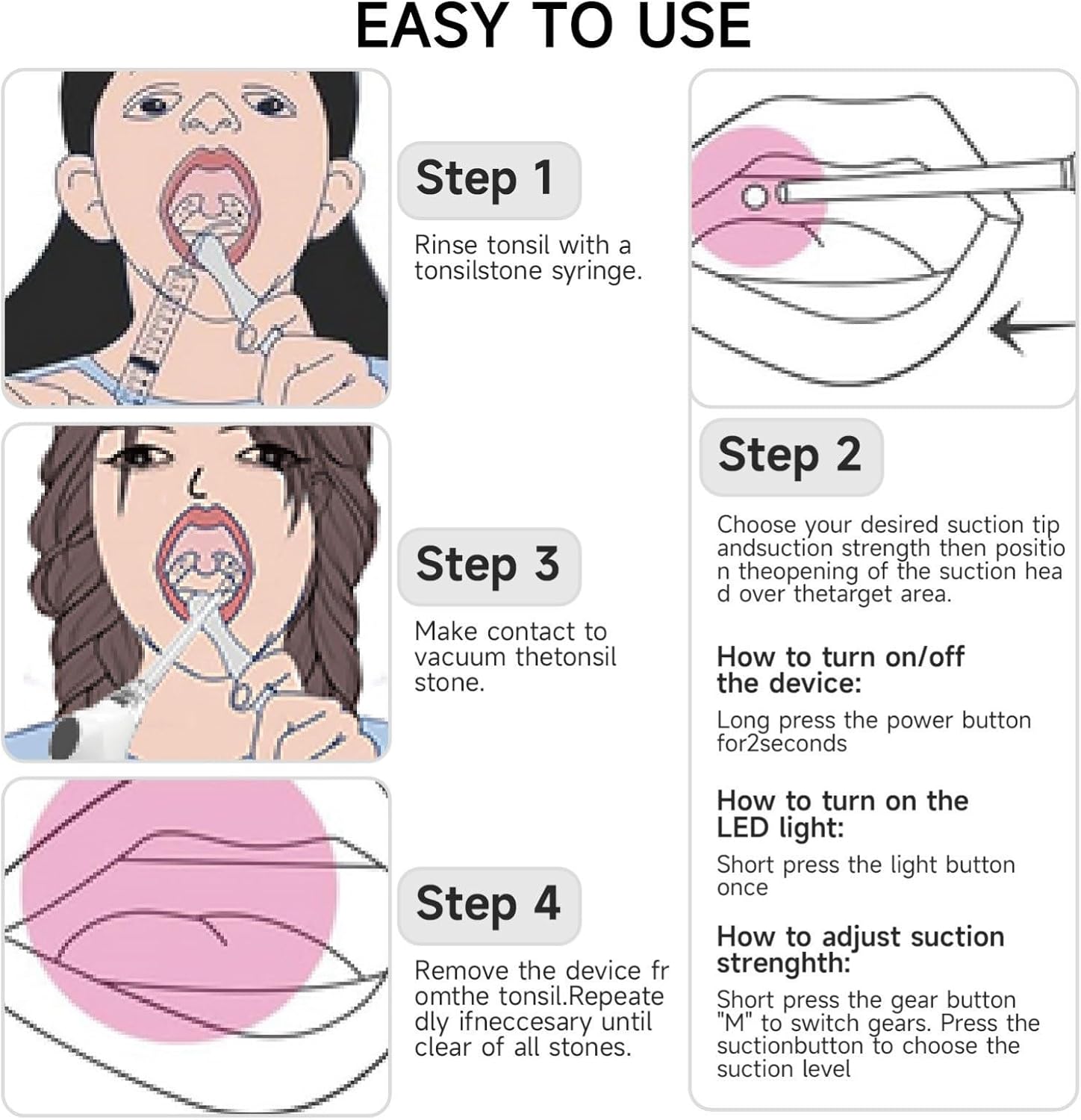
Image: Illustrated steps for using the tonsil stone remover, from preparation to stone extraction.
6. Maintenance
Proper maintenance ensures the longevity and hygiene of your device:
6.1 Cleaning the Device
- After each use, detach the silicone tip from the device.
- Rinse both the silicone tip and the device's suction nozzle thoroughly with warm water.
- For optimal hygiene, consider sterilizing the silicone tips with an appropriate oral care sterilizer or by soaking them in a mild antiseptic solution.
- Ensure all parts are completely dry before reassembling or storing.
6.2 Storage
Store the device and its accessories in a clean, dry place away from direct sunlight, extreme temperatures, and humidity. Keep it out of reach of children.
7. Troubleshooting
If you encounter any issues with your device, refer to the following common problems and solutions:
- Device not turning on:
Ensure the device is fully charged. Connect it to the USB charging cable and allow sufficient time to charge. If the issue persists after charging, contact customer support. - Weak or no suction:
Check if the silicone tip is securely attached to the device. Ensure the suction nozzle is clear of any debris or blockages. Try adjusting to a higher suction mode using the "M" button. - Difficulty removing stones:
Ensure you have adequate lighting and visibility of the tonsil stone. Try using a different silicone tip that may be better suited for the stone's position or size. Re-rinse your tonsils with warm water to help dislodge the stone. - Device making unusual noise:
Turn off the device immediately. Check for any visible damage or loose parts. Do not attempt to repair the device yourself. Contact customer support for assistance.
8. Specifications
| Product Name | Tonsil Stone Remover |
| Model | NASA009 |
| Brand | CHSUFBTY |
| Material | ABS/PC/Silicone |
| Device Size | Approximately 15 cm (5.9 inches) |
| Power Source | USB Charging |
| Suction Modes | 8 (Adjustable) |
| Item Weight | 1000 Grams (2.2 Pounds) |
| Package Dimensions | 1.18 x 0.79 x 0.39 inches |
9. Warranty and Support
The CHSUFBTY Electronic Tonsil Stone Remover Kit is manufactured under strict quality standards to ensure reliability and performance. We are committed to your satisfaction.
A dedicated customer experience team is available to assist with any questions or concerns you may have regarding your device. If you encounter any issues, require assistance with operation, or have inquiries about the product, please do not hesitate to contact our customer support for prompt assistance.
10. Important Safety Information
Please read and adhere to the following safety guidelines:
- This device is intended for personal oral hygiene. It is not a medical device and should not be used to diagnose, treat, cure, or prevent any disease or health condition.
- Consult a healthcare professional or dentist if you experience persistent oral discomfort, pain, bleeding, or have underlying medical conditions before using this device.
- Do not use the device if any part appears damaged or broken.
- Keep the device and all accessories out of reach of children.
- Avoid using excessive force when operating the device to prevent injury to oral tissues.
- Do not immerse the main body of the device in water. Only the silicone tips and the suction nozzle should be rinsed.
- Use only the provided USB charging cable for charging.