
1. Introduction
Thank you for choosing the Generic OFACDOCUO Gaming Table. This manual provides essential information for the safe and efficient assembly, operation, and maintenance of your new desk. Please read these instructions carefully before assembly and retain them for future reference.
2. Product Overview
The Generic OFACDOCUO Gaming Table is designed for versatility, suitable for gaming, office work, or study. It features an ergonomic design, robust construction, and thoughtful details for user convenience.
Key Features:
- Ergonomic Curved Desktop: Designed to fit the human body for improved comfort during extended use.
- High-Quality Density Board: Provides strong load-bearing capacity and resistance to deformation.
- U-Shaped Steel Bracket: Enhances structural stability and load-bearing capacity.
- Reinforced Beam Design: Minimizes shaking and ensures stability, especially during intense activities.
- Wire Threading Hole: Helps manage cables for a tidy desktop.
- Complimentary Tray: For convenient placement of computer mainframes or other items, with a heightened design for water resistance.
- Rounded Corners: Prevents bumps and adds to the aesthetic appeal.
Components:
The package includes the desktop, U-shaped steel brackets, support beams, a complimentary tray, foot pads, and all necessary assembly hardware.

Figure 2.1: Example of the White Gaming Table setup with monitor, PC, and peripherals.

Figure 2.2: Example of the Black Gaming Table setup with monitor, PC, and office chair.

Figure 2.3: Illustration of the ergonomic curved desktop design, showing dimensions of 120cm length and 60cm width.

Figure 2.4: Details highlighting the high-quality density board material and rounded corners of the desktop.
3. Setup and Assembly Instructions
Assembly of the Gaming Table is designed to be straightforward. Please follow the detailed installation instructions included in your product packaging. Ensure all parts are present before beginning assembly.
General Assembly Steps:
- Unpack Components: Carefully remove all parts from the packaging and lay them out on a clean, soft surface to prevent scratches. Verify all hardware and components are present against the packing list.
- Assemble Frame: Attach the U-shaped steel brackets to the support beams using the provided screws. Ensure all connections are secure but do not overtighten initially.
- Attach Desktop: Carefully place the desktop onto the assembled frame. Align the pre-drilled holes on the desktop with the holes on the frame. Secure the desktop to the frame using the appropriate screws.
- Install Accessories: Attach the complimentary tray to the designated area under the desk. Insert the foot pads into the bottom of the U-shaped brackets to protect your floor.
- Final Tightening: Once all components are in place and aligned, fully tighten all screws.
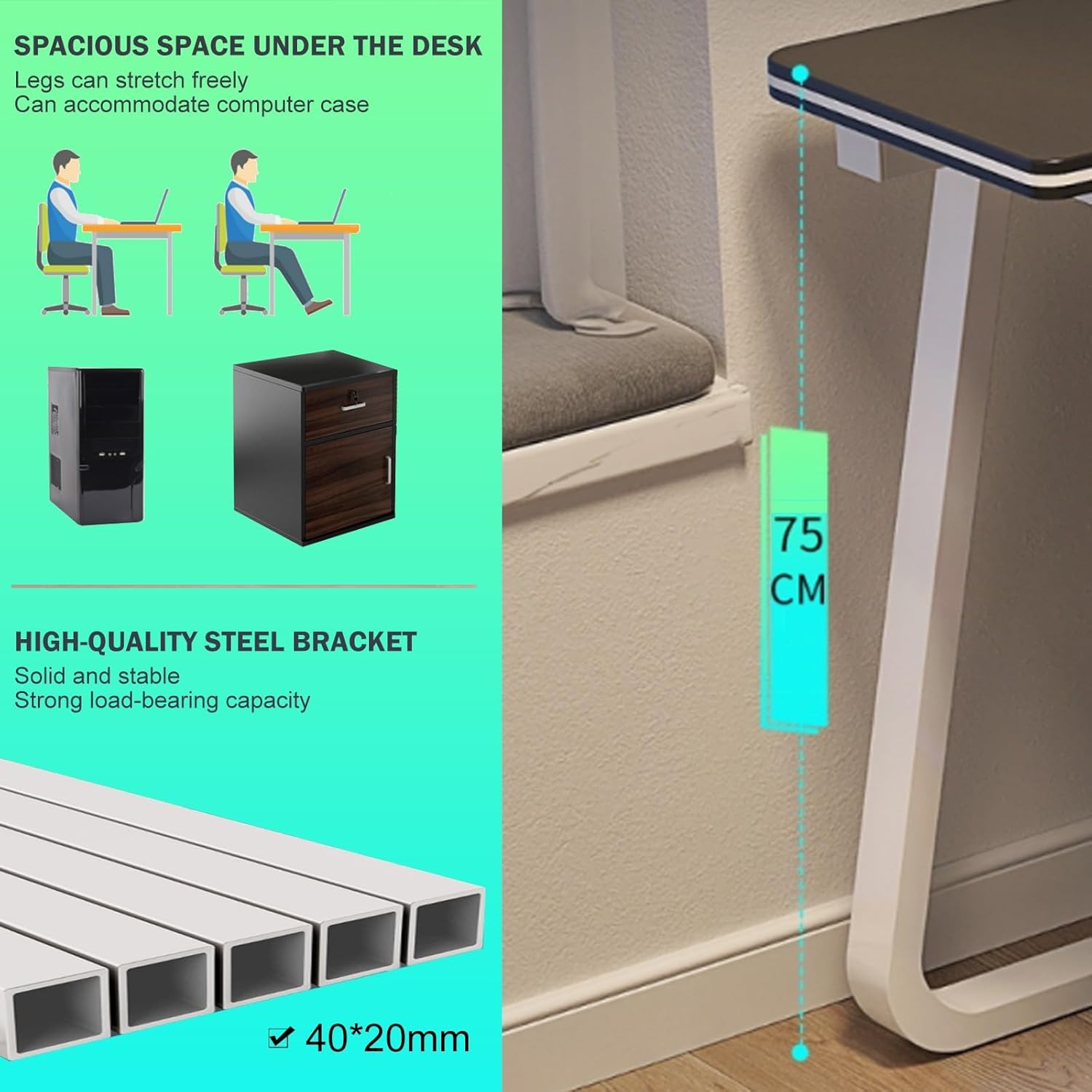
Figure 3.1: Overview of desk dimensions (75cm height) and detail of the high-quality steel bracket construction.

Figure 3.2: Comparison illustrating the upgraded stable structure with beam reinforcement versus a regular, unstable version without it.
4. Operating Instructions
The Gaming Table is designed for straightforward use. No complex operational procedures are required.
- Placement: Position the desk on a flat, stable surface to ensure maximum stability.
- Cable Management: Utilize the integrated wire threading hole to route and organize cables from your monitor, PC, and other peripherals, keeping your desktop tidy.
- PC Tower Placement: The complimentary tray is designed to hold your computer mainframe, keeping it off the floor and protected.
- Weight Distribution: Distribute weight evenly across the desktop. Avoid placing excessively heavy items on one side.

Figure 4.1: Details of the complimentary tray for PC chassis, the wire threading hole for cable organization, and protective foot pads.
5. Maintenance
Proper maintenance will ensure the longevity and appearance of your Gaming Table.
- Cleaning: Wipe the desktop and frame with a soft, damp cloth. Avoid using harsh chemicals or abrasive cleaners, which can damage the finish.
- Spills: In case of spills, wipe them immediately to prevent staining or damage to the desktop material.
- Inspection: Periodically check all screws and connections to ensure they remain tight. Retighten if necessary.
- Avoid Extreme Conditions: Do not expose the desk to extreme temperatures, direct sunlight for prolonged periods, or high humidity, as this may affect the material integrity.
6. Troubleshooting
If you encounter any issues with your Gaming Table, refer to the following common solutions:
- Desk Wobbles:
- Ensure the desk is placed on a level surface.
- Check that all assembly screws are fully tightened.
- Verify that the foot pads are correctly installed and making even contact with the floor.
- Difficulty Assembling:
- Refer to the detailed assembly instructions provided in the packaging.
- Ensure you are using the correct hardware for each step.
- Do not force parts together; if they don't fit, re-check the instructions.
- Scratches on Desktop:
- Use a desk mat or mouse pad to protect the surface from scratches from peripherals.
- Avoid dragging sharp or heavy objects across the desktop.
7. Specifications
| Attribute | Specification |
|---|---|
| Model Number | OFACDOCUO |
| Product Dimensions | 120 x 60 x 75 cm (Length x Width x Height) |
| Item Weight | 22 pounds |
| Material | MDF Desktop, Steel Bracket |
| Manufacturer | Generic |
| ASIN | B0DF7DC2FF |

Figure 7.1: White Gaming Table illustrating key dimensions: 120cm length, 60cm width, and 73cm height to the desktop surface.
8. Warranty and Support
This product comes with a standard manufacturer's warranty. For specific warranty details, please refer to the documentation included with your purchase.
If you have any questions, require assistance with assembly, or encounter any issues not covered in this manual, please do not hesitate to contact the seller or manufacturer's customer support. They are available to provide assistance and resolve any concerns you may have.
Contact information can typically be found on your purchase receipt or the product packaging.