
Corsair CW-9061023-WW
CORSAIR iCUE Link Titan 360 RX LCD Liquid CPU Cooler User Manual
Model: CW-9061023-WW | Brand: Corsair
Introduction
The CORSAIR iCUE LINK TITAN RX LCD CPU Cooler is designed to provide high-performance, low-noise cooling for your CPU. It integrates seamlessly into the iCUE LINK ecosystem, offering simplified connectivity and a customizable 2.1” IPS LCD screen for displaying system information or personalized content. This manual provides essential information for setting up, operating, and maintaining your cooler.
Key Features
- All-in-One CPU Cooling with iCUE LINK: High-performance, low-noise AIO cooling with simplified, streamlined connections through the iCUE LINK ecosystem.
- Brilliant IPS LCD Display: A 2.1” IPS LCD screen (480x480 resolution, 600cd/m² backlight, 30 FPS, 16.7 million colors) for real-time CPU temperature, animated GIFs, or custom content.
- Effortless Connectivity and Intelligent Design: iCUE LINK technology allows sequential connection of components using universal connectors to a single port on the included iCUE LINK System Hub, reducing cable clutter.
- FlowDrive Cooling Engine: Features a high-performance three-phase pump and a precision-engineered cold plate surface profile for optimal thermal contact and efficiency.
- Pre-Mounted iCUE LINK RX RGB Fans: RX RGB fans with AirGuide technology and Magnetic Dome bearings are optimized for high airflow and static pressure, ensuring superior cooling and quiet operation.
- Broad Compatibility: Supports Intel LGA 1851/1700 and AMD AM5/AM4 CPU sockets.
Setup and Installation
The CORSAIR iCUE LINK TITAN RX LCD CPU Cooler is designed for straightforward installation. For detailed, step-by-step instructions, please refer to the official installation guide provided by Corsair. A QR code for the digital guide is typically found within the product packaging or can be accessed via the link below.
The iCUE LINK system simplifies cable management by allowing components to be connected in a daisy-chain fashion, reducing the number of cables needed for your build.
Compatibility: This cooler is compatible with a wide range of modern CPU sockets, including Intel LGA 1851, Intel LGA 1700, AMD AM5, and AMD AM4.
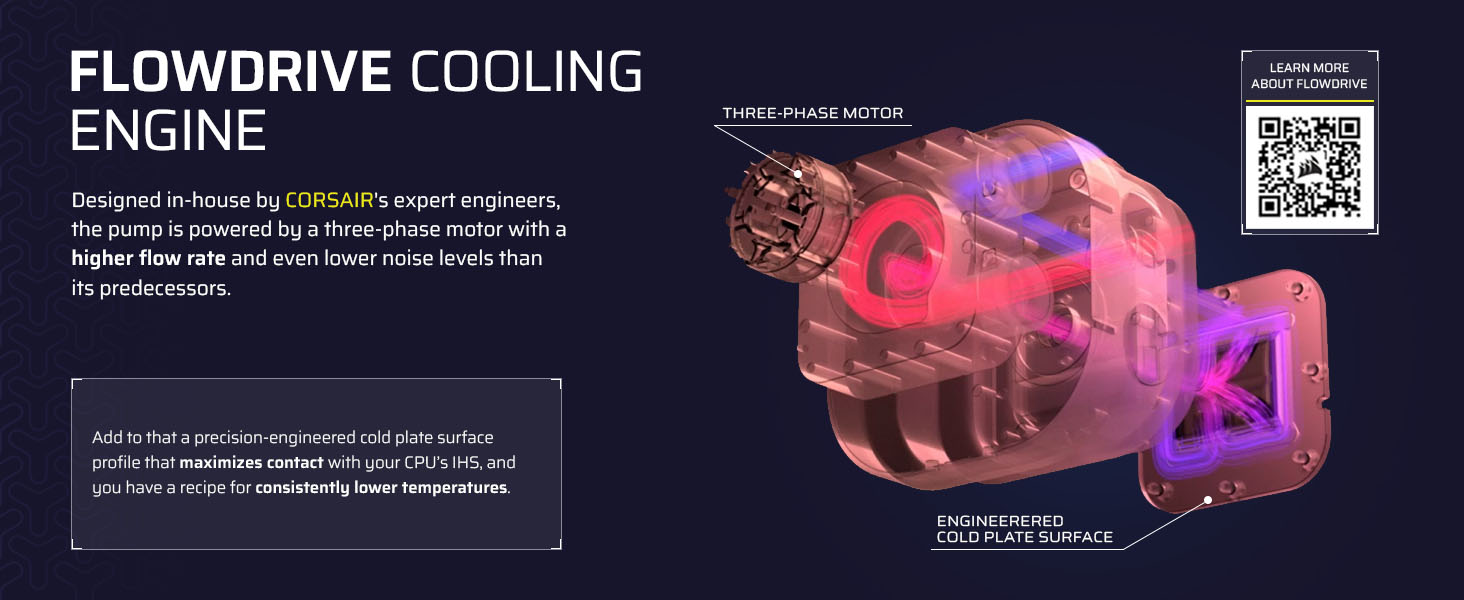
Image: Compatibility with Intel and AMD CPU sockets.

Image: Simplified cable management with the iCUE Link System Hub.
For the official installation guide, visit: Corsair Quick Start Guide
Official Product Video: CORSAIR iCUE LINK TITAN RX RGB AIO Trailer
Video: An official trailer showcasing the CORSAIR iCUE LINK TITAN RX RGB AIO Cooler's features and aesthetics.
Operating the Cooler
The primary control and customization of your CORSAIR iCUE LINK TITAN RX LCD CPU Cooler are managed through the iCUE software. This software allows you to:
- Monitor real-time CPU temperature and other system parameters.
- Customize the content displayed on the 2.1” IPS LCD screen, including animated GIFs, images, or system stats.
- Control the dynamic RGB lighting of the pump and RX RGB fans.
- Adjust fan speeds and pump performance via PWM control, including Zero RPM mode for silent operation at low loads.

Image: The customizable 2.1" IPS LCD display on the pump head.

Image: Customizable pump cap and fan lighting.
Ensure you download and install the latest version of the iCUE software from the official Corsair website for full functionality and optimal performance.
Performance and Cooling Technology
The TITAN RX LCD cooler is engineered for superior thermal management:
- FlowDrive Cooling Engine: This engine features a high-performance three-phase pump designed for efficient coolant circulation and a precision-engineered cold plate surface profile to maximize contact with your CPU's integrated heat spreader.
- RX RGB Fans: The included RX RGB fans are specifically designed for radiator cooling, providing high airflow and static pressure. They utilize CORSAIR AirGuide technology for directed airflow and Magnetic Dome bearings for quiet and durable operation.
- Pre-Applied Thermal Paste: The cooler comes with pre-applied CORSAIR XTM70 Extreme Performance Thermal Paste, ensuring excellent heat transfer from your CPU to the cold plate right out of the box.

Image: Three RX RGB fans designed for optimal radiator performance.

Image: Internal view of the FlowDrive Cooling Engine.

Image: Performance comparison of pre-applied thermal paste.
Maintenance
To ensure the longevity and optimal performance of your liquid CPU cooler, regular maintenance is recommended:
- Dust Cleaning: Periodically clean the radiator fins and fan blades to prevent dust buildup, which can impede airflow and reduce cooling efficiency. Use compressed air or a soft brush.
- Inspect Tubing and Connections: Occasionally check the tubing for any signs of kinks, leaks, or damage. Ensure all iCUE LINK connections are secure.
- Software Updates: Keep your iCUE software updated to the latest version to benefit from performance improvements, bug fixes, and new features.
Troubleshooting
If you encounter issues with your CORSAIR iCUE LINK TITAN RX LCD CPU Cooler, consider the following common troubleshooting steps:
- Cooler Not Detected by iCUE: Ensure all iCUE LINK cables are properly connected to the iCUE LINK System Hub and the hub is connected to your motherboard's USB header and power supply. Try restarting the iCUE software or your system.
- High CPU Temperatures: Verify that the pump is running (you may feel a slight vibration or hear a faint hum). Check that the cold plate is securely mounted to the CPU and that the thermal paste application is adequate. Ensure fans are spinning and not obstructed.
- LCD Display Issues: If the display is not working or showing incorrect information, check the iCUE software settings for the display. Ensure the cooler is properly detected and firmware is up to date.
- Unusual Noises: Investigate any new or unusual noises. This could indicate air bubbles in the loop (which often resolve over time), or a fan bearing issue.
For more in-depth troubleshooting or technical support, please visit the official Corsair support website.
Specifications
| Feature | Detail |
|---|---|
| Model Number | CW-9061023-WW |
| Product Dimensions | 15.59 x 4.72 x 1.06 inches |
| Item Weight | 3.75 Pounds |
| Compatible Devices | Desktop PCs |
| Cooling Method | Water Cooling |
| Noise Level | 36 dB (Maximum) |
| Maximum Rotational Speed | 2100 RPM |
| Power Connector Type | 4-Pin |
| Supported CPU Sockets | Intel LGA 1851/1700, AMD AM5/AM4 |
| UPC | 840440482956 |
| Country of Origin | Taiwan |
Warranty and Support
The CORSAIR iCUE LINK TITAN RX LCD CPU Cooler's FlowDrive cooling engine is backed by a 6-year warranty, ensuring long-term reliability and peace of mind.
For comprehensive support, including warranty claims, technical assistance, and access to the latest drivers and software, please visit the official Corsair support website:
Related documentsCW-9061023-WW


Ask a question about this manual
Ask about setup, troubleshooting, compatibility, parts, safety, or missing instructions. Manuals+ will review the question and use this page’s manual context to help answer it.