Overview
The DeLUX GM909 is a full-size wireless ergonomic keyboard designed for natural and comfortable typing. It features an ultra-thin split design with a cushioned palm rest, supporting both 2.4G wireless and Bluetooth dual channels for multi-device connectivity. Powered by a built-in 500mAh rechargeable battery, it offers quiet scissor switches for a precise typing experience and includes an auto-sleep mode for power efficiency. Compatible with Windows, Mac, iOS, and Android systems.

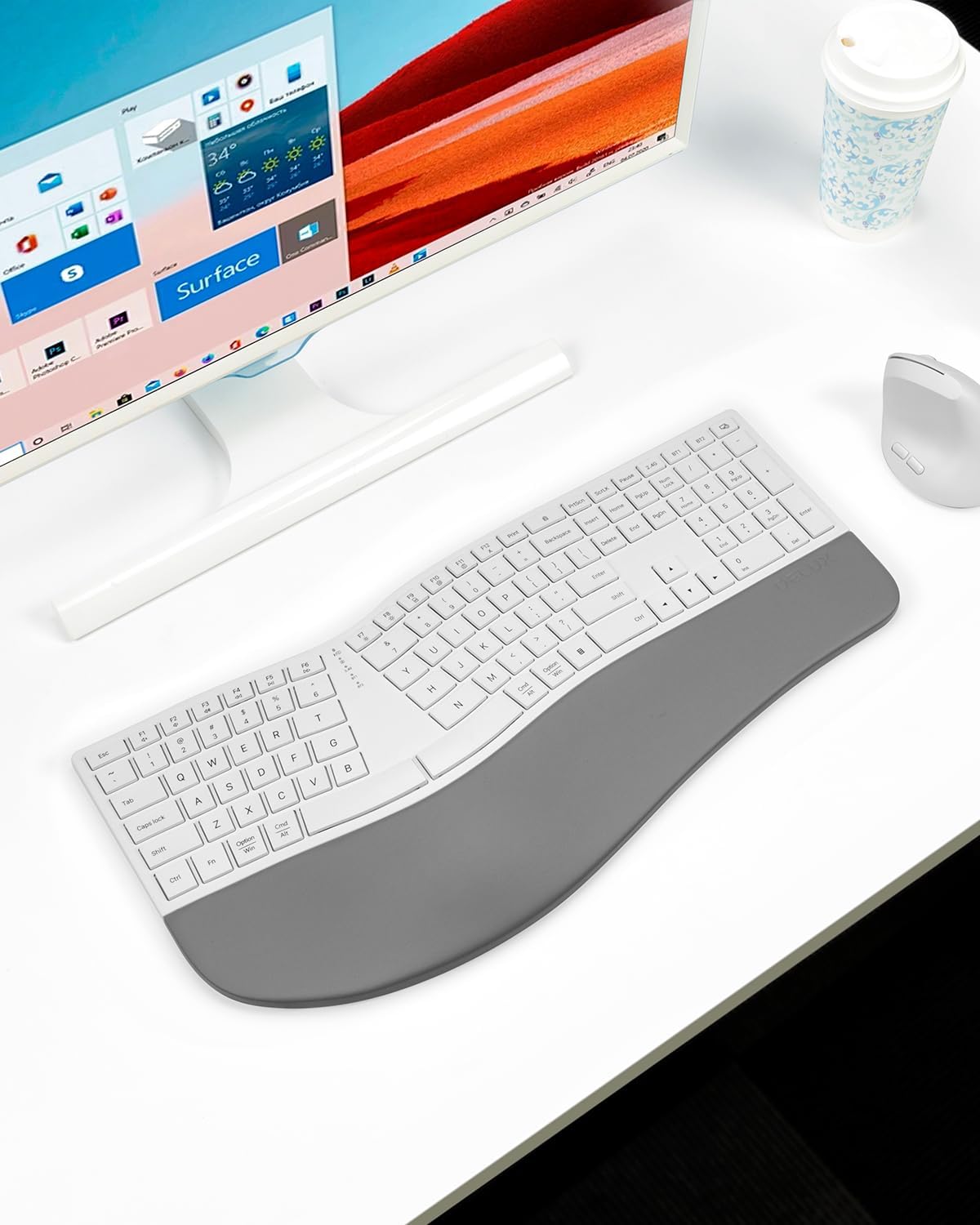
This image shows the overall design of the DeLUX GM909 keyboard, highlighting its full-size layout, split ergonomic design, and integrated palm rest.
Key Features
- Full-size Layout: Compared to compact keyboards, a full-size keyboard satisfies your typing habits, enhancing productivity and typing accuracy. Providing more function keys and shortcuts, improves work efficiency.
- Ultra-thin Ergonomic Design: Natural arc and slight arch offer familiar typing and improve typing posture. Ultra-thin design with cushioned palm rest keep your hand and keyboard at the same levels, without bending your wrist.
- Curved Split Design: Subtle changes to the key layout are designed to promote a more natural alignment of your wrists and forearms when typing and effectively reduce muscle activity in the upper trapezius muscle.
- Cushioned Palm Rest: The curved palm rest offers soft touch and comfort support to reduce wrist fatigue and strain, keeping your hand and keyboard at the same levels, without bending your wrist.
- Multi-devices Connection: Supports 2.4G wireless and Bluetooth dual channels, easy switching between three devices. It is compatible with Windows, Mac, iOS, Andriod systems.
- Rechargeable Battery: Built-in 500mAh Li-Ion battery for extended working hours, letting you focus on your work without worrying about charging.
- Auto Sleep Mode: For power savings and longer standby times, the keyboard will automatically enter sleep mode after 10 minutes of non-use. Wake-up method: Press any key to wake up. This feature is fixed and is not supported to be turned off for the time being.
- Scissor Switches Keys: Make every keystroke quiet and fast rebound, providing quick and precise typing experience.

This image illustrates the ultra-thin ergonomic split design of the keyboard, emphasizing how it promotes a more comfortable and natural typing posture.

This image highlights the full-size ergonomic layout of the keyboard, showing how its design provides ample space and improves typing efficiency.

This image details the leather-cushioned palm rest, designed to provide soft support and reduce wrist fatigue during extended typing sessions.

This image demonstrates the keyboard's ability to connect to multiple devices via 2.4G wireless and Bluetooth, allowing for seamless switching between them.

This image shows the keyboard's USB-C charging port and indicates its 500mAh rechargeable battery, providing long-lasting power.
This image highlights three key features: the quiet scissor switches for smooth typing, the convenient magnetic storage compartment for the USB receiver, and the indicator lights for connection status.
Setup
Unboxing
Carefully remove the keyboard and all accessories from the packaging. Ensure all components are present: DeLUX GM909 keyboard, USB-C charging cable, and 2.4G USB receiver.
Charging the Keyboard
The keyboard comes with a built-in rechargeable 500mAh Li-Ion battery.
- Locate the USB-C charging port on the keyboard (refer to image 500mAh rechargeable battery in the Key Features section).
- Connect the provided USB-C cable to the keyboard and the other end to a USB power source (e.g., computer USB port, USB wall adapter).
- The charging indicator light will illuminate (red) during charging and turn off when fully charged. A full charge takes approximately 1.5 hours.
Connecting the Keyboard
The DeLUX GM909 supports two wireless connection modes: 2.4G wireless via USB receiver and Bluetooth.
2.4G Wireless Connection
- Locate the 2.4G USB receiver stored magnetically on the underside of the keyboard (refer to image Quiet scissor switches, receiver storage, indicator light in the Key Features section for receiver storage).
- Plug the USB receiver into an available USB port on your computer.
- Turn on the keyboard using the ON/OFF switch located on the side.
- The keyboard should automatically connect to your device. The 2.4G indicator light will confirm connection.
Bluetooth Connection
- Turn on the keyboard using the ON/OFF switch.
- Press the Fn key simultaneously with BT1 or BT2 (located on the F-keys) to select a Bluetooth channel. The corresponding indicator light will blink rapidly, indicating pairing mode.
- On your device (computer, tablet, smartphone), go to Bluetooth settings and search for "DeLUX GM909" or a similar name.
- Select the keyboard to pair. Once connected, the indicator light will stop blinking and remain solid.
- Repeat steps 2-4 to connect up to two additional Bluetooth devices using BT1 and BT2.
- To switch between connected devices, simply press Fn + BT1, Fn + BT2, or Fn + 2.4G (for the USB receiver connection).
Operating Instructions
Ergonomic Design Benefits
The keyboard's curved split design and cushioned palm rest are engineered to promote a natural hand and wrist posture, reducing strain and fatigue during prolonged typing. This design helps align wrists and forearms, minimizing muscle activity in the upper trapezius.
Multimedia Functions
The keyboard features multimedia function keys (F1-F12). To access these functions, press the Fn key simultaneously with the desired F-key. For example, Fn + F7 might control media playback.
Power Saving Mode
To conserve battery life, the keyboard automatically enters sleep mode after 10 minutes of inactivity. To wake the keyboard, simply press any key. This feature is fixed and cannot be disabled.
Maintenance
Cleaning
To clean the keyboard, gently wipe the surface with a soft, damp cloth. Avoid using harsh chemicals or abrasive materials. For the keys, a soft brush or compressed air can remove debris.
Battery Care
To prolong battery life, avoid fully discharging the battery frequently. Recharge the keyboard when the low battery indicator appears. Store the keyboard in a cool, dry place when not in use for extended periods.
Troubleshooting
- Keyboard not responding: Ensure the keyboard is turned on. Check the connection mode (2.4G or Bluetooth) and ensure the USB receiver is properly plugged in or Bluetooth is paired. Recharge the battery if it's low.
- Lag or intermittent connection: Move the keyboard closer to your device. Ensure there are no major obstructions between the keyboard and the receiver/device. Check for interference from other wireless devices.
- Keys not working: Ensure the keyboard is clean and free of debris. If specific keys are unresponsive, contact customer support.
- Cannot pair via Bluetooth: Ensure the keyboard is in pairing mode (indicator light blinking rapidly). Delete previous pairings on your device and try pairing again. Ensure your device's Bluetooth is enabled.
- Keyboard not charging: Check the USB-C cable and charging port for damage. Try a different USB power source.
Specifications
| Feature | Detail |
|---|---|
| Brand | DeLUX |
| Model Name | GM909 |
| Connectivity Technology | 2.4G, Bluetooth |
| Keyboard Description | Ergonomic, Split |
| Special Feature | Ergonomic, Rechargeable |
| Color | White |
| Number of Keys | 112 |
| Product Dimensions | 18.15"L x 9.06"W x 1.17"H |
| Item Weight | 3.34 pounds |
| Battery | 500mAh Lithium Ion (rechargeable, included) |
| Compatible Devices | Laptop, PC (Windows, Mac, iOS, Android systems) |
| Manufacturer | DELUX |
| Date First Available | October 31, 2024 |
Warranty and Support
The DeLUX GM909 keyboard comes with a standard manufacturer's warranty. For detailed warranty information, product support, or technical assistance, please visit the official DeLUX website or contact their customer service.
Official DeLUX Store: DeLUX Store on Amazon


