
S.M.S.L B200
S.M.S.L B200 Hi-Res Digital Audio DAC
Instruction Manual
1. Introduction
Thank you for purchasing the S.M.S.L B200 Hi-Res Digital Audio DAC. This device is designed to enhance your audio experience by providing high-fidelity sound conversion and versatile connectivity options. Please read this manual thoroughly before using the product to ensure proper operation and to maximize its performance.
2. Safety Information
- Power Supply: Only use the provided USB A-C cable for power. It is strictly forbidden to use a charger exceeding 5V 2A to power the B200. Using an improper power supply may damage the device and void the warranty.
- Placement: Place the device on a stable, flat surface away from direct sunlight, heat sources, and moisture. Ensure adequate ventilation to prevent overheating.
- Cleaning: Disconnect the power before cleaning. Use a soft, dry cloth. Do not use liquid or aerosol cleaners.
- Servicing: Do not attempt to disassemble or repair the unit yourself. Refer all servicing to qualified personnel.
- Water Exposure: Do not expose the device to water or excessive humidity.
3. Package Contents
Please check that all items are present in the box:
- S.M.S.L B200 Unit
- USB A-C Cable
- Quick Start Guide
4. Product Overview
The S.M.S.L B200 is a compact and powerful digital audio DAC and Bluetooth receiver, featuring a 2.33-inch color display and multiple output options.
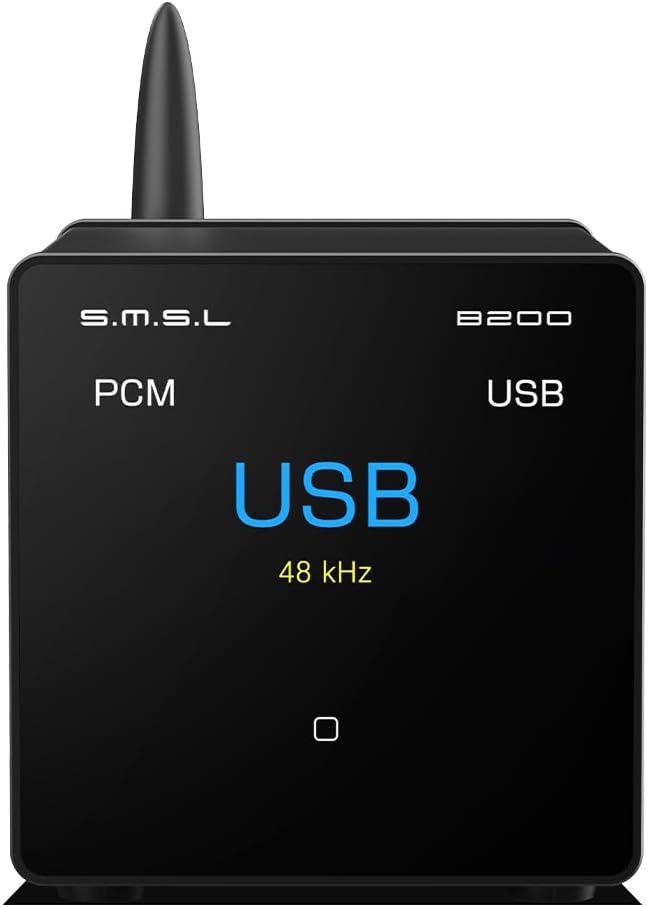
Figure 4.1: Front view of the S.M.S.L B200 unit, displaying 'USB' and '48 kHz' on its screen.
4.1 Front Panel
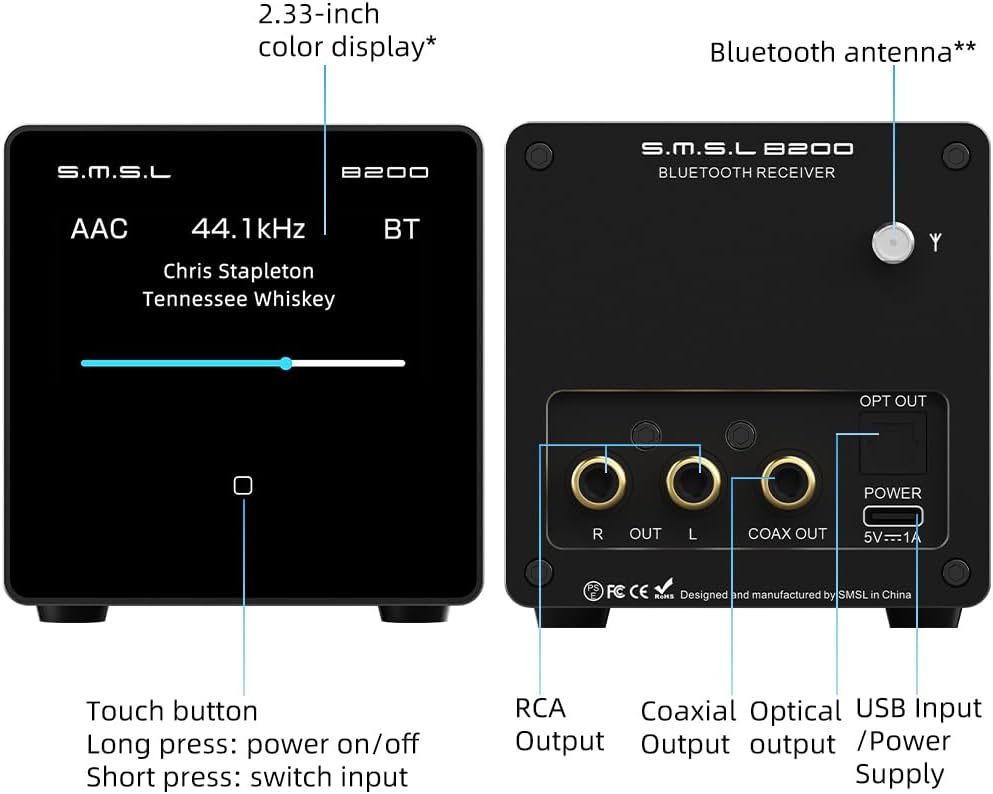
Figure 4.2: Detailed diagram of the B200's front and rear panels, indicating the 2.33-inch color display, touch button, Bluetooth antenna, RCA output, Coaxial output, Optical output, and USB Input/Power Supply.
- 2.33-inch Color Display: Shows current input, sample rate, Bluetooth codec, and can display title/artist information.
- Touch Button: A short press switches input sources. A long press powers the unit on or off.
4.2 Rear Panel

Figure 4.3: Rear panel of the B200, highlighting the RCA (R/L), Coaxial, and Optical outputs, along with the 5V/1A USB-C power input and Bluetooth antenna connection.
- RCA Output (R/L): Analog stereo output for connection to amplifiers or active speakers.
- Coaxial Output: Digital audio output.
- Optical Output: Digital audio output.
- USB Input/Power Supply (5V/1A): USB-C port for both power and digital audio input from a computer or mobile device.
- Bluetooth Antenna: Connect the included Bluetooth antenna for optimal wireless signal reception.
5. Setup
5.1 Power Connection
Connect the provided USB A-C cable to the USB Input/Power Supply port on the rear of the B200. Plug the other end into a compatible USB power source (e.g., a computer USB port or a 5V/1A USB power adapter). Ensure the power source does not exceed 5V 2A.

Figure 5.1: The B200 can be powered and receive USB audio input from various devices such as a PC, phone, or tablet using the USB A-C cable.
5.2 Audio Output Connections
The B200 offers simultaneous RCA, Optical, and Coaxial outputs. Choose the appropriate connection for your audio system.

Figure 5.2: The B200's versatile output options allow connection to various audio components like DACs, amplifiers, and active speakers.
- RCA: Connect RCA cables from the R and L outputs on the B200 to the corresponding analog inputs on your amplifier or active speakers.
- Optical/Coaxial: Connect an optical or coaxial cable from the B200's respective output to the digital input of your DAC or amplifier.
5.3 Bluetooth Antenna
Screw the provided Bluetooth antenna firmly into the designated connector on the rear panel of the B200.
6. Operating Instructions
6.1 Power On/Off
To power on the B200, long press the touch button on the front panel. To power off, long press the touch button again.
6.2 Input Selection
Short press the touch button on the front panel to cycle through the available input sources: Bluetooth and USB.
6.3 Bluetooth Operation
When Bluetooth input is selected, the B200 will enter pairing mode. On your mobile device or computer, search for Bluetooth devices and select "S.M.S.L B200" to connect. The B200 supports high-fidelity Bluetooth codecs including LDAC, apt-X HD, apt-X, SBC, and AAC.

Figure 6.1: Comparison of transfer rates for various Bluetooth codecs supported by the B200, demonstrating LDAC's superior performance.
6.4 USB Audio Playback
Connect the B200 to your computer or compatible mobile device via the USB A-C cable. Select the B200 as the audio output device in your operating system's sound settings. The B200 supports 24-bit digital audio via USB.
6.5 Display Features
The 2.33-inch color display can show the current input, sample rate, and Bluetooth codec. For dynamic display of title and artist information, you may need to enable "Car Bluetooth Lyrics" and "External Bluetooth Device Lyrics" or similar settings within your mobile device's playback software. Compatibility may vary depending on the mobile phone model and software used.

Figure 6.2: The B200's display showing song information. Note that enabling lyrics display may require specific software settings on your connected device.
Video 6.1: An official S.M.S.L video demonstrating the B200's display capabilities, including title and artist information. This video highlights the device's features and user interface.
7. Maintenance
To ensure the longevity and optimal performance of your S.M.S.L B200, follow these maintenance guidelines:
- Cleaning: Use a soft, dry, lint-free cloth to wipe the exterior of the unit. Avoid using abrasive cleaners, solvents, or strong detergents, as they may damage the finish.
- Dust: Keep the device free from dust accumulation. You may use a soft brush or compressed air to gently remove dust from vents and ports.
- Storage: If storing the device for an extended period, disconnect it from power and store it in a cool, dry place, away from extreme temperatures and humidity.
8. Troubleshooting
If you encounter issues with your S.M.S.L B200, please refer to the following common problems and solutions:
| Problem | Possible Cause | Solution |
|---|---|---|
| No power | Power cable not connected; faulty power source. | Ensure USB A-C cable is securely connected. Try a different USB port or power adapter (5V/1A). |
| No sound output | Incorrect input selected; cables not connected properly; volume too low on connected device/amplifier. | Short press the touch button to select the correct input. Check all audio cable connections. Increase volume on the connected amplifier or active speakers. |
| Bluetooth not pairing | B200 not in pairing mode; device too far; interference. | Ensure B200 is set to Bluetooth input. Move your device closer to the B200. Avoid strong electromagnetic interference. |
| Lyrics/Artist not displayed | Mobile device settings; playback software limitations. | Check your mobile device's Bluetooth settings for options like "Car Bluetooth Lyrics" or "External Bluetooth Device Lyrics" and enable them. Ensure your playback software supports sending this metadata. |
If the problem persists after trying these solutions, please contact S.M.S.L customer support for further assistance.
9. Specifications
The S.M.S.L B200 is engineered with advanced components for superior audio performance.

Figure 9.1: The B200 features the highly acclaimed Cirrus Logic CS43131 decoding chip, contributing to its exceptional audio performance.
- Decoding Chip: Cirrus Logic CS43131
- Bluetooth Version: 5.1
- Supported Bluetooth Codecs: LDAC, apt-X HD, apt-X, SBC, AAC
- Outputs: Optical, Coaxial, RCA (simultaneous output)
- USB Input: Supports 24-bit digital audio
- Display: 2.33-inch color screen
- THD+N (Total Harmonic Distortion + Noise): As low as 0.0002% (RCA analog signal output)
- SNR (Signal-to-Noise Ratio): As high as 128dB
- Power Supply: 5V/1A via USB-C (Do not exceed 5V 2A)
- Item Weight: 1.21 pounds
- Package Dimensions: 5.87 x 5.87 x 3.9 inches
- Model Number: B200
10. Warranty and Support
S.M.S.L provides dedicated customer service to assist with any inquiries or concerns regarding your B200. Please refer to your purchase documentation for specific warranty period details. For technical support or warranty claims, please contact the official S.M.S.L support channels or your authorized dealer.
For more information, you may visit the official S.M.S.L website: www.smsl-audio.com
Ask a question about this manual
Ask about setup, troubleshooting, compatibility, parts, safety, or missing instructions. Manuals+ will review the question and use this page’s manual context to help answer it.