
1. Introduction
This document provides comprehensive instructions for the Lumote Replacement Remote Control, designed for seamless compatibility with Philips DVD750VR, 483521837351, and DVD750VR17 models. This remote is a direct replacement, offering all original functions without requiring complex setup codes. Simply insert batteries, and it is ready for use.
The remote features a standard layout with dedicated buttons for various functions, ensuring intuitive operation of your Philips DVD player.
2. Setup
2.1. Battery Installation
The remote control requires two AAA batteries (not included). Follow these steps to install them:
- Locate the battery compartment cover on the back of the remote control.
- Slide the cover downwards or press the latch (if present) to open the compartment.
- Insert two AAA batteries, ensuring the positive (+) and negative (-) terminals align correctly with the indicators inside the compartment.
- Replace the battery compartment cover by sliding it back into place until it clicks securely.
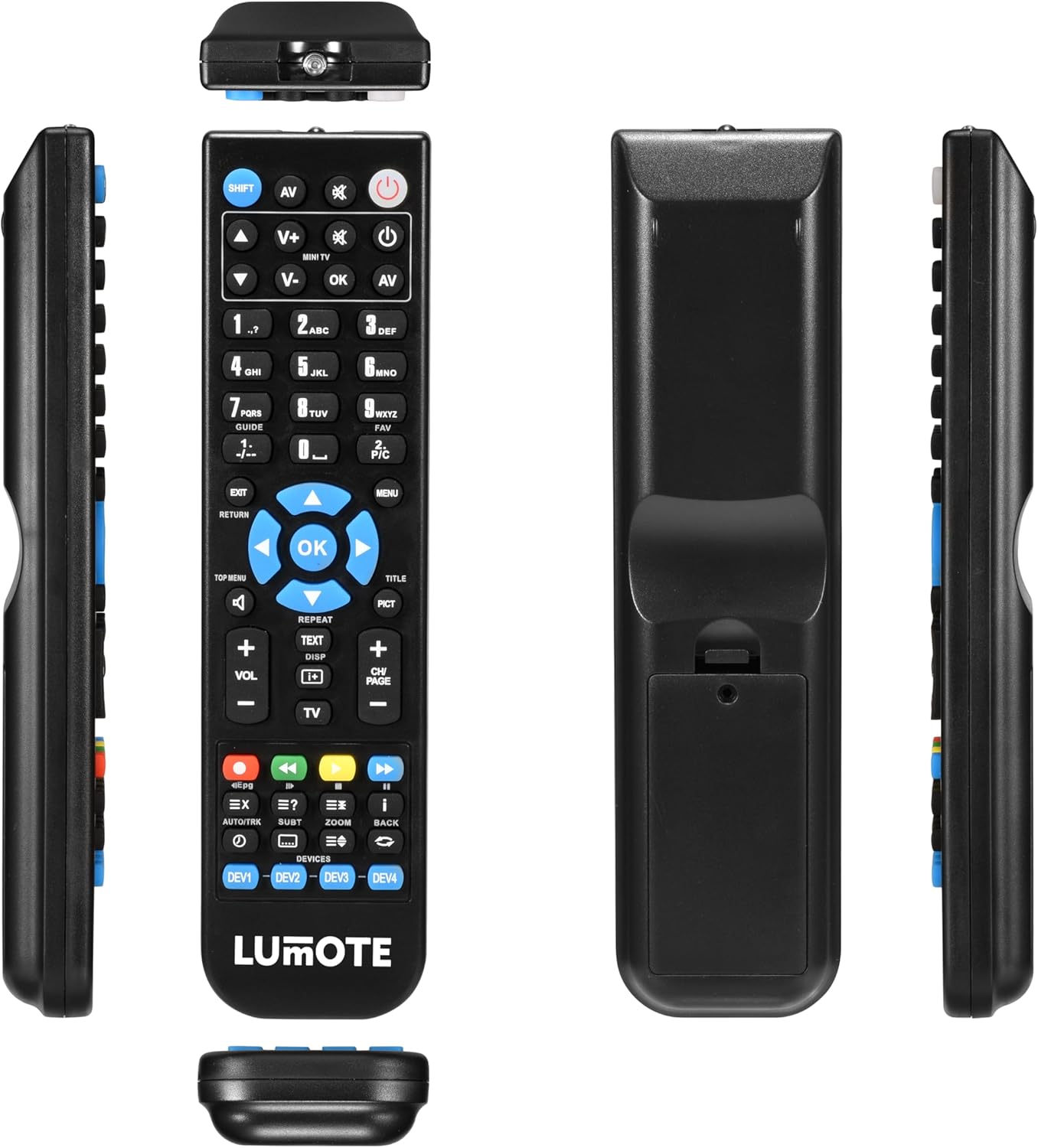
Image: Rear view of the remote control showing the battery compartment.
Once batteries are installed, the remote is ready for immediate use with compatible Philips DVD750VR series devices.
2.2. Initial Use (No Setup Code Required)
This Lumote replacement remote control is pre-programmed for Philips DVD750VR, 483521837351, and DVD750VR17 models. No manual code entry or programming is typically required. Simply point the remote at your device and begin operation.
If the remote does not function immediately, ensure the batteries are correctly installed and have sufficient charge. If issues persist, refer to the Troubleshooting section.
3. Operating Instructions
The remote control features a standard layout for intuitive operation. Below is a general overview of key buttons and their functions:

Image: Front view of the remote control with all buttons labeled.
- Power (Red button, top right): Turns the device on or off.
- Input/AV: Selects the input source (e.g., TV, AV).
- Number Pad (0-9): Directly enters channel numbers or menu selections.
- Volume Up/Down (VOL +/-): Adjusts the audio volume.
- Channel Up/Down (CH +/-): Changes the channel.
- Mute (Speaker icon): Mutes or unmutes the audio.
- Navigation Buttons (Up, Down, Left, Right arrows): Navigates through menus and options.
- OK (Center button): Confirms selections.
- Menu: Accesses the device's main menu.
- Exit/Return: Exits menus or returns to the previous screen.
- Playback Controls (Play, Pause, Stop, Rewind, Fast Forward): Controls media playback.
- Repeat: Repeats playback of a track or chapter.
- TEXT/DISP: Displays text information or on-screen display.
- PICT: Picture mode selection.
- TV: Switches to TV mode.
- DEV1, DEV2, DEV3, DEV4: Device selection buttons (if multi-device programming is supported, though this model is a direct replacement).
For specific functions related to your Philips DVD player, refer to your device's original user manual in conjunction with this remote control.
4. Maintenance
4.1. Battery Replacement
Replace batteries when the remote's response becomes sluggish or it stops functioning. Always replace both batteries simultaneously with new AAA batteries. Do not mix old and new batteries, or different types of batteries.
4.2. Cleaning
To clean the remote control, use a soft, dry cloth. Do not use liquid cleaners, aerosols, or harsh chemicals, as these may damage the remote's surface or internal components.
5. Troubleshooting
- Remote not responding:
- Ensure fresh AAA batteries are correctly installed.
- Check for any obstructions between the remote and the device's infrared sensor.
- Verify that the remote is pointed directly at the device.
- Some buttons not working:
- Since this is a direct replacement, all buttons should function as the original. If specific buttons do not work, try replacing the batteries.
- Ensure the remote is not in a different device mode (e.g., if it has multi-device capabilities, ensure it's set to the correct device).
If issues persist after following these steps, contact customer support.
6. Specifications
| Brand | Lumote |
| Model Compatibility | Philips DVD750VR, 483521837351, DVD750VR17 |
| Batteries Required | 2 x AAA (not included) |
| Item Weight | 6 ounces |
| Package Dimensions | 9 x 3 x 2 inches |
7. Warranty and Support
This Lumote Replacement Remote Control comes with a 12-month guarantee. For warranty claims, technical assistance, or any product-related inquiries, please contact the seller or manufacturer directly through your purchase platform.
Please retain your proof of purchase for warranty purposes.
8. Related Videos
Universal Remote Control Overview
Video: An overview of a universal remote control, demonstrating button presses and general functionality. This video provides a visual guide to handling and operating a similar remote.
Universal TV Remote Control Features
Video: Demonstrates various features and button functions of a universal TV remote control, including compatibility with multiple TV brands.