Introduction
This manual provides instructions for the Lumote Replacement Remote Control, designed for use with specific AKAI audio system models. This remote control functions as a direct replacement for the original AKAI RC-S49, AM-39, AM-49, AM-59, and AM-69 remote controls, offering all original functionalities without requiring any setup codes.
Package Contents
- 1 x Lumote Replacement Remote Control
Note: 2 x AAA batteries are required and are not included in the package.
Setup
1. Installing Batteries
The remote control requires two (2) AAA batteries for operation. Follow these steps to install them:
- Locate the battery compartment on the back of the remote control.
- Slide the battery compartment cover downwards or in the direction indicated by an arrow to open it.
- Insert two AAA batteries, ensuring the positive (+) and negative (-) terminals align correctly with the markings inside the compartment.
- Replace the battery compartment cover by sliding it back into position until it clicks securely.
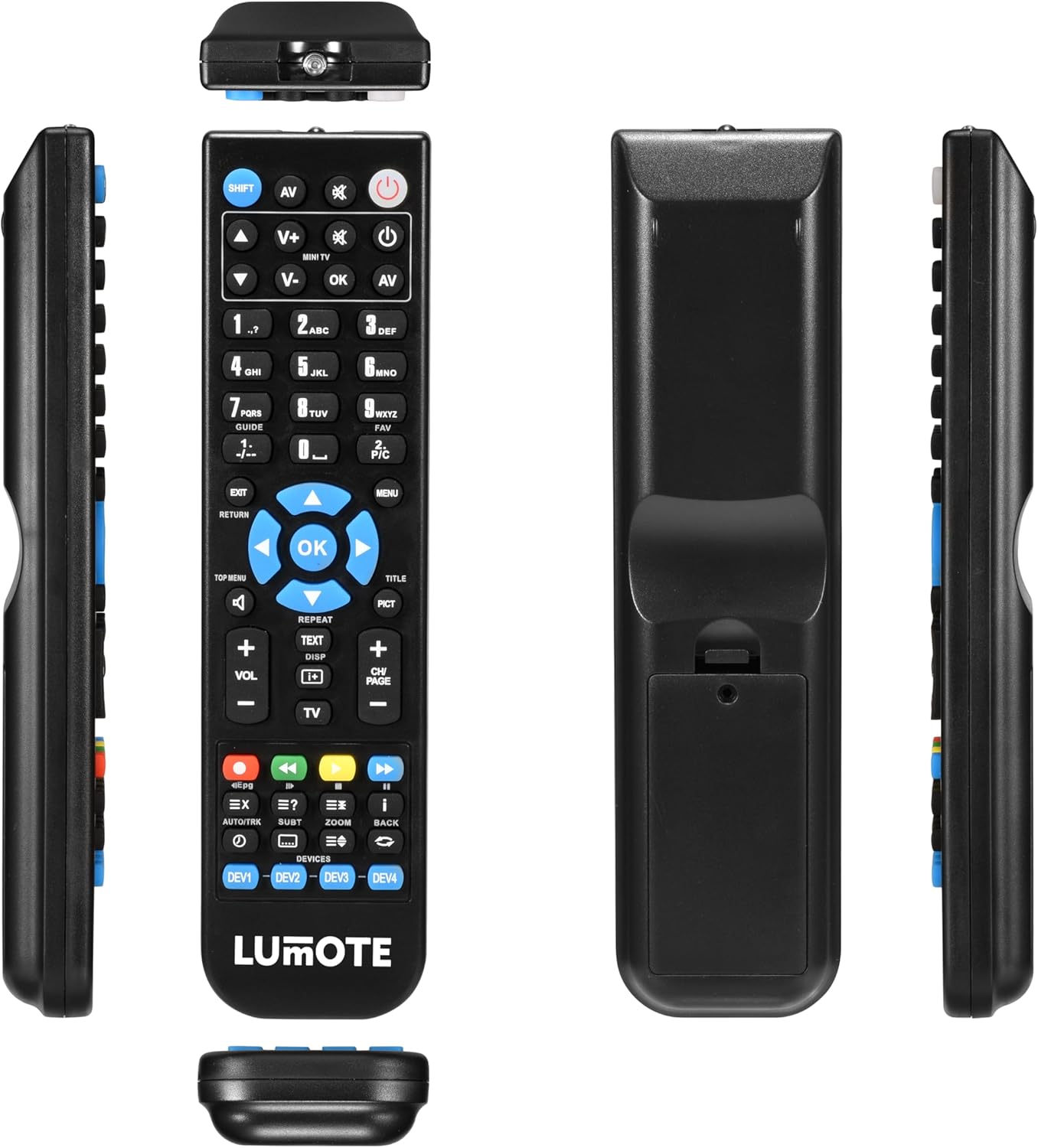
Image: Back view of the Lumote remote control, showing the battery compartment cover. The cover is designed to slide open for battery insertion.
2. Initial Use
This Lumote replacement remote control is pre-programmed and ready for immediate use with compatible AKAI models. No additional setup codes or programming steps are required. Simply install the batteries, point the remote at your AKAI audio system, and begin operation.
Operating Instructions
The Lumote replacement remote control replicates the functionality of your original AKAI remote. Refer to your AKAI audio system's user manual for specific functions of each button. Below is a general overview of common remote control functions:

Image: Front view of the Lumote remote control, displaying its full array of buttons including power, volume, channel, numeric keypad, navigation, and media playback controls.
- Power Button: Turns the AKAI audio system on or off.
- Numeric Keypad (0-9): Used for direct input of track numbers, radio frequencies, or other numerical selections.
- Volume Up/Down (VOL +/-): Adjusts the audio output level.
- Mute: Silences the audio output.
- Source/Input (AV, SHIFT): Selects different audio input sources (e.g., CD, Tuner, AUX).
- Navigation Buttons (Up, Down, Left, Right, OK): Used to navigate menus and confirm selections.
- Playback Controls (Play, Pause, Stop, Fast Forward, Rewind, Skip): Controls media playback functions.
- Menu/Return: Accesses system menus or returns to the previous screen.
Maintenance
To ensure the longevity and optimal performance of your remote control, follow these maintenance guidelines:
- Cleaning: Wipe the remote control with a soft, dry cloth. For stubborn dirt, lightly dampen the cloth with water. Avoid using harsh chemicals, abrasive cleaners, or solvents, as these can damage the remote's surface and internal components.
- Battery Replacement: Replace batteries when the remote's response becomes sluggish or stops functioning. Always replace both batteries at the same time with new AAA batteries. Do not mix old and new batteries, or different types of batteries.
- Storage: Store the remote control in a cool, dry place away from direct sunlight, extreme temperatures, and high humidity. If the remote will not be used for an extended period, remove the batteries to prevent leakage.
- Avoid Drops: Protect the remote from physical impact. Dropping the remote can damage its internal circuitry.
Troubleshooting
If you experience issues with your Lumote replacement remote control, consult the following troubleshooting steps:
- Remote Not Responding:
- Check if the batteries are inserted correctly with the correct polarity (+/-).
- Replace the batteries with fresh AAA batteries.
- Ensure there are no obstructions between the remote control and the AKAI audio system's infrared receiver.
- Confirm you are within the effective operating range and pointing the remote directly at the audio system.
- Some Buttons Not Working:
- This remote is a direct replacement. Verify that the specific function exists on your AKAI audio system and was controlled by the original remote.
- Clean the remote control, especially around the unresponsive buttons, to remove any dirt or debris that might be preventing proper contact.
- Interference:
- Bright light sources, such as direct sunlight or certain types of fluorescent lighting, can interfere with infrared signals. Try operating the remote in a different lighting condition.
Specifications
| Feature | Description |
|---|---|
| Brand | Lumote |
| Compatible Models | AKAI RC-S49, AM-39, AM-49, AM-59, AM-69 |
| Power Source | 2 x AAA Batteries (not included) |
| Setup Required | None (Pre-programmed) |
| Item Weight | 6 ounces (approximately 170 grams) |
| Package Dimensions | 9 x 3 x 2 inches (approximately 22.86 x 7.62 x 5.08 cm) |
Warranty and Support
This Lumote Replacement Remote Control comes with a 12-month guarantee from the date of purchase. This warranty covers manufacturing defects and ensures the remote functions as described. Please retain your proof of purchase for warranty claims.
For technical support or warranty inquiries, please contact your retailer or the Lumote customer service department. Contact information can typically be found on the product packaging or the retailer's website.