1. Introduction
Thank you for choosing the Omron M7 Intelli IT Afib Automatic Upper Arm Blood Pressure Monitor. This device is designed to accurately measure your blood pressure and detect potential atrial fibrillation (Afib) at home. Regular monitoring can provide valuable information for you and your healthcare professional.
This manual provides essential information on the safe and effective use of your blood pressure monitor. Please read it thoroughly before use and keep it for future reference.

Image: The Omron M7 Intelli IT Afib Blood Pressure Monitor, showing the main unit, the Intelli Wrap Cuff, and the product packaging.
2. Important Safety Information
Please read the following safety precautions carefully before using the device.
- Consult Your Doctor: Always consult your doctor regarding specific blood pressure readings and treatment. Self-diagnosis and treatment based on measurement results can be dangerous.
- Proper Cuff Size: Ensure the cuff size is appropriate for your arm circumference. Using an incorrect cuff size can lead to inaccurate readings.
- Avoid Interference: Do not use the device in close proximity to strong electromagnetic fields, such as mobile phones or microwave ovens, as this may affect accuracy.
- Not for Infants/Children: This device is intended for adult use only. Do not use on infants, toddlers, or children.
- Battery Safety: Follow proper battery installation and disposal guidelines. Do not mix old and new batteries or different types of batteries.
- Afib Detection: The Afib detection feature is for screening purposes only. It is not a diagnosis. If the Afib indicator appears frequently, consult your doctor.
3. Package Contents
Verify that all components are present in your package:
- Omron M7 Intelli IT Afib Blood Pressure Monitor Unit
- Intelli Wrap Cuff (HEM-FL31, arm circumference 22-42 cm)
- Instruction Manual (this document)
- Storage Case
- Set of Batteries (AA)

Image: The Omron M7 Intelli IT Afib Blood Pressure Monitor unit and the Intelli Wrap Cuff, showing the cuff's size range (22-42 cm).
4. Setup
4.1. Installing Batteries
- Open the battery compartment cover on the back of the monitor.
- Insert four AA batteries according to the polarity indicators (+/-) inside the compartment.
- Close the battery compartment cover securely.
4.2. Connecting the Air Tube to the Monitor
- Locate the air jack on the left side of the monitor unit.
- Firmly insert the air plug from the Intelli Wrap Cuff into the air jack until it clicks into place.
4.3. Initial Device Settings (Date, Time, User Profile)
Upon first use or after battery replacement, the device will prompt you to set the date and time. Refer to the on-screen prompts and use the navigation buttons to adjust the values. The monitor supports two user profiles (User 1 and User 2) and a Guest mode.
4.4. Pairing with Omron Connect App (Optional)
The Omron M7 Intelli IT Afib can connect to the Omron Connect app via Bluetooth for easy data management and tracking.
- Download the "Omron Connect" app from your smartphone's app store (iOS or Android).
- Enable Bluetooth on your smartphone.
- Open the Omron Connect app and follow the on-screen instructions to pair your device. The app will guide you through the pairing process, which typically involves pressing the Bluetooth button on the monitor.
5. Operating Instructions
5.1. Applying the Intelli Wrap Cuff
Correct cuff placement is crucial for accurate readings. The Intelli Wrap Cuff is designed for 360-degree accuracy, making placement easier.
- Sit upright with your back supported and feet flat on the floor.
- Place your arm on a table so the cuff is at heart level.
- Slide your arm through the cuff loop. The air tube should run down the inside of your arm and be aligned with your middle finger.
- Wrap the cuff snugly around your upper arm, ensuring the bottom edge of the cuff is 1-2 cm above your elbow. The blue mark on the cuff should be centered on the inside of your arm.
- Secure the fabric fastener firmly. The cuff should be snug but not too tight; you should be able to insert two fingers between the cuff and your arm.
5.2. Taking a Measurement
Ensure you are relaxed and have not exercised, eaten, or smoked for at least 30 minutes prior to measurement.
- Select your user profile (User 1 or User 2) using the user selection button, or choose Guest mode if not storing data.
- Press the START/STOP button. The cuff will begin to inflate automatically.
- Remain still and silent during the measurement.
- Once the measurement is complete, the cuff will deflate, and your systolic, diastolic, and pulse readings will be displayed. Any detected Afib or irregular heartbeat will also be indicated.
- Press the START/STOP button again to turn off the monitor. If not turned off, it will automatically power down after a few minutes.
5.3. TruRead Mode (3-Measurement Average)
The TruRead mode automatically takes three consecutive measurements at short intervals and displays the average result. This provides a more reliable indication of your typical blood pressure.
- To activate TruRead, press the dedicated TruRead button (if available, or refer to specific device instructions for activation).
- The monitor will automatically take three measurements with a brief pause between each.
- The final display will show the average of the three readings.
5.4. Understanding Your Readings
- SYS (Systolic Pressure): The highest pressure in your arteries when your heart beats.
- DIA (Diastolic Pressure): The lowest pressure in your arteries when your heart rests between beats.
- Pulse: Your heart rate, or the number of times your heart beats per minute.
- Afib Indicator: An icon will appear if the device detects an irregular heartbeat that may be indicative of Atrial Fibrillation.
- Cuff Wrap Guide: An indicator on the display confirms if the cuff has been wrapped correctly.
5.5. Using the Omron Connect App
The Omron Connect app allows you to view your measurement history, track trends, and share data with your healthcare provider.
- After pairing, measurements taken on the monitor will automatically transfer to the app when it is open and Bluetooth is enabled.
- The app provides graphical representations of your blood pressure trends over time.
- You can add notes to your readings, set reminders, and export data for your records.
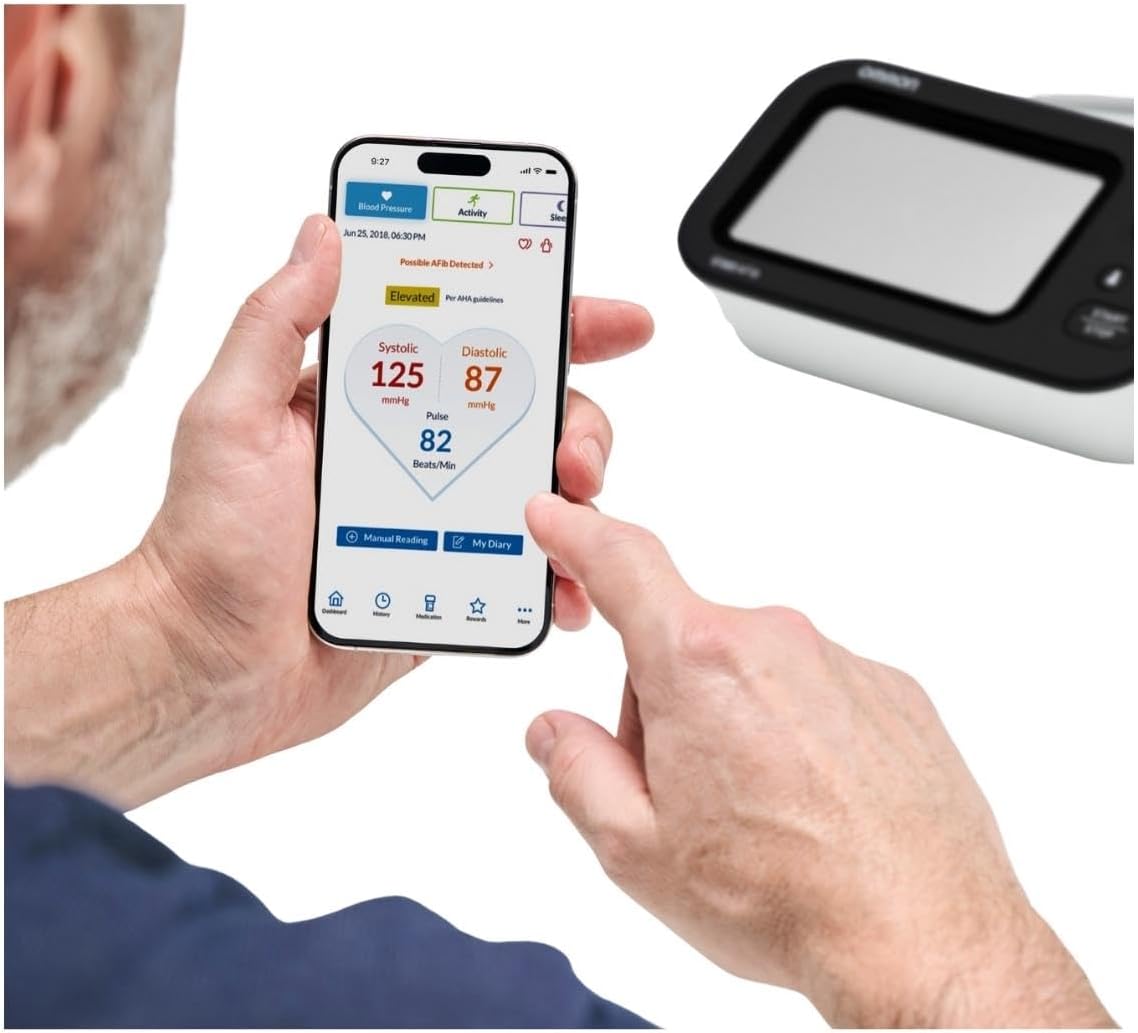
Image: A person viewing their blood pressure readings on the Omron Connect app on a smartphone, with the Omron M7 Intelli IT Afib monitor visible in the background.
6. Maintenance and Care
6.1. Cleaning the Monitor and Cuff
- Wipe the monitor and cuff with a soft, dry cloth.
- If necessary, use a soft cloth moistened with water and a mild soap, then wipe dry.
- Do not use abrasive cleaners, alcohol, or benzene. Do not wash the cuff or immerse the monitor in water.
6.2. Storage
- Store the device and cuff in the provided storage case when not in use.
- Store in a clean, dry place away from direct sunlight, extreme temperatures, and high humidity.
- Do not store the device in a location where it may be exposed to strong vibrations or shocks.
7. Troubleshooting
If you encounter issues with your monitor, refer to the following common problems and solutions:
| Problem | Possible Cause | Solution |
|---|---|---|
| No display when powered on | Batteries are dead or incorrectly inserted. | Replace batteries or reinsert them with correct polarity. |
| Error message (e.g., E1, E2) | Cuff not applied correctly, movement during measurement, or air leakage. | Reapply cuff correctly, remain still, check air tube connection. Refer to manual for specific error codes. |
| Inconsistent readings | Improper cuff placement, movement, talking, or incorrect posture. | Ensure proper cuff placement, remain still and silent, maintain correct posture. Take multiple readings using TruRead mode. |
| Cannot pair with Omron Connect app | Bluetooth off, app not open, or device already paired. | Ensure Bluetooth is on, app is open, and follow app pairing instructions. Forget device in phone's Bluetooth settings if previously paired. |
If the problem persists after trying these solutions, please contact Omron customer support.
8. Specifications
| Feature | Detail |
|---|---|
| Model Number | HEM-7380T1-EBK |
| Measurement Method | Oscillometric method |
| Cuff Type | Intelli Wrap Cuff (HEM-FL31) |
| Cuff Arm Circumference | 22 to 42 cm |
| Power Source | 4 "AA" batteries 1.5V or optional AC adapter (not included) |
| Weight | Approximately 0.4 Kilograms (monitor only, without batteries) |
| Memory | 100 measurements with date and time for each user (2 users) |
| Connectivity | Bluetooth® Smart |
| Material Feature | Reusable |
| Age Range | Adult |
9. Warranty and Support
9.1. Warranty Information
The Omron M7 Intelli IT Afib Blood Pressure Monitor comes with a 5-year guarantee from the date of purchase. This warranty covers defects in materials and workmanship under normal use. It does not cover damage caused by misuse, accidents, or unauthorized alterations.
9.2. Customer Support
For technical assistance, warranty claims, or further information, please contact Omron customer support through their official website or the contact details provided in your product packaging. Please have your model number (HEM-7380T1-EBK) and proof of purchase ready when contacting support.