
1. Introduction
This manual provides detailed instructions for the assembly, operation, and maintenance of your YIHAYO Electric Standing Desk with Drawers. Please read this manual thoroughly before assembly and use to ensure proper function and safety. This desk is designed to offer a versatile workspace, allowing seamless transitions between sitting and standing positions, and includes integrated storage solutions.
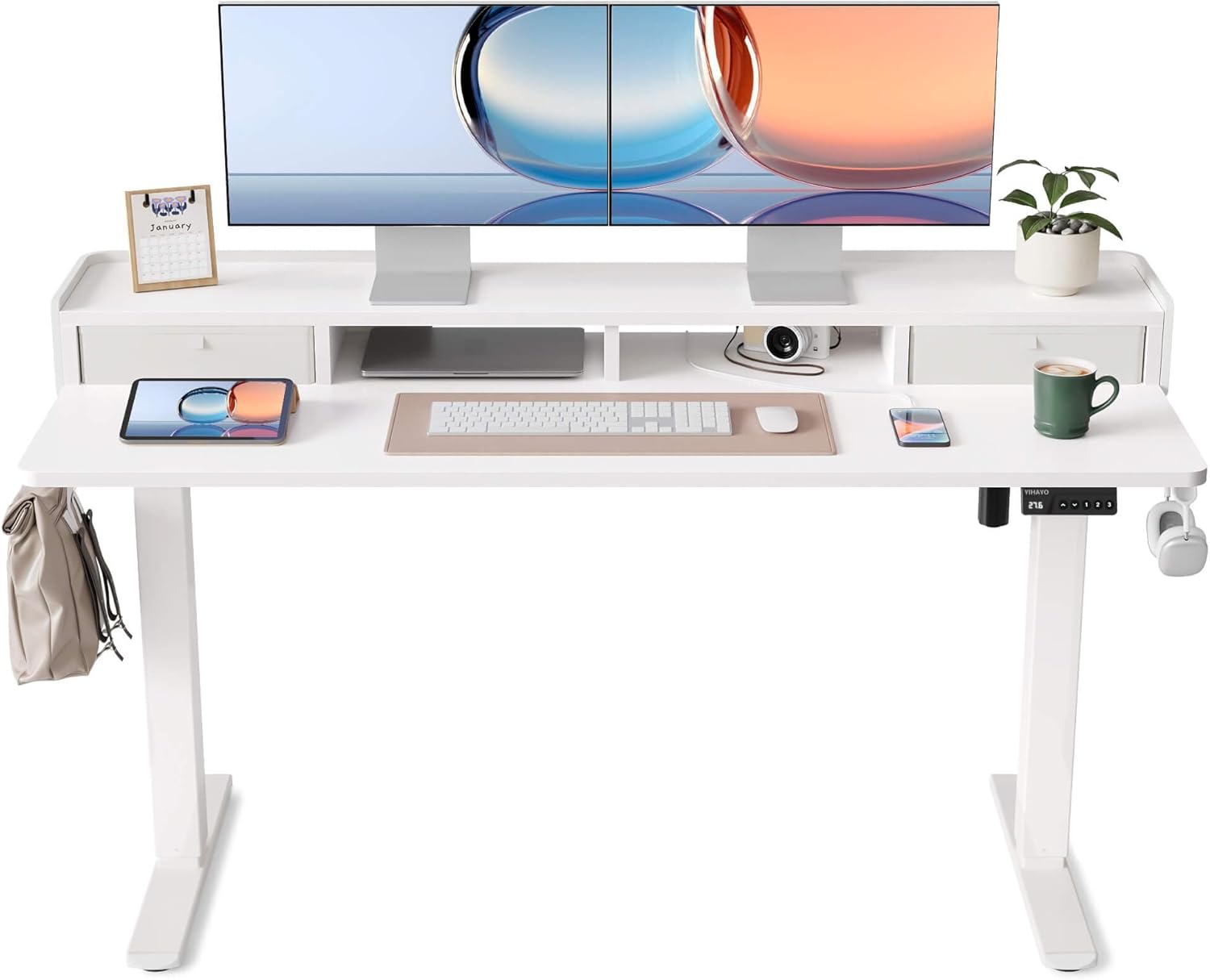
Image 1.1: The YIHAYO Electric Standing Desk with integrated monitor stand and drawers, showcasing its design and features.
2. Safety Information
- Ensure all components are present and undamaged before assembly. Do not use if any parts are missing or broken.
- Keep children and pets away from the desk during operation to prevent injury.
- Do not overload the desk. The maximum load capacity is 154 lbs (70 kg).
- Ensure there are no obstructions above or below the desk during height adjustment.
- Only use the provided power adapter. Disconnect power before cleaning or maintenance.
- Avoid placing liquids directly on the desk surface without protective coasters.
- This desk is intended for indoor use only.
3. Package Contents
Verify that all the following components are included in your package:
- Desktop (2 sections)
- Desk Legs (2)
- Foot Pads (2)
- Monitor Stand
- Fabric Drawers (2)
- Control Panel / Keypad
- Power Adapter and Cable
- Headphone Hook (2)
- Assembly Hardware (screws, Allen wrenches, etc.)
- Instruction Manual

Image 3.1: Overview of desk dimensions and key features like rounded corners, adjustable foot pads, and desk hooks.
4. Assembly Instructions
Assembly typically takes approximately 60-90 minutes. It is recommended to have a second person for assistance during certain steps. Follow the included step-by-step diagrams and instructions carefully.
- Unpack Components: Lay out all parts on a clean, soft surface to prevent scratches. Verify all parts against the package contents list.
- Assemble Desktop: The desktop consists of two sections. Align and secure these sections according to the provided hardware. Ensure the connection is tight and flush.
- Attach Desk Legs: Secure the desk legs to the assembled desktop using the designated screws. Ensure all screws are tightened firmly.
- Install Foot Pads: Attach the adjustable foot pads to the bottom of the desk legs. These can be adjusted later to level the desk on uneven surfaces.
- Mount Monitor Stand and Drawers: Attach the monitor stand and integrate the fabric drawers into their designated slots on the desktop.
- Install Control Panel and Headphone Hooks: Mount the control panel to the underside of the desktop in an accessible location. Attach the headphone hooks to the sides of the desk as desired.
- Connect Power: Connect the power adapter to the desk motor and then to a power outlet.
Important Note:
- When inserting screws, ensure they are aligned straight with the pre-drilled holes to prevent damage to the desktop material.
- A power drill can expedite assembly, but manual tools are sufficient.

Image 4.1: The desk's sturdy steel frame and aviation-grade lift column connectors ensure stability.
5. Operating Instructions
5.1. Height Adjustment
The YIHAYO Electric Standing Desk offers an adjustable height range from 27.6 inches to 45.3 inches. Use the up and down arrow buttons on the control panel to adjust the desk height.
- Press the Up Arrow button to raise the desk.
- Press the Down Arrow button to lower the desk.
- Release the button at your desired height.

Image 5.1: Illustrates the desk's height adjustment capabilities, accommodating both sitting and standing postures.
5.2. Memory Presets
The control panel features three memory buttons (1, 2, 3) to store and recall your preferred sitting and standing heights.
- Set a Memory Height:
- Adjust the desk to your desired height using the up/down arrows.
- Press the S button (Set).
- Immediately press one of the memory buttons (1, 2, or 3) until you hear a beep or see a confirmation on the display. The current height is now saved to that button.
- Recall a Memory Height:
- Press the desired memory button (1, 2, or 3). The desk will automatically move to the saved height.

Image 5.2: The smart keypad allows for precise height adjustments and saving up to three preferred positions.
5.3. Anti-Collision Technology
The desk is equipped with an automatic anti-collision system. If the desk encounters an obstruction during height adjustment, it will automatically stop and reverse slightly to prevent damage or injury. Ensure the area around the desk is clear, but this feature provides an additional layer of safety.
The motor operates quietly, typically below 40 dB, ensuring minimal disruption during use, even in quiet environments.
6. Maintenance
- Cleaning: Wipe the desk surface and frame with a soft, damp cloth. Avoid abrasive cleaners or harsh chemicals.
- Check Connections: Periodically check all screws and connections to ensure they remain tight. Retighten if necessary.
- Cable Management: Organize cables to prevent tangling or interference with the desk's movement.
7. Troubleshooting
| Problem | Possible Cause | Solution |
|---|---|---|
| Desk does not move | Power cable disconnected; Motor error; Overload | Check power connections; Unplug and replug power after 10 seconds; Reduce load on desk. |
| Uneven desk surface | Uneven floor; Foot pads not adjusted | Adjust the screw-in foot pads at the base of the legs until the desk is level. |
| Desk stops during adjustment (anti-collision activated) | Obstruction detected | Remove any objects obstructing the desk's path. Resume adjustment. |
| Wobbling at maximum height | Loose connections; Uneven load | Ensure all assembly screws are tightened. Distribute weight evenly on the desktop. |
If you encounter issues not listed here or if solutions do not resolve the problem, please contact customer support.
8. Specifications
| Feature | Detail |
|---|---|
| Brand | YIHAYO |
| Model | Electric Standing Desk with Drawers, 60x24 Inch |
| Worktop Dimensions | 60 inches (W) x 24 inches (D) |
| Height Adjustment Range | 27.6 inches to 45.3 inches |
| Maximum Load Capacity | 154 lbs (70 kg) |
| Noise Level | < 40 dB |
| Material | Steel frame, Wood top |
| Special Features | Monitor stand, 2 fabric drawers, 3 memory presets, Anti-collision system, Headphone hooks, Adjustable foot pads |

Image 8.1: The desk demonstrating its robust 154 lbs load capacity.
9. Warranty and Support
YIHAYO provides up to 3 years of after-sales support for this electric standing desk. If you have any questions, require assistance with assembly, operation, or troubleshooting, please contact YIHAYO customer service. Please refer to your purchase documentation for specific contact details.
For further information or support, please visit the official YIHAYO website or contact their customer service department.