Introduction
Thank you for choosing the YIHAYO Low Height Adjustable Electric Standing Desk. This manual provides essential information for the safe assembly, operation, and maintenance of your new desk. Please read these instructions carefully before use and retain them for future reference.
This electric standing desk is designed to offer a versatile and ergonomic workspace, allowing for seamless transitions between sitting and standing postures. Its adjustable height range makes it suitable for various users and environments, including home offices, bedrooms, and classrooms.
Safety Information
Important Safety Instructions:
- Ensure all components are securely fastened before use.
- Keep children and pets away from the desk during height adjustment.
- Do not place hands or objects in the path of moving parts.
- The desk supports a maximum load of 176 lbs (80 kg). Do not exceed this weight limit.
- Use the anti-collision feature to prevent accidents.
- Only use the provided power adapter and cables.
- If any unusual noise or movement occurs, immediately stop operation and consult the troubleshooting section or contact customer support.
Package Contents
Please verify that all parts are present before beginning assembly. If any parts are missing or damaged, contact YIHAYO customer service.
- Desktop Platform (2 parts)
- Desk Frame (Legs and Crossbar)
- Monitor Stand
- Fabric Drawers (2 units)
- Control Panel
- Power Adapter and Cable
- Headphone Hook
- Assembly Hardware (screws, bolts, tools)
- Instruction Manual
Setup & Assembly
The YIHAYO electric standing desk features a simple assembly design. The desktop platform is divided into two parts for easier handling. Clear installation instructions are included in the package to guide you through the setup process quickly.
- Unpack Components: Carefully remove all parts from the packaging and lay them out on a clean, flat surface. Verify against the package contents list.
- Assemble Desk Frame: Follow the detailed instructions provided to connect the desk legs to the crossbar, ensuring all screws are tightened securely.
- Attach Desktop: Join the two desktop platform parts and secure them to the assembled desk frame.
- Install Monitor Stand and Drawers: Attach the monitor stand and insert the fabric drawers into their designated slots.
- Connect Control Panel and Power: Mount the control panel to the underside of the desk and connect all necessary cables to the motor and power adapter. Plug the power adapter into a wall outlet.
- Attach Accessories: Install the headphone hook and any other included accessories as desired.
Tip: An electric screwdriver can expedite the assembly process, though all necessary tools are typically included.
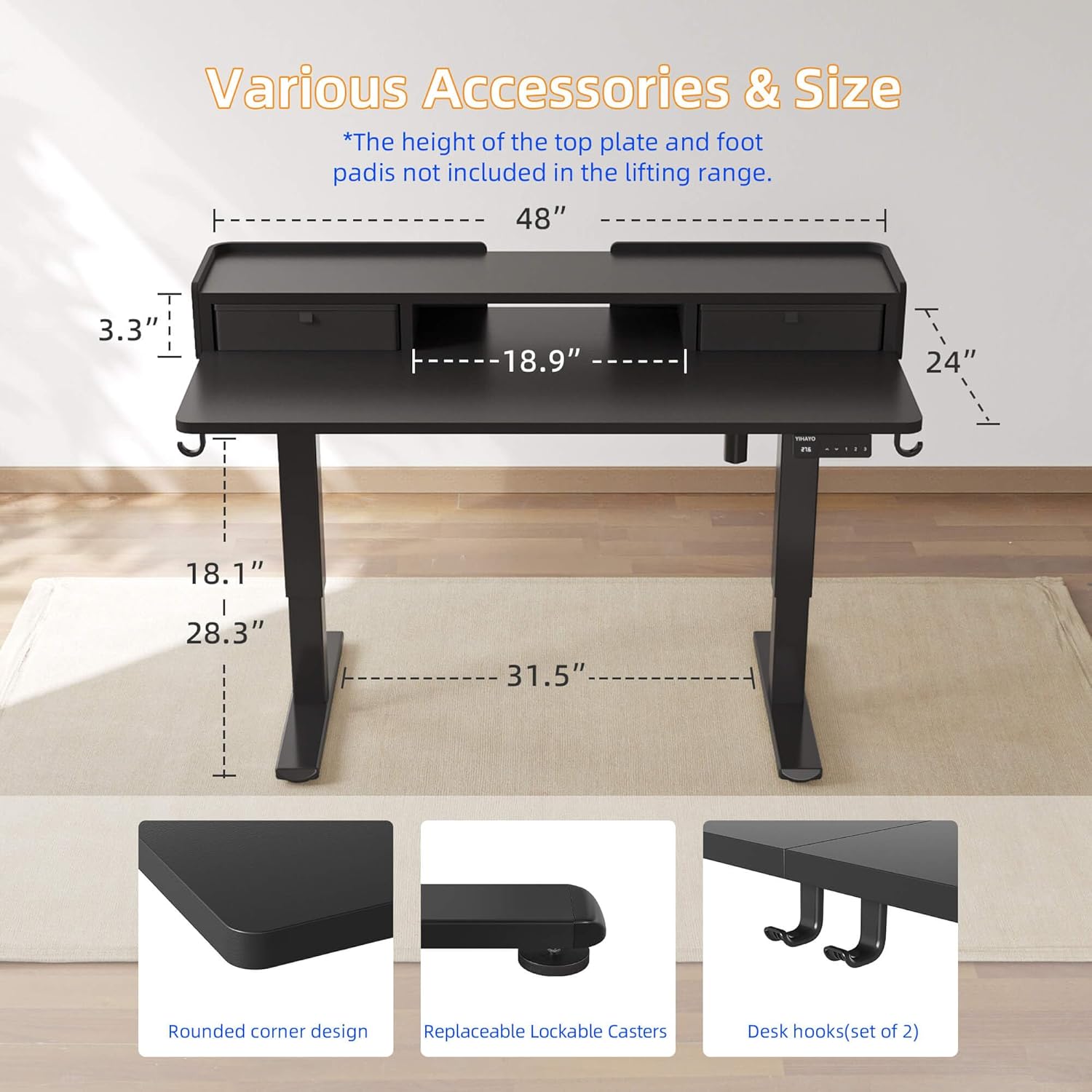
Image: This image illustrates the overall dimensions of the YIHAYO Electric Standing Desk, including the 48x24 inch worktop and the height range of 18.1 to 28.3 inches. It also highlights key features such as rounded corner design, replaceable lockable casters (if applicable, though the product description mentions foot pads), and desk hooks.
Operating Instructions
Height Adjustment
Your YIHAYO electric standing desk offers a wide height adjustment range from 18.1 to 28.3 inches, making it versatile for various sitting and standing preferences.

Image: A close-up of the YIHAYO desk control panel, showing the up/down arrows and three memory preset buttons (1, 2, 3) for quick height adjustments.
- Adjusting Height: Use the Up (▲) and Down (▼) arrow buttons on the control panel to raise or lower the desk to your desired height. The current height will be displayed on the panel.
- Memory Function: The desk is equipped with a memory function, allowing you to save up to three preferred heights. To set a memory position:
- Adjust the desk to your desired height using the arrow buttons.
- Press and hold one of the memory buttons (1, 2, or 3) until you hear a beep or see the display flash, indicating the height has been saved.
- Recalling Memory Position: Simply press the corresponding memory button (1, 2, or 3) to automatically move the desk to the saved height.
Anti-Collision System
The desk features an anti-collision system that automatically stops and slightly reverses movement if it encounters an obstacle during height adjustment. This enhances safety and prevents damage to the desk or surrounding objects.
Product Features
- Integrated Monitor Stand: The electric lifting desk is equipped with a monitor stand, designed to elevate your screen to an ergonomic viewing height. This helps align your line of sight with the screen, reducing neck and back strain.
- Ample Storage with Drawers: Two fabric drawers provide convenient storage space for files, books, cables, and other office essentials, helping to keep your desktop tidy and organized.
- Robust Load Capacity: The desk supports up to 176 lbs (80 kg), offering excellent load capacity for multiple monitors, computers, and other equipment.
- Sturdy and Reliable Structure: Constructed with a sturdy steel frame and aviation-grade lift column connectors, the desk ensures stability and safe operation even at maximum height. It has been tested for over 50,000 cycles.
- Quiet Operation: The sound generated during height adjustment is less than 40 dB, ensuring a quiet environment suitable for use at any time, including late at night.
- Rounded Corner Design: The desktop features rounded corners for enhanced safety and a sleek aesthetic.
- Adjustable Foot Pads: The desk is equipped with adjustable foot pads to ensure stability on uneven surfaces.
- Headphone Hook: A convenient hook is included for hanging headphones or bags, keeping your workspace clutter-free.
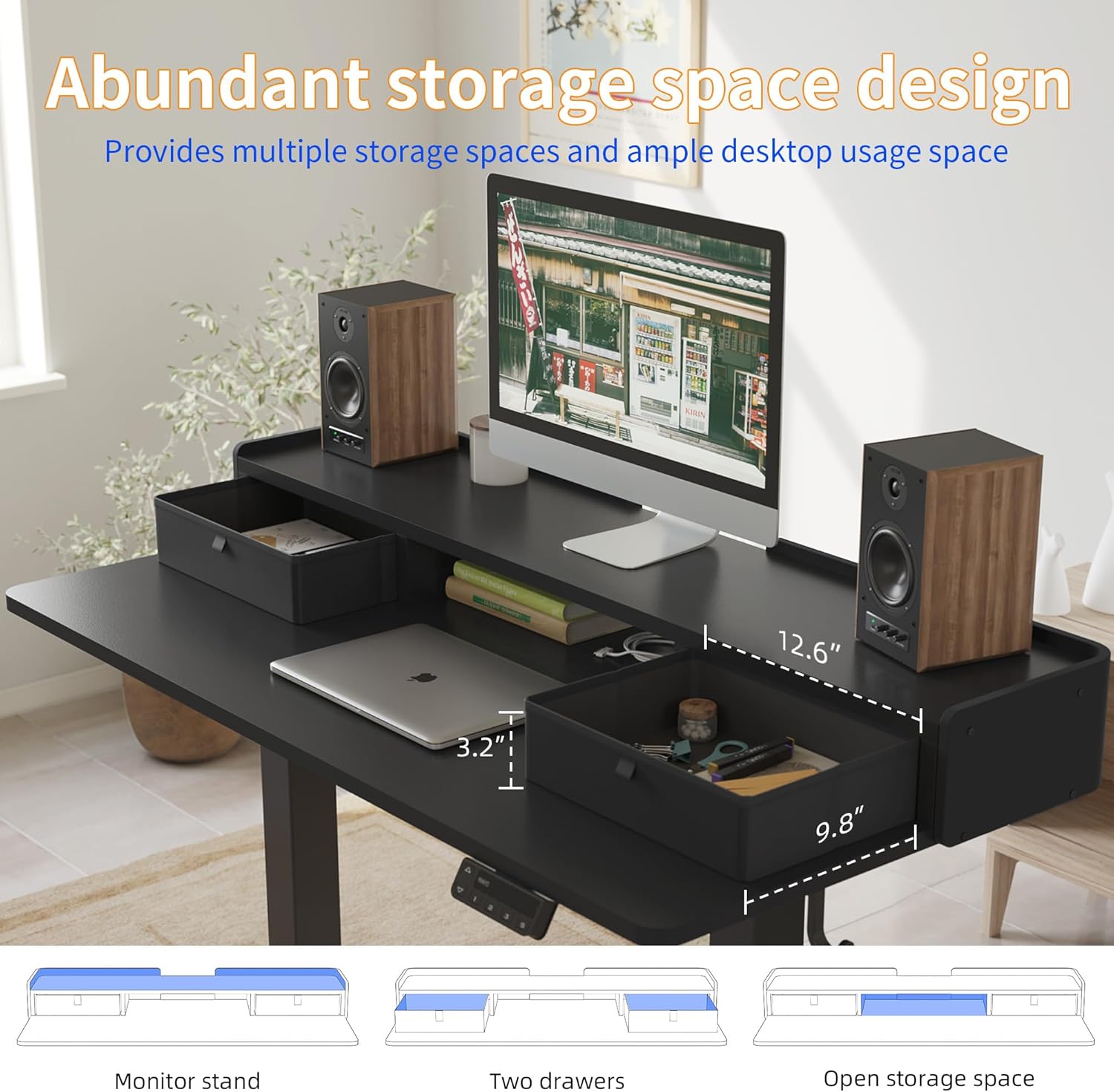
Image: This image displays the integrated storage solutions of the YIHAYO desk, including the two fabric drawers and an open storage compartment beneath the monitor stand, designed to keep your workspace organized.

Image: The desk is shown supporting a significant weight of books and boxes, demonstrating its robust load capacity of up to 176 lbs.
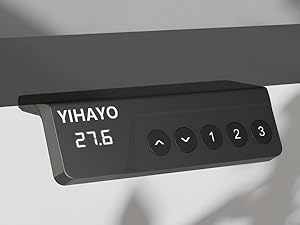
Image: A close-up view highlighting the rounded corner design of the desk, which contributes to safety and a modern appearance.
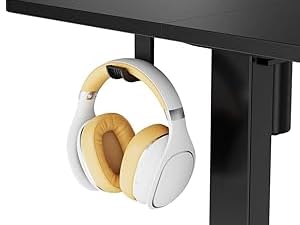
Image: A detailed view of the adjustable foot pad at the base of the desk leg, designed to provide stability and prevent wobbling on various floor types.

Image: A close-up of the headphone hook attached to the side of the desk, providing a practical storage solution for headphones or other items.
Maintenance
- Cleaning: Wipe the desk surface with a soft, damp cloth. Avoid harsh chemicals or abrasive cleaners that could damage the finish.
- Inspection: Periodically check all screws and connections to ensure they remain tight. Retighten if necessary.
- Cable Management: Ensure power cables and other cords are neatly managed to prevent entanglement or damage during height adjustments.
- Environmental Conditions: Avoid exposing the desk to extreme temperatures or high humidity.
Troubleshooting
| Problem | Possible Cause | Solution |
|---|---|---|
| Desk does not move or respond to controls. | Power cable disconnected; motor overload; control panel issue. | Check power connections. Unplug and replug the power cable. Reduce load on the desk. Contact support if the issue persists. |
| Desk moves unevenly or makes unusual noises. | Loose connections; uneven weight distribution; motor issue. | Check and tighten all assembly screws. Redistribute weight evenly on the desktop. Contact support. |
| Height memory function not working. | Incorrect setting procedure. | Ensure you press and hold the memory button until a confirmation (beep/flash) is received. Refer to 'Operating Instructions'. |
| Anti-collision system frequently triggers. | Obstruction in path; sensitivity setting. | Ensure there are no obstacles above or below the desk during adjustment. Consult the full manual for sensitivity adjustment if available. |
If you encounter any issues not listed here or if the suggested solutions do not resolve the problem, please contact YIHAYO customer service for assistance.
Specifications
- Brand: YIHAYO
- Model: 48x24 Inch (Black Frame/Black Top)
- Product Dimensions (D x W x H): 24" x 48" x 18.1"-28.3"
- Adjustable Height Range: 18.1 - 28.3 inches
- Maximum Load Capacity: 176 lbs (80 kg)
- Desktop Material: Wood
- Base Material: Metal
- Number of Drawers: 2 (Fabric)
- Special Features: Adjustable Height, Monitor Stand, Storage Drawers, Headphone Hook, Memory Presets, Anti-Collision System, Quiet Operation (<40dB)
- Assembly Required: Yes
- Item Weight: Approximately 35.7 Pounds
Warranty & Support
YIHAYO provides a 3-year limited warranty for this electric standing desk. This warranty covers manufacturing defects and ensures reliable operation under normal use conditions.
For any questions, concerns, or assistance with your product, please do not hesitate to contact YIHAYO customer service. We are committed to providing a satisfactory solution within 24 hours.
Contact Information: Please refer to the contact details provided on the YIHAYO official website or your purchase documentation.