
KONLEMEI Plug in
KONLEMEI Ozone Air Purifier User Manual
Model: Plug in
Product Overview
The KONLEMEI Ozone Air Purifier is a compact and portable device designed to purify air and eliminate odors using ozone and negative ion technology. It is suitable for various indoor environments such as pet rooms, bathrooms, kitchens, and shoe cabinets.

Image: Front and back view of the KONLEMEI Ozone Air Purifier. The front shows control buttons and air vents, while the back displays the plug and product specifications.
This device operates quietly and does not require filter replacements, offering a convenient solution for improving indoor air quality. Its small size makes it highly portable and easy to place.

Image: The compact air purifier shown next to a smartphone, illustrating its small and portable size.
The purifier effectively tackles various air quality issues, transforming stale, odor-filled environments into fresh, clean spaces.
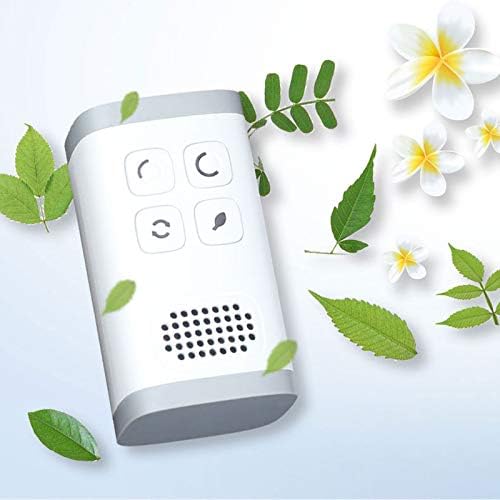
Image: A visual comparison showing a 'Before use' scene with symbols for bad smell, smoke, and bacteria, and an 'After use' scene with a person relaxing in a fresh environment, indicating improved air quality.
Safety Information
Important: Ozone is a powerful oxidant. Always follow safety guidelines when using the ozone function.

Image: A yellow triangular warning sign with an exclamation mark, indicating caution regarding ozone.
Statements regarding dietary supplements have not been evaluated by the FDA and are not intended to diagnose, treat, cure, or prevent any disease or health condition. This product is an air purifier and not a dietary supplement.
Setup
Preparation: Before activating the air purifier, ensure the area is clean and free of major pollutants. Close all windows and doors in the room where the purifier will be used to maximize effectiveness.

Image: A four-panel diagram illustrating the setup process. Panel 1 shows cleaning and closing windows. Panel 2 shows selecting a working mode. Panel 3 shows staying away during ozone release. Panel 4 shows ventilating after use.
Placement: Plug the air purifier directly into a standard wall outlet. The compact design allows for discreet placement in various rooms.

Image: The KONLEMEI Ozone Air Purifier shown plugged into a standard electrical wall outlet.
Operating Instructions
The air purifier features multiple working modes, easily selectable via the control buttons on the front of the device.

Image: A diagram illustrating the four distinct working modes: 30 minutes Ozone release, 60 minutes Ozone release, Cyclically Ozone release, and Continuously Anions release.
Working Modes:
- Ozone Purification 30 Minutes: Releases ozone for 30 minutes, then stops.
- Ozone Purification 60 Minutes: Releases ozone for 60 minutes, then stops.
- Ozone Cycle Mode: Releases ozone for 40 minutes, then stands by for 20 minutes, repeating the cycle continuously.
- Anion Cycle Mode: Continuously releases negative ions.
To select a mode, press the corresponding button on the device. Refer to the icons on the device for specific mode identification.
Important Note on Ozone Use: When using ozone purification modes, ensure that people and pets are not present in the confined space during the ozone release period. After the ozone cycle is complete, open windows and doors to ventilate the area thoroughly before re-entering.

Image: A diagram illustrating various application scenarios for the air purifier, including kitchen, smoke, pet room, toilet, bathroom, and for eliminating bacteria.
The device is designed for use in various locations to address specific odor and air quality concerns, such as pet rooms, bathrooms, kitchens, and shoe cabinets.
Maintenance
The KONLEMEI Ozone Air Purifier is designed for low maintenance. It operates quietly and does not require any filter replacements.

Image: An icon depicting multiple air filters with a red 'X' over them, signifying that no filters are required for this device.
To clean the exterior of the device, gently wipe it with a soft, dry cloth. Do not use liquid cleaners or immerse the device in water.
Troubleshooting
If the KONLEMEI Ozone Air Purifier is not functioning as expected, please check the following:
- Power Connection: Ensure the device is securely plugged into a working electrical outlet.
- Mode Selection: Verify that the desired working mode has been correctly selected by pressing the appropriate button.
- Odor Persistence: For persistent odors, ensure the room is properly sealed during ozone treatment and adequately ventilated afterward. Consider running a longer ozone cycle if available.
If issues persist after checking these points, please contact customer support for further assistance.
Specifications
| Brand | KONLEMEI |
| Model Number | Plug in |
| Product Dimensions | 1.96"D x 1.96"W x 3.54"H (4.8 ounces) |
| Color | White |
| Controller Type | Button Control |
| Voltage | AC 110-240V |
| Rated Power | 2.5W |
| Certification | CE Certified |
Warranty and Support
For warranty information or technical support, please refer to the product packaging or contact KONLEMEI customer service directly. Contact details can typically be found on the manufacturer's official website or through your point of purchase.
Ask a question about this manual
Ask about setup, troubleshooting, compatibility, parts, safety, or missing instructions. Manuals+ will review the question and use this page’s manual context to help answer it.