
1. Introduction
Thank you for choosing the LUCKGULU 12V/24V Heavy Duty Smart Battery Charger. This manual provides essential information for the safe and efficient operation, maintenance, and troubleshooting of your new battery charger. Please read this manual thoroughly before use and retain it for future reference.
This smart battery charger is designed to charge, maintain, and repair various 12-volt and 24-volt lead-acid batteries, including AGM, GEL, EFB, SLA, Flooded (WET), and Calcium types. It features automatic voltage detection, multiple charging modes, and comprehensive safety protections.
2. Important Safety Instructions
- Read all instructions: Before using the charger, read all instructions and cautionary markings on the charger, the battery, and the product using the battery.
- Ventilation: Ensure the charging area is well-ventilated. Batteries can produce explosive gases.
- Eye and Skin Protection: Always wear eye protection and protective clothing when working with batteries.
- Avoid Sparks and Flames: Do not smoke or allow sparks or flames in the vicinity of the battery or engine.
- Disconnect Power: Always disconnect the AC power cord from the outlet before connecting or disconnecting the battery clamps.
- Correct Polarity: Connect the red (+) clamp to the positive battery terminal and the black (-) clamp to the negative battery terminal. Incorrect polarity can cause damage.
- Lithium Batteries: This charger is NOT compatible with lithium batteries. Attempting to charge lithium batteries may result in fire, injury, or damage.
- Children: Keep the charger and batteries out of reach of children.
- Damaged Equipment: Do not operate the charger if it has received a sharp blow, been dropped, or otherwise damaged.
3. Product Features
- Heavy Duty Construction: Made with copper coil, metal, and ABS casing for durability.
- Versatile Compatibility: Charges, maintains, and repairs all 12V and 24V lead-acid automotive, marine, and deep-cycle batteries (AGM, GEL, EFB, SLA, Flooded, Calcium). NOTE: LITHIUM BATTERY DISABLED.
- High Power & Fast Charging: Offers 12V-20 Amp and 24V-10 Amp output. Features Fast charge and Trickle charge modes.
- Automatic Detection: Automatically detects 12V and 24V batteries.
- Auto Shut-off: Prevents overcharging by stopping when the battery is fully charged.
- Maintain Mode: Uses pulse current to restore and extend the life of old, drained, stratified, and sulfated batteries after full charge.
- Winter/Summer Mode: Adjusts charging based on ambient temperature to optimize performance and prevent overcharging in extreme conditions.
- High-Efficiency Pulse Repair Mode: Revives dead batteries (above 3V) using high-frequency and low-frequency pulse technology.
- Multiple Protections: Includes overcharge protection, over current protection, built-in cooling fan, overheating protection, reverse polarity protection, short circuit protection, and sparks-free contact.
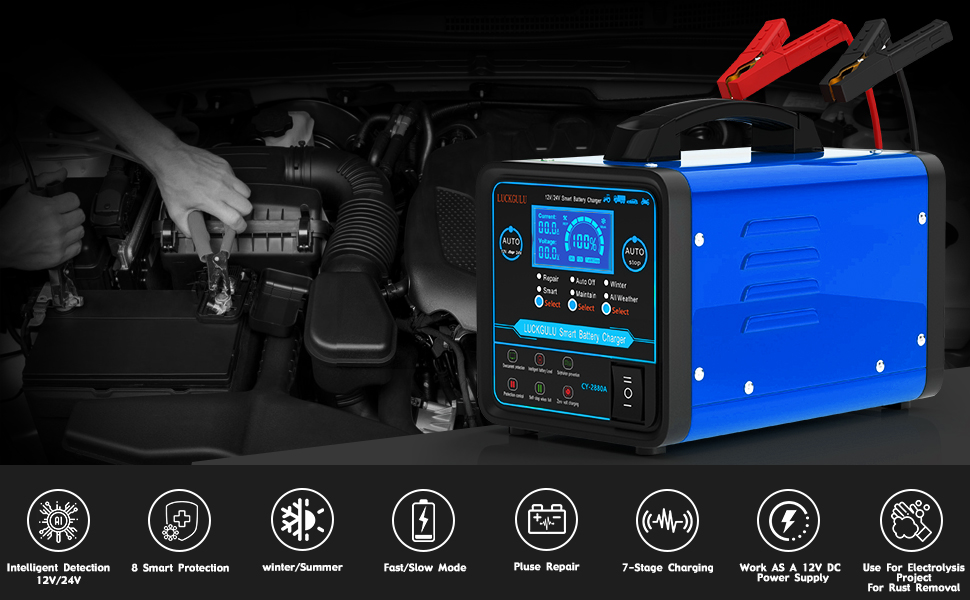
Image: LUCKGULU 12V/24V Smart Battery Charger with automatic voltage detection and selectable fast/slow charging modes.
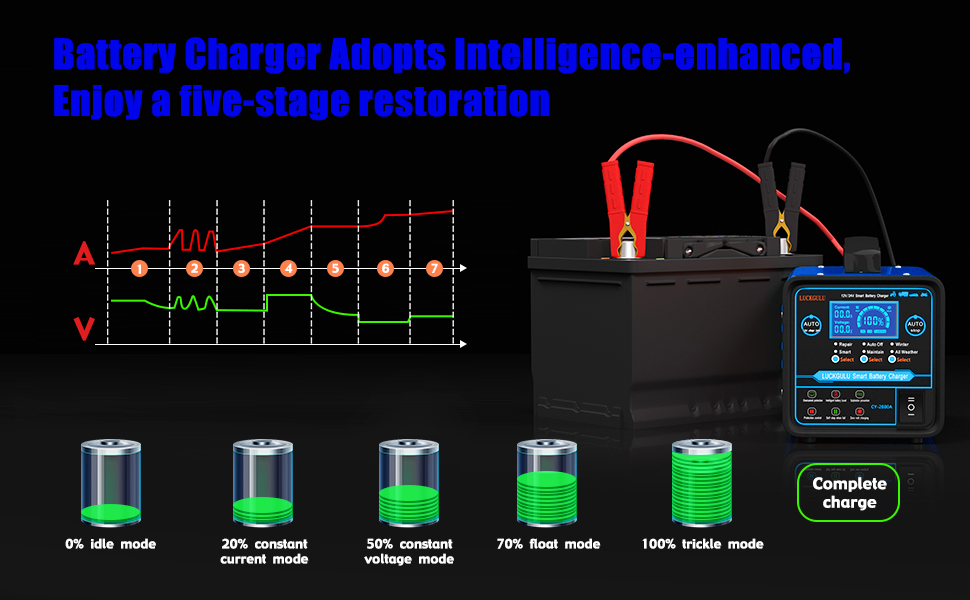
Image: The charger is an all-in-one solution for 12V/24V lead-acid batteries, suitable for cars, trucks, SUVs, ATVs, boats, motorcycles, and lawn mowers.
4. Setup and Initial Connection
- Prepare the Battery: Ensure the battery terminals are clean and free of corrosion.
- Connect Battery Clamps:
- Connect the RED (+) positive clamp to the positive (+) battery terminal.
- Connect the BLACK (-) negative clamp to the negative (-) battery terminal.
- Connect to AC Power: Plug the charger's AC power cord into a standard 110V 50/60Hz electrical outlet. The charger will automatically detect the battery voltage (12V or 24V).
- Select Charging Mode: Use the 'Select' buttons on the charger's control panel to choose the desired mode (e.g., Fast, Trickle, Repair, Maintain, Winter/All Weather).
- Start Charging: Once the mode is selected, the charger will begin the charging process. The LCD display will show current, voltage, and charge percentage.
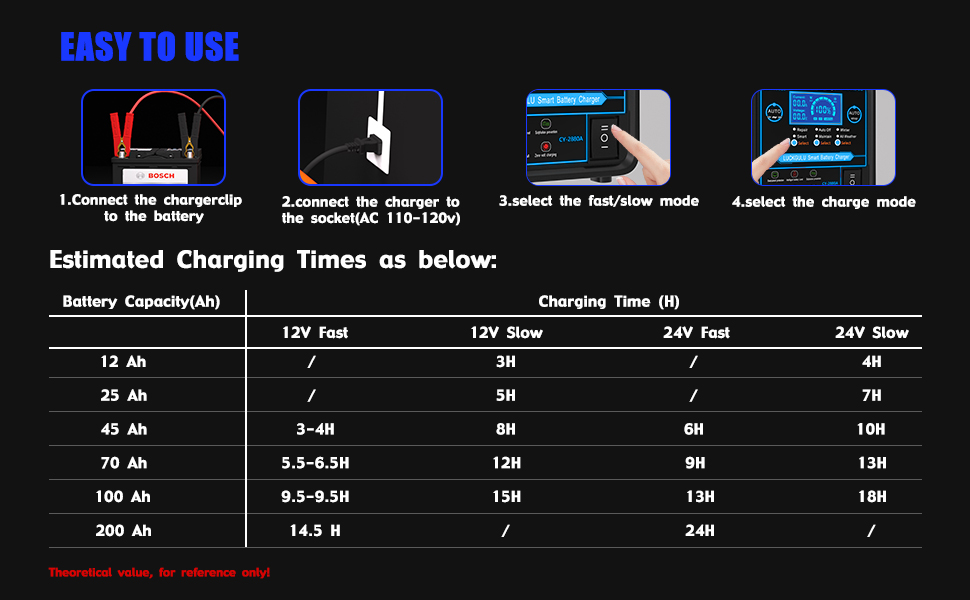
Image: Visual guide for connecting the charger: 1. Connect battery clips, 2. Connect to AC outlet, 3. Select fast/slow mode, 4. Select charge mode.
5. Operating Modes
The LUCKGULU Smart Battery Charger offers several modes to optimize battery charging and maintenance:
- Fast Charge Mode: Recommended for 30-400AH batteries, providing quicker charging.
- Trickle Charge Mode: Ideal for 6-30AH batteries, offering a slower, gentler charge.
- Repair Mode: Designed to recover old or idle batteries (above 3V) by using high-frequency and low-frequency pulse technology to desulfate and reactivate them. Select this mode if the battery cannot be charged normally.
- Auto Off / Maintain Mode: Once the battery is fully charged, the charger automatically switches to a maintenance mode, preventing overcharging and extending battery life through pulse current.
- Winter / All Weather Mode: Automatically adjusts charging parameters based on ambient temperature to ensure optimal charging in both hot summer and cold winter conditions.

Image: Diagram illustrating the 7-stage charging process, including idle, constant current, constant voltage, float, and trickle modes, leading to a complete charge.

Image: Illustration of the Smart Repair Function, showing how it can bring dead batteries (above 4V) back to life, improving performance and extending battery life.
6. Charging Process
After connecting the charger and selecting the desired mode, the charger will initiate the multi-stage charging process. The LCD display provides real-time feedback on the charging status:
- Current (A): Displays the charging current in Amperes.
- Voltage (V): Shows the battery voltage in Volts.
- Charge Percentage (%): Indicates the estimated charge level of the battery.
- Work Indicator: Illuminates when the charger is actively charging.
The charger will automatically stop charging when the battery reaches full capacity and transition to maintenance mode. To stop charging manually, unplug the AC power cord first, then disconnect the battery clamps.
7. Estimated Charging Times
The following table provides theoretical estimated charging times based on battery capacity and selected mode. Actual charging times may vary depending on battery condition, temperature, and other factors.
| Battery Capacity (Ah) | 12V Fast (H) | 12V Slow (H) | 24V Fast (H) | 24V Slow (H) |
|---|---|---|---|---|
| 12 Ah | / | 3H | / | 4H |
| 25 Ah | / | 5H | / | 7H |
| 45 Ah | 3-4H | 8H | 6H | 10H |
| 70 Ah | 5.5-6.5H | 12H | 9H | 13H |
| 100 Ah | 9.5-9.5H | 15H | 13H | 18H |
| 200 Ah | 14.5 H | / | 24H | / |
Table: Estimated charging times for various battery capacities in different modes. Values are theoretical and for reference only.
8. Maintenance
- Cleaning: Keep the charger clean and dry. Wipe the casing with a soft, damp cloth. Do not use solvents or abrasive cleaners.
- Storage: Store the charger in a cool, dry place when not in use. Ensure cables are neatly coiled and not kinked.
- Cable Inspection: Regularly inspect the AC power cord and battery cables for any signs of damage, cuts, or fraying. Replace if damaged.
- Cooling Fan: Ensure the cooling fan vents are not obstructed to prevent overheating.
9. Troubleshooting
If you encounter issues with your charger, refer to the following common problems and solutions:
- Charger Not Turning On:
- Check if the AC power cord is securely plugged into a live outlet.
- Ensure the power switch on the charger is in the 'ON' position.
- Battery Not Charging:
- Verify that the battery clamps are correctly connected to the battery terminals (red to positive, black to negative).
- Check if the battery voltage is extremely low (below 3V). The repair mode can revive batteries above 3V.
- Ensure the selected charging mode is appropriate for your battery type and size.
- Overheating:
- Ensure the charger's cooling fan vents are clear and not obstructed.
- Operate the charger in a well-ventilated area.
- Error Codes on Display: Refer to the specific error code displayed on the LCD screen. Consult the manufacturer's support for detailed explanations and solutions if not covered in this manual.
If the problem persists after attempting these troubleshooting steps, please contact customer support.
10. Specifications
| Feature | Detail |
|---|---|
| Brand | LUCKGULU |
| Model Number | CY2880A |
| Product Dimensions (D x W x H) | 8.23" x 4.09" x 7.09" |
| Item Weight | 4.5 Kilograms (approx. 9.9 lbs) |
| Input Voltage | 110 Volts AC (50/60Hz) |
| Output Voltage | 12 Volts / 24 Volts DC |
| Current Rating (Max) | 20 Amps (12V) / 10 Amps (24V) |
| Applicable Battery Capacity | Fast Mode: 30-400AH; Trickle Mode: 6-30AH |
| Compatible Battery Types | Lead-acid (AGM, GEL, EFB, SLA, Flooded, Calcium) |
| Safety Certification | FCC |

Image: Physical dimensions and weight of the heavy-duty charger, including cable lengths.
11. Warranty and Support
This LUCKGULU battery charger comes with a Three-Year Warranty. If you experience any issues or have questions regarding the use, maintenance, or performance of your product, please contact LUCKGULU customer support for assistance.
Please retain your proof of purchase for warranty claims.