
1. Introduction
Thank you for choosing WAMOVAL Heated Socks SK-02. These socks are designed to provide warmth and comfort in cold conditions, featuring app control, long-lasting rechargeable batteries, and a washable design. Please read this manual thoroughly before use to ensure proper operation and maintenance.
2. Important Safety Information
- Always charge batteries fully before first use.
- Do not use the socks if the heating elements or wiring appear damaged.
- Remove batteries before washing the socks.
- Do not dry the socks at high temperatures (e.g., in a dryer). Air dry naturally.
- Keep batteries away from water and extreme temperatures.
- If you experience discomfort, excessive heat, or skin irritation, discontinue use immediately.
- Not recommended for individuals with impaired sensation or children without supervision.
3. Package Contents
The WAMOVAL Heated Socks SK-02 package includes the following items:
- One Pair of Heated Socks
- Two 5V 10000mAh Power Bank Batteries
- One Type-C Charging Cable
- One 5V2A USB Charging Adapter
- One User Manual
- One Sock Washing Bag
Video: Unboxing and contents of the WAMOVAL Heated Socks package.
4. Setup
4.1 Charging the Batteries
Before first use, fully charge both 10000mAh batteries. Use the provided Type-C charging cable and 5V2A USB adapter. The batteries can be charged simultaneously. A full charge typically takes approximately 4 hours.
4.2 Inserting Batteries into Socks
- Locate the small pocket on the upper cuff of each sock.
- Connect the sock's power cable to the battery.
- Carefully insert the connected battery into the pocket. Secure the pocket closure (button) to prevent the battery from falling out during activity.

Image: Overview of WAMOVAL Heated Socks components, including batteries and charging accessories.
Video: Demonstration of connecting the battery to the sock and inserting it into the pocket.
5. Operating Instructions
5.1 Manual Control
To operate the socks manually:
- Ensure the battery is connected to the sock.
- Press and hold the power button on the battery pack for a few seconds to turn it on.
- Short press the power button to cycle through the available heat settings. Indicator lights on the battery will show the current heat level.
- To turn off, press and hold the power button again.
5.2 APP Control
For advanced control and temperature customization, use the dedicated smartphone application:
- Scan the QR code in this manual or search for "Warm Uping" in your smartphone's app store (App Store or Google Play) to download and install the application.
- Ensure Bluetooth is enabled on your smartphone.
- Open the "Warm Uping" app and follow the on-screen instructions to connect to your heated socks.
- Once connected, you can control power on/off, adjust temperature between 86°F - 158°F, and set a timer for up to 120 minutes directly from the app.

Image: Detailed view of the smartphone application for controlling the heated socks.
Video: Demonstration of using the mobile application to control the heated socks.
6. Maintenance
6.1 Washing Instructions
The heated socks are machine washable, but proper care is essential to maintain their functionality:
- Always remove the batteries and disconnect all connecting wires before washing.
- Place the socks inside the provided laundry bag to protect them during the wash cycle.
- Wash on a gentle cycle with cold water.
- Do not use bleach or harsh detergents.
- After washing, gently turn the power cord out and allow the socks to air dry naturally.
- Do not dry at high temperatures, such as in a tumble dryer, as this can damage the heating elements.
6.2 Battery Care
- Store batteries in a cool, dry place when not in use.
- If storing for extended periods, charge the batteries to about 50% capacity to prolong their lifespan.
- Do not expose batteries to direct sunlight or heat sources.
- If batteries are not in use, unplug them from the socks to prevent discharge.
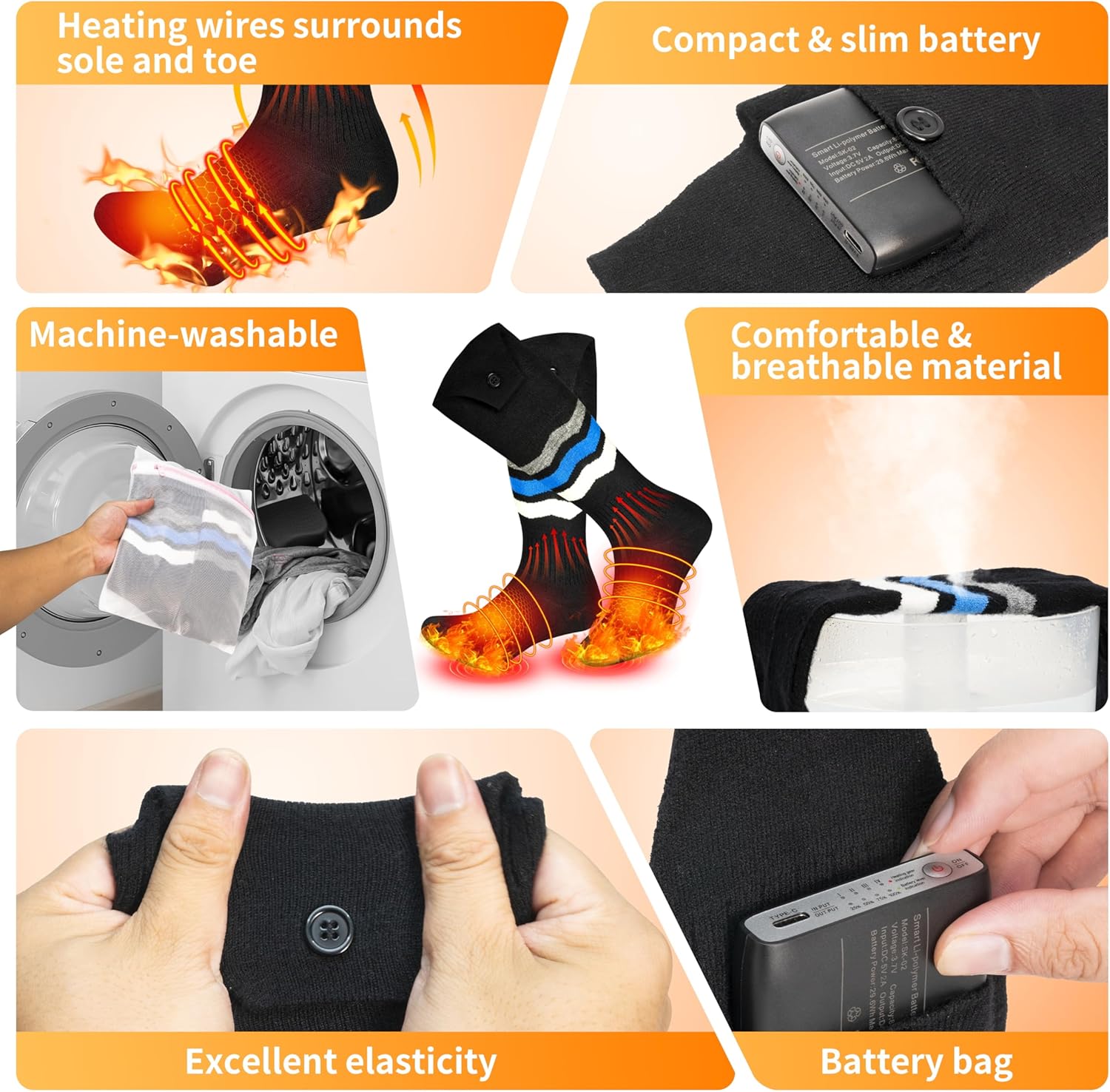
Image: Visual guide to washing instructions and battery placement.
7. Troubleshooting
| Problem | Possible Cause | Solution |
|---|---|---|
| Socks not heating. | Battery not charged or connected properly. | Ensure batteries are fully charged and securely connected to the socks. Press the power button on the battery to activate. |
| Short battery life. | High heat setting or incomplete charge. | Lower the heat setting for longer duration. Ensure batteries are fully charged before use. Unplug batteries when not in use. |
| App not connecting to socks. | Bluetooth off or app not paired. | Ensure Bluetooth is enabled on your phone. Follow app instructions to pair the socks. Restart the app or phone if necessary. |
| Socks feel too tight. | Sizing issue. | While designed as 'Universal Size', individual fit may vary. Ensure socks are not overly stretched or bunched. |
8. Specifications
- Model Name: SK-02
- Brand: WAMOVAL
- Size: Universal Size (US Men 7-11, US Women 8.5-10.5, EU Unisex 39-45)
- Color: Black/Blue
- Material: 22.5% Viscose, 52.5% Nylon, 10% Polyester, 15% Spandex
- Battery Type: Lithium-Polymer
- Battery Capacity: 10000 mAh (per battery, 2 included)
- Charging Time: Approximately 4.5 hours
- Temperature Range: 86°F - 158°F (30°C - 70°C)
- Operating Time: Up to 10 hours (on lowest setting), 3-5 hours (on highest setting)
- Heating Area: Whole front foot and instep (3D hidden loop heating wire)
- Control: APP Control (Warm Uping app) and Manual Button Control
- Reusability: Rechargeable
- Item Weight: 21.5 Ounces

Image: Battery capacity and temperature settings with corresponding run times.

Image: Illustration of the larger heating area in WAMOVAL socks.
9. Warranty and Support
WAMOVAL Heated Socks SK-02 come with a one-year manufacturer's warranty. This warranty covers defects in materials and workmanship under normal use.
If you encounter any issues or have questions regarding your product, please contact WAMOVAL customer support. We are committed to providing excellent service and will respond to inquiries within 24 hours.
For support, please refer to the contact information provided on the product packaging or the official WAMOVAL website.