
Introduction
The WAMOVAL Heated Socks are designed to provide warmth and comfort in cold conditions. Featuring an 8000mAh rechargeable battery and convenient app control, these washable electric socks can deliver up to 10 hours of continuous heat. They are suitable for various outdoor activities such as skiing, hiking, fishing, and motorcycling, as well as for general use at home to combat cold feet. This manual provides essential information for the proper setup, operation, maintenance, and troubleshooting of your heated socks.
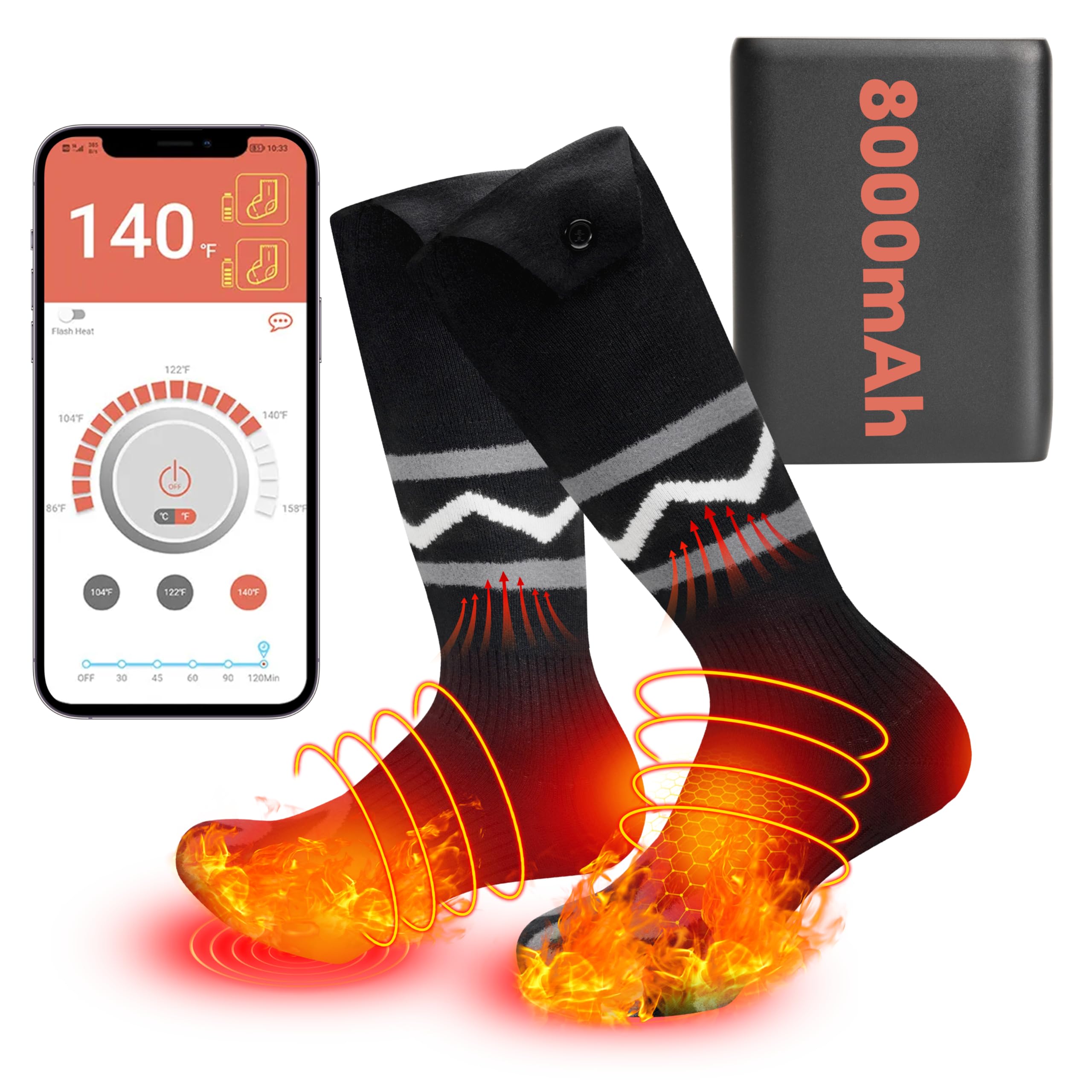
Image: Overview of the WAMOVAL Heated Socks, showing the sock design, battery pack, and an illustration of the heating elements.
Setup
1. Initial Charging
Before first use, fully charge both 8000mAh batteries. Use the provided dual-head USB Type-C charging cable and 5V 2A USB charging adapter. The charging time is approximately 4 hours. Ensure batteries are fully charged to maximize performance and lifespan.
2. Battery Installation
Locate the battery pocket at the top of each sock. Insert a fully charged battery into each pocket. Connect the sock's power cable to the battery. Ensure a secure connection.

Image: Close-up showing the compact battery, battery pocket, and heating wires surrounding the sole and toe.
3. App Installation (Optional)
For smart control, download the "Warm Uping" app. You can scan the QR code provided in the detailed user manual or search for "Warm Uping" in your smartphone's app store. No registration is required to use the app.
Operating Instructions
1. Power On/Off
To power on the socks, press and hold the power button on the battery pack or use the app. To power off, repeat the process.
2. Temperature Control
The socks offer four heat settings, adjustable via the app or manually using the button on the battery pack. The temperature range is 86°F to 154°F (30°C to 68°C).
- Level I: 101-107°F (38-42°C) - Up to 10-10.5 hours run time
- Level II: 119-125°F (48-52°C) - Up to 6-6.5 hours run time
- Level III: 138-144°F (59-62°C) - Up to 4-4.5 hours run time
- Level IV: 152-158°F (67-70°C) - Up to 3-3.5 hours run time
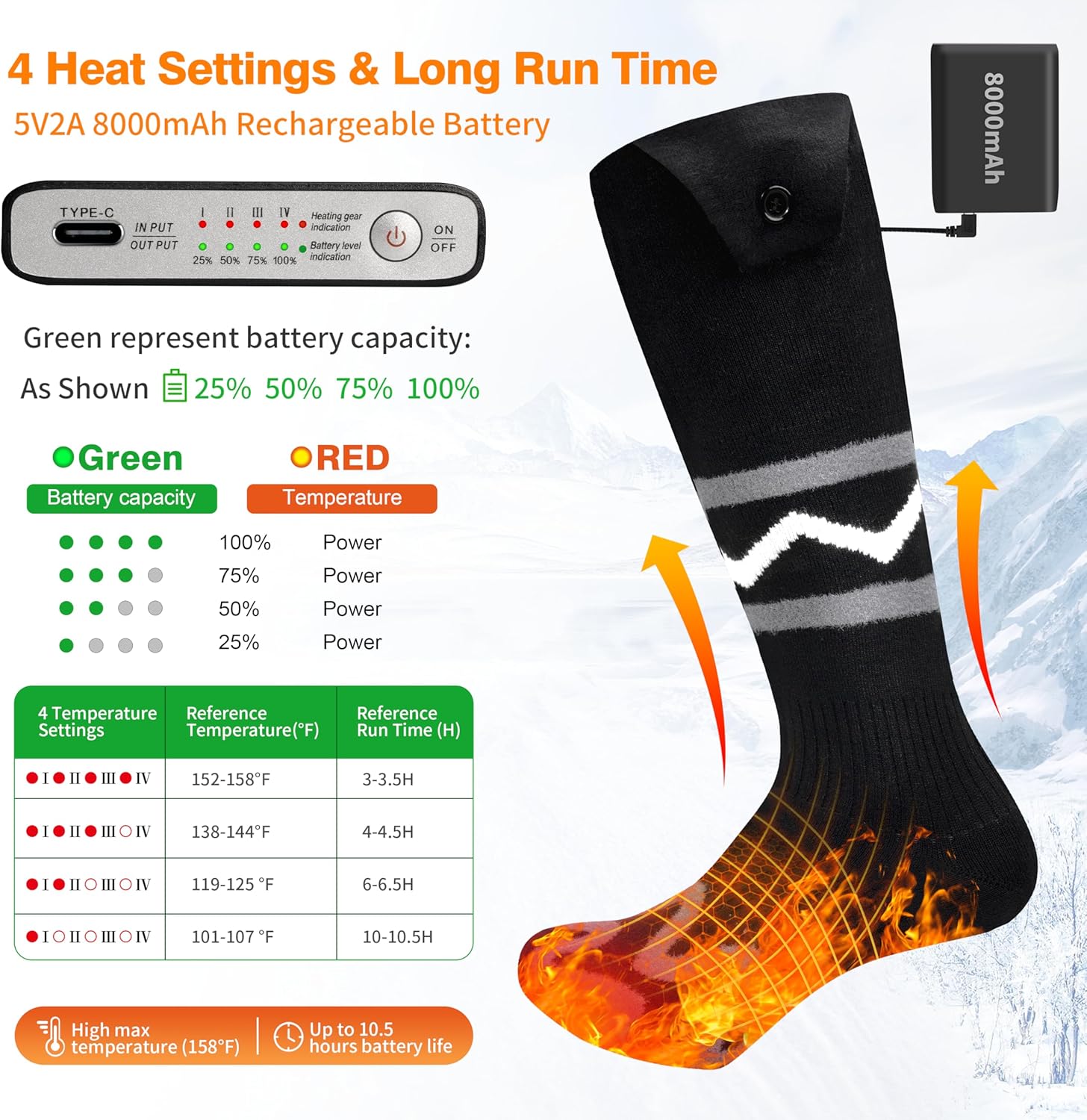
Image: Visual guide to battery capacity, temperature settings, and corresponding run times.
3. App Control Features
The "Warm Uping" app allows for precise control over your heated socks:
- On/Off: Easily power the socks on or off.
- Temperature Adjustment: Set the desired temperature within the 86°F - 154°F range.
- Timer Function: Set a timer for up to 120 minutes for automatic power-off.
- Battery Indicator: Monitor the battery level of each sock.

Image: Screenshot of the "Warm Uping" app, highlighting features like temperature setting, battery indicator, and timer.
4. Heating Technology
The socks feature a 3D hidden loop heating wire that covers the entire toe area, ensuring even heat distribution. Heat is generated within 20 seconds, promoting warmth and circulation.

Image: Illustration detailing the sock's construction, including windproof layer, stretch fabric, ultra-thin heating wire, and warm layer, with an indication of quick heating.
Maintenance
1. Washing Instructions
The heated socks are machine-washable. Before washing, ensure batteries are removed from the sock pockets. Place the socks in the provided washing bag to protect them during the wash cycle. Use a gentle cycle with cold water. Do not bleach or iron. Air dry only; do not tumble dry.
2. Battery Care
Store batteries in a cool, dry place when not in use. Avoid exposing batteries to extreme temperatures or direct sunlight. Do not puncture or damage the battery packs.
Troubleshooting
No Heat or Intermittent Heating
- Check Battery Connection: Ensure the battery is securely connected to the sock's power cable.
- Charge Batteries: Verify that the batteries are fully charged. Low battery levels can result in reduced or no heat.
- App Connection: If using the app, ensure your smartphone is properly connected to the socks via Bluetooth.
- Manual Control: Try operating the socks using the manual button on the battery pack to rule out app-related issues.
App Connectivity Issues
- Bluetooth: Ensure Bluetooth is enabled on your smartphone.
- App Restart: Close and reopen the "Warm Uping" app.
- Device Restart: Restart your smartphone and try connecting again.
If problems persist after attempting these steps, please refer to the support section for further assistance.
Specifications
| Feature | Detail |
|---|---|
| Model Number | SK-02 |
| Brand | WAMOVAL |
| Color | Black/Blue |
| Size | Universal Size |
| Material | 22.5% Viscose, 52.5% Nylon, 10% Polyester, 15% Spandex |
| Included Items | 1 Pair Heated Socks, 2x 8000mAh Batteries, 1 USB Type-C Charging Cable, 1 Washing Bag, 1 User Manual, 1x 5V 2A USB Charging Adapter |
| Battery Type | Lithium Polymer |
| Battery Capacity | 8000mAh (per battery) |
| Charging Time | Approx. 4 hours |
| Temperature Range | 86°F - 154°F (30°C - 68°C) |
| Max Run Time | Up to 10.5 hours (on lowest setting) |
| Product Dimensions | 49.99 x 10.11 x 0.25 cm |
| Product Weight | 649 grams |
Size Chart

Image: Detailed size chart to help users select the appropriate sock size.
Warranty Information
The WAMOVAL Heated Socks come with a one-year warranty from the date of purchase. This warranty covers manufacturing defects and performance issues under normal use. Please retain your proof of purchase for warranty claims.
Customer Support
For any questions, concerns, or technical assistance regarding your WAMOVAL Heated Socks, please do not hesitate to contact our customer support team. We are committed to providing prompt assistance and aim to respond to all inquiries within 24 hours.
Please refer to the product packaging or the detailed user manual included with your purchase for specific contact information (e.g., email address, website).