
1. Introduction
This manual provides comprehensive instructions for the safe and effective use of the HUACAITU NACS to CCS1 Adapter, Model HZ888. This adapter is designed to enable CCS1-compatible electric vehicles (EVs) to utilize Tesla V3 Supercharger stations for fast charging. Please read this manual thoroughly before first use to ensure proper operation and to prevent damage to the adapter or your vehicle.
2. Safety Information
Adherence to the following safety guidelines is crucial for preventing injury and damage:
- Temperature Protection: The adapter features a built-in temperature kill switch. If the adapter's internal temperature reaches 194°F (90°C), charging will automatically cease to prevent overheating. Do not attempt to bypass this safety feature.
- Secure Connection: The adapter is designed for a tight fit to ensure a secure and safe electrical connection. Apply firm, steady pressure when plugging in and unplugging the adapter.
- Environmental Conditions: The adapter has an IP55 waterproof rating and high flame retardancy, allowing it to withstand various weather conditions. However, avoid submerging the adapter in water or exposing it to extreme temperatures beyond its operational limits.
- Compatibility Verification: Before purchasing and using, verify that your electric vehicle supports DC fast charging and is compatible with this adapter. Refer to the "Compatibility" section for detailed information. PHEV and pre-2016 EV models generally do not support DC fast charging.
- Authorized Use: This adapter is intended for use only with Tesla V3 Superchargers. Do not attempt to use it with home chargers, wall connectors, destination chargers, mobile connectors, or any other Supercharger versions (V1, V2, V4).
- Inspection: Before each use, inspect the adapter for any signs of damage, cracks, or wear. Do not use a damaged adapter.
3. Product Overview
The HUACAITU NACS to CCS1 Adapter facilitates the connection of CCS1-equipped electric vehicles to Tesla V3 Supercharger stations. It is engineered for high-speed DC charging, offering a robust and reliable solution for expanding your charging options.

Image 1: The HUACAITU NACS to CCS1 Adapter. This image displays the adapter from a front-side angle, highlighting both the NACS input and CCS1 output ports. A smaller inset shows the CCS1 port configuration.
4. Compatibility
This adapter is specifically designed for use with Tesla V3 Superchargers ONLY. It is not compatible with V1, V2, or V4 Superchargers, nor with home chargers, wall connectors, destination chargers, or mobile connectors.
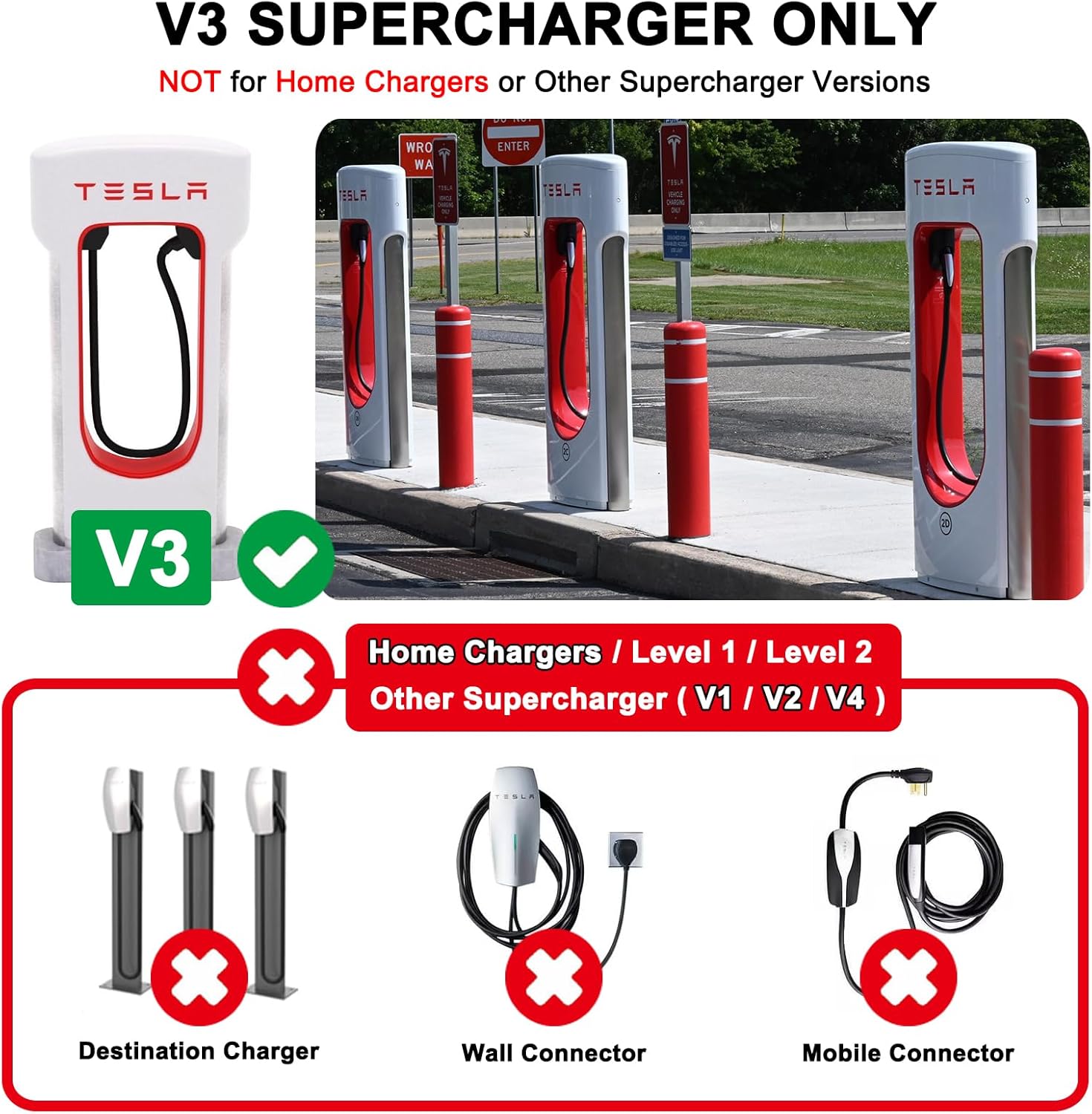
Image 2: Visual guide to V3 Supercharger compatibility. This image illustrates a Tesla V3 Supercharger with a green checkmark, indicating compatibility. Below it, various incompatible charging types (Destination Charger, Wall Connector, Mobile Connector, and other Supercharger versions) are shown with red 'X' marks.
4.1. Supported Electric Vehicles (CCS1 EVs)
The adapter is compatible with select CCS1-equipped electric vehicles from the following brands:
- Ford (excluding Mustang Mach-E, Focus Electric Model Year (MY) 2012-2016, and plug-in hybrid vehicles (PHEVs))
- Rivian
- General Motors (GM)
- Volvo (excluding C40, XC40)
- Polestar (excluding Polestar 1, Polestar 2)
- Nissan
- Lucid
- Mercedes-Benz
- Hyundai
- Genesis
- Kia (excluding 2015-2019 Soul EVs)
- Honda
- Acura
- JLR (Jaguar Land Rover)
- Audi
- Porsche
4.2. Important Compatibility Notes
- PHEVs and pre-2016 models: Vehicles that are Plug-in Hybrid Electric Vehicles (PHEVs) or models released before 2016 typically do not support DC fast charging. Please consult your vehicle manufacturer to confirm DC fast charging support before using this adapter.
- Specific Model Exclusions: As noted above, certain models from supported brands are not compatible. Always verify your specific vehicle model.
- Unsupported Brands: If your EV brand is not listed above, this adapter is not guaranteed to work.

Image 3: Detailed compatibility chart for electric vehicles. This image presents a list of supported EV brands with specific exclusions, and a clear statement that PHEVs and pre-2016 models are not supported for DC fast charging.
5. Setup and Operating Instructions
Follow these steps to safely and effectively charge your CCS1 EV at a Tesla V3 Supercharger station:
- Locate a V3 Supercharger: Use the Tesla app or your EV's native app to find an available Tesla V3 Supercharger station. Ensure it is a V3 station, as other versions are not compatible.
- Prepare Your Vehicle: Park your EV within reach of the Supercharger cable. Ensure your vehicle's charging port is clean and free of debris.
- Connect the Adapter:
- First, firmly insert the NACS end of the HUACAITU adapter into the Tesla Supercharger cable.
- Next, firmly insert the CCS1 end of the adapter into your vehicle's CCS1 charging port. Ensure both connections are secure and fully seated. The adapter features a double safety lock mechanism that automatically engages once connected.
- Initiate Charging:
- Open the Tesla app on your smartphone.
- Follow the prompts within the Tesla app to select the Supercharger stall and initiate the charging session for your non-Tesla EV.
- Monitor your vehicle's dashboard or charging app to confirm that charging has begun.
- Monitor Charging: While charging, periodically check the adapter and connections for any unusual heat, sounds, or error messages. The adapter's temperature kill switch will activate if overheating occurs.
- End Charging Session:
- Once your desired charge level is reached or you wish to stop, end the charging session via the Tesla app or your vehicle's controls.
- Press the release button on the adapter (if applicable) or the Supercharger handle to unlock and remove the Supercharger cable from the adapter.
- Then, firmly pull the adapter from your vehicle's charging port.
- Store the Adapter: Disconnect the adapter from the Supercharger cable and store it in a clean, dry place, preferably in its protective case.

Image 4: The HUACAITU NACS to CCS1 Adapter in use. This image shows the adapter securely connected to an electric vehicle's charging port, with the Tesla Supercharger cable plugged into the adapter. A double safety lock mechanism is highlighted.
6. Performance and Durability
The HUACAITU NACS to CCS1 Adapter is engineered for high performance and long-lasting durability:
- Fast Charging: Supports charging rates up to 500KW, with a maximum rating of 500A/1000V DC. This allows for rapid charging, potentially adding 150 miles of range in approximately 15 minutes, depending on vehicle and Supercharger conditions.
- Robust Construction: Made from high-quality pure copper with silver plating for superior conductivity. The casing is constructed from UL94 V0 compliant glass fiber-containing PC material, ensuring high flame retardancy and resistance to wear.
- Enhanced Safety: Features organosilicon full insulation for improved heat management and a built-in temperature detection system for overheat protection.
- Tested Durability: The adapter has undergone rigorous testing, including 10,000+ plug-in tests, 6.5 FT drop tests, and 1.5T car drive-over tests, demonstrating its resilience.

Image 5: Illustration of the adapter's maximum charging capabilities. This image highlights the adapter's ability to handle up to 500 Amps and charge up to 150 miles in 15 minutes, with a visual representation of current and power ratings.

Image 6: Diagram detailing the adapter's construction and durability. This image shows internal components like silver-plated copper conductors and organosilicon insulation, alongside test results for drop resistance and vehicle drive-over.
7. Maintenance
To ensure the longevity and optimal performance of your HUACAITU NACS to CCS1 Adapter, follow these maintenance guidelines:
- Cleaning: Wipe the adapter with a clean, dry, or slightly damp cloth. Do not use harsh chemicals, solvents, or abrasive cleaners. Ensure the ports are dry before storage or next use.
- Storage: Store the adapter in a cool, dry place away from direct sunlight and extreme temperatures. It is recommended to use the protective case provided (if applicable) to prevent dust and physical damage.
- Inspection: Regularly inspect the adapter for any signs of physical damage, such as cracks, bent pins, or corrosion on the connectors. If any damage is observed, discontinue use immediately.
8. Troubleshooting
If you encounter issues while using the adapter, consider the following troubleshooting steps:
- Charging Not Initiating:
- Check Connections: Ensure both the Supercharger cable to adapter and adapter to EV connections are fully seated and secure.
- Verify Supercharger Type: Confirm that you are at a Tesla V3 Supercharger. The adapter is not compatible with V1, V2, V4, or other charging types.
- Tesla App: Ensure you have the Tesla app installed and are initiating the charging session correctly through the app for non-Tesla vehicles.
- Vehicle Compatibility: Double-check that your EV model is listed as compatible and supports DC fast charging. PHEVs and pre-2016 models are generally not supported.
- Supercharger Availability: The specific Supercharger stall might be faulty or temporarily unavailable. Try a different stall if possible.
- Slow Charging Speed:
- Vehicle Limitations: Your EV's maximum DC fast charging rate may be lower than the adapter's or Supercharger's capacity.
- Battery State of Charge (SoC): Charging speed typically slows down as your EV's battery approaches full capacity.
- Environmental Factors: Extreme ambient temperatures can affect charging performance.
- Supercharger Load: Charging speeds can be affected by the number of vehicles simultaneously charging at the station.
- Adapter Overheating:
- If the adapter feels excessively hot and charging stops, the internal temperature kill switch has activated. Disconnect the adapter and allow it to cool down before attempting to charge again.
- Ensure the adapter is not exposed to direct sunlight or other heat sources during charging.
- Physical Damage: If the adapter shows any signs of physical damage, discontinue use immediately and contact customer support.
If these steps do not resolve the issue, please contact HUACAITU customer support for further assistance.
9. Specifications
| Feature | Specification |
|---|---|
| Model | HZ888 |
| Input Connector | Tesla NACS (North American Charging Standard) |
| Output Connector | CCS1 (Combined Charging System 1) |
| Maximum Voltage | 1000V DC |
| Maximum Current | 500A |
| Maximum Power | 500KW |
| Operating Temperature | Refer to product packaging for specific range; features overheat protection at 194°F (90°C) |
| Material | Pure copper with silver plating (conductor), UL94 V0 compliant glass fiber-containing PC (casing) |
| Waterproof Rating | IP55 |
| Item Weight | 1.57 pounds (approx. 0.71 kg) |
| Dimensions (Package) | 6.61 x 5.12 x 3.62 inches (approx. 16.8 x 13 x 9.2 cm) |
10. Warranty and Support
For warranty information and customer support, please refer to the documentation included with your purchase or contact HUACAITU directly through their official channels. Standard return policies typically apply for products purchased through retailers like Amazon (e.g., 30-day return window).
When contacting support, please have your product model (HZ888) and purchase details readily available.